Microsoft 365 E3 plus Defender Suite versus E5: the security licensing decision
Microsoft 365 E3 vs E5 security licensing: what the Defender Suite covers, which displacements are real, and the costs outside the licence.
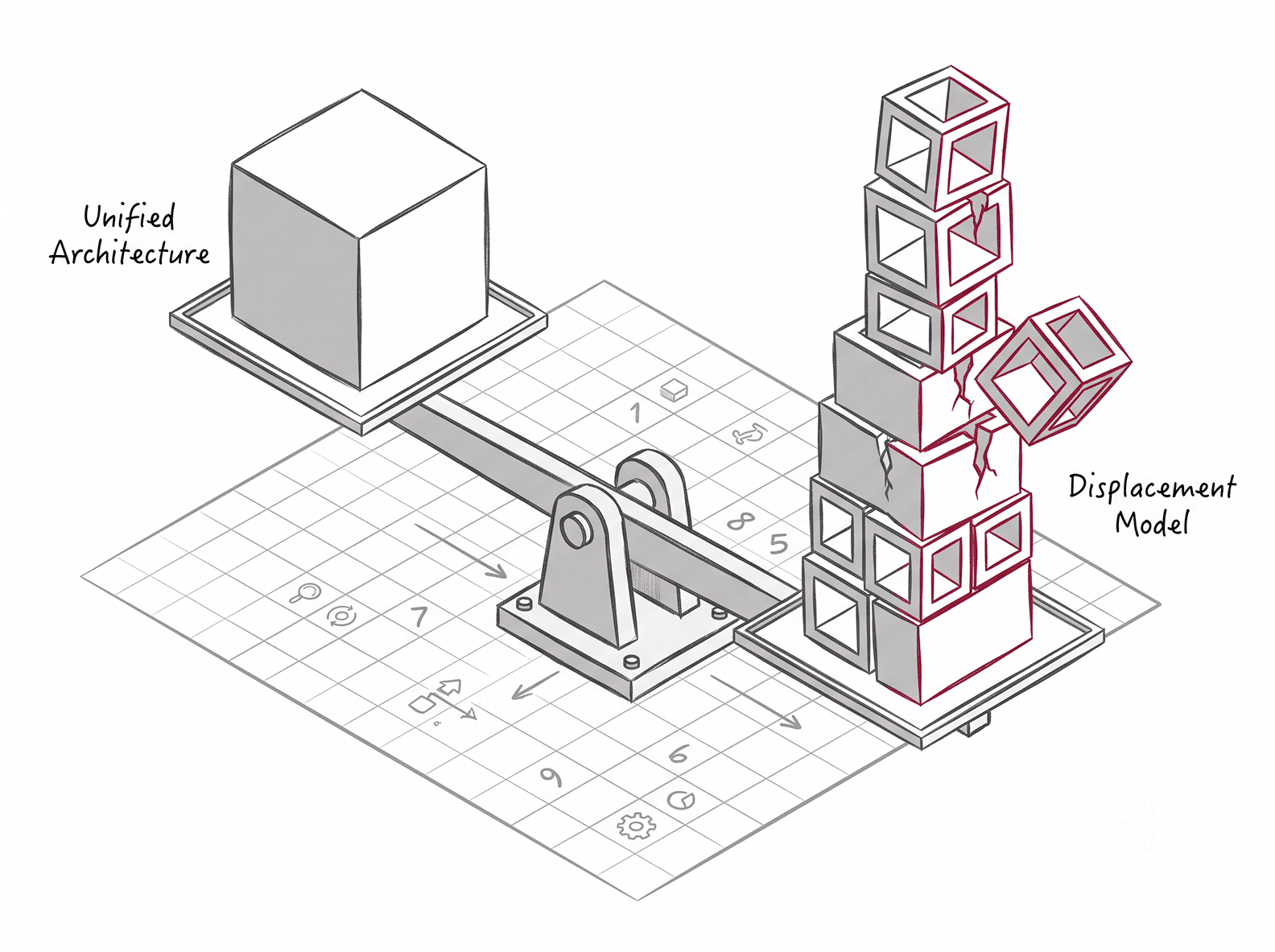
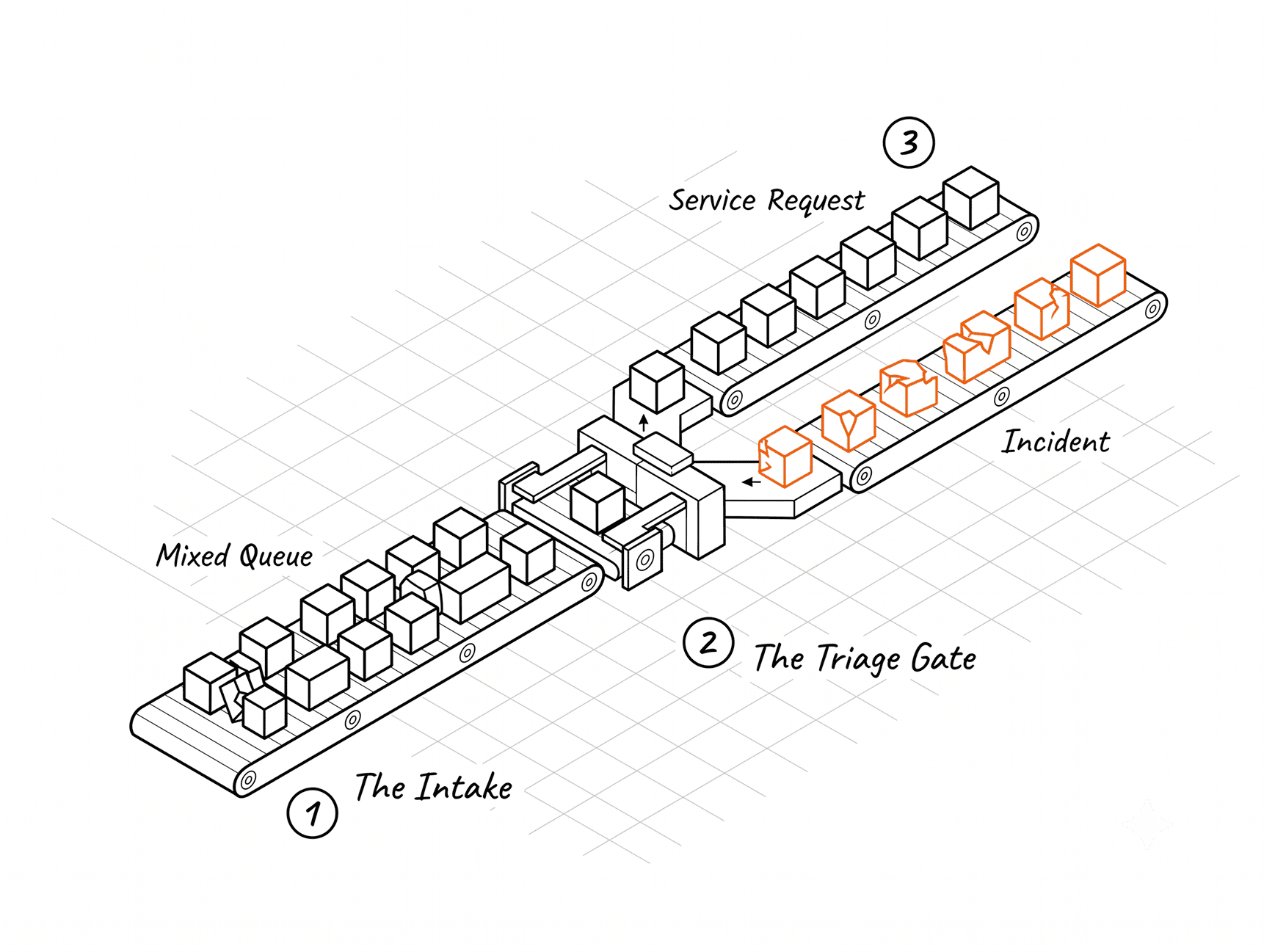
Your renewal is in front of you and the reseller has modelled E5 as cost-neutral. Current spend on email security, endpoint detection, CASB, SIEM and DLP goes in one column, the licence delta goes in the other, and the two roughly cancel.
That model rests on two assumptions. The first is that every displacement it claims is real. The second is that the E3 you are being compared against is the E3 you had last year.
Both are worth testing, and the second one broke in 2026.
I have scoped this to security and compliance. E5 also carries Teams Phone, audio conferencing and Power BI Pro, which inflate the headline price and belong in a different conversation.
Four paths, not two, and what each costs after July 2026
Most coverage frames this as a binary. There are four viable positions, and the third one is the one buyers most often miss.
- E3 as it stands, with the remaining gaps accepted
- E3 plus Microsoft Defender Suite, the security add-on formerly sold as Microsoft 365 E5 Security
- E3 plus third-party point solutions
- Full E5
Microsoft renamed the add-ons on 1 October 2025. What was Microsoft 365 E5 Security is now Microsoft Defender Suite, and Microsoft 365 E5 Compliance is now Microsoft Purview Suite. The products did not change. The search terms your team uses probably have not caught up.
The Defender Suite contains exactly five workloads: Defender for Endpoint Plan 2, Defender for Office 365 Plan 2, Defender for Identity, Defender for Cloud Apps, and Microsoft Entra ID P2. It carries none of the Purview compliance stack and it does not include Microsoft Sentinel.
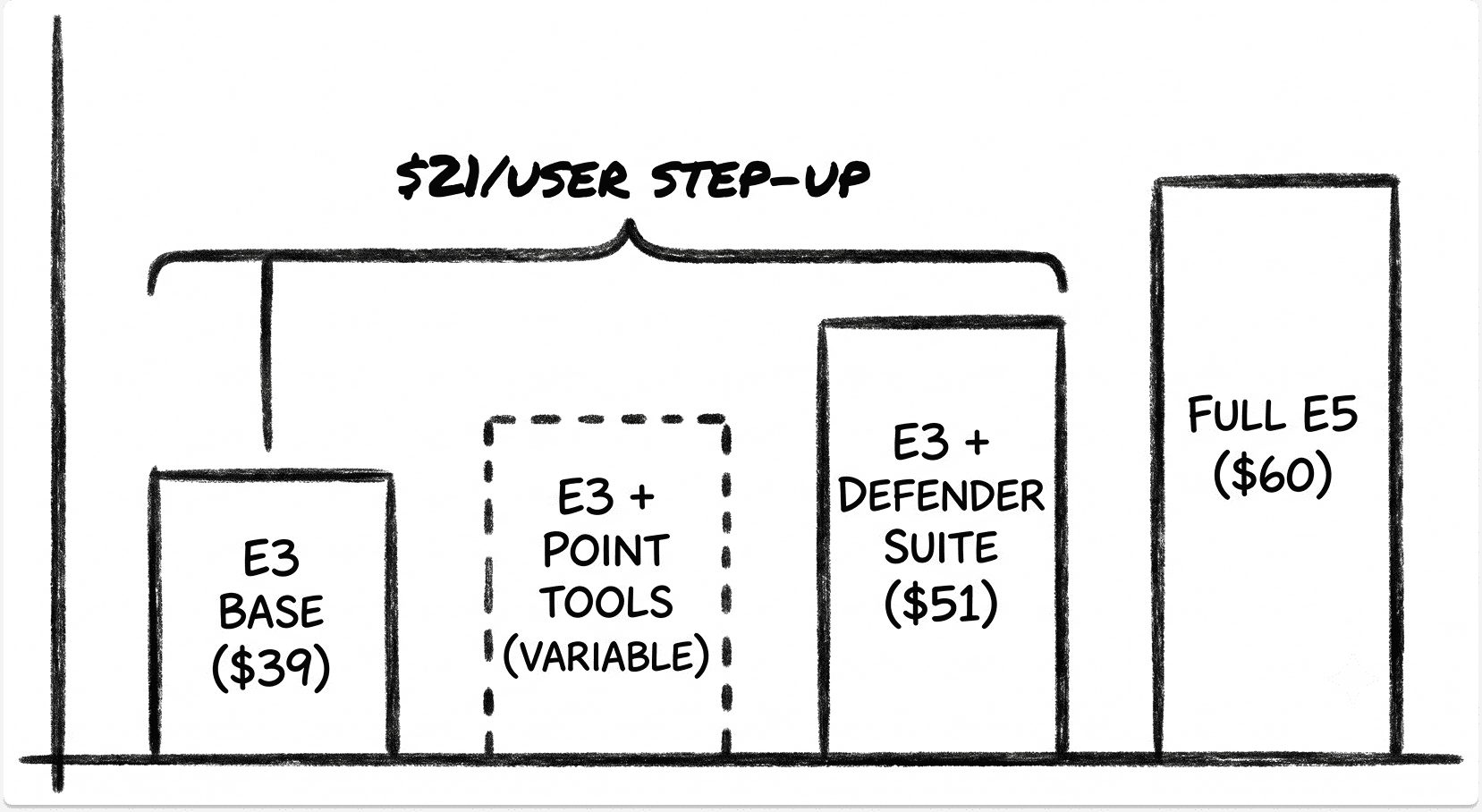
On Microsoft's published enterprise pricing, effective 1 July 2026, Microsoft 365 E3 lists at $39 per user per month on annual commitment and E5 at $60. The Defender Suite lists at $144 per user per year, which works out at $12 per month. So path two lands near $51 and path four at $60.
The step-up from E3 to E5 is $21 per user per month. Across 1,000 users that is $252,000 a year, before anything gets configured.
Two timing points matter. Existing customers hold current pricing until their first renewal after 1 July 2026, so a renewal signed before that date locks the older rate for the term.
And Microsoft removed Enterprise Agreement volume discount tiers in November 2025, which compounds with the increase. For a large estate the effective change is considerably larger than the headline percentage.
What Microsoft 365 E3 includes in 2026, and the three gaps that drive the upgrade
The E3 baseline moved this year, and it moved in the direction that shrinks the E5 case. Microsoft added Defender for Office 365 Plan 1, Intune Plan 2, Remote Help and Advanced Analytics to E3 as part of the 2026 packaging change, with rollout completing on 1 August 2026.
Almost every comparison article and reseller model still describes an E3 with no advanced email protection. If your business case was built on that assumption, it overstates the gap you are closing.
Here is what you already own on E3, stated precisely.
Defender for Endpoint Plan 1. Next-generation antivirus, attack surface reduction rules, device control, endpoint firewall, network protection, application control, and manual response actions. What P1 does not give you is EDR, automated investigation and remediation, advanced hunting, threat and vulnerability management, or access to Microsoft Threat Experts. Those are Plan 2.
Defender for Office 365 Plan 1. Safe Links, Safe Attachments including SharePoint, OneDrive and Teams, anti-phishing policies and real-time detections. Threat Explorer, campaign views, Attack Simulation Training and automated investigation remain Plan 2.
Microsoft Entra ID P1. Conditional Access, MFA, single sign-on, self-service password reset with writeback. Risk-based policies require Identity Protection, which Microsoft documents as an Entra ID P2 capability.
Intune Plan 1 and Plan 2, covering device management across Windows, macOS, iOS and Android. If you are still on Configuration Manager, the migration path to Intune is a separate project with its own timeline.
Purview at E3 level. Manual sensitivity labels, DLP for Exchange, SharePoint, OneDrive and Teams files, eDiscovery Standard, Audit Standard with 180-day default retention, and basic retention policies.
Strip that out and three gaps remain. They are the only three that honestly justify the conversation.
- Behavioural detection and response on the endpoint. P1 blocks. It does not investigate, hunt or respond.
- Risk-based identity protection and privileged access. Conditional Access without signal-driven risk evaluation is static policy.
- Automated information protection. Manual labelling scales to a pilot. It does not scale to an estate.
Everything else in a typical E5 pitch either sits in E3 already or sits outside the licence entirely.
Component by component: what E5 replaces, and whether the replacement holds
This is the part the spreadsheet skips. Each line in the displacement model deserves a verdict of its own.
Endpoint detection and response
Defender for Endpoint Plan 2 is the line item that most often justifies the whole upgrade, and on Windows it earns it. You get EDR with behavioural telemetry, automated investigation and remediation, advanced hunting through KQL, threat and vulnerability management, and deep file analysis.
Against CrowdStrike and SentinelOne, the evaluation evidence is thinner than vendors imply. The MITRE ATT&CK Enterprise Evaluations measure detection and visibility under one adversary emulation and deliberately publish no ranking.
They do not measure operational load, false positive rate, or cost. Microsoft, SentinelOne and Palo Alto all withdrew from the 2025 Enterprise round, so forward comparability has degraded and the 2024 results are now the most recent common data point.
Cross-platform coverage is where the displacement narrows. Defender's macOS and Linux agents have improved, and parity with Windows is still incomplete. If a meaningful share of your fleet is not Windows, verify feature-level coverage rather than trusting the support matrix, and read our Defender to CrowdStrike migration analysis for what teams hit in practice.
Then the trap that catches nearly everyone. Microsoft 365 E5 does not cover your servers. Server EDR requires Defender for Servers, purchased through Microsoft Defender for Cloud and billed per server hour.
Plan 1 runs at roughly $0.007 per hour, around $4.90 a month for an always-on machine. Plan 2 runs at roughly $0.02 per hour, near $15 a month, and adds agentless scanning, vulnerability assessment, file integrity monitoring and a daily Sentinel ingest allowance per node. A 200-server estate on Plan 2 is around $36,000 a year that no E5 business case includes.
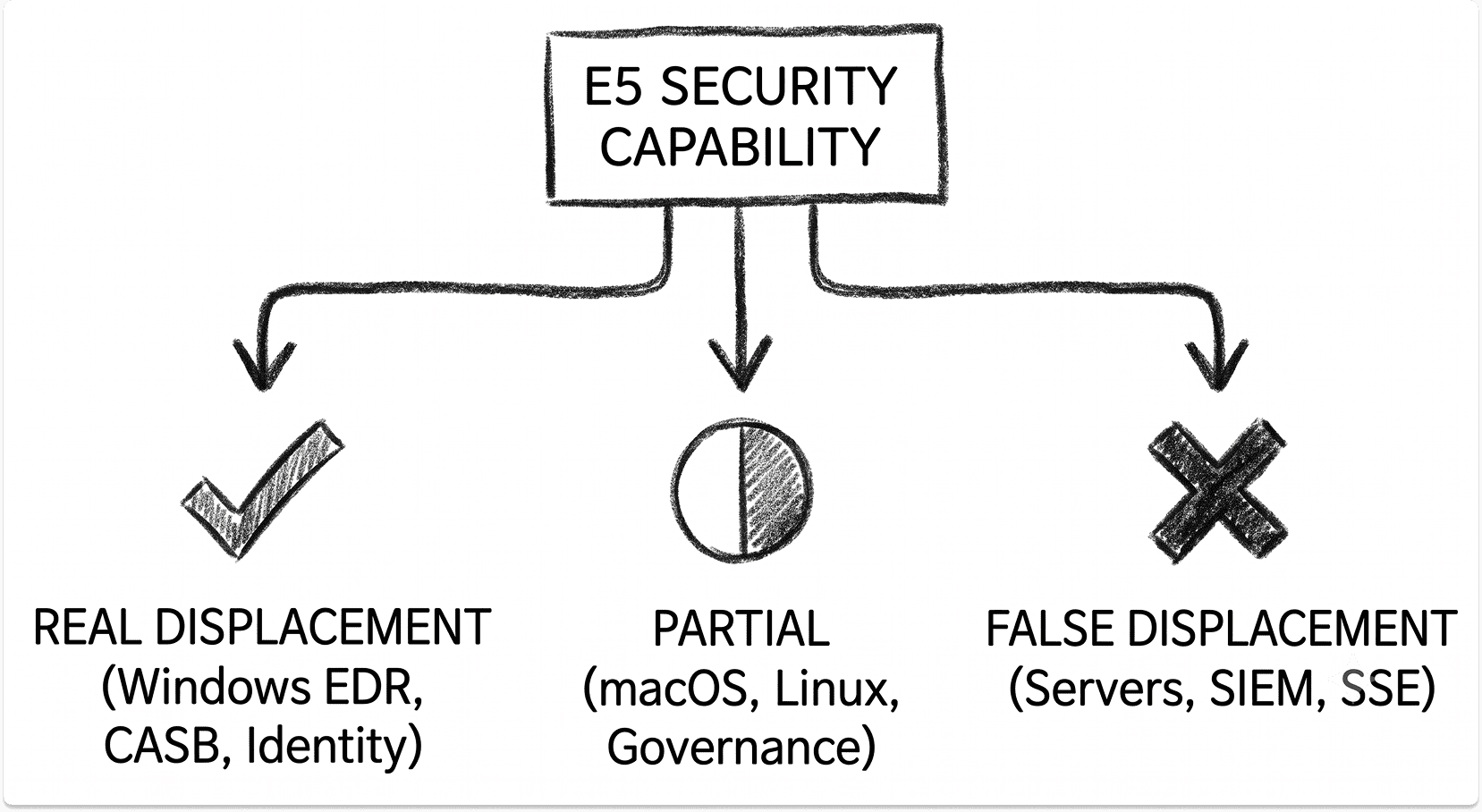
Verdict: real for Windows endpoints, partial cross-platform, and it stops at the server boundary.
Email and collaboration security
Because Plan 1 now ships in E3, the question changed shape. You are no longer asking whether to buy email protection. You are asking whether Plan 2 is worth the step, and separately whether either plan replaces a behavioural layer.
Plan 2 adds Threat Explorer, campaign views, Attack Simulation Training and automated investigation and response. For a team that actually investigates email incidents, Threat Explorer alone changes the working day.
The structural weakness sits elsewhere. Microsoft implicitly trusts internal mail, and business email compromise exploits exactly that trust. A message from a genuinely compromised colleague or supplier carries no malicious link and no attachment, which is what the gateway model was built to catch. Vendor email compromise is the same problem one hop further out.
Microsoft also offers no native email continuity. If Exchange Online is unavailable, mail stops. Mimecast built a business on that gap, and it remains unaddressed. Our Proofpoint, Mimecast and Abnormal Security comparison works through where each layer earns its place.
Verdict: partial. Strong on hygiene and investigation, weak on BEC and continuity.
Identity protection and governance
Entra ID P2 gives you Identity Protection with sign-in and user risk signals, risk-based Conditional Access, Privileged Identity Management with just-in-time elevation, and access reviews. For an organisation running static Conditional Access today, this is the most immediately useful thing in the bundle.
The complication is that Microsoft split governance out. Lifecycle Workflows, auto-assignment policies, machine-learning assisted access reviews and custom approval workflows now require Microsoft Entra ID Governance, a separate SKU at roughly $7 per user per month, or the Entra Suite at around $12 which also bundles Internet Access and Private Access.
So if your business case displaces an identity governance platform on the strength of "E5 includes P2", check which capabilities you are actually relying on.
Joiner-mover-leaver automation is not in P2. Our Ping, Okta and OneLogin comparison covers where dedicated IAM platforms still hold an advantage, and if you are moving off on-premises directory services first, the Active Directory to Entra ID migration guide covers the sequencing.
One counting rule to note. Microsoft's licensing guidance for entitlement management requires licences for every user who can request an access package, not only those who do. If 2,000 staff are in scope and 150 submit requests, you license 2,000.
Verdict: real for identity protection, partial for governance.
Data loss prevention and information protection
Purview DLP at E5 covers Exchange, SharePoint, OneDrive, Teams chat and channel messages, endpoint DLP on managed devices, and third-party SaaS through Defender for Cloud Apps. Automatic sensitivity labelling based on content inspection is the capability that makes classification survive contact with a real estate.
Two constraints decide whether this displaces a dedicated DLP platform.
First, endpoint DLP is Windows-first. macOS support exists but trails Windows on policy coverage, and there is no Linux endpoint agent. A design team on Macs or an engineering group on Linux workstations sits outside the strongest part of the control.
Second, coverage of non-Microsoft cloud storage routes through Defender for Cloud Apps, which adds configuration surface and latency to enforcement. Direct API-level inspection of AWS S3 or Google Cloud Storage is not equivalent to what a dedicated platform does. Our Purview, Forcepoint and Symantec DLP comparison sets out the differences by channel.
Verdict: real for a Windows-centric Microsoft estate, partial everywhere else.
Cloud app security
Defender for Cloud Apps does the CASB job properly. Shadow IT discovery ingests firewall and proxy logs and scores discovered applications against a large risk catalogue. API connectors govern sanctioned apps. Session control works through a reverse proxy tied to Conditional Access. SaaS security posture management flags misconfiguration.
For a Microsoft-centric organisation, this genuinely removes a standalone CASB line from the budget, and our CASB vendor guide sets out what you would otherwise be buying.
The boundary is sharp. Defender for Cloud Apps is not a secure web gateway. It does not do inline web filtering, TLS inspection at global scale, or private application access.
Microsoft's answer to those is the Entra Suite, sold separately. If your model treats E5 as displacing a Zscaler or Netskope subscription, it is wrong, and the ZTNA comparison explains why private access is a distinct purchase.
Verdict: real as a CASB, false as an SSE replacement.
SIEM and security operations
This is the cleanest false displacement in the decision, and the one that does the most damage when it goes unchallenged.
Microsoft Sentinel is not in E5. It is an Azure consumption service billed on data ingested. On Microsoft's published Sentinel pricing, Analytics Logs run at roughly $4.30 per GB pay-as-you-go, with commitment tiers from 100 GB per day cutting that by around 30 percent.
Basic Logs sit near $1.12 per GB with query charges and no real-time analytic rules. Auxiliary Logs, generally available since April 2025, run around $0.15 per GB with long-term retention at roughly $0.02 per GB per month.
E5 does carry a Sentinel benefit, and it is smaller than people assume. Microsoft grants up to 5 MB per user per day of Microsoft 365 data ingestion, covering Entra sign-in and audit logs, Defender for Cloud Apps discovery logs, Purview Information Protection logs and Microsoft 365 advanced hunting data. For 2,000 users that is 10 GB a day. Useful, and nowhere near a full SIEM feed.
Separately, alerts from the Defender products ingest free. The raw device telemetry behind those alerts does not. Teams routinely discover this after the first month's bill.
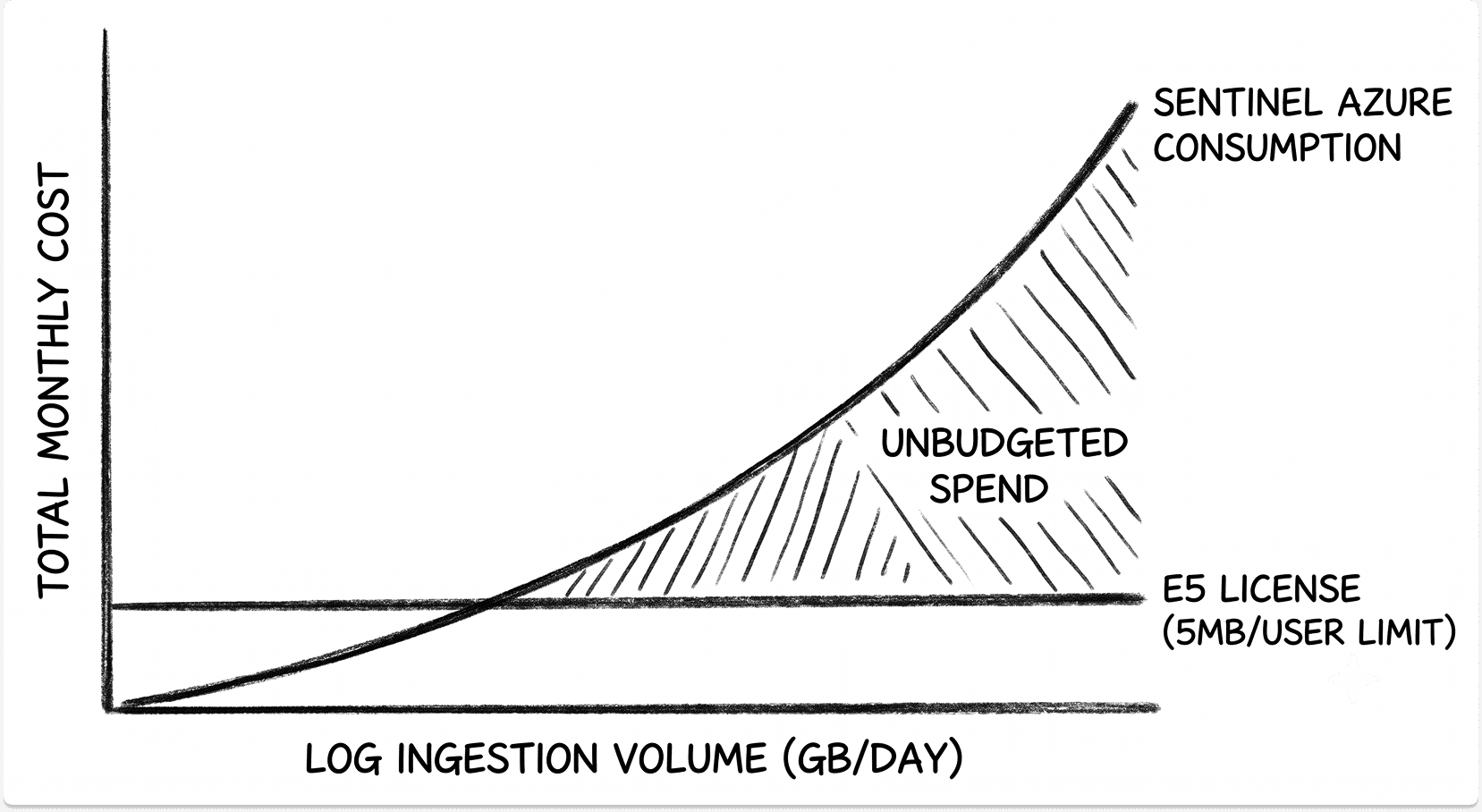
If you are displacing Splunk or QRadar, you are moving cost from a licence line to a consumption line, and consumption lines grow. Our piece on the problems that surface after replacing an on-premises SIEM covers the pattern, and the SIEM vendor comparison covers the alternatives.
Verdict: false at the licence level.
Insider risk, eDiscovery and audit
Short section, and its job is to stop one specific mistake.
Insider Risk Management, Communication Compliance, eDiscovery Premium and Audit Premium sit in full E5 or the Purview Suite. They are not in the Defender Suite. If you take path two to save money and your legal team is expecting eDiscovery Premium review sets, you will have bought the wrong thing.
Audit retention is the quiet one. E3 gives you 180 days by default. E5 gives you a year. If your incident response plan assumes twelve months of audit history, check which you actually have before you need it.
Verdict: real, but only on paths one and four.
The costs that are not on the licence
Four budget lines and one contractual rule that sit outside the per-user price.
Sentinel ingest and retention. Model this in gigabytes per day against your actual log sources, not per seat. Ingest filtering, tier selection and summary rules are the controls that keep it predictable. Teams that skip that work are the ones that report cost overrun.
Defender for Servers. Restated here because it belongs in the budget as well as the capability analysis. Count your servers, pick a plan, multiply.
Operating burden. E5 capabilities deliver nothing until someone configures and tunes them. The EDR queue needs triage, live response needs trained hands, and advanced hunting needs KQL fluency.
Microsoft's own answer to this is Defender Experts for XDR, which tells you something. Microsoft does not publish a universal list price for it, so treat any promotional discount claim you are shown as unverified until it appears in writing on your quote. If you are weighing managed detection either way, our MDR comparison sets out the options.
Utilisation. CoreView, analysing more than five million enterprise Microsoft 365 users, reports that 23 percent of E5 licences are inactive and 27 percent are unassigned. Those are CoreView's figures rather than Microsoft's, and directionally they match what I see in most estates. Buying capability that never gets deployed is the most expensive outcome available to you.
Security Copilot. Partially bundled as of the January 2026 Product Terms, at 400 security compute units per month per 1,000 paid E5 users, capped at 10,000 units. Beyond that allowance, provisioned capacity bills at roughly $4 per SCU per hour whether you use it or not.
Then the rule. Microsoft's Product Terms require a subscription licence for every user who accesses a service, and Microsoft applies that as a benefits-from test rather than an assignment test.
Defender for Identity is the sharp edge. Microsoft's documentation states plainly that the service cannot limit its capabilities to specific users, and advises customers to limit the service benefit to licensed users. Since the sensor watches the whole domain, that advice is difficult to act on. In practice, deploying Defender for Identity means licensing the directory.
Enforcement here is contractual rather than technical. The portal will not stop you. The true-up will.
Running E3 and E5 side by side
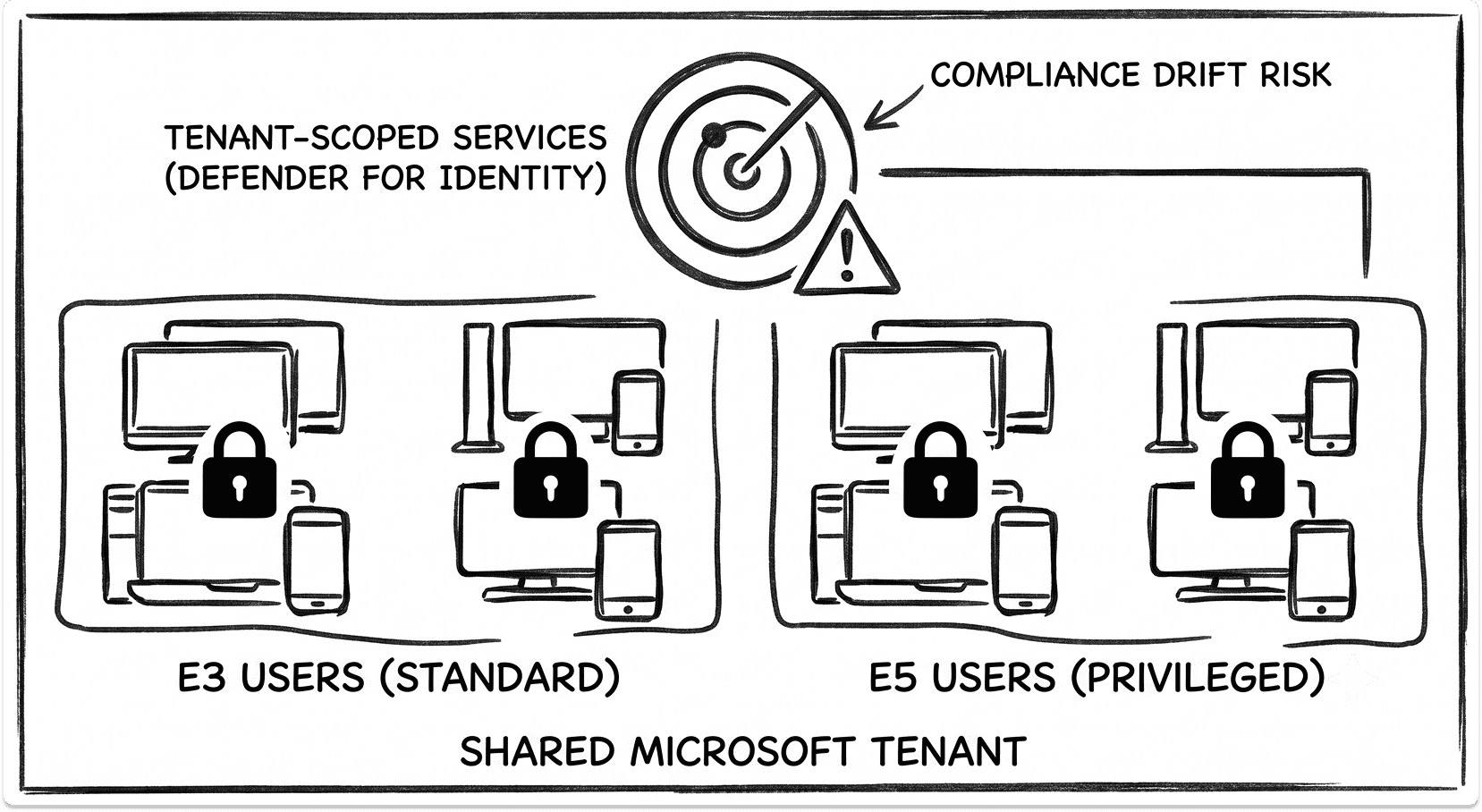
Mixed licensing works, and it is how most well-run estates land. It works cleanly where a capability is user-scoped and degrades where it is tenant-scoped.
Where it holds. Defender for Endpoint P2 licensing follows the user. Entra ID P2 assignment is per user. Purview policies scope to licensed users. Segmenting privileged accounts, developers, finance and executives onto E5 while general staff stay on E3 is defensible and saves real money.
Where it breaks.
- Preset security policies and Safe Links can technically apply to mailboxes you have not licensed. That is an exposure rather than a saving.
- Risk-based Conditional Access evaluates only for P2 users. A policy that depends on sign-in risk silently does nothing for your P1 population, which is easy to miss in policy review.
- Defender for Identity cannot scope benefit per user, as above. Global excluded entities reduce the exposure and also reduce your protection.
- Defender for Business, which arrives with Business Premium, does not coexist with Defender for Endpoint P2. A tenant defaults to Defender for Business unless every user carries P2 and you raise a support request. Organisations that grew out of Business Premium hit this during the upgrade.
- Audit retention differs by user licence, so your investigation window varies by who you are investigating.
The administrative cost is real. Two populations means ongoing reconciliation through licence assignment reporting, a process for moving people between tiers when roles change, and a defensible record of who benefits from what when the true-up arrives.
When full E5 is clearly the right answer
Four situations, and in each of them I would sign.
A small security team with no capacity to integrate. If you have two analysts, the operational saving from one console and one telemetry model outweighs the detection advantage of best-of-breed. Integration is labour you do not have.
Five or more vendor contracts expiring inside the same window. Displacement is only a saving when you can actually exit. Aligned renewals are what turn a spreadsheet exercise into cash.
A heavily Microsoft and Windows estate with little third-party investment. Every partial verdict above becomes real when the estate has no macOS fleet, no Linux workstations and no significant non-Microsoft SaaS.
A Microsoft 365 Copilot rollout. Copilot does not create access. It reveals access you already granted and forgot about, which is why oversharing surfaces within days of a pilot. Remediation needs sensitivity labelling, DLP and content controls, which puts Purview readiness on the critical path. Worth noting that SharePoint Advanced Management now comes with Copilot licences, so Restricted Content Discovery and oversharing assessment are not an additional purchase for Copilot customers. Our DSPM comparison for Copilot readiness covers the alternatives to doing this natively.
When E3 plus point solutions is clearly the right answer
Equally, four situations where I would hold.
Contracts with real term remaining. A displacement you cannot realise for eighteen months is not a saving this year. It is a plan.
One capability gap that outweighs consolidation. If business email compromise is your live threat and losses are measurable, a behavioural email layer earns its place regardless of what the bundle costs.
A multi-platform estate. Meaningful macOS, Linux or Google Workspace presence lands you in the partial column on endpoint, DLP and identity at once. Microsoft's coverage there is thinner by design, and our Intune, Jamf and Kandji comparison shows what that looks like on Apple specifically.
Low expected utilisation. If a user population would use fewer than about three E5-exclusive capabilities, you are paying $21 per user per month for shelf stock. The Defender Suite at $12 usually serves that population better.
How to build the comparison for your own environment
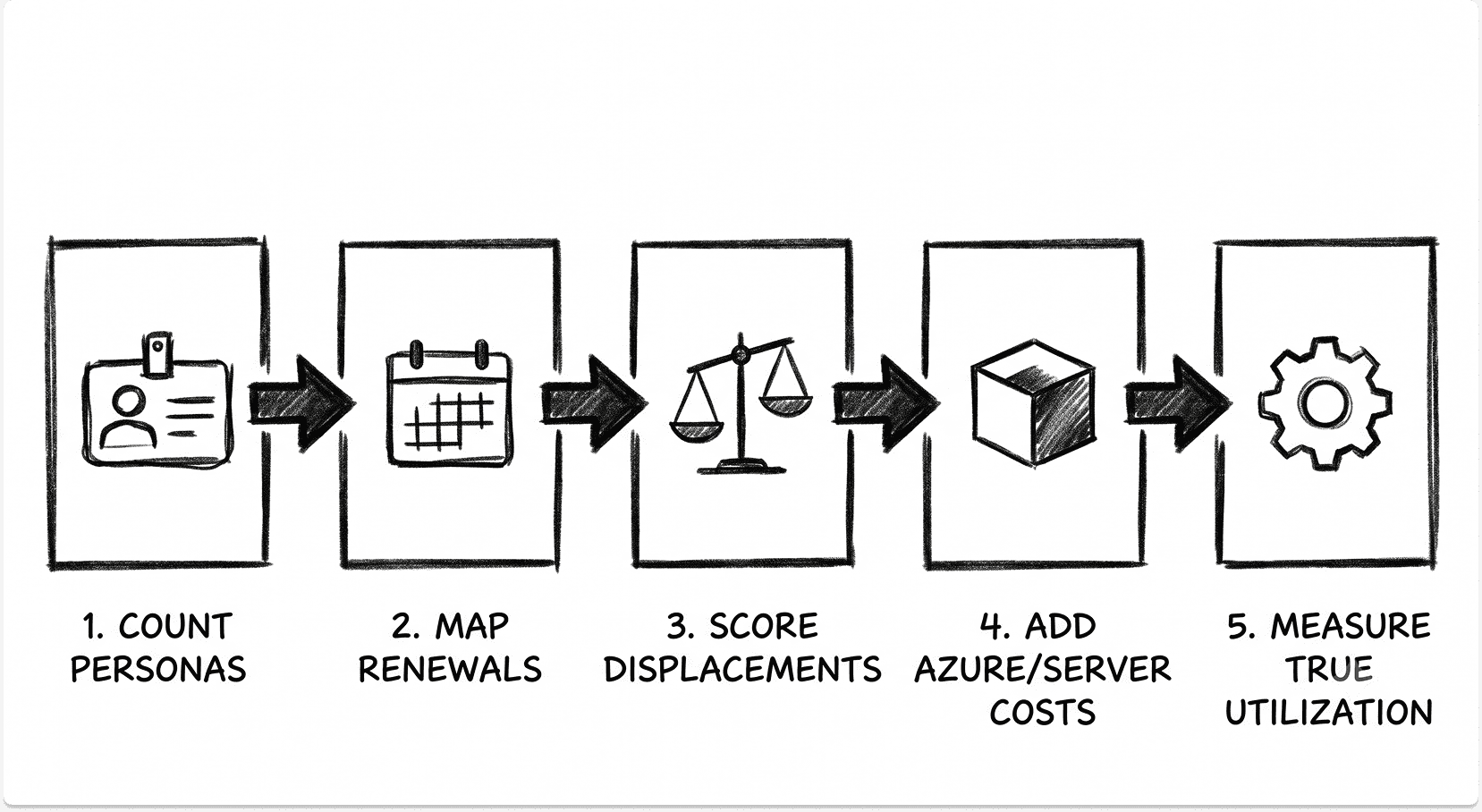
Six steps. Work through them in order and the answer tends to produce itself.
1. Count users by licence need, not headcount. Segment privileged accounts, developers, executives and sensitive-data handlers from prevention-only populations. Persona-based counting typically cuts the upgrade population by a third against a blanket model.
2. List current security spend with renewal dates. Every line, every renewal month. The dates matter as much as the figures.
3. Map each line to its equivalent. Note which tier delivers it: E3, Defender Suite, Purview Suite, full E5, or separate purchase.
4. Mark each displacement real, partial or false. Use the verdicts above as a starting point and test them against your own platform mix.
5. Add the costs that are not on the licence. Sentinel ingest, server coverage, operating and managed detection cost, and the configuration project.
6. Check what is configured, not what is purchased. Microsoft Secure Score is a reasonable proxy for deployment maturity. Licence utilisation reporting in the admin centre and Entra licence assignment reports tell you what is assigned. The gap between those two numbers is your real starting position.
If the completed model shows two or more capabilities you depend on landing in the partial or false column, the Defender Suite plus selective point solutions will usually beat full E5. If five contracts expire together and your estate is Microsoft throughout, E5 wins on operational grounds before it wins on price.
Your renewal date is fixed. Your options are not.
Whichever path the numbers point to, you will be comparing vendors for whatever E5 does not genuinely displace. That comparison can be hard and we can help. Tell us your requirements and we'll get back to you with a shortlist of vendors who fit. If you choose to talk to them, we will setup the meeting and prep them so you conversation starts with context.
Book a call
FAQ
Is Microsoft 365 E5 cheaper than buying the components separately?
For the security stack alone, the Defender Suite at $12 per user per month is cheaper than purchasing Defender for Endpoint P2, Defender for Office 365 P2, Defender for Identity, Defender for Cloud Apps and Entra ID P2 individually. Full E5 is cheaper than assembling every equivalent only if you genuinely use the Purview compliance stack as well as the security components.
What is the Microsoft Defender Suite and who should buy it?
It is the add-on previously sold as Microsoft 365 E5 Security, renamed on 1 October 2025. It sits on an E3 base at $144 per user per year and contains five security workloads with no compliance capabilities. It suits organisations that want the Defender and identity stack without paying for Purview, Teams Phone and Power BI Pro.
Can we licence some users on E5 and others on E3?
Yes, and it is usually the right answer. User-scoped capabilities such as Defender for Endpoint P2 and Entra ID P2 follow the assigned user cleanly. Tenant-scoped capabilities, particularly Defender for Identity, cannot restrict their benefit, which creates exposure under Microsoft's benefits-from licensing rule.
Does Defender for Office 365 replace a dedicated email security gateway?
For malware, spam, malicious links and attachments, yes. For business email compromise originating from compromised internal or supplier accounts, the detection model is weaker than behavioural platforms built for that problem. Microsoft also provides no native email continuity during an Exchange Online outage.
Does Microsoft 365 E5 include a SIEM?
No. Microsoft Sentinel is an Azure consumption service billed per gigabyte ingested. E5 includes a grant of up to 5 megabytes per user per day for specific Microsoft 365 data sources, which covers a fraction of a production SIEM feed.
Do we still need third-party EDR with E5?
For Windows endpoints, generally no. Reassess if you run a meaningful macOS or Linux fleet, and remember that servers require Defender for Servers as a separate purchase through Microsoft Defender for Cloud.
What does Microsoft 365 E5 not cover?
Server endpoint protection, SIEM ingest, secure web gateway and private application access, identity lifecycle workflows, and Security Copilot capacity beyond the bundled allowance. It also covers nothing that has not been configured.
How often does Microsoft change these bundles?
Frequently enough that any comparison needs a date on it. The add-on renames landed in October 2025, the Business Premium prerequisite change in September 2025, and the packaging and pricing changes in 2026. Verify current contents against the Product Terms before you sign.