What Happens When You Migrate Between Microsoft Defender and CrowdStrike
When migrating between Microsoft Defender for Endpoint and CrowdStrike Falcon, there are changes to the passive mode configuration, server-specific registry keys, security controls that go dark during co-existence, SOC workflow shifts, and what to validate before the first sensor installs.

Migrating between Microsoft Defender for Endpoint and CrowdStrike Falcon involves more than swapping agents. The sequence matters. Server behavior differs from workstations. Several security controls go dark during the transition window. And SOC workflows change on both sides of the cutover.
This article covers both directions. If you're moving from CrowdStrike to Defender, or from Defender to CrowdStrike, the sections below map what changes, what to configure, and what to validate before the migration starts.
The Co-Existence Window: What You Need to Configure First
Both migrations require a period where both tools run on the same endpoints simultaneously. This keeps protection active while you validate the new tool is working before removing the old one.
Running two EDR solutions on the same machine without proper configuration causes resource contention, alert duplication, and detection interference. The configuration that prevents this differs depending on whether you're working with workstations or servers.
Workstations and Servers Require Different Configuration
On Windows 10 and Windows 11, the Windows Security Center (WSC) handles the transition automatically. When CrowdStrike is installed, WSC recognizes it as the primary security product and moves Defender to passive mode. When you move back to Defender, WSC reverses this when the CrowdStrike sensor is removed.
On Windows Server 2016, 2019, and 2022, WSC does not exist. Neither tool stands down automatically when the other is installed. Without manual configuration, both run in active enforcement simultaneously.
What to do:
Before any sensor installs on a server, push this registry key:
Path:  HKLM\SOFTWARE\Policies\Microsoft\Windows Advanced Threat Protection
Name:  ForceDefenderPassiveMode
Type:  REG_DWORD
Value: 1
Deploy this via GPO or a pre-installation PowerShell script. After it's applied, confirm the state:
Get-MpComputerStatus | select AMRunningMode
The output should return SxS Passive Mode or Passive. If it returns Normal, Defender is still active.
Disable Tamper Protection Before Pushing Any Migration Configuration
Tamper Protection is designed to block unauthorized changes to Defender's security settings. During a migration, it treats GPO changes and PowerShell commands the same way.
Registry edits to ForceDefenderPassiveMode, Set-MpPreference cmdlets, and sensor removal scripts will silently revert if Tamper Protection is active.
What to do:
Turn off Tamper Protection in the Defender portal before pushing any migration configuration:
security.microsoft.com > Settings > Endpoints > Advanced Features > Tamper Protection = Off
Verify it's off:
Get-MpComputerStatus | select IsTamperProtected
This should return False before you proceed.
What Defender Can and Cannot Do in Passive Mode
Several Defender functions remain active during co-existence. Others switch off the moment passive mode is enabled.
ASR rules, Network Protection, and Controlled Folder Access stop functioning as soon as Defender enters passive mode. If your security baseline relies on any of those controls, replicate the equivalent enforcement in CrowdStrike's prevention policies before the migration starts.
It's budget season; let's see how you do
Budget comes up in about 88% of the thousands of conversations we have with IT leaders. So we made a game about it. Play to find out what your year-end board meeting looks like.
Play game
Migrating from CrowdStrike to Microsoft Defender for Endpoint
The Correct Sequence
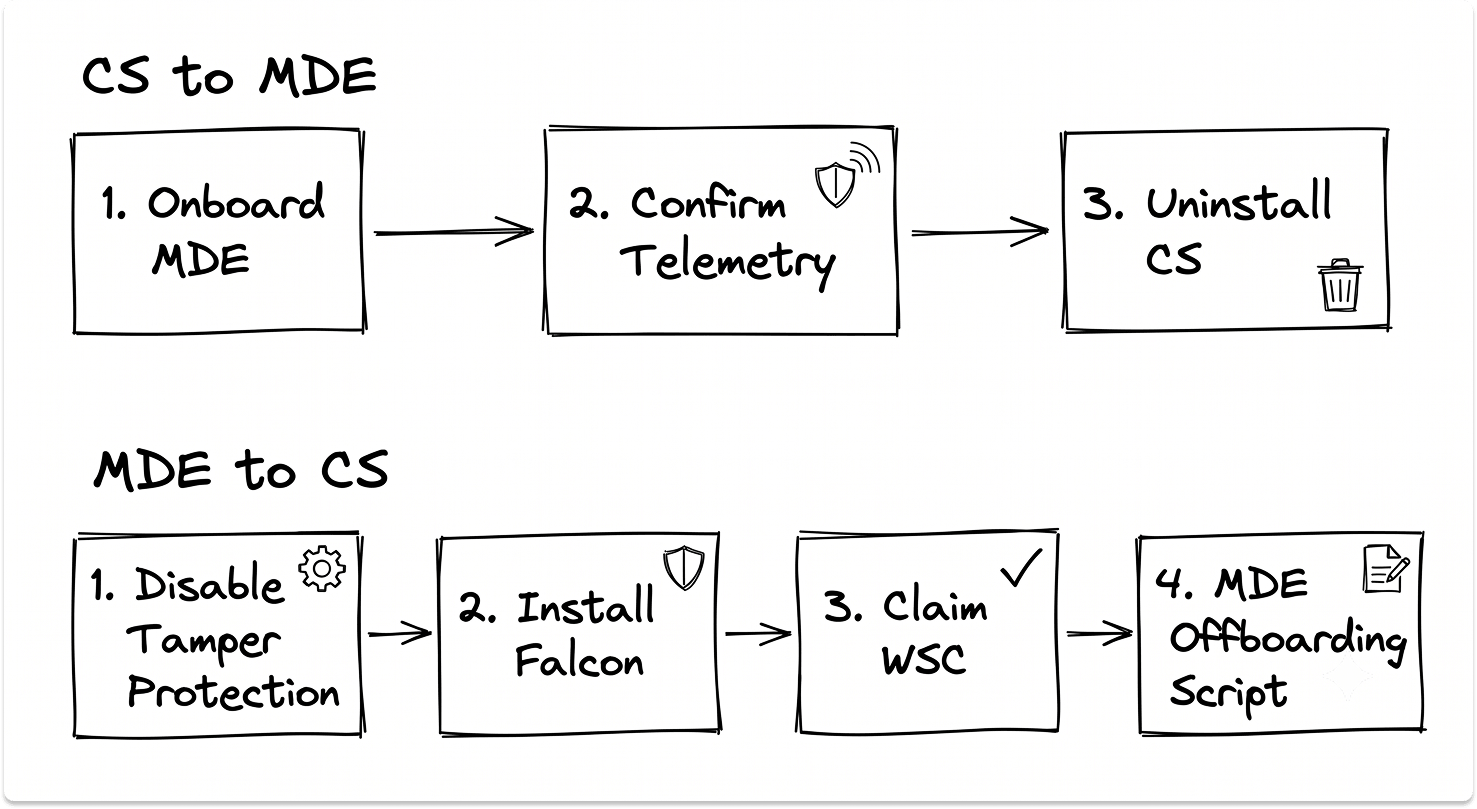
Onboard devices to MDE first while keeping CrowdStrike active. Confirm telemetry is flowing in the Defender portal. Then uninstall CrowdStrike. Reversing this order leaves endpoints without active protection during the transition.
Microsoft's migration process follows three phases: Prepare, Set Up, Onboard. The onboarding script activates mssense.exe, the Windows Defender Advanced Threat Protection Service.
After running the script, verify the service is running before removing CrowdStrike:
services.msc > "Windows Defender Advanced Threat Protection Service" = Running
Then confirm the device appears in the Defender portal under Assets > Devices with an Onboarded status before proceeding.
For server fleets, use Azure Arc for internet-connected machines and SCCM for isolated environments. Local scripts at scale create a maintenance burden when it's time to push updates.
Pull CrowdStrike Maintenance Tokens Before Starting
Uninstalling the Falcon sensor requires a unique maintenance token per machine. These tokens live in the Falcon console. Without them, the sensor removal fails on individual endpoints.
Pull and document maintenance tokens from the Falcon console as part of pre-migration preparation. At scale, this is worth scripting through the Falcon API.
Two Settings to Enable During the Co-Existence Window
EDR in Block Mode allows Defender's EDR layer to detect and block malicious behavior while still running in passive mode. It provides a secondary detection layer during the transition.
Enable it at: security.microsoft.com > Settings > Endpoints > Advanced Features > EDR in Block Mode = On
Intelligence Update Rings configure phased rollout of Defender's definition updates via Intune. Assign test devices to the first ring and production devices to the second. This controls the blast radius of a bad update before it reaches your full endpoint fleet.
What Changes in Your SOC After Day One
Defender surfaces more alerts than Falcon and provides more contextual detail per alert. The contextual detail is useful, but it requires more analyst review time per alert. Expect a tuning period of four to six weeks before alert volume stabilizes. Assign someone to own that process from day one.
The management interface also splits. Security operations run through the Defender portal. Endpoint policy management runs through Intune. These are two separate interfaces where CrowdStrike had one.
If You Were Running Falcon Complete
Falcon Complete is a managed 24/7 detection and response service. It is separate from the CrowdStrike platform itself. Moving to Defender for Endpoint Plan 2 does not replace it.
Microsoft offers Defender Experts for XDR as a comparable managed service, but it is a separate SKU not included in M365 E5. If licensing consolidation is driving the migration, factor the cost of replacing the managed response layer into the project budget before the migration starts.
Migrating from Microsoft Defender to CrowdStrike
The Correct Sequence
Step one: Disable Tamper Protection in the Defender portal.
Step two: Install the Falcon sensor. On Windows 10/11 workstations, WSC moves Defender to passive automatically. On servers, push the ForceDefenderPassiveMode registry key via GPO before or alongside the sensor installation.
Step three: In the Falcon console, enable "Quarantine and Security Center Registration" in your prevention policy. This instructs CrowdStrike to take ownership of the Windows Security Center, stops the Defender service, and sets its startup type to Manual on supported systems.
Step four: Once the Falcon sensor is stable and telemetry is confirmed in the Falcon console, run Microsoft's official MDE offboarding script.
Removing Defender or uninstalling the application alone does not stop EDR telemetry. The mssense.exe service continues running and sending data to the Microsoft Defender portal until the offboarding script explicitly stops it.
Download the offboarding script at:
security.microsoft.com > Settings > Endpoints > Offboarding
Select your OS, download the package, and run as Administrator.
Configure Mutual Exclusions Before Sensors Install on Production Machines
Without mutual exclusions, both tools scan each other's processes and write to overlapping file paths. This causes performance degradation, false positive alerts, and detection interference.
Add CrowdStrike's sensor directory to Defender's exclusion list. Add Defender's core paths to CrowdStrike's exclusion policy:
C:\ProgramData\Microsoft\Windows Defender\
C:\Program Files\Windows Defender\
C:\Windows\System32\MpSigStub.exe
Configure these before the migration touches any production machine. Exclusions applied after sensors are already installed require a restart to take full effect.
What Changes in Your SOC After Day One
CrowdStrike's Falcon console surfaces fewer, higher-confidence alerts with less noise than Defender. The reduced volume reflects a different detection philosophy, not reduced coverage.
Threat hunting requires rebuilding. Defender runs on KQL (Kusto Query Language) inside Microsoft Sentinel. CrowdStrike uses its own Event Search query language in the Falcon console. Custom detection logic and hunting queries built in Sentinel need to be rebuilt in Falcon. Scope this work before the migration, not after.
Network isolation behavior is different. CrowdStrike's contain action cuts all network access by default. Defender's isolation allows communication tools like email and Teams to continue during containment. If your SOC team is used to Defender's selective isolation, the first time they contain an endpoint in Falcon, the machine will appear completely unreachable. Brief your team on this before it happens during a live incident.
Real Time Response (RTR) enables batch command sessions across hundreds of endpoints simultaneously. Running remediation commands at scale is faster than Defender's response model when you're dealing with a wide incident.
What Happens to Defender for Identity
Defender for Identity monitors Active Directory and Domain Controllers for identity-based lateral movement. It is a separate product from Defender for Endpoint. Installing CrowdStrike on endpoints does not replace it or inherit its coverage.
If your environment used the unified Microsoft Defender XDR view, which surfaces Endpoint, Identity, and Email signals in a single portal, that consolidated view breaks when endpoint protection moves to CrowdStrike. Identity monitoring needs to be addressed separately, either by keeping Defender for Identity running alongside Falcon or deploying CrowdStrike's Falcon Identity Protection module.
This is worth scoping carefully if you're managing a hybrid Active Directory environment or mid-way through an on-premises Active Directory to Entra ID migration. Identity coverage gaps that open during an endpoint migration compound when the underlying directory infrastructure is also in transition.
Let's Assess Migration Readiness Between Defender and CrowdStrike
Four Decisions to Resolve Before Migration Day
Who owns alert tuning for the first 90 days? Both migrations produce noise during the stabilization window. Assign someone to daily triage and policy refinement before the migration starts.
Is your server fleet on the modern unified MDE agent? Windows Server 2012 R2 and 2016 require the modern unified MDE solution to support passive mode. The legacy MDE agent does not support it. If your servers run the legacy agent, passive mode will not engage.
What does your SIEM integration look like after the switch? Moving away from Defender changes your native log ingestion model in Microsoft Sentinel. CrowdStrike connects to Sentinel via a data connector, but the schema differs from native Defender logs. Custom detection rules built on Defender's schema need to be reviewed and updated before cutover. If your SIEM architecture is already complex, the problems that surface after replacing a SIEM apply here.
Have you scoped Linux and macOS endpoints separately? The passive mode registry keys, WSC behavior, and co-existence steps above apply to Windows only. Linux and macOS have separate agent behavior and separate migration paths. Treat them as a distinct workstream with their own validation steps.
The Migration Is a Sequencing Problem
The technical documentation for both migrations is available from Microsoft and CrowdStrike directly.
The variables that create problems are the ones that don't fit neatly into a step-by-step guide: server passive mode not engaging, Tamper Protection reverting configurations, identity coverage going out of scope, and SIEM schema changes landing as a surprise post-cutover.
Get the sequence right before day one. The tools handle the rest.
Also read: How to plan a Windows Server upgrade or move to Azure
Looking for EDR vendors?
We have a catalog of pre-vetted vendors on our platform. Explore options based on your requirements, architecture, and budget. Only reach out to them when you're ready to talk. It's private and completely free for you.
FAQ
How do you migrate from CrowdStrike to Microsoft Defender for Endpoint?
Onboard devices to Defender for Endpoint in passive mode first while CrowdStrike remains active. Confirm telemetry is flowing in the Defender portal, then uninstall the CrowdStrike sensor using the maintenance token from the Falcon console. On Windows Server 2016, 2019, and 2022, push the ForceDefenderPassiveMode registry key before the migration starts — Windows Security Center does not manage the handover on server operating systems. Run a detection test after CrowdStrike is removed to confirm Defender is active and reporting correctly.
Can CrowdStrike and Microsoft Defender run on the same machine at the same time?
Yes, but only with proper configuration. On Windows 10 and 11, Windows Security Center detects CrowdStrike and moves Defender to passive mode automatically. On Windows Server 2016, 2019, and 2022, this does not happen automatically. Both tools will run in active enforcement simultaneously unless you set ForceDefenderPassiveMode to 1 in the registry before installation. Running both tools without this configuration causes resource contention, alert duplication, and detection interference.
What security controls stop working when Microsoft Defender is in passive mode?
Attack Surface Reduction (ASR) rules, Network Protection, Controlled Folder Access, real-time protection, and threat remediation all stop functioning when Defender enters passive mode. File scanning, security intelligence updates, Data Loss Prevention, and device control remain active. If your security baseline relies on ASR rules or Network Protection, those controls go dark from the moment co-existence begins and need to be replicated in CrowdStrike's prevention policy layer before the migration starts.
What is the difference between removing Microsoft Defender and running the MDE offboarding script?
Removing the Defender application stops antivirus scanning but does not stop EDR telemetry. The mssense.exe service continues running and sending data to the Microsoft Defender portal, consuming system resources, until the official MDE offboarding script is executed. The offboarding script is available at security.microsoft.com > Settings > Endpoints > Offboarding. Running it is the only way to fully close the Defender EDR footprint after migrating to CrowdStrike.
Does installing CrowdStrike replace Microsoft Defender for Identity?
No. Defender for Identity is a separate product from Defender for Endpoint. It monitors Active Directory, Domain Controllers, and identity-based lateral movement patterns independently of endpoint protection. Installing CrowdStrike Falcon on endpoints does not replace or inherit that coverage. After migrating endpoint protection to CrowdStrike, identity monitoring needs to be handled separately — either by keeping Defender for Identity running alongside Falcon or by deploying CrowdStrike's Falcon Identity Protection module.