Why IAM Breaks in Hybrid Okta Environments, and How to Fix It Before It Costs You
Five failure modes in hybrid Okta deployments, with root causes and fixes. Covers AD agent outages, NTLM v1 fallback, MFA bypass lanes, deprovisioning gaps, and identity source conflicts.

80% of cyberattacks leverage identity-based techniques. Stolen credentials were involved in 32% of all data breaches last year. Credentials are the attack surface. And if you are running Okta in a hybrid environment, that attack surface has more entry points than your admin console will ever show you.
The assumption that Okta is handling the bridge between on-prem AD and the cloud is partially correct. That partial correctness is where the risk lives.
I have seen teams spend months deploying Okta, run user acceptance testing, and declare the project complete, only to discover later that a misconfigured AD agent had been silently queuing provisioning failures for weeks. Or that MFA was enforcing on cloud app logins while on-prem auth paths were running NTLM with no policy enforcement at all. Or that 11 terminated employees still had active accounts in apps Okta had never seen.
Plenty of orgs have migrated to Okta and have landed themselves in they had in AD. Unclear group names, tangled entitlements, inconsistent employee titles. The tooling changed but the people and process problems followed them over.
This article covers five specific failure modes in hybrid Okta deployments. Where they happen in the architecture, why they are hard to see, and what fixing them looks like in practice.
The Hybrid Okta Architecture That Creates Identity Blind Spots
73% of organizations run a hybrid environment, with only 19% operating exclusively on-premises. Most teams running Okta in this model are managing a three-way architecture: on-prem Active Directory, Microsoft Entra ID, and Okta as the identity broker in the middle.
That is already complex. Add cross-cloud workloads, and it gets harder. Teams working across AWS and Azure frequently fill authentication gaps with hardcoded API keys or static secrets because traditional AD has no native mechanism to handle cross-cloud workload identity. That credential sprawl is invisible to both Okta and Entra.
The architecture persists because consolidating identity vendors is expensive and operationally risky. Teams accept the technical debt. The five failure modes below are where that debt comes due.
Let's Assess the Risk of Your Hybrid Okta Environment
Failure #1: The Okta AD Agent Is a Single Point of Failure With No Built-In Alerting
The Okta AD agent is a Windows service installed on a domain-joined server. It handles everything between Okta and your on-prem Active Directory: user imports, authentication delegation, password sync, and provisioning writes.
If it goes offline, on-prem authentication stops. Every downstream provisioning task queues silently until someone reports a problem.
Three things take it offline that teams consistently miss.
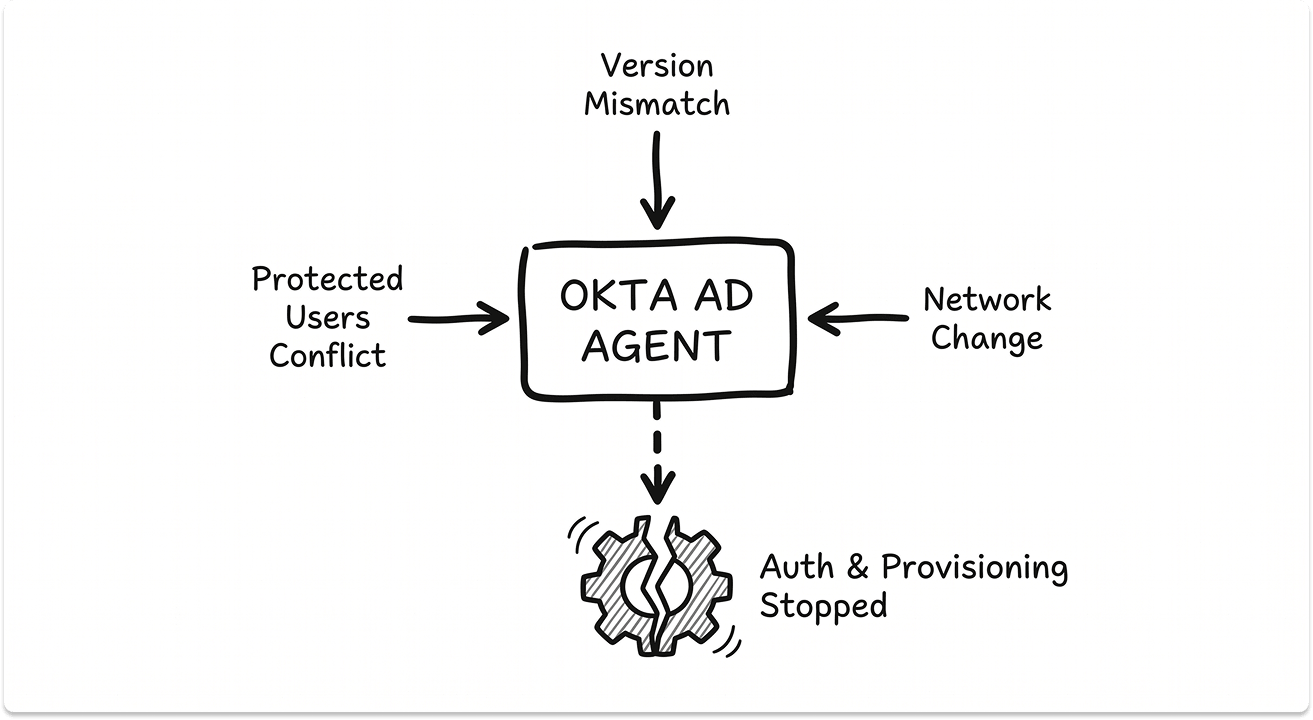
The Protected Users group conflict. Your security team hardens AD by placing service accounts in the Protected Users group. Reasonable policy. The problem is the Okta AD agent's service account cannot be in that group. The Protected Users group strips NTLM, Kerberos delegation, and long-term credential caching, all of which the agent depends on. The agent fails with "Unable to find DC in the domain" and "The username or password is incorrect," even when credentials are correct. It looks like an auth error. It is a group membership conflict.
Agent version mismatches. Running multiple AD agents across the same domain? Okta's documentation flags version mismatches as a cause of agent-wide failure. An update on one server that does not roll out to the others will degrade the entire integration.
Network changes that break the HTTPS tunnel. A firewall rule update or DNS change that disrupts the agent's outbound connection produces no automatic alert in default configurations. Centralizing log monitoring is one of the most commonly skipped steps in hybrid deployments. Okta's System Log is a data source. Monitoring agent health through it reactively means finding out about failures from users.
There is also a device-level consequence. In hybrid Autopilot deployments, intermittent AD agent failures cause devices to end up in a dual state, both Azure AD Registered and Hybrid Azure AD Joined simultaneously.
That dual-state conflict causes persistent Conditional Access policy failures that trace back to an agent problem nobody flagged. Enrollment that should complete in minutes stretches to 1.5 to 2 hours. For teams onboarding clinical staff or contractors at scale, that delay has a measurable operational cost.
What to do:
- Deploy a minimum of two AD agents on separate servers per domain
- Remove the Okta AD agent service account from the Protected Users group
- Pin agent versions across all domain servers and enforce an update cadence
- Route agent health status to your SIEM, not the Okta admin console
Failure #2: Kerberos Fails Silently, and NTLM v1 Is the Default Fallback
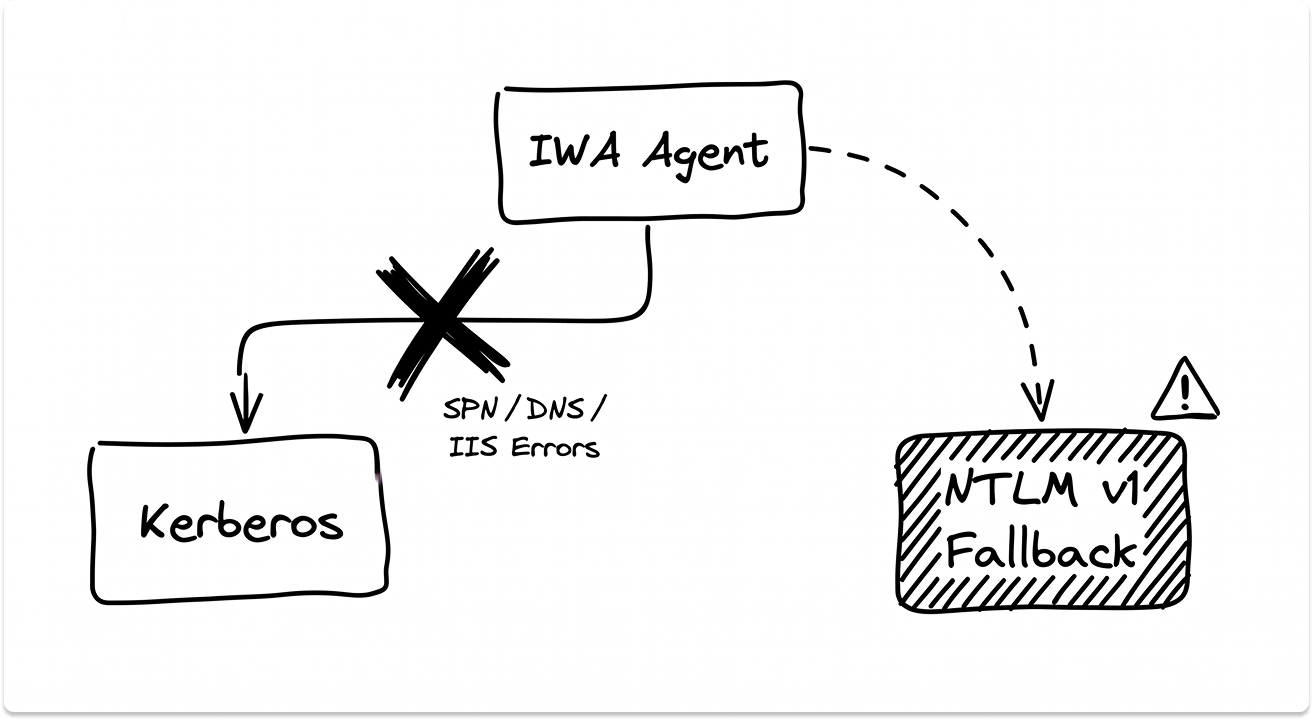
Okta's Integrated Windows Authentication (IWA) agent enables Desktop SSO, seamless login for domain-joined machines using Kerberos. When Kerberos fails, NTLM takes over automatically. The security issue is which version of NTLM takes over.
Okta accepts NTLM v1 by default. A security engineer found this when NTLM v1 alerts started firing in Splunk and the source traced back to the Okta IWA servers. They raised it with Okta support. But Okta does not have the functionality to refuse NTLM v1.
NTLM v1 is vulnerable to pass-the-hash and relay attacks. For any team running under CIS Controls or NIST 800-53, active NTLM v1 traffic is an audit finding.
Kerberos breaks in hybrid environments for predictable reasons. It requires correct Service Principal Name (SPN) registration, DNS resolution that matches the IWA server's hostname and FQDN, specific IIS settings (Negotiate listed above NTLM in authentication providers, kernel-mode authentication disabled), and domain reachability from the client.
Any one of these conditions failing causes a silent Kerberos drop and NTLM fallback. Okta's IWA Troubleshooting Guide documents the exact failure patterns in detail, but most teams only find it mid-incident.
There is a further distinction worth knowing. In a Hybrid Azure AD Join (HAADJ) with Autopilot scenario, IWA is the wrong agent path entirely. You need Desktop SSO (DSSO). Using IWA in that setup fails at the device enrollment stage. Most documentation does not make this clear.
Legacy authentication is a hard requirement for HAADJ with Okta. The working mitigation restricts the legacy auth policy to internal network zones only and the Okta authentication happens within the network and the policy for legacy auth is restricted to the internal zones. That's how you can limit the risk.
A working HAADJ and Okta deployment also requires the custom agent string Windows-AzureAD-Authentication-Provider/1.0 in your Okta sign-on policy to enable the device PRT token flow.
Without it, Windows devices cannot obtain the Primary Refresh Token, and Conditional Access cannot recognize the device. Run dsregcmd /status and check for AzureADPRT: Yes in the SSO State section. If it shows No, the device is not properly enrolled regardless of what Okta reports.
What to do:
- Validate SPN registration with
setspn -L <service_account>, both short hostname and FQDN - Disable kernel-mode authentication in IIS for the IWA site
- Block NTLM v1 via Group Policy: set LAN Manager Authentication Level to NTLMv2 only
- For HAADJ and Autopilot: use DSSO, add the custom agent string, and verify
AzureADPRTstatus on enrolled devices
Failure #3: Your MFA Coverage Has Gaps That the Admin Console Will Not Show You
MFA in a hybrid Okta environment runs as multiple policies simultaneously: Okta's sign-on policies, Microsoft Entra Conditional Access, per-app MFA configurations, and legacy application authentication policies that may sit outside both. The challenge is that these policies enforce across different authentication paths, and coverage is rarely uniform.
Legacy protocols like NTLM, Basic Auth, and older Exchange clients can authenticate without ever triggering Okta's MFA policy. An attacker using credential stuffing or a stolen hash against a legacy auth endpoint moves laterally without seeing a prompt.
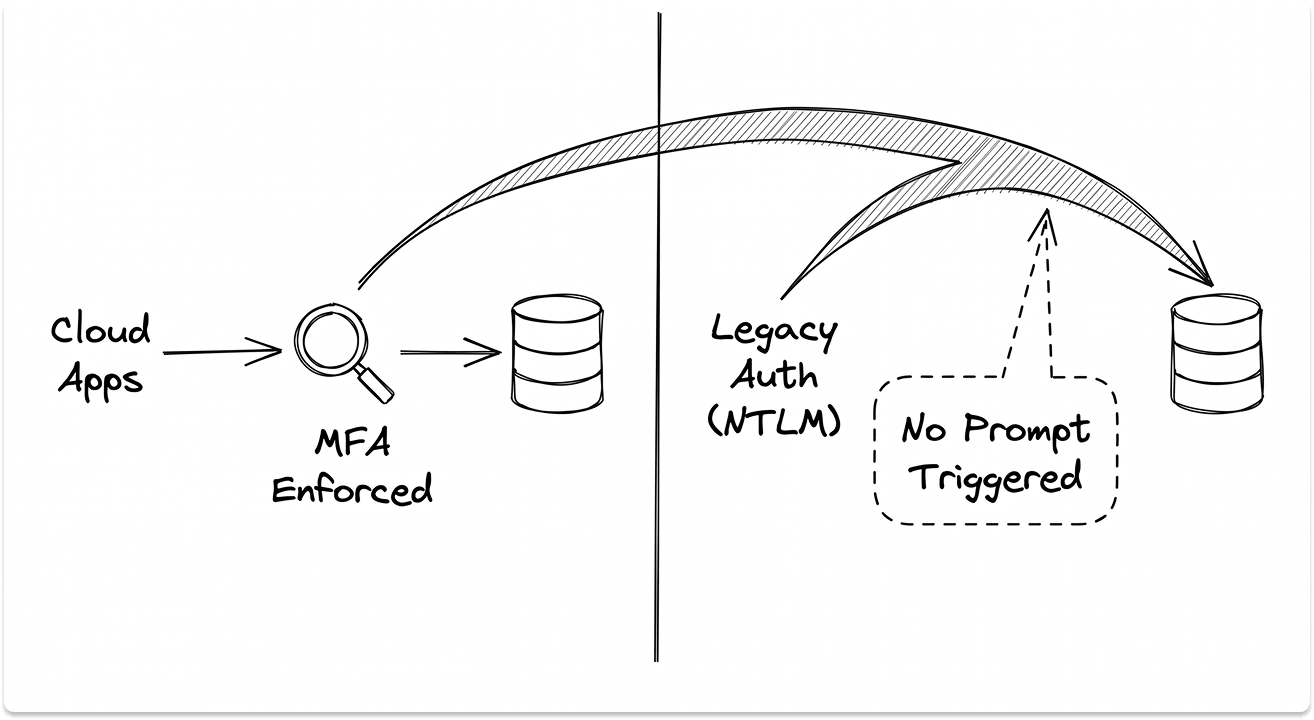
This is what it looks like in a real deployment.
According to a user, MFA never works on both sides at the same time. It's just one side or the other. 4 hours hunt and peck, try this, try that can lead you to believe that the solution does not work on a hybrid AD-Azure setup.
The resolution required deploying two separate Okta MFA applications, one mapped to AD-joined devices and one mapped to Azure-registered devices. It works. But you have to know to build it that way.
There is also a documented platform-level risk to account for. In October 2023, attackers accessed Okta's customer support system and downloaded session tokens from support case files.
Those tokens were used to hijack authenticated sessions and bypass MFA entirely. BeyondTrust identified the activity and reported it to Okta first, more than two weeks before Okta confirmed and notified affected customers. MFA on the authentication layer does not protect post-authentication session tokens.
In 2024, a security researcher found that Okta's Classic app experience contained a sign-on policy bypass vulnerability, allowing users with valid credentials to skip MFA under certain conditions. Okta patched it. The takeaway for your architecture: Okta's policy engine cannot be the only enforcement layer.
The 2025 Co-op ransomware attack succeeded partly because an IT admin was phished and SMS-based MFA was bypassed. SMS MFA is phishable. For privileged accounts, it is not a sufficient control.
What to do:
- Audit every authentication path separately: cloud apps via Okta, on-prem apps via IWA or delegated auth, Exchange clients, VPN
- Block legacy authentication protocols at both the network layer and the Entra Conditional Access layer
- Configure Okta sign-on policies and Entra Conditional Access to enforce independently, using Okta's device trust integration to align them
- Move privileged accounts off SMS MFA to FIDO2 hardware tokens
Failure #4: Deprovisioning Works in Okta and Fails Everywhere Else
When a user leaves, Okta deprovisions what it manages. AD-mastered accounts get disabled. SCIM-connected SaaS apps get deprovisioned. That covers roughly 60% of the average organization's application stack.
The other 40% is the gap.
The average company runs approximately 130 SaaS applications. Around 40% have no SSO integration, no SCIM, and no API hook into Okta. Those tools require a human to log in and manually remove the account.
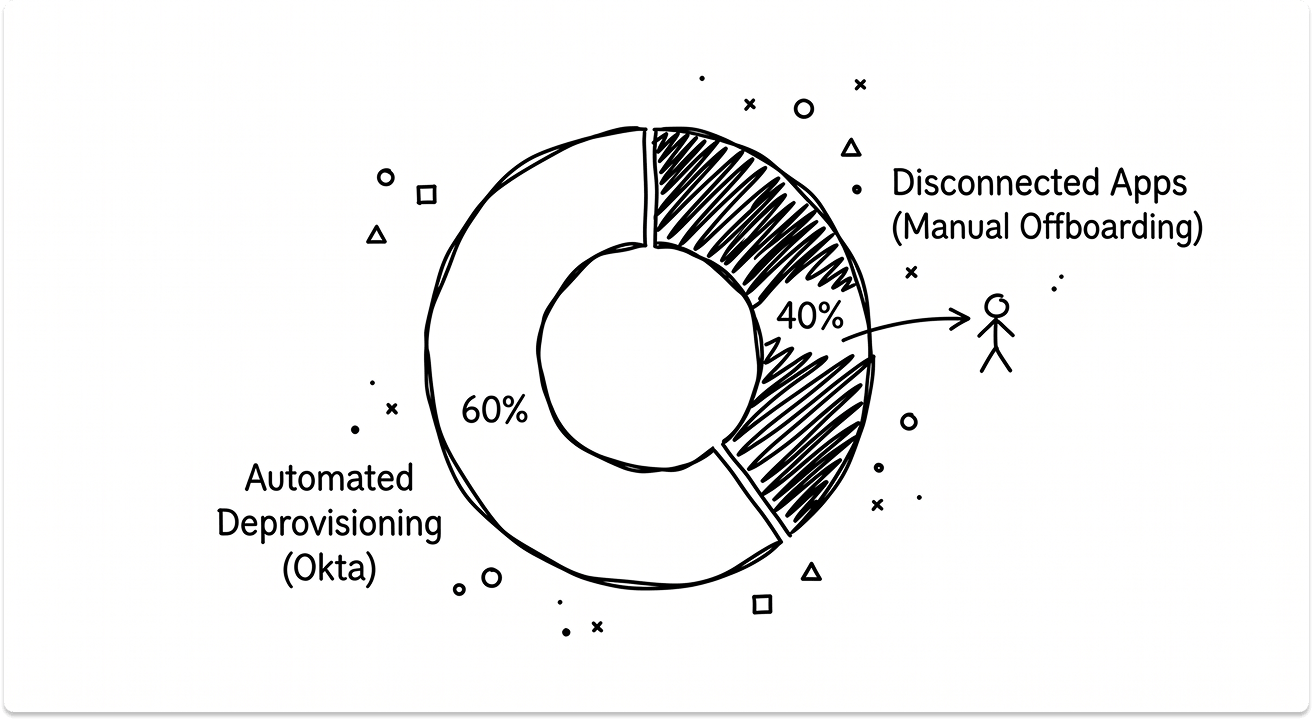
Up to 50% of ex-employees retain active access to at least one application after offboarding. Over 70% of companies admit employees have received inappropriate access or retained it after leaving.
In a hybrid Okta environment, the failure compounds. The same identity may exist in three places: the on-prem AD account, the Entra ID synced account, and the Okta universal directory.
If a deprovisioning event triggers in Okta but the AD write-back fails, the AD account stays live. The user shows as deprovisioned in the dashboard. They have active credentials in your on-prem environment.
Okta's support documentation confirms this failure mode explicitly: AD write-backs fail silently when the agent is offline, the target OU is missing from the integration, or the sAMAccountName value conflicts with an existing object. The same conditions that break provisioning break deprovisioning. No alert. No retry by default.
The governance problem sits upstream of the tooling. If you don't have governance discipline now, Okta won't magically create it. Unclear group names, tangled entitlements, and inconsistent employee titles in the HRIS flow directly into your lifecycle processes and produce the orphaned accounts your next audit will find.
The fix that works consistently: connect Okta directly to your HRIS. A termination event in Workday or equivalent triggers automated deprovisioning and removes the IT ticket from the chain. For the disconnected app tail, a documented manual offboarding SOP with sign-off requirements is the only reliable control.
What to do:
- Establish HRIS as the authoritative trigger for all lifecycle events
- Map every application in your environment, including those outside Okta's reach, and build a manual offboarding checklist for the disconnected tail
- Monitor AD write-back task completion as a required deprovisioning step, with alerting on failure
- Run quarterly access reviews with documented sign-off for privileged and contractor accounts
Failure #5: Conflicting Identity Sources Produce Duplicate Accounts and Authentication Drift
In a three-way identity architecture, attribute conflicts are common and hard to trace. A user whose UPN in on-prem AD differs from their Entra ID registered identity and their Okta profile will see unpredictable authentication behavior. Some apps work. Others return errors. Finding the root cause requires log correlation across three systems.
The Entra Connect and Okta provisioning conflict. In a working HAADJ and Autopilot deployment, provisioning to Entra ID must flow from AD on-premises through Entra Connect, not through Okta's direct provisioning path.
When both Entra Connect and Okta's provisioning write to Entra simultaneously, they produce duplicate or inconsistently attributed accounts. The admin console shows everything as healthy. Users experience broken SSO.
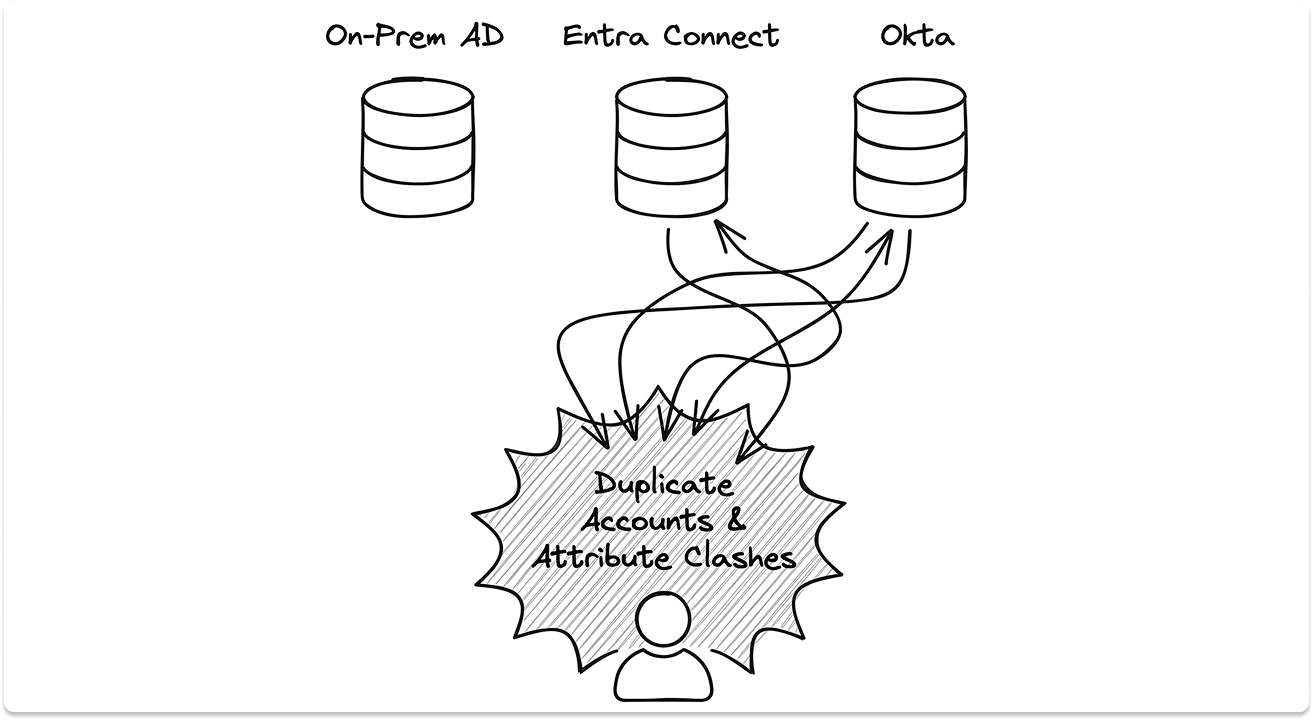
Nested group propagation gaps. AD nested group membership does not translate cleanly into Okta groups without explicit configuration. Those groups may then fail to propagate into downstream apps like Salesforce. A user appears in the right AD group, appears in Okta, and still cannot access the application because the group mapping was never validated end-to-end.
M&A identity collisions. Acquired company AD forests frequently produce duplicate identities during integration. One from the acquired forest, one from the primary forest, both provisioning into Okta with attribute collisions. Reconciling these requires custom attribute mapping and rule-based matching logic, not a default Okta configuration.
One thing to know about platform transitions: an Okta Certified Administrator moving to Entra in a hybrid AD environment found that complex provisioning workflows built in Okta required explicit re-mapping before Entra could reproduce them. Identity drift follows any platform consolidation where attribute flows were never formally documented. It is a process failure before it is a tooling failure.
If your organization is evaluating a platform transition, our guide on migrating from on-prem Active Directory to Microsoft Entra ID covers the attribute mapping and cutover process in detail.
What to do:
- Designate one authoritative identity source, in most hybrid models on-prem AD, and ensure all downstream systems derive from it
- Validate
sAMAccountName,userPrincipalName, and email attribute mapping explicitly across all three systems in Okta's directory integration settings - For HAADJ, confirm provisioning flows through Entra Connect only and run
dsregcmd /statuson test devices before rolling out broadly - Document group propagation paths end-to-end before assuming they work
What a Hardened Hybrid IAM Posture Actually Looks Like
The teams that avoid these failure modes share one trait. They treat their hybrid IAM architecture as a living system, not a completed project.
Here is what that looks like operationally.
Inventory before you configure. Before assuming Okta's directory integration shows you everything, catalog every workload, every authentication method, and every credential type: passwords, API keys, service accounts, Kerberos tickets. The gaps live in what you have not inventoried.
Define policy at the architecture level. Access rules should be defined before tooling is configured. If you cannot state in plain language which users have access to which systems via which authentication paths, your policy is assumed, not implemented.
Pilot changes on low-risk workloads first. Validate agent updates, MFA policy expansions, and provisioning changes in development environments before touching production auth flows. One bad sign-on policy update can lock out users across multiple apps simultaneously.
Replace static service account credentials. Long-lived service account credentials are the highest-risk items in most hybrid environments. Where possible, replace them with short-lived tokens via workload identity federation. This is an early-stage fix, not a final optimization.
Centralize monitoring. Export authentication logs, provisioning events, and policy decisions to your SIEM. Credential-based breaches take an average of 328 days to identify and contain. You will not close that window through periodic console reviews.
Govern before you automate. Establish clean group naming conventions, access request workflows, and quarterly review cycles before pointing Okta at your production directory. Automate what is already clean.
If you are evaluating where Okta fits in your broader IAM strategy, our comparison of Ping Identity, Okta, and OneLogin cover the architectural fit questions across platforms.
The Cost of Getting This Wrong
The average cost of a data breach is $4.45 million. 99% of security decision-makers expect to face an identity-related compromise within the next year.
Credential-based breaches take 328 days on average to identify and contain. That is almost a full year of exposure before most teams even know there is a problem.
These are the outcomes for organizations that deployed identity tooling, assumed it was working, and found out otherwise.
The failures in this article are in Okta's own support documentation, in practitioner forums, and in the 2025 breach post-mortems. Documented, recurring, and fixable. The engineers who have run these deployments are not anti-Okta. They are honest about where the seams are. The ones who avoid this outcome are the ones who went looking for the seams before an attacker did.
You should fix them now.
Looking for IAM solutions or Okta Alternatives?
We have a pre-vetted catalog of vendors who might be the right fit. Explore, discover, and match with vendors based on your requirements, architecture, and budget. Only talk to them when you're ready. Plus, this is a free service.
FAQ
Why does Okta fail in hybrid Active Directory environments?
Okta in a hybrid environment operates across three identity planes simultaneously: on-prem Active Directory, Microsoft Entra ID, and the Okta cloud directory. Each plane is a seam where policy enforcement, provisioning, and authentication can break independently and silently. The five most common failure modes are AD agent outages, Kerberos falling back to NTLM v1, MFA policies that do not cover legacy authentication paths, incomplete deprovisioning for apps outside Okta's SSO coverage, and attribute conflicts between identity sources producing duplicate accounts.
What causes the Okta AD agent to go offline and how do I fix it?
The three most common causes are: the agent service account placed in Active Directory's Protected Users group (which strips NTLM and Kerberos delegation the agent depends on), version mismatches between multiple agents running on the same domain, and network changes that break the outbound HTTPS tunnel without triggering an alert. The fix is to remove the service account from the Protected Users group, deploy a minimum of two agents on separate servers within each domain, and route agent health status to your SIEM. Reactive alerting through the Okta admin console finds failures after users report them.
Does Okta enforce MFA on on-premises applications in a hybrid environment?
Okta's MFA sign-on policies only cover authentication paths that route through Okta's policy engine. Legacy protocols (NTLM, Basic Auth, older Exchange clients) bypass Okta's policy engine entirely, which means an attacker with stolen credentials can authenticate against legacy endpoints without ever seeing an MFA prompt. In a hybrid deployment, legacy authentication must be blocked at both the network layer and Microsoft Entra Conditional Access independently of Okta. A 2024 Okta Classic sign-on policy vulnerability also confirmed that Okta's own policy enforcement cannot be the sole MFA layer.
What causes deprovisioning failures in hybrid Okta deployments?
Deprovisioning failures in hybrid Okta environments occur when AD write-back tasks fail silently. This happens when the Okta AD agent is offline at the time of the termination event, the target OU is missing from the integration settings, or attribute values like sAMAccountName conflict with existing objects in the directory. The result is a user who appears deprovisioned in the Okta dashboard while their on-prem Active Directory account remains active. Monitoring AD write-back task completion as a required deprovisioning step, with alerting on failure, closes this gap.
How do I audit whether my hybrid Okta IAM deployment is secure?
A hybrid Okta deployment audit should cover five areas: AD agent redundancy and service account configuration, authentication protocol hygiene (SPN registration validated with setspn -L and NTLM v1 blocked via Group Policy), MFA enforcement coverage across every authentication path including legacy protocols and VPN, deprovisioning completeness against your full application inventory including apps outside Okta's SSO and SCIM coverage, and attribute mapping consistency (sAMAccountName, UPN, email) across AD, Entra ID, and Okta. For HAADJ deployments, run dsregcmd /status on enrolled devices and verify AzureADPRT: Yes in the SSO State output to confirm device trust is working correctly.