What is Okta, How it Works, and What it Does for IT Leaders
What is Okta and how does it work? A technical guide to Okta's SSO, adaptive MFA, passwordless FastPass, lifecycle management, governance, and identity threat protection for IT leaders.

A technical guide to how Okta's identity platform works, covering SSO, adaptive MFA, FastPass, lifecycle management, governance, privileged access, and threat protection for IT leaders.
What Is Okta?
Okta is a cloud-native identity and access management platform. It sits between your people and the applications they use, confirms who each person is, and controls what they can reach. Instead of every application holding its own username and password, the application trusts Okta to handle the login.
In practice, Okta:
Okta is used by organizations of every size, and it fits most naturally where the workforce is distributed, application sprawl is real, and login credentials have become the primary way attackers get in.
When a single stolen password can reach everything, the login itself becomes the control point worth investing in. That is the same reasoning behind a well-built Zero Trust architecture, where identity, not the network perimeter, becomes the thing you verify.
An Investigations Report analyzed 10,626 confirmed breaches and found that the use of stolen credentials was the initial action in 24% of them, while 68% of breaches involved a non-malicious human element such as a person being phished or making an error.
The global average breach cost is about $4.88 million and identified stolen or compromised credentials as the single most common initial attack vector at 16%, and the slowest to contain at an average of 292 days. Credential-based attacks are both the most frequent and among the most expensive to clean up.
How Does Okta Work?
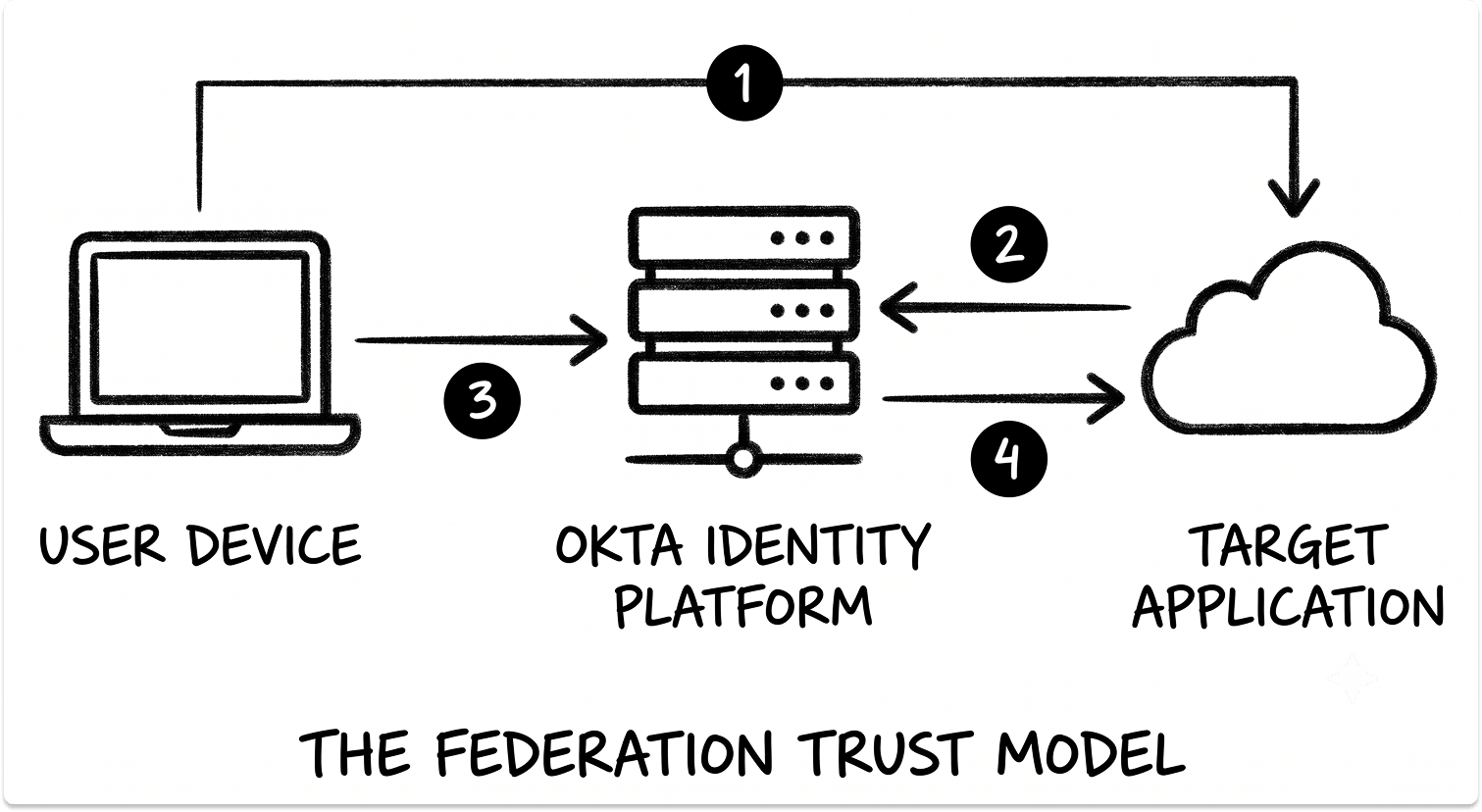
Okta replaces the scattered, per-application login model with one identity layer in the cloud. A user proves who they are to Okta, and Okta vouches for that user to each application using shared standards.
1. You connect your identity sources to Okta
Okta needs to know who your people are. It can hold user profiles natively, or it can pull them from systems you already run, such as Microsoft Active Directory, an LDAP directory, or an HR platform like Workday.
A lightweight software agent installed on a server inside your network makes an outbound-only connection to Okta, so no inbound firewall ports are opened.
Every user ends up as one profile in Universal Directory, Okta's built-in directory. That profile becomes the authoritative record that drives access everywhere else.
For organizations still routing every login through a single in-office directory server, this matters, because that one server becomes a company-wide point of failure the day it goes down. Getting the model right the first time avoids the pain covered in our guide on why IAM breaks in hybrid Okta environments.
2. The user authenticates once to Okta
When a user opens an application, the application redirects the browser to Okta. Okta asks for the password (or better, a passwordless factor), confirms it, and establishes a session. From that point, the user reaches other connected applications without logging in again.
3. Okta checks context and risk before granting access
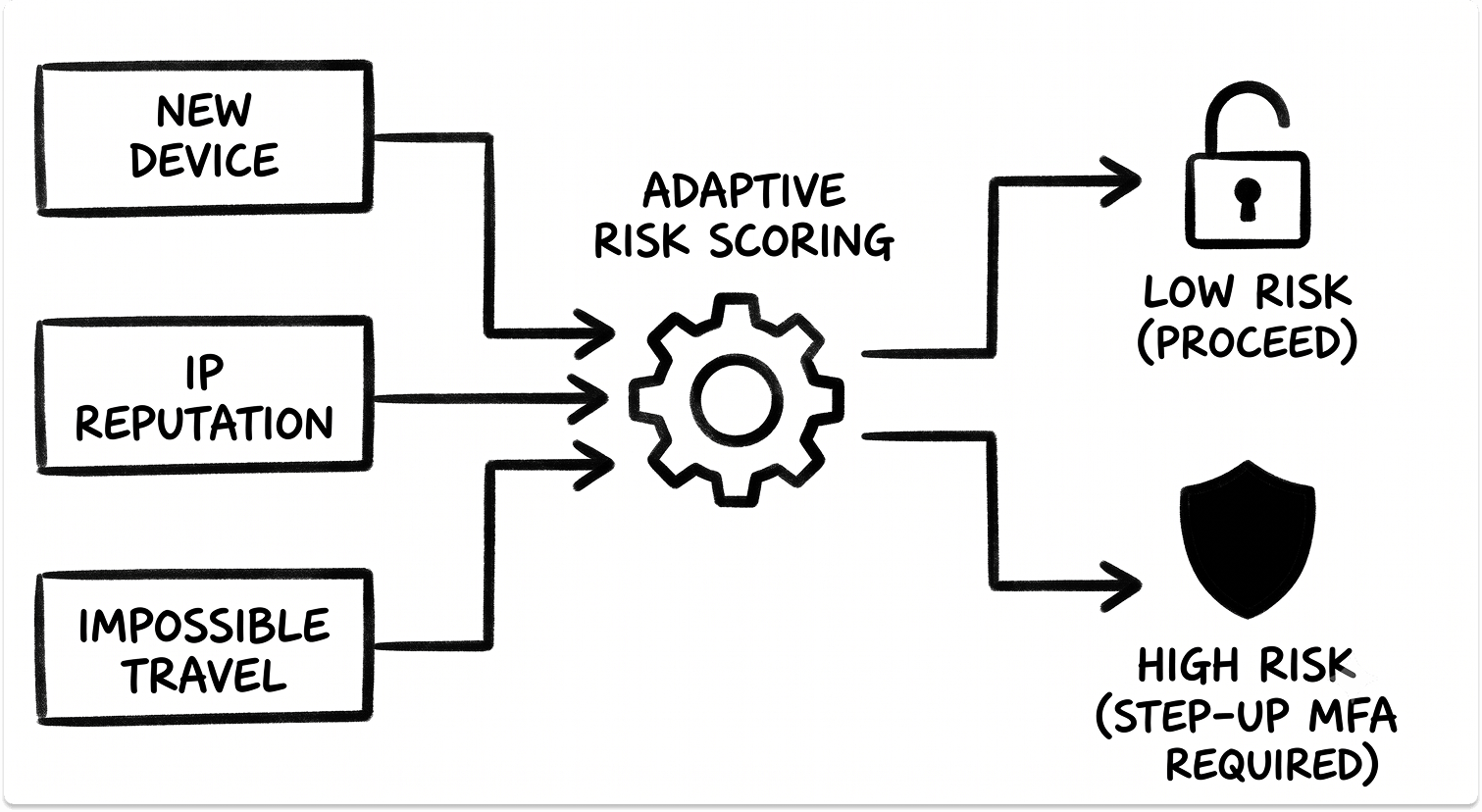
Okta does not treat every login the same. Its adaptive MFA scores each sign-in as low, medium, or high risk using signals such as the device, the network, the physical location, the reputation of the IP address, and behavior patterns like a login from a new country or an impossible-travel jump.
A high-risk score triggers a step-up challenge, so a suspicious login has to clear an extra hurdle before it succeeds.
Okta ThreatInsight adds a network effect on top of this. IP addresses seen running credential-stuffing or password-spray attacks against other Okta tenants can be blocked before they reach your users at all.
4. Okta federates the identity to the application
Once the user is verified, Okta hands the application a signed proof of identity. It does this with SAML 2.0 (a signed XML assertion) or OpenID Connect (a signed token built on the OAuth 2.0 framework).
For both, the user's password never travels to the application. For older applications that support no federation standard, Okta uses Secure Web Authentication, which stores the credential encrypted and submits it to the application's login page on the user's behalf.
5. Access is granted and revoked automatically
Okta uses SCIM 2.0, the open standard for provisioning, to create and remove accounts inside connected applications.
When you assign a user to an application, Okta creates the account. When someone leaves and their profile is disabled, Okta sends a signal that switches the downstream account to inactive within seconds, closing the access window that manual offboarding leaves open for weeks.
6. The session is watched after login
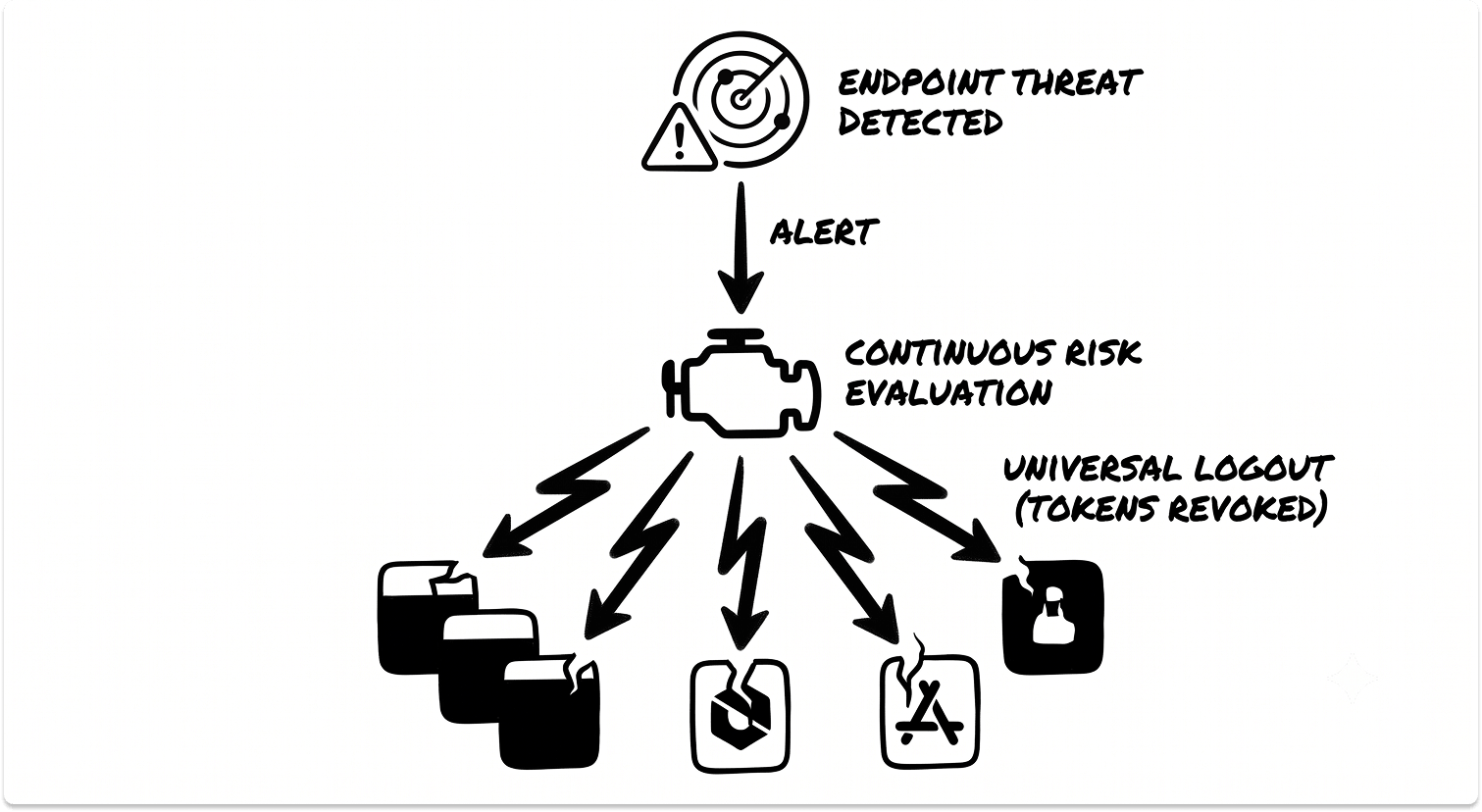
With Identity Threat Protection enabled, Okta keeps evaluating risk after the user is already in. If it detects a stolen session token being replayed from a new location or device, it can force re-authentication or end the session across applications at once, a capability called Universal Logout.
The Okta Platform: Products and What Each One Does
Okta is not a single product. It is a set of products that share the same identity data, the same policy engine, and the same risk signals. Most evaluations start with the core Workforce Identity capabilities and add the others as specific needs surface.
Workforce Identity Cloud
This is the core, and it covers the day-to-day identity needs of employees and partners.
Single Sign-On connects your applications to Okta through the Okta Integration Network, a catalog of more than 8,000 pre-built integrations. Okta maintains the connectors, so you configure rather than build.
Universal Directory holds every user profile, standardizes attributes across sources, and drives access through group rules that assign application access based on attributes like department or role.
Adaptive MFA enforces a second factor and adjusts the challenge based on the risk of each login. The available factors range from phishing-resistant to easily phishable, and the choice matters. Here is how they compare.
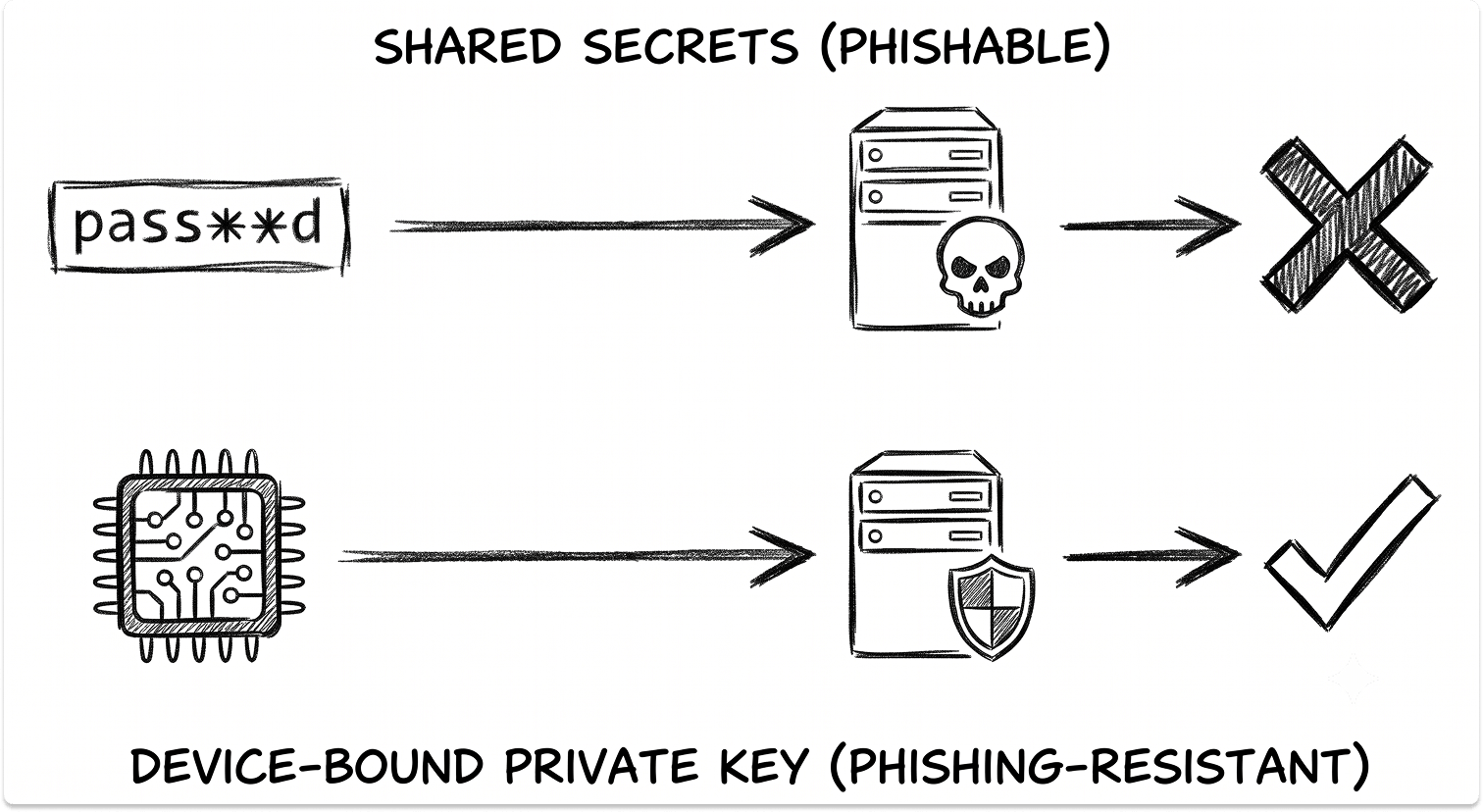
Okta FastPass delivers passwordless login. During enrollment, the Okta Verify app generates a public and private key pair, storing the private key inside the device's hardware security module so it never leaves the device.
At login, Okta issues a cryptographic challenge, the device signs it with that private key, and Okta verifies the signature. Because the credential is bound to the legitimate origin, a phishing site cannot relay it. Moving to this model is worth planning carefully, and our field notes on real-world migrations to passwordless authentication cover where teams hit friction.
Lifecycle Management automates the joiner-mover-leaver process over SCIM. An HR system can act as the source of truth, so a new hire in Workday becomes an Okta account and the right application accounts on day one, and a departure disables all of them without a ticket.

Okta Workflows is a no-code automation builder for identity events. It uses pre-built connectors and logic blocks, so you can automate steps like notifying a manager, moving a user to a quarantine group, or calling an external API when an event fires.
API Access Management turns Okta into an OAuth 2.0 authorization server for your own APIs. You define scopes, claims, and access policies, and Okta issues and validates the tokens that protect machine-to-machine and application traffic.
Customer Identity Cloud (Auth0)
Okta acquired Auth0 in May 2021 in an all-stock deal valued at roughly $6.5 billion, and it runs as a separate platform aimed at customer-facing applications. Workforce Identity secures the people who work for you. Customer Identity secures the people who buy from you.
The distinction is architectural. Auth0 is built for developers, with deep code-level control of login flows through versioned functions called Actions, extensive social login connections, and a large set of SDKs. It is typically priced per monthly active user rather than per seat.
Okta Identity Governance (OIG)
OIG adds governance to the same identity fabric, aimed at the slow accumulation of stale access over time. It covers access certifications, where managers review and confirm who still needs what on a schedule; access requests through a self-service catalog with approval workflows; entitlement management for fine-grained in-app permissions; and separation of duties, which flags or blocks conflicting combinations such as the ability to both create and approve a payment. This is the identity side of the same discipline covered in GRC software for IT leaders.
Okta Privileged Access (OPA)
OPA is Okta's cloud-native privileged access management, built so that access to Linux and Windows servers uses the same identity, device, and risk signals as everything else. It grants just-in-time access with zero standing privileges, issues short-lived SSH and RDP certificates instead of static keys, and vaults and rotates shared account passwords so users never see the actual secret. Server sessions can require step-up MFA, approval, and session recording.
Identity Threat Protection (ITP)
ITP moves protection past the single moment of login. It continuously scores login risk, session risk, and user risk, and it detects post-login threats such as session-token theft.
Through the OpenID Shared Signals Framework, it both consumes and sends security signals to and from partners like CrowdStrike, Jamf, and Microsoft, so a threat one tool sees can trigger a response in Okta.
Its headline response is Universal Logout, which ends a compromised user's sessions and revokes tokens across connected applications at once. In a 30-day window Okta reported that ITP flagged roughly 8,000 high-risk users across more than 200 organizations, and more than 6,500 of those cases were remediated automatically.
Here is a plain mapping of which product answers which need.
What Okta Offers to IT Leaders
Beyond the product list, four outcomes tend to drive the decision.
Cutting the credential attack surface
Every password removed and every login placed behind a phishing-resistant factor closes the door that the breach data shows attackers use most. FastPass and FIDO2 remove the shared secret an attacker can steal or trick a user into handing over.
For admin accounts, which hold the keys to everything, OPA adds just-in-time elevation so a privileged account is not standing open between uses. I have seen the shape of the risk plainly: one reused admin password is often the entire distance between a phishing email and a full compromise.
Faster, safer joiner-mover-leaver
Manual offboarding is where access quietly leaks. When deprovisioning depends on a spreadsheet and a memory, accounts stay live for weeks after people leave. SCIM-based Lifecycle Management cuts that to seconds, and it does the same on the joiner side, so a new hire is productive on day one instead of waiting on access tickets.
Audit-readiness and compliance
Okta holds the certifications auditors expect, including FedRAMP, SOC 2, and ISO 27001, published through Okta's Trust site. More useful day to day, OIG produces the evidence an audit demands: a record of who approved what access, when it was last reviewed, and what conflicts exist.
When a customer contract or a cyber-insurance renewal makes MFA on every account a hard condition, that evidence is what turns a scramble into a report. Tools like Vanta and Drata pair with this to keep the wider compliance picture continuous.
Continuous threat response after login
A valid session token bypasses both the password and MFA, which is why post-login monitoring matters. ITP watches for that, and its integration with endpoint tools means a device flagged by CrowdStrike or an Apple management platform can raise a user's risk and trigger an automatic logout. The response happens without waiting for an analyst to notice.
See Which Okta Module Fits Your Situation and Where to Begin
Is Okta Right for Your Environment?
Okta fits organizations that have accepted the login is now the control point. If your workforce is spread across locations, your applications live in the cloud, and your biggest exposure is a stolen or reused credential, Okta is worth a serious evaluation.
Start with SSO and adaptive MFA, add Lifecycle Management when manual provisioning becomes the bottleneck, and layer in OIG, OPA, or ITP as governance, privileged access, or post-login threats become the pressing problem.
If your environment is small, largely on one platform, and mostly office-based, the operational overhead of a full identity platform may outrun the benefit for now. The value grows with distribution, application count, and the number of people whose access you have to manage and prove.
The real question is not whether Okta is capable. It is whether your exposure to credential-based attacks and your obligation to prove control have grown enough to justify making identity a managed platform rather than a setting inside each application.
Before you commit, weigh it against the alternatives in our Ping Identity vs Okta vs OneLogin comparison guide, and see where it sits among the leading IAM vendors.
Evaluating Okta against Ping, Entra, or other IAM platforms?
If you are weighing Okta against the alternatives, our platform helps you filter identity vendors against your actual requirements and start conversations on your terms. Plus this services is free to you.
FAQ
What does Okta do?
Okta is a cloud-based identity and access management platform that confirms who a user is and controls what applications they can reach. It authenticates a user once, adds a second verification factor, and grants single sign-on to connected applications, while automatically creating and disabling accounts as people join and leave. It replaces scattered, per-application logins with one identity layer in the cloud.
Is Okta an SSO tool or an MFA tool?
Both, and more. Single sign-on and multi-factor authentication are two features of the Workforce Identity Cloud, which also includes Universal Directory, passwordless FastPass, and lifecycle management. Okta also sells governance, privileged access, and threat-protection products on top of that core.
Is Okta the same as Auth0?
They are related but separate. Auth0, now the Customer Identity Cloud, is Okta's platform for logging in your customers, and it is built for developers embedding authentication into customer-facing applications. The Workforce Identity Cloud handles employees and partners. Many organizations run both.
How does Okta connect to Active Directory?
Okta installs a lightweight agent on a server inside your network. The agent makes an outbound-only connection to Okta, so no inbound firewall ports are opened, and it can synchronize users and pass login checks back to your domain controller. This lets you keep Active Directory in place while moving the login experience to Okta.
What is Okta FastPass?
FastPass is Okta's passwordless, phishing-resistant login. The Okta Verify app generates a key pair, keeps the private key locked in the device's hardware, and signs a cryptographic challenge at each login. Because the credential is bound to the real login origin, a fake site cannot capture or replay it.
Is Okta an identity provider?
Yes. Okta acts as the identity provider, the trusted system that authenticates the user and vouches for that identity to applications using standards like SAML 2.0, OpenID Connect built on OAuth 2.0, and WebAuthn for passwordless factors. The applications trust Okta so they do not have to manage passwords themselves.