NinjaRMM vs ConnectWise Automate vs Datto RMM vs Atera: The RMM Platform Comparison Guide for IT Leaders
Comparing NinjaRMM, ConnectWise Automate, Datto RMM, and Atera for 2026? This guide breaks down architecture, pricing, scripting depth, and which platform was actually built for your team size and stack.

Your RMM platform is not a utility. It is the nervous system of your IT operation — the tool your team uses every single day to monitor endpoints, push patches, run scripts, and respond to incidents before they become outages.
Choosing the wrong one costs you more than money. It costs your team hours of manual workarounds, missed patch windows, and a ticketing backlog that never clears. I've seen MSPs locked into platforms that technically "work" but require a dedicated admin just to keep the automation running. That is not operational efficiency; that is technical debt wearing a license agreement.
The four platforms that consistently make the enterprise shortlist are NinjaRMM (NinjaOne), ConnectWise Automate, Datto RMM, and Atera. Each takes a fundamentally different architectural stance.
This guide breaks down exactly where each platform wins, where it struggles, and which type of organization it was actually built for.
The Core Architecture Split: Three RMM Models
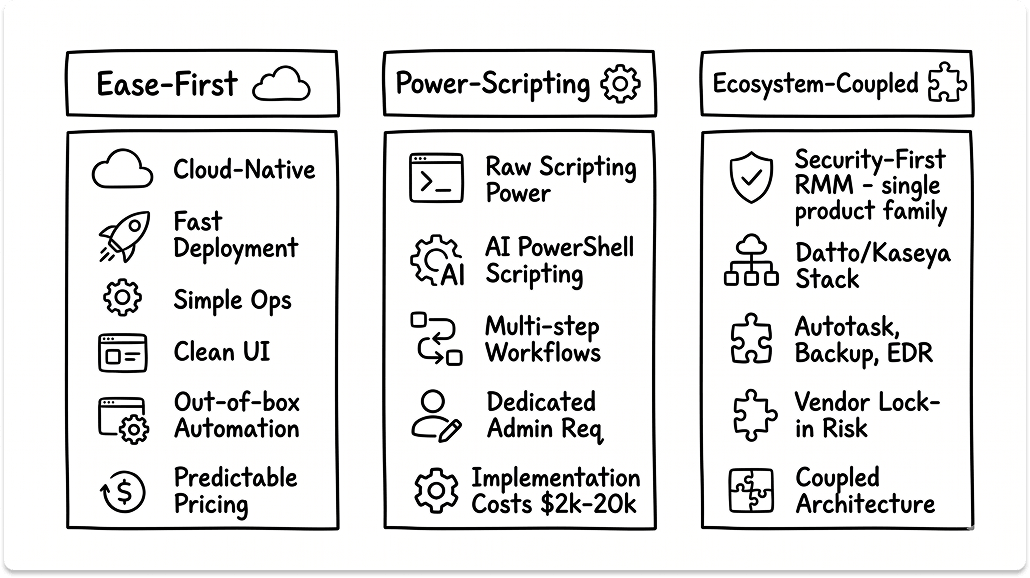
Before you evaluate features, you need to understand the three distinct architectural models that divide this market.
Model 1: Cloud-Native, Ease-First Platforms (NinjaOne, Atera)
These platforms were designed for rapid deployment and operational simplicity. They prioritize a clean UI, out-of-the-box automation, and predictable pricing over raw scripting power. NinjaOne charges per device. Atera charges per technician and bundles unlimited endpoints. Both can be operational in under a day.
Primary Benefit: Low barrier to entry. Minimal dedicated admin overhead. Teams are productive within hours of provisioning.
Primary Limitation: Depth of automation and scripting flexibility caps out faster than the power-scripting platforms. For complex, multi-condition automation logic, you will hit walls.
Model 2: The Power-Scripting Engine (ConnectWise Automate)
ConnectWise Automate, formerly known as LabTech, is the most technically capable automation platform in this comparison. It was not designed for ease; it was designed for power. The scripting engine supports AI-assisted PowerShell scripting, multi-step conditional workflows, and automation logic that can replace entire manual processes at scale.
Primary Benefit: Ceiling for automation is virtually unlimited. If you can define the logic, you can script it.
Primary Limitation: This platform requires a dedicated Automate administrator. Implementation projects routinely cost between $2,000 and $20,000 before your first device is managed.
Model 3: The Ecosystem-Coupled Platform (Datto RMM)
Datto RMM is a cloud-based platform owned by Kaseya. Its core identity is security-first RMM, and it is engineered to deliver maximum value within the Kaseya/Datto product family: Autotask PSA, Datto Backup, Datto EDR, and Kaseya BMS. Outside that ecosystem, it is a capable but incomplete platform.
Primary Benefit: If you are already operating in the Kaseya/Datto stack, Datto RMM is the natural center of gravity for your endpoint operations.
Primary Limitation: Evaluating Datto RMM in isolation, without the surrounding ecosystem, gives you an incomplete picture of both its value and its total cost.
NinjaRMM (NinjaOne): The Cloud-Native Standard for Lean IT Teams
NinjaOne is one of the fastest-growing RMM platforms in the SMB and mid-market segment. Its architecture is cloud-native, meaning there is no on-premise server to maintain, no database to manage, and no legacy agent infrastructure to work around. The platform scales from 50 to 150,000 endpoints — Windows, macOS, Linux, and cloud-based devices — from a single console.
Technical Architecture and Capabilities
NinjaOne uses a lightweight endpoint agent that deploys in minutes. Once installed, the agent handles real-time monitoring, automated alerting, patch management, and remote access from a single dashboard. Monitoring covers performance thresholds (CPU, storage), applications, processes, services, daemons, device state, and hardware changes. Patch management covers Windows, macOS, and Linux, with auto-updates for over 200 third-party applications.
The platform ships with four integrated remote access solutions for attended and unattended sessions. It also includes auto-remediation: condition-based script deployments that automatically resolve common issues like stopped services, missed reboots, and open ports — without technician intervention.
The platform integrates natively with major PSA and ticketing tools including ConnectWise Manage, Autotask, and ServiceNow, and with security platforms including CrowdStrike, SentinelOne, and Microsoft Intune. NinjaOne Backup — a proprietary solution built on NinjaOne's acquisition of Dropsuite (completed June 2025) — handles device backup, SaaS data protection (Microsoft 365, Google Workspace), and server backup from the same console.
Key Capabilities:
- Automated OS patching and auto-updates for 200+ third-party applications
- Real-time monitoring: CPU, storage, processes, services, daemons, hardware changes
- Four built-in remote access solutions (attended and unattended)
- Condition-based auto-remediation (stopped services, open ports, missed reboots)
- Remote command line, PowerShell/terminal, task manager, file explorer, registry editor
- Native documentation, self-service portal, and warranty tracking
- Network monitoring: printers, firewalls, routers, switches
- NinjaOne Backup: file/folder, image, and SaaS data protection
Operational Reality: Pros and Cons
Pros:
- Fast deployment — most MSPs are up and running within one week, with operator proficiency under 10 days.
- 95% of customers report saving time on manual tasks; 94% reduced ticket volumes and resolution times, per NinjaOne customer data.
- 82% of customers replaced 3–4 tools with NinjaOne; some replaced 10–15 tools, according to NinjaOne.
- Pricing is volume-based: NinjaOne's published range starts at $1.50/endpoint/month at 10,000 endpoints, rising to $3.75/endpoint/month at 50 or fewer endpoints. Actual contract pricing varies by region, modules selected, and negotiated terms. No hidden fees for onboarding, training, or support.

Cons:
- Scripting flexibility is more limited compared to ConnectWise Automate. Complex conditional automation requires workarounds.
- Reporting capabilities are functional but not enterprise-grade. Large MSPs managing hundreds of clients will find the reporting module constrained.
- Less suited for organizations that need deep automation logic or highly customized monitoring policies at scale.
Best Suited For: MSPs and internal IT teams scaling from 50 to tens of thousands of endpoints, who prioritize clean operations, fast time-to-value, and tool consolidation over maximum scripting depth.
ConnectWise Automate: Maximum Automation Power at Operational Cost
ConnectWise Automate is the automation engine of choice for large, technically mature MSPs. It was built for environments where IT operations need to be systematized at scale, and where a dedicated platform administrator is a standard, justified headcount.
Technical Architecture and Capabilities
ConnectWise RMM is built on the Asio platform — a cloud-native architecture that enables real-time data processing, faster updates, and scalable performance. The platform supports cloud-hosted and on-premise deployment, and it is engineered to handle environments with 100,000+ devices.
The core of the platform is its scripting and automation engine, which supports PowerShell, bash, and batch scripting, along with AI-generated scripts and monitors via ConnectWise Sidekick for RMM. Prebuilt scripts and NOC-tuned monitoring conditions ship out of the box, reducing time to value for teams that don't need full customization. For MSPs managing thousands of endpoints across dozens of clients, this scripting depth is a genuine operational differentiator.
The platform connects tightly with the broader ConnectWise ecosystem, particularly ConnectWise Manage (PSA) and ScreenConnect (remote access). ScreenConnect enables instant, secure device access with role-based permissions and audit trails. DataViews allow technicians to query endpoints on demand for specific software versions or configurations across the entire estate. The platform also includes live topology mapping and network discovery built into the RMM.
Key Capabilities:
- AI-assisted scripting (ConnectWise Sidekick) supporting PowerShell, bash, and batch
- NOC-tuned out-of-the-box monitoring conditions and alert automation
- Automated OS and third-party patch management with approval workflows and deployment rings
- DataViews for on-demand endpoint configuration querying
- Live topology mapping and network discovery
- Native integration with ConnectWise Manage and ScreenConnect
- Access to ConnectWise NOC, Help Desk, and Dedicated Technician expert services
- On-premises or cloud-hosted deployment via Asio platform
- Open API library for custom dashboards and reporting integrations
Operational Reality: Pros and Cons
Pros:
- The automation ceiling is the highest of any platform in this comparison. There is virtually no workflow you cannot systematize.
- ConnectWise reports an 80% reduction in alerts and 50% reduction in tickets through automated consolidation and remediation — and operations managers report 150–200 tickets auto-cleared daily.
- Deep PSA integration with ConnectWise Manage creates a tightly unified MSP operations stack.
- Built-in access to ConnectWise NOC and Help Desk expert services extends team bandwidth without additional headcount.
- Scales to 100,000+ devices. TechMD manages more than 33,000 agents on the platform.

Cons:
- Implementation costs are not optional overhead. Basic onboarding starts around $2,000; fully customized scripting environments for large MSPs can reach $20,000.
- The UI has not kept pace with newer platforms. It feels like what it is: a powerful platform built over many years, not a modern SaaS product.
- Requires a dedicated Automate administrator. If you lose that person, platform performance degrades immediately.
- Pricing is custom-quoted. Budget conversations require a sales cycle.

Best Suited For: Large MSPs (typically 500+ managed endpoints) with dedicated technical staff, who are already using ConnectWise Manage and need maximum automation depth to operate at scale.
Datto RMM: Security-First Operations Within the Kaseya Ecosystem
Datto RMM is the cloud-based RMM platform within the Kaseya/Datto product family. Its identity is shaped by the companies it was designed to serve: security-conscious MSPs who want tight integration between endpoint management, backup, and threat detection.
Technical Architecture and Capabilities
Datto RMM is a fully cloud-native platform hosted on Amazon AWS EC2 infrastructure, with a 99.99% availability SLA. Its endpoint agent is lightweight, and the architecture is built for MSP multi-tenancy with strong regional data isolation — the platform operates five regional instances (two in Ireland, two in the US, one in Sydney), with data in each region inaccessible from others.
Datto is the only channel vendor whose RMM has been evaluated by the Building Security In Maturity Model (BSIMM), where it ranked in the top 20% of all firms on first assessment and among the industry's top 128 secure application developers globally. It is also the only RMM to offer a native and unified Microsoft 365 management module, enabling IT teams to onboard, offboard, and quarantine users; reset passwords; and manage M365 tenants without leaving the RMM console.
The platform's automation relies on custom scripts, policies, and webhooks, with intelligent alerting that supports auto-response and auto-resolution. A built-in ransomware detection module monitors endpoints and automatically alerts when suspicious activity is detected.
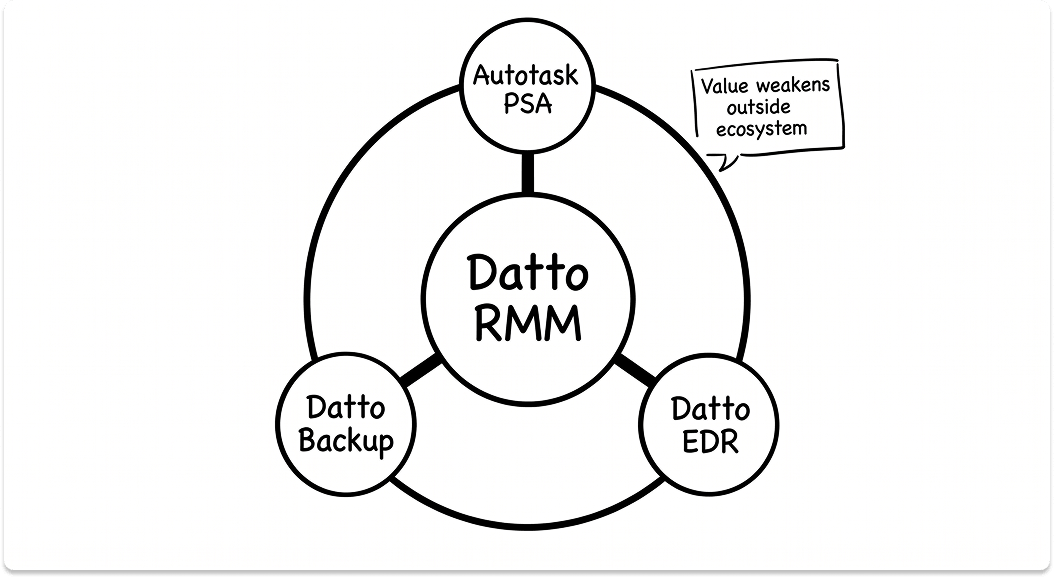
The genuine strategic value of Datto RMM surfaces when it operates alongside Autotask PSA (for service delivery), Datto SIRIS/Backup (for endpoint and server backup), and Datto EDR (for threat detection and response). In that configuration, RMM events trigger PSA tickets, backup jobs, and EDR investigations from a single pane of glass.
Key Capabilities:
- Cloud-native multi-tenant architecture with regional data isolation (hosted on AWS)
- BSIMM-evaluated security architecture — top 20% globally on first assessment
- Intelligent alerting with auto-response and auto-resolution
- Built-in ransomware detection with automated client alerts
- Native, unified Microsoft 365 management module (onboarding, offboarding, password resets)
- Automated patch management with compliance reporting
- Network topology mapping
- HTML5-based browser remote access (no client software required)
- Deep integration with Autotask PSA, Datto Backup, and Datto EDR
- Monthly innovation release cadence with 24/7/365 expert support
Operational Reality: Pros and Cons
Pros:
- The BSIMM evaluation and top 20% security ranking is a verifiable, third-party-validated differentiator that no other RMM in this comparison can match.
- The native M365 management module removes a common tool from the MSP stack entirely.
- Regional data isolation makes it well-suited for MSPs managing clients in regulated industries with data residency requirements.
- Customer TeleGlobal achieved 95% patch compliance across remote environments. Customer Central Technology deployed to over 4,000 endpoints in a single day.

Cons:
- Pricing is not publicly listed. All quotes require a sales conversation, which adds friction to the evaluation process.
- The platform's value proposition weakens significantly outside the Kaseya/Datto ecosystem. You pay for integration depth you cannot access with a different PSA or backup tool.
- The 2021 Kaseya VSA ransomware attack (attributed to the REvil group) impacted up to 1,500 downstream businesses through MSPs using the Kaseya VSA platform. Datto RMM is architecturally separate from VSA, but the incident created vendor-level trust questions that still surface in enterprise procurement reviews. Ask specifically about Datto RMM's security architecture and penetration testing cadence in your vendor conversations.
- Vendor lock-in is a real strategic risk. As Kaseya continues to consolidate acquisitions, product roadmaps and pricing are increasingly influenced by ecosystem bundling decisions.
Best Suited For: MSPs already operating on Autotask PSA and Datto Backup, who want a security-validated, unified operations stack and are comfortable with the Kaseya/Datto vendor relationship long-term.
Atera: Per-Technician Pricing and the All-in-One Bet
Atera is the only platform in this comparison that charges per technician rather than per endpoint. That single pricing decision shapes everything about who Atera is right for and where it breaks down.

Technical Architecture and Capabilities
Atera is a cloud-native RMM and PSA platform with an AI layer built into its core architecture. The platform currently serves 13,000+ customers, managing 6 million devices and handling 1 million tickets per month. One platform handles endpoint monitoring, patch management, remote access, ticketing, billing, reporting, and autonomous AI remediation.
The per-technician model means that as your managed device count grows, your Atera costs stay flat. A team of three technicians managing 1,000 endpoints pays the same as a team managing 200. The Atera agent goes online in 1.2 seconds and delivers a 97% patch success rate and 99% automated patching action rate, per Atera's own platform data.
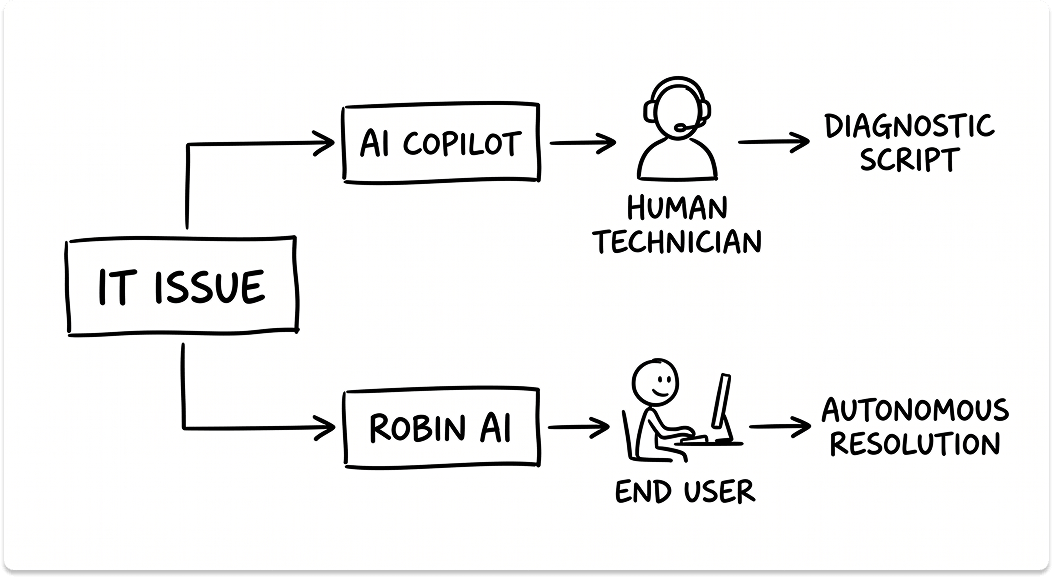
The AI layer has two distinct components. AI Copilot is an intelligent assistant for technicians — handling real-time device diagnostics, proactive alert analysis, script generation (including OID generators), and AI-driven audit logs. Robin is a separate autonomous AI service agent that resolves issues directly for end users without technician involvement, reducing IT workload by up to 40% according to Atera.
Remote access in Atera is broader than most platforms in this category — the platform integrates natively with AnyDesk, Splashtop, TeamViewer, and ScreenConnect, giving technicians flexibility in their remote tooling rather than locking them into a single vendor.
Key Capabilities:
- RMM and PSA in a single platform
- Per-technician pricing with unlimited endpoint monitoring
- Automated patch management for Windows, macOS, and Linux with customizable policies; 97% patch success rate
- Remote access via AnyDesk, Splashtop, TeamViewer, and ScreenConnect (plan-dependent)
- AI Copilot: real-time device diagnostics, script generation, proactive alert analysis, compliance audit logs
- Robin: autonomous AI agent for end-user self-resolution (reduces IT workload up to 40%)
- Built-in ticketing, billing, contracts, asset management, and client reporting
- Network Discovery: real-time monitoring and mapping of connected devices
- Atera Agent tracks CPU, RAM, disk usage, component temperatures, network bandwidth, Windows events, IP address, OS version, security settings, and user activity
MSP Pricing (Annual Billing):
- Pro: $129/month per technician ($139/month billed monthly)
- Growth: $179/month per technician ($189/month billed monthly)
- Power: $209/month per technician ($249/month billed monthly)
- Superpower: Contact sales — includes SSO, unlimited custom reports, 7-year audit log, BAA for HIPAA, 99.9% uptime SLA
- AI Copilot: $95/month per technician (available as a paid add-on on all plans)
Operational Reality: Pros and Cons
Pros:
- The pricing model is uniquely cost-effective for teams with high endpoint-to-technician ratios.
- The RMM + PSA + AI consolidation eliminates significant integration overhead for small teams.
- 6 million devices under management and 1 million monthly tickets processed demonstrates production-scale reliability.
- AI Copilot users report 90% accurate diagnostics and average savings of 11–13 hours per week, per Atera customer data.
- Leeds United achieved a 35% reduction in tickets using AI Copilot. Trapp Technology reported a 30% decrease in first reply time.
Cons:
- Community feedback consistently indicates that performance and feature depth begin to strain as teams grow past 20–30 technicians. This is a qualitative pattern from peer reviews, not a hard technical limit.
- macOS and Linux patch management, AnyDesk remote access, and advanced reporting require the Growth plan or above — the entry-level Pro plan is primarily Windows-focused.
- Robin (the autonomous AI agent) and AI Copilot are separate products. Teams expecting a fully unified AI experience need to understand how the two components fit together and price accordingly.
- Scripting capabilities are functional but not the strength of the platform. Teams that rely on complex automation should weight this heavily.
Best Suited For: Small-to-mid MSPs and lean internal IT departments managing more endpoints than their headcount would typically justify on per-device pricing, and teams actively investing in AI-driven IT operations.
RMM Platform Comparison Table
Finding the Right RMM for Your Organization
Closing Thoughts
There is no universally correct RMM platform. The right choice depends on your team's technical maturity, your existing tooling ecosystem, and what you actually need the platform to do day to day.
- Choose NinjaOne if you want the fastest path to a stable, well-managed RMM operation without dedicating headcount to platform administration. It consolidates more tools than any other platform in this comparison and scales from 50 to 150,000 endpoints without an architecture change.
- Choose ConnectWise Automate if you run a large MSP with a dedicated Automate admin, are already embedded in the ConnectWise ecosystem, and need scripting depth that no other platform in this comparison can match. The built-in NOC and Help Desk services are a genuine force multiplier for teams managing high endpoint volumes.
- Choose Datto RMM if your MSP runs on Autotask and Datto Backup, and you want a security-validated, unified operations stack. The BSIMM ranking and native M365 module are verifiable differentiators that carry real weight in regulated industry conversations.
- Choose Atera if you lead a small-to-mid team managing a disproportionately high number of endpoints, and the per-technician pricing model aligns with how your business is structured. If you are actively investing in AI-driven IT operations, the combination of AI Copilot and Robin gives Atera a differentiated roadmap.
Before any final commitment, run a Proof of Concept with at least two platforms across a representative sample of your managed device types. Patch behavior, alert fidelity, and remote session performance all present differently in a real environment than in a vendor demo.
Also read: MSP vs. MSSP vs. Co-Managed IT: Which Model is Right for Your Business?
Looking for monitoring tools?
Help us understand your environment and priorities. We'll match you with the vendors worth talking to. Plus a $50 gift card for your time.
FAQ
What is the difference between NinjaOne and ConnectWise Automate?
NinjaOne is a cloud-native RMM built for fast deployment and operational simplicity. It is fully managed in the cloud, requires no dedicated platform administrator, and most teams reach proficiency in under 10 days. ConnectWise Automate is built for raw automation power. Its scripting engine supports complex, multi-condition workflows that no other platform in this comparison can match, but it requires a dedicated Automate admin and implementation costs that start at $2,000 and can reach $20,000. NinjaOne wins on speed and ease. ConnectWise wins on scripting depth. The right choice depends on whether your MSP has the technical headcount to justify the latter.
Is Atera RMM good for MSPs managing large numbers of endpoints?
Atera's per-technician pricing makes it unusually cost-effective for small-to-mid teams managing a high endpoint-to-technician ratio. A team of three technicians pays the same whether they manage 200 or 2,000 devices. The constraint is scale: community feedback consistently shows performance and feature depth begin to strain past 20 to 30 technicians. Atera is the right call for lean teams investing in AI-driven operations. For large MSPs managing tens of thousands of endpoints across complex client environments, NinjaOne or ConnectWise Automate is a more defensible choice.
How secure is Datto RMM compared to other RMM platforms?
Datto RMM is the only platform in this comparison evaluated by the Building Security In Maturity Model (BSIMM), where it ranked in the top 20% of all firms globally on its first assessment. It also operates on a multi-tenant AWS architecture with regional data isolation across five instances, making it well-suited for MSPs serving clients in regulated industries with data residency requirements. One important distinction: Datto RMM is architecturally separate from Kaseya VSA, the platform targeted in the 2021 REvil ransomware attack. Ask vendors specifically about Datto RMM's penetration testing cadence when you are in procurement conversations.
What RMM platform works best with Autotask PSA?
Datto RMM integrates natively with Autotask PSA as part of the Kaseya/Datto product family. In that configuration, RMM events trigger PSA tickets, backup jobs, and EDR investigations from a unified console. If you run Autotask and Datto Backup and plan to stay in that ecosystem long-term, Datto RMM is the logical operational center. If you run Autotask but are evaluating RMM tools independently, NinjaOne also supports native Autotask integration and gives you more flexibility if your stack evolves.
How much does NinjaOne RMM cost per endpoint?
NinjaOne's published pricing runs from $1.50 per endpoint per month at 10,000 endpoints to $3.75 per endpoint per month for estates of 50 or fewer devices. Actual contract pricing varies by region, modules selected, and negotiated terms. There are no additional fees for onboarding, training, or support. For comparison, ConnectWise Automate and Datto RMM do not publish pricing publicly; both require a sales conversation to generate a quote.