



Migrating from On-Prem Active Directory to Microsoft Entra ID
A guide for migrating from on-premises Active Directory to Microsoft Entra ID. Covers target state selection, dependency mapping, sync tool selection, authentication protocol resolution, device strategy, GPO migration gaps, and phased execution of a multi-year identity program.

Active Directory has run enterprise identity for over two decades. It was built for a perimeter-based world where users logged in from domain-joined machines on a managed network, and applications authenticated via Kerberos or LDAP against a local domain controller.
That world still exists inside most organizations. It just no longer describes how most work actually happens.
Treating this migration as a platform swap is the most reliable way to run into serious problems six months in. It's a complete endpoint management re-architecture. The architectural scope extends far beyond identity, and every section below reflects that reality.
IT Leaders Report 2026
What are your IT peers investing in 2026?
We spoke to about 1,300 IT leaders from various organisations to understand what they're evaluating. Insights about what they're prioritising, where they're moving, and how they're spending.
Read the report
Step 1: Define Your Target State Before You Touch Anything
After aligning the organization toward halting growth of the AD DS footprint, the focus shifts to moving existing on-premises workloads to Microsoft Entra ID across multiple migration workstreams, executed based on priorities and available resources. Before that work begins, you need to decide what you're actually building toward.
Three realistic target states exist.
The distinction between hybrid as a target state and hybrid as a temporary phase matters enormously. Organizations that treat hybrid as a stepping stone without defining what "ready to advance" actually looks like consistently remain there indefinitely. Define the criteria for moving to cloud-only before the migration begins.
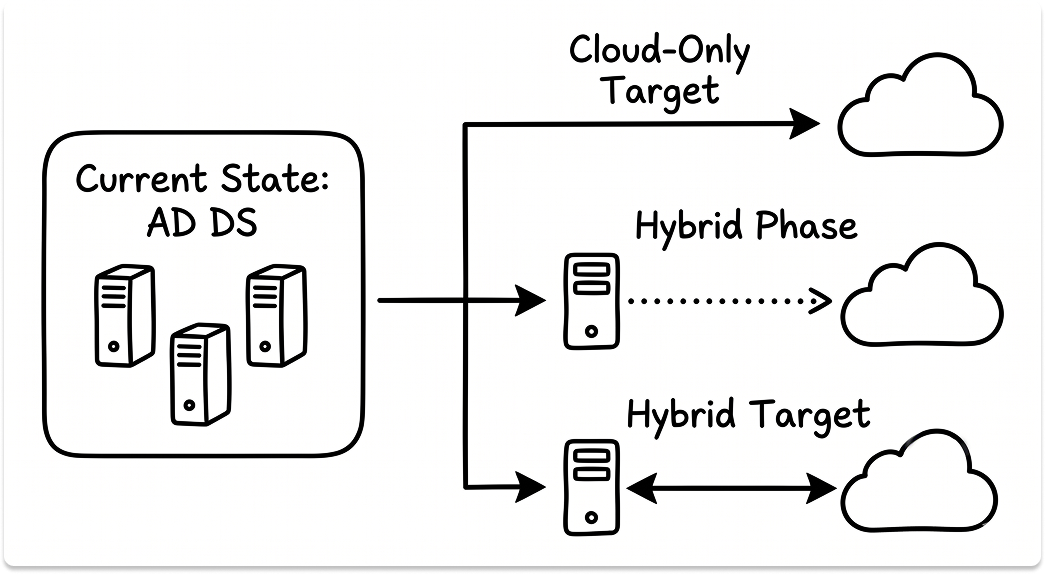
If your environment still runs traditional servers hosting business-critical applications, and those servers aren't moving to PaaS, you are going to maintain a domain. Name that reality early.
Step 2: Run the Dependency Inventory
The dependency inventory is the output that defines your migration scope. It needs to exist before any sync configuration begins. Don't just look for LDAP and Kerberos. The dependencies that cause the most damage mid-migration are the ones nobody documented.
Infrastructure dependencies (most commonly missed):
- SMTP relays authenticating against on-premises servers
- NPS/RADIUS configurations used for Wi-Fi and VPN authentication
- DHCP and DNS services running on domain controllers
- Print servers authenticating via NTLM
- 802.1x network access control using AD computer certificate objects
- ADFS federations to third-party SaaS applications
Identity categories (must be mapped separately):
Look for stale accounts, weak password policies, nested groups, and administrator sprawl. These are not cosmetic problems. They increase risk and complicate the move to Entra ID because the cloud side will faithfully mirror bad structure if you sync it without cleanup.
One practitioner who completed this migration for a 1,200-user organization described the dependency-first sequence that worked: eliminate user-facing file servers, print servers, and LDAP-dependent services before touching a single device. Three years of execution, six months of planning. Two full-time engineers, no MSP.

Step 3: Choose Your Sync Mechanism
Two mechanisms exist. The choice is determined by your environment requirements.
Cloud Sync is a lightweight agent-based approach that removes the requirement for a dedicated synchronization server. However, it cannot be used with Entra Domain Services, does not support Pass-Through Authentication, and has a hard group membership limit of 50,000 members.
Work through the Connect Sync feature requirements first. If your environment needs device writeback, PTA, or groups exceeding 50,000 members, Connect Sync is the answer.
Regardless of which you choose: sync to a pilot group first. Validate attribute mapping, confirm downstream application access, and resolve UPN conflicts before expanding to production identities.
UPN mismatches between on-premises and Entra ID are one of the most common causes of SSO failures post-cutover. They are significantly cheaper to fix before sync is at scale.

Step 4: Resolve the Authentication Protocol Problem
This is where migration scope is most consistently underestimated.
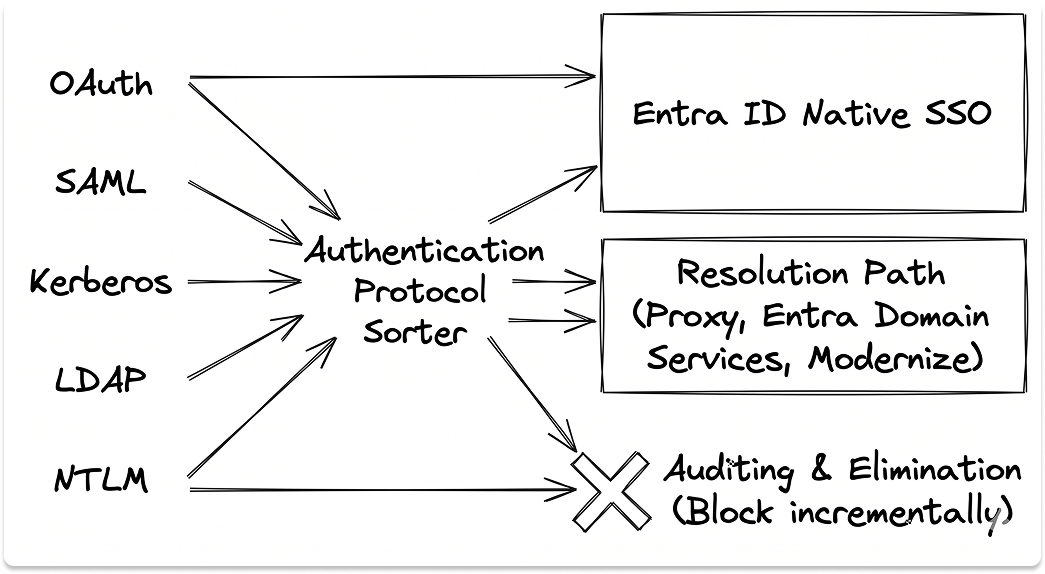
Entra ID is not a domain controller and does not automatically replace Kerberos, LDAP, or GPO. Every application or service authenticating via these protocols needs a specific resolution strategy.
Three approaches exist for resolving legacy application dependencies: migrate to SaaS alternatives using modern authentication; deploy Microsoft Entra Domain Services into an Azure virtual network and join legacy application VMs to that managed domain; or lift and shift legacy apps to Azure VMs domain-joined to Entra Domain Services.
NTLM elimination is its own workstream. Expect 18 to 22 months for complex environments. The process:
- Enable full NTLM auditing across all domain controllers
- Collect audit logs for minimum 30 to 90 days — this surfaces periodic services, scheduled tasks, and monthly processes that a shorter window misses
- Document every dependency surfaced in the audit window
- Resolve each dependency before applying any blocking policy
- Apply blocking policies incrementally, starting with the least critical traffic
Skip the audit period and you'll apply blocking policies against dependencies you don't know exist. That is how a NTLM removal project becomes a Monday morning outage.
Step 5: Execute the Device Strategy
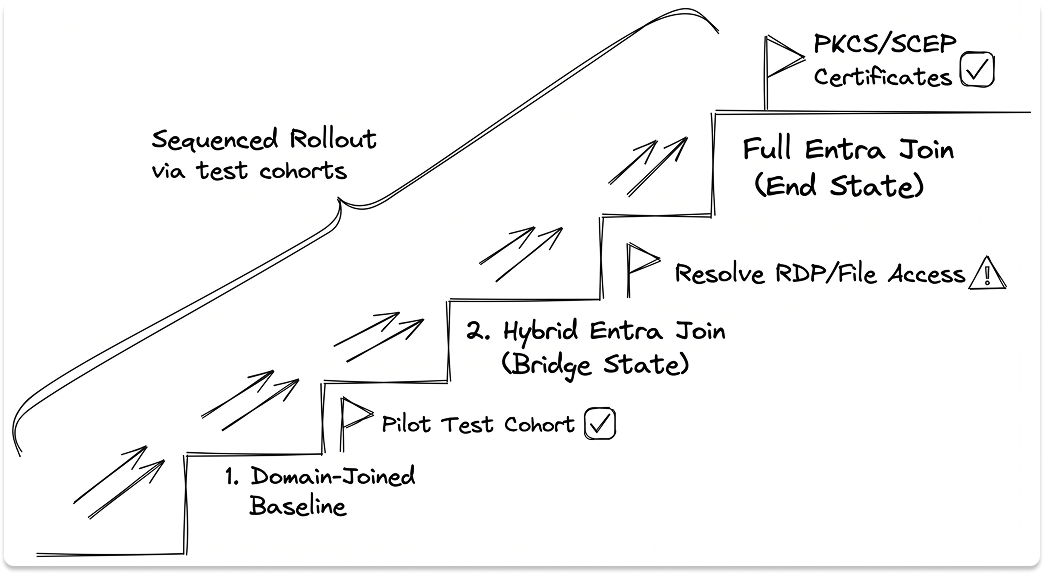
Two device states bridge the migration. Most organizations need to pass through Hybrid Entra Join before advancing to full Entra Join.
Build a test endpoint with full Entra join first. See what breaks. Move a small cohort of IT staff onto the new profile, resolve failures, then expand. Practitioners who have run this successfully all describe the same approach: take it in small bites.
Three failure points that consistently appear on fully Entra-joined devices:
- File share access: On-premises SMB shares prompt for credentials repeatedly or fail entirely. Resolution: deploy Cloud Kerberos Trust.
- RDP from non-Windows clients: Linux, macOS, and Android users connecting via RDP to an Entra-joined device will face NLA authentication failures. Disabling NLA resolves it but reduces security. Plan this before you migrate those machines.
- 802.1x network access control: Entra-joined devices have no AD computer objects. Traditional 802.1x using AD-issued computer certificates needs to be reworked using Intune-delivered SCEP or PKCS certificates. That infrastructure needs to be in place before devices leave the domain.
Step 6: Replace GPO — and Understand What Intune Cannot Do
Group Policy migration is where organizations most consistently underestimate scope.
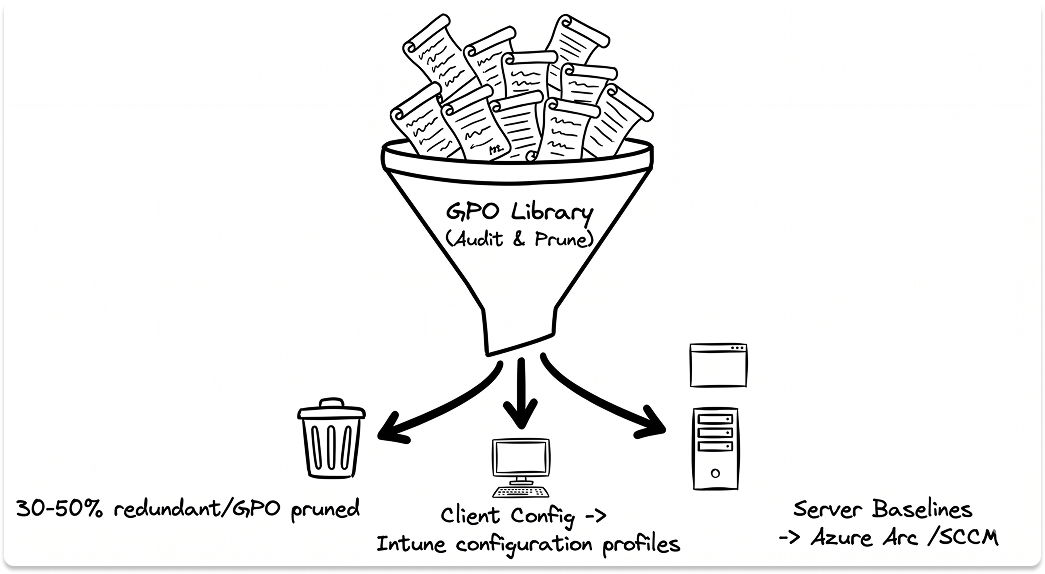
GPO settings map to three destinations:
Organizations running Intune alongside SCCM in co-management mode for server management add operational complexity that needs to be accounted for in the migration plan. If your GPO library currently covers server hardening baselines or server-level software deployment, those policies need alternative tooling before GPO is retired.
Before migrating a single GPO: audit first. In most enterprise environments, 30 to 50 percent of GPOs are redundant, no longer applied to active OUs, or were built for situations that no longer exist. Pruning before migration reduces scope significantly.
For printing: Universal Print, Printix, or PrinterLogic. This is the consistent practitioner answer. One organization that completed this migration for 400 users moved entirely to Printix for cloud-based printing and decommissioned all Windows print servers as part of the migration.
Step 7: The Phased Migration Execution
This is not a cutover event. It is a sequenced program where each phase depends on the previous one completing cleanly.
Phase 1: Identity Cleanup
- Normalize UPNs to match your verified Entra ID domain
- Disable and quarantine stale accounts (inactive for 90+ days)
- Flatten deeply nested groups where possible
- Separate service accounts from human identities
- Document all service account dependencies before proceeding
Phase 2: Pilot Sync
- Deploy Connect Sync or Cloud Sync to a controlled pilot group (start with 20-50 accounts)
- Validate attribute mapping and downstream application access
- Resolve all UPN conflicts before expanding
- Confirm pilot group can access all required resources via synced identity
Phase 3: MFA and Conditional Access Baseline
- Prioritize SSO and MFA for the ten applications most used by the business first. Delivering SSO plus Conditional Access quickly builds momentum and credibility for the longer workstreams.
- Establish baseline Conditional Access policies: require MFA for all users, block legacy authentication protocols
- Validate that no application or workflow depends on basic auth before blocking it
Phase 4: Device Migration
- Roll out Hybrid Entra Join across the fleet via Autopilot or manual re-enrollment
- Validate Cloud Kerberos Trust for file share and print access
- Resolve RDP and 802.1x configurations per device cohort before advancing
- Run a pilot cohort of full Entra Join — test against all on-premises resource dependencies
- Expand full Entra Join only after Cloud Kerberos Trust is confirmed working in your environment
Phase 5: Application Authentication Migration
- Work through LDAP, Kerberos, and ADFS-dependent applications one workload at a time
- For each application: modernize to modern auth, move to Entra Domain Services, or document it as a remaining AD DS dependency with a defined resolution date
- Migrate ADFS-federated applications to direct Entra ID federation and validate SSO before decommissioning ADFS
Phase 6: GPO Audit and Intune Migration
- Audit and prune GPO library before migrating anything
- Migrate active client configuration settings to Intune configuration profiles
- Migrate access policies to Conditional Access
- Confirm Azure Arc or SCCM coverage for all server targets before retiring server-applicable GPOs
Phase 7: NTLM Audit and Elimination
- Enable NTLM audit logging across all domain controllers
- Collect logs for 30 to 90 days
- Document every dependency surfaced
- Resolve all dependencies, then apply blocking policies incrementally
Phase 8: AD DS Footprint Reduction
- Decommission domain controllers that are no longer needed for remaining workloads
- For any remaining AD DS workloads: assign explicit ownership, document the resolution path, and set a review cadence
Realistic timelines from practitioners who have done this:
Both are honest outcomes. The difference is the legacy dependency surface, not effort level.

The Leadership Reality of This Migration
The project plan won't capture what follows. The IT leader has to.
The timeline gap is a leadership problem. The most consistent pattern in organizations that struggle with this migration is not technical. It is the gap between the timeline the business expects and what the dependency surface actually requires.
That gap needs to be closed before the project starts, not after the first delayed milestone.
Before the kickoff meeting, align on these four things:
- Scope acknowledgment: This is a re-architecture of how every endpoint, application, and service authenticates, not a configuration project. Executive sponsors need to understand what they are approving, including the operational risk during the transition period.
- Staffing: You need engineers who understand both AD DS and Entra ID deeply. That profile is not common. Dedicated project capacity, whether internal or through a Microsoft identity partner, is a requirement for a migration of this scope.
- Contingency in the timeline: Build explicit timeline extension conditions into the plan upfront. "The timeline extends if X legacy dependency is unresolved by date Y" is a cleaner governance structure than explaining delays as they happen.
- Definition of done: Define what the end state looks like before the project starts. Open-ended migrations without exit criteria stall. Every remaining AD DS dependency at the end of the initial migration window should carry a resolution path, an owner, and a review date.
Change management for users is consistently underinvested. Device re-enrollment, new login flows, MFA enrollment, and changes to file share access all generate helpdesk volume. One practitioner noted that browser passwords were the top user complaint during device migration, because they don't transfer during re-enrollment. That impact is predictable. Communicate the change before users experience it.
What the End State Actually Looks Like
For most enterprises, the realistic end state is Entra ID as the primary identity control plane for all modern authentication, device management, and conditional access enforcement, with AD DS maintained as a dependency host for workloads not yet modernized.
Classify every remaining AD DS workload at migration close:
Microsoft's own road-to-cloud documentation positions this as a multi-workstream program executed in priority order based on available resources, not a single cutover event. The organizations that execute this migration well treat it exactly that way: a managed program with defined phases, owned dependencies, and explicit exit criteria for each workstream.
Also read: How a compromised Entra ID environment led to the Iranian cyber attack on Stryker
Looking for vendors to help migrate?
You can find pre-vetted vendors from a curated catalog. Match with those who fit your infrastructure, compliance requirements, migration stage, and reach out to them when you're ready.
FAQ
How long does it take to migrate from on-premises Active Directory to Microsoft Entra ID?
Timeline depends almost entirely on legacy dependency complexity. A 400-user organization with a primarily SaaS application stack can complete the migration in 12 to 15 months. A 1,200-user organization with on-premises servers, LDAP-dependent applications, and NTLM-dependent infrastructure should plan for three or more years. The technology is not the bottleneck. Legacy authentication dependencies and application remediation work are.
What is the difference between Microsoft Entra ID and Active Directory?
Active Directory is a directory service built on LDAP, Kerberos, and Group Policy, designed for on-premises, perimeter-based environments. Microsoft Entra ID is a cloud identity platform built on OAuth 2.0, OpenID Connect, and SAML, designed for cloud application access, conditional policy enforcement, and remote device management. Entra ID does not natively support Kerberos, LDAP bind, or Group Policy. Applications and devices that depend on those protocols require a specific resolution strategy before their AD DS dependency can be removed.
Do I need to replace Group Policy when migrating to Microsoft Entra ID?
Yes, but the replacement is not one-to-one. Most client device configuration settings migrate to Intune configuration profiles. Access control policies migrate to Conditional Access. However, Intune does not manage Windows Server, which means any GPO currently applied to server targets requires a separate management plane, either Azure Arc or SCCM. Some GPO settings, particularly legacy software management and GPP drive mappings, have no direct Intune equivalent and require custom remediations or scripting.
What happens to Kerberos and NTLM during a Microsoft Entra ID migration?
Entra ID does not natively support Kerberos or NTLM. Applications and services that depend on either protocol need a resolution path before AD DS can be decommissioned. Options include migrating to a SaaS equivalent with modern authentication, deploying Microsoft Entra Domain Services for LDAP and Kerberos workloads, or retaining AD DS for those specific dependencies. NTLM elimination requires a dedicated audit period of 30 to 90 days across all domain controllers before any blocking policies are applied.
What is the difference between Hybrid Entra Join and full Entra Join?
A Hybrid Entra-joined device remains domain-joined to Active Directory while also being registered in Entra ID. It is managed by both Group Policy and Intune and retains full access to on-premises resources. A fully Entra-joined device has no domain dependency and is managed exclusively by Intune. On-premises resource access from a fully Entra-joined device requires Cloud Kerberos Trust to be configured for file share and print access. Hybrid Entra Join is the recommended bridge state during migration before advancing to full Entra Join.


