Data Center Lease Ending: A Migration Plan for Colocation, Cloud or Hybrid
Data center lease ending? Plan your data center migration workload by workload across colocation, cloud and hybrid, working back from your exit date.

A data center lease end date turns a strategy debate into a scheduling problem. Every system in the room needs a new home by a fixed day, and your options shrink with each week of delay. The answer is a data center migration planned workload by workload.
Decide where each system lands. Start the work with the longest lead times first. Use colocation as the holding position for anything you can't rebuild before the exit date.
I have run a data center exit against a lease date. The cutover weekend was the easy part. The months before it were hard, when one forgotten circuit order could push the schedule past the exit date.
The cost of getting it wrong is real. 57% of survey respondents said their most recent major outage cost more than $100,000. A rushed move is a reliable way to cause one.
A sound data center exit strategy has three parts: a destination for every workload, a plan that works back from the date, and a clean handback of the space.
What to do first when your data center lease is ending
Start with three tasks. Confirm the exact exit date and the lease terms that apply at the end. Build a full inventory of what runs in the room, including dependencies, data volumes, circuits and contracts. Then work backward from the exit date and place the orders that take longest, such as carrier circuits, before anything else.
The same steps apply to a data center consolidation, where you combine two sites into one. Only the destination changes.
The map below shows the whole path from lease date to handback. Read it top to bottom. Each workload takes one of the four middle lanes.
Read the lease: restoration, early exit and holdover terms
Pull the lease and read the end-of-term clauses before you plan anything else. Three clauses decide what leaving costs.
- Holdover. Staying past the end date triggers holdover rent. Commercial leases commonly set it at 150% to 200% of base rent, and landlords often seek damages for a delayed re-let as well.
- Restoration. The lease may require you to remove cabling, racking and fixtures and return the space in a set condition. Restoration language is often vague, so agree the scope with the landlord in writing.
- Extension or early exit. A short extension can cost less than a rushed move. Ask for one before you need it.
Terms vary by contract and by state, and state law fills gaps where a lease is silent. Take these clauses to your counsel. If your current room is itself a colocation contract, check its removal timeline, data destruction terms and holdover fees too.
Inventory what runs there: apps, dependencies, data volumes, circuits, contracts
An inventory for a data center exit covers far more than servers. List every application, its hosts and the systems it talks to.
Record data volumes, because large data sets need their own transfer plan. Add every carrier circuit, cross-connect and maintenance contract.
The cloud providers' assessment tools help, and their core features cost nothing. Azure Migrate is free for server and database assessment, and Google Cloud Migration Center costs nothing extra for existing Google Cloud organizations.
AWS Migration Hub stopped accepting new customers on November 7, 2025, and AWS recommends AWS Transform in its place. Our comparison of AWS, Azure and Google Cloud migration tools covers the differences.
Give discovery time to run. A typical discovery takes a few weeks on average. A short scan misses the month-end jobs and quarterly batch runs that surface later as broken dependencies.
Colocation vs cloud: deciding where each workload goes
Place each workload on its own merits. Retire what nobody uses. Replace commodity apps with SaaS. Keep systems with hard constraints, such as latency to on-site equipment or licensing tied to physical hosts, on your own servers in colocation. Send systems already due for a rebuild to the cloud. Rehost the rest where their demand pattern fits.
Colocation means renting space, power and cooling in a provider's facility while you keep your own servers. Hybrid means some workloads run in colocation and some run in the cloud, joined by private network links.
The worksheet below sorts each workload into a destination. Add a row per system or application group and answer up to six yes-or-no questions. You get a suggested placement for each row, a count by destination, and flags for Microsoft licensing and for rebuilds that may not fit your lease date.
Colocation vs cloud: cost, control and time to move
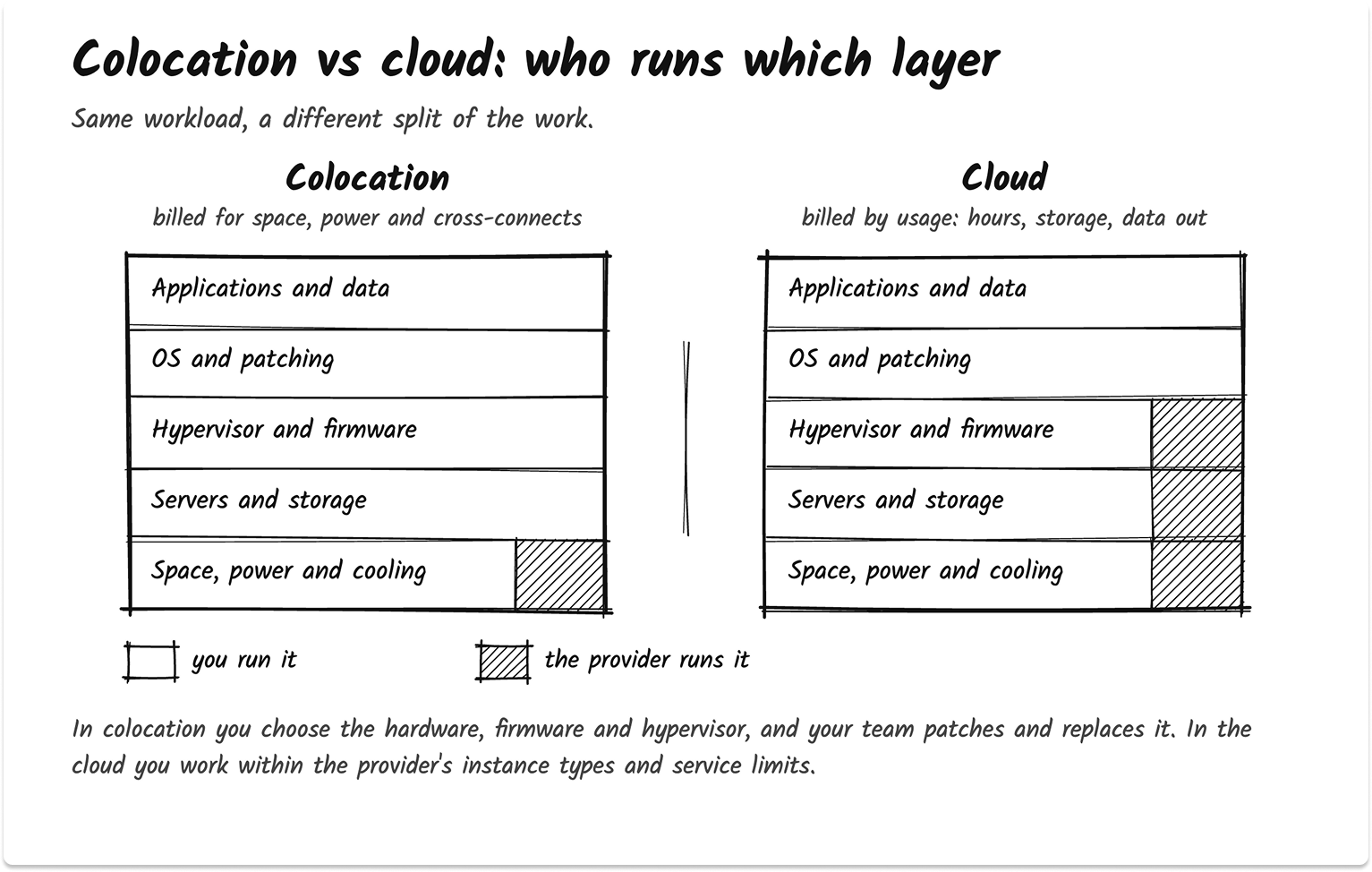
Colocation keeps your hardware and your operating model. You pay for space, power and connectivity on a contract term, and your team still patches, replaces and supports the servers. The time to move depends on the physical move and on the circuits.
The cloud swaps hardware ownership for usage billing. You pay for every running hour, every stored gigabyte and the data you send out. The time to move depends on replication and testing.
Control shifts as well. In colocation you choose the hardware, firmware and hypervisor. In the cloud the provider runs those layers, and you work within its instance types and service limits.
In my experience, colocation is the faster safe landing for a fixed date, and the cloud is the better home for systems you were going to change anyway.
Cloud vs on-premises for the workloads you keep
Some workloads stay on hardware you own, now in a colocation cage instead of your old room. That is the cloud vs on-premises decision in its current form.
Hardware with life left, steady load and host-bound licensing favor your own servers. Bursty demand, short-lived environments and planned rebuilds favor the cloud.
Licensing can make the call for you. Microsoft licenses bought on or after October 1, 2019 without Software Assurance and mobility rights cannot run on dedicated hosted cloud services from Microsoft, Amazon, Google or Alibaba. Servers you own in a colocation facility sit outside that rule.
Windows estates add a second clock. If the room still runs older Windows Server builds, plan around Windows Server 2016 end of support and decide whether those servers get upgraded in place or move to Azure as part of the same project.
The 7 Rs of cloud migration
AWS names seven migration strategies: rehost, replatform, refactor, repurchase, retire, retain and relocate. Microsoft's Cloud Adoption Framework uses eight, with replace for SaaS and rebuild for a full rewrite. Google lists six, from rehost to repurchase.
Watch one term. AWS's relocate means moving VMs to a cloud version of the same platform, such as VMware Cloud on AWS. A physical move into colocation sits outside all three lists, so treat it as its own path.
Data center migration paths: colocation, lift and shift, replatform, SaaS and retire
Every workload takes one of five paths. Colocation moves or refreshes your hardware into a provider's facility. Rehost lifts VMs into the cloud largely unchanged. Replatform or refactor moves an application onto managed services. Repurchase replaces it with SaaS. Retire switches it off and archives the data. A hybrid estate is the sum of those choices.
The table below compares the paths side by side, and each row ends with the guide to read next.
Colocation and data center relocation
Data center relocation means physically moving servers and storage to a new facility. It suits stable workloads, hardware with life left, and systems you can't change before the exit date.
The risks are physical. Shut storage arrays down in the vendor's documented order, and save switch configurations before you power off. Some storage shelves must travel with their drives packed separately.
Check support terms too. HPE requires equipment moved by another provider to be recertified before it reinstates support or warranty. Confirm insurance for the trip.
I treat every relocated server as one that might not power back on. Take a verified backup before it leaves the rack.
Hardware near the end of its life is a poor candidate for a truck ride. Buying new servers for the cage avoids the move. If that choice includes leaving VMware, compare Hyper-V vs VMware vs Nutanix and read our guide to migrating off VMware before you buy.
Lift-and-shift migration to the cloud
Lift and shift, or rehost, moves VMs to AWS, Azure or Google Cloud without changing the application. It is the fastest way to empty a room that holds many VMs.
The replication tools cost little to start. AWS Transform MGN gives each source server 2,160 free replication hours, which is 90 days of continuous use, and Google's Migrate to Virtual Machines carries no charge for migrations into Google Cloud. Both bill the test and cutover instances you launch.
Size each VM before you move it, using the assessment tools' right-sizing recommendations. If your needs go past the big three, look at specialized IaaS providers and the criteria to evaluate IaaS vendors.
Replatform or refactor during the move
Replatforming moves an application onto managed services during the migration, such as moving SQL Server to a managed database. Refactoring changes the architecture to use cloud-native features.
Both take the longest of any path. On a near lease date they fit only the few systems already due for a rebuild. Everything else holds in colocation or rehosts first, then modernizes after the room is empty.
Repurchase: replacing the system with SaaS
Repurchase means replacing an application with a SaaS product. Email, file shares, ITSM and HR systems are the usual candidates.
The work moves from servers to data migration, integrations and user change. A plan to switch IT vendors without downtime covers the handover.
Retire unused systems and archive the data
Retire means switching a system off and archiving its data. Every exit I have worked on turned up systems with no known owner.
Confirm the system has no live dependencies and check records retention rules. Archive what you must keep, then shut it down.
Building a hybrid cloud strategy from the placements
The result is usually hybrid: some systems in colocation, some in the cloud, some in SaaS.
A hybrid cloud strategy built this way needs private links between the cage and the cloud, through AWS Direct Connect, Azure ExpressRoute or Google Cloud Interconnect. It also needs one monitoring view and one operating model.
A data center migration plan that works back from the lease date
Plan six phases: assess and decide, order circuits and sign contracts, run pilot moves, move in waves, cut over, then decommission. Fix the lease end date first and fit every phase before it. Start the items you don't control, such as carrier circuits and colocation contracts, at the very beginning.
The timeline below works back from your lease end date. It is not to scale. Each phase lists the outputs you need before the next one starts, and phase two flags the step that slips most often.
Order circuits and cross-connects first
Network links carry lead times you don't control. AWS can take up to 72 business hours just to review a Direct Connect port request, and net-new dedicated connections can take several weeks to a few months to install. That is before the carrier builds the last mile.
A cross-connect is a physical cable inside a colocation facility. It connects your equipment to a carrier or a cloud provider. The provider installs it after you send an authorization letter.
An LOA-CFA is that letter: a Letter of Authorization and Connecting Facility Assignment. The cloud provider issues it. You give it to the colocation provider.
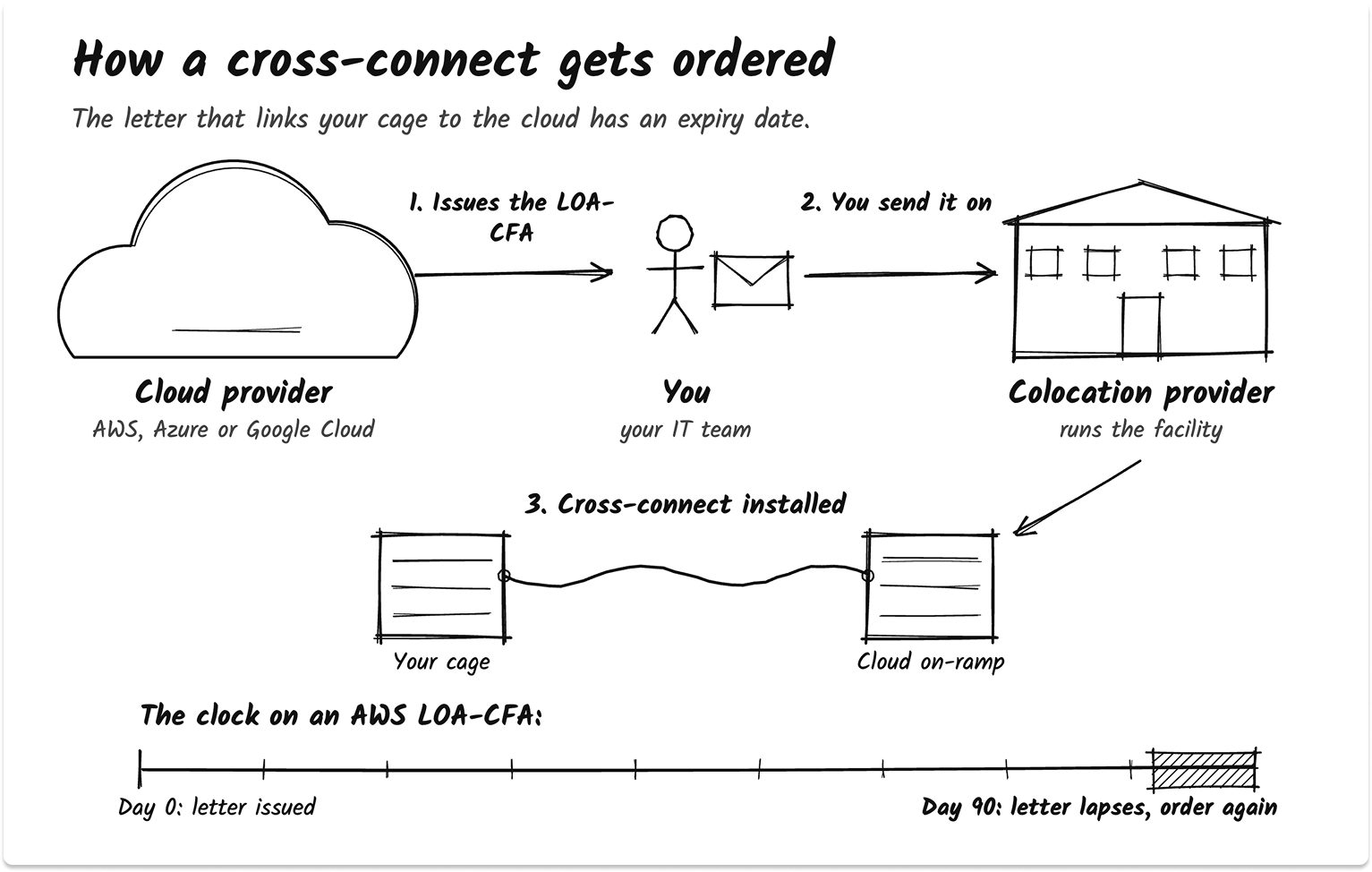
The letter expires. An AWS LOA-CFA lapses if the cross-connect isn't completed within 90 days. Log every one with its date.
Plan migration waves by dependency
A sound wave order is simple. Move lower-risk systems first, and non-production before production. Keep dependent systems in the same wave, and group them when unsure.
Plan only the next wave in detail. Review the schedule at 25%, 50% and 75% complete.
IP addresses cause the surprises. A new address breaks more than DNS covers: partner VPN tunnels, customer allowlists and applications with hardcoded IPs all need changes before cutover. Move hardcoded connections to DNS names early.
Procedure matters most on cutover night. Failures to follow established procedures remain the leading driver of human-error outages. Write the runbook, rehearse it, and name one person who decides whether to fix forward or roll back.
Data center migration checklist: the items that slip
The checklist below covers the items I have seen slip on every exit, from LOA-CFA expiry to the final asset audit. Tick each one as you close it, and the bar shows what's left. The last group doubles as your data center decommissioning checklist.
Protecting backup and DR during a data center migration
Keep a known-good backup outside both the old site and the new one until each wave is verified. Take a final backup of every system before its cutover so you can roll back. Confirm backup jobs follow each system to its new location, and test restores instead of trusting a green dashboard.
Backup coverage breaks quietly during a move. Jobs point at old hosts, and change-tracking chains reset when VMs change platforms. Our guide to your backup strategy during a migration walks through those gaps.
Three practices hold up under pressure:
- Keep offline, encrypted copies of critical data, and test that they restore.
- Take a final backup of the source system before cutover. It is your rollback copy.
- Write rollback triggers, checkpoints and a decision owner into every cutover plan.
Disaster recovery needs the same care. If the old room hosted your DR site or DR target, that protection ends when the room closes.
Stand up the replacement before the last wave. DRaaS options can cover the gap while you decide on a permanent design.
Colocation pricing and cloud migration cost: what you pay for
Colocation is quoted on space, power, cross-connects, remote hands and contract term. Cloud is billed on usage after the move: compute hours, storage and data transfer out. The migration adds its own costs, including partner fees, parallel running and the test instances the replication tools launch. Compare every option on the same basis.
The cards below show what a colocation quote bills for and how cloud billing differs. Your own quotes supply the numbers.
Power is the line to read twice. Providers bill reserved power regardless of use, or metered power by consumption.
Usable power also sits below the circuit rating: on 120/208V circuits in the Americas, Equinix caps draw at 80% of the circuit size. Size cabinets on measured draw, then add headroom.
Cross-connects carry a one-time install fee and usually a monthly charge. Remote hands bill by the hour in set increments. The annual escalators, renewal notice periods and holdover fees in the colocation agreement matter as much as the first-year price.
Cloud cost needs ownership from the first wave. Commitment discounts lower compute cost once usage settles. Track spend with FinOps tools so a rehosted estate doesn't drift.
Data center decommissioning: handing back the space
Data center decommissioning means sanitizing every storage device, disposing of hardware with a record for each asset, cancelling circuits and cross-connects, restoring the space to the lease terms and closing with a final audit. Sanitize media to NIST SP 800-88 Rev. 2 and keep a certificate of sanitization for every device.
NIST SP 800-88 Rev. 2 became the current standard on September 26, 2025, and NIST withdrew Rev. 1 the same day. Update any contract or policy that still cites Rev. 1.
Sanitization means making the data on a storage device impossible to recover. NIST defines three levels:
- Clear uses logical techniques. It protects against simple recovery.
- Purge uses physical or logical techniques. It makes recovery infeasible and can leave the media reusable.
- Destroy makes recovery infeasible even with state-of-the-art lab techniques. The media can't be used again.

Rev. 2 also separates verification, which confirms the technique ran, from validation, which confirms the data is gone.
Each certificate records the device's manufacturer, model and serial number, the method and tool used, and who verified it. A certified ITAD and data destruction service can run this on-site and hand you the certificates.
Then close the facility side. Cancel circuits early, because Equinix, for one, bills cross-connects through the actual removal date, at least 30 days after the request.
Walk the space with the landlord against the restoration clause. Finish with an audit that accounts for every serial number.
Choosing partners for a data center exit
A data center exit usually needs up to three partner types. A colocation provider supplies space, power and connectivity. A cloud migration partner runs the rehost and replatform work. An MSP or relocation specialist handles the physical move and day-two operations. Define each scope before you sign, and write service levels for the migration window.
Shortlist partners by the paths your worksheet produced. A cloud-heavy result points to cloud migration services; a colocation-heavy result points to a provider in the right metro plus a relocation partner.
Put cutover windows, rollback responsibility and response times into each contract. Our SLA management guide covers how to write and track them. Before you hand ongoing operations to a provider, read our guide to hiring a managed service provider.
Ask every partner who owns the decision to roll back, and how fast they can make it. The answer tells you more than a capabilities deck.
Find a data center exit partner. Tell us your lease end date and what you run. We'll introduce vetted colocation providers, cloud migration partners and MSPs, and no vendor contacts you until you're ready. Get matched.
Find a data center exit partner
Tell us your lease end date and what you run, and we'll match you with vetted colocation providers, cloud migration partners and MSPs.
FAQ
What should you do when your data center lease is ending?
Confirm the exit date and read the lease's holdover and restoration clauses. Build a full inventory of applications, dependencies, data volumes, circuits and contracts. Then decide a destination for each workload, order carrier circuits and cross-connects early, and plan migration waves that finish before the lease end date. Leave time to sanitize media and restore the space before handback.
Is colocation cheaper than the cloud?
It depends on the workload. Colocation bills for reserved space, power, cross-connects and remote hands on a contract term, so steady workloads on hardware you already own often fit it well. Cloud bills by usage, which suits variable demand. Compare your own quotes, normalized to cost per kW and the same term, against right-sized cloud estimates.
How long does a data center migration take?
No reliable benchmark exists, because duration depends on the number of systems, their dependencies and the circuits involved. Discovery alone takes a few weeks on average, and net-new dedicated cloud connections can take several weeks to a few months to install. Work back from your lease end date and start long-lead items first.
What is the difference between colocation and cloud?
Colocation means renting space, power and cooling in a provider's facility while you keep and run your own servers. Cloud means renting compute, storage and services that the provider owns and operates, billed by usage. Colocation keeps your hardware and control. Cloud removes hardware ownership and adds elastic capacity.
Should you move everything to the cloud when you exit a data center?
Moving everything rarely fits a lease date. Place each workload on its own merits. Retire unused systems, replace commodity apps with SaaS, and keep systems with hard constraints on your own servers in colocation. Move systems already due for a rebuild to the cloud. Colocation also works as a holding position for anything you can't rebuild before the exit date.
What are the 7 Rs of cloud migration?
AWS defines seven migration strategies: rehost (lift and shift), replatform, refactor, repurchase, retire, retain and relocate. Microsoft's Cloud Adoption Framework uses eight similar terms, and Google lists six. In AWS's model, relocate means moving VMs to a cloud version of the same platform. A physical move into colocation is a separate path.
What does data center decommissioning involve?
Decommissioning covers sanitizing every storage device to NIST SP 800-88 Rev. 2 with a certificate per device, disposing of hardware through a certified ITAD provider, cancelling circuits and cross-connects, restoring the space to the lease terms and closing with an audit that accounts for every asset serial number.
Can you mix colocation and cloud?
Yes. A hybrid result is common after a data center exit. Some systems run on your own servers in colocation and others run in the cloud or in SaaS. Join them with private links such as AWS Direct Connect, Azure ExpressRoute or Google Cloud Interconnect, and run both under one monitoring view and one operating model.