Hyper-V vs VMware vs Nutanix: Which Virtualization Infrastructure Best Suits IT Leaders
Azure Stack (Hyper-V) vs. VMware vs. Nutanix as your virtualization platform. Choose VMware for power, Nutanix for simple ops, or Azure Stack for cost. Select the ecosystem that fits your cloud strategy.
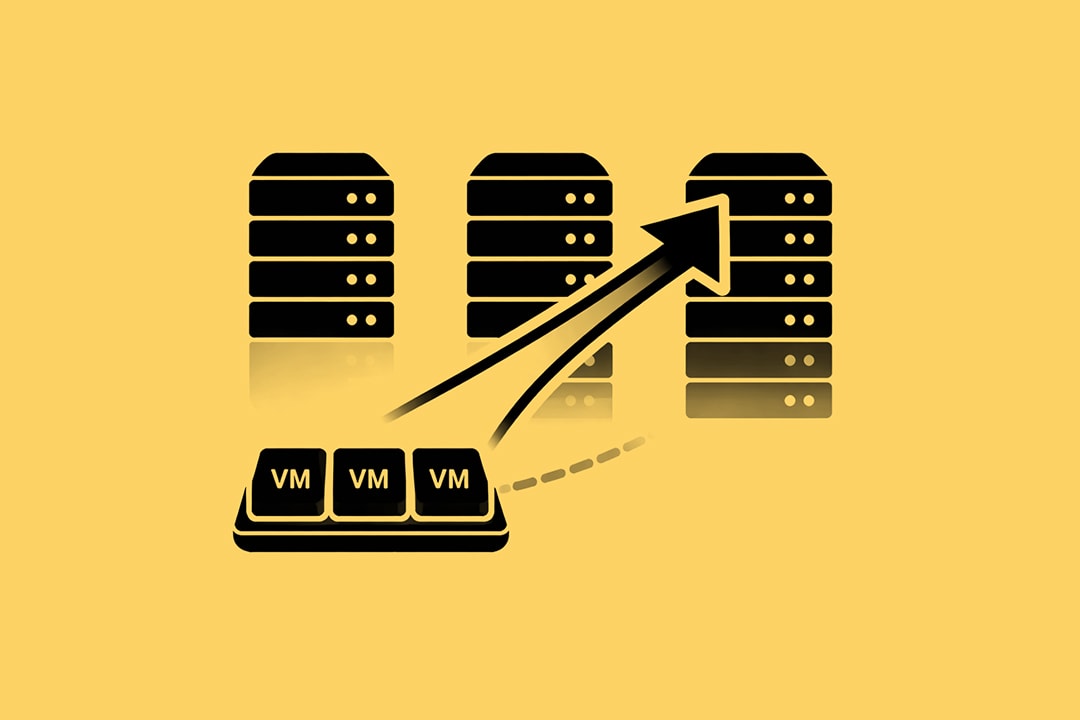
The virtualization market has historically been predictable. For fifteen years, the decision tree for IT leaders was simple. If you had the budget, you bought VMware. If you were a pure Microsoft shop with a limited budget, you used Hyper-V. If you wanted hyper-converged simplicity, you looked at Nutanix.
That predictability is gone.
The Broadcom acquisition of VMware fundamentally altered the economics of the data center. We are no longer discussing technical parity or feature sets. We are discussing the viability of licensing models, the risk of vendor lock-in, and the future of the private cloud.
IT leaders are currently facing renewal quotes that are 300% to 500% higher than previous cycles. This has forced a market-wide re-evaluation of infrastructure. The question is no longer "Which hypervisor is best?" The question is "Which infrastructure stack survives the next five years of cost scrutiny?"
This guide analyzes the three primary contenders: VMware by Broadcom, Nutanix AHV, and Microsoft Azure Stack HCI. We look at the operational realities, the licensing traps, and the strategic fit for the modern enterprise.
Virtualization as a Part of the Ecosystem
Before analyzing the tools, we must understand the shift in the market. The era of the "commodity hypervisor" is over. Virtualization is now sold as a platform, not a utility.
In the past, you could purchase a hypervisor to run virtual machines (VMs). Today, vendors view virtualization as the entry point to a captured ecosystem. VMware wants to sell you the full Cloud Foundation. Microsoft wants to tether your on-premise servers to Azure. Nutanix wants to own your storage and management plane.
This shift means that moving from one platform to another is not just a technical migration. It is a change in operational philosophy.
The New Economic Reality
The primary driver for this conversation is the elimination of perpetual licensing. The industry has moved almost exclusively to subscription-based models. This shifts infrastructure from a capital expenditure (CapEx) to an operational expenditure (OpEx).
For many organizations, this breaks long-standing budget cycles. Assets that were supposed to depreciate over five years now carry a recurring annual tax that increases with core counts.
We see three distinct paths emerging for IT leaders:
- Accept the Premium: Stay with the incumbent, pay the increased cost, and focus on maximizing the value of the full stack.
- Refactor for Cloud: bypass the on-premise virtualization layer entirely and move workloads to public cloud or containers.
- Repatriate and Diversify: Move to one of the VMware alternatives that offers a middle ground between cost and capability.
VMware by Broadcom
VMware remains the technical standard for enterprise virtualization. Despite the market turbulence, vSphere is the most mature, widely supported, and feature-rich hypervisor available.
However, the business case for VMware has changed. Broadcom has made it clear that their strategy focuses on the top tier of enterprise customers. They have streamlined their portfolio into two primary bundles: VMware Cloud Foundation (VCF) and VMware vSphere Foundation (VVF).
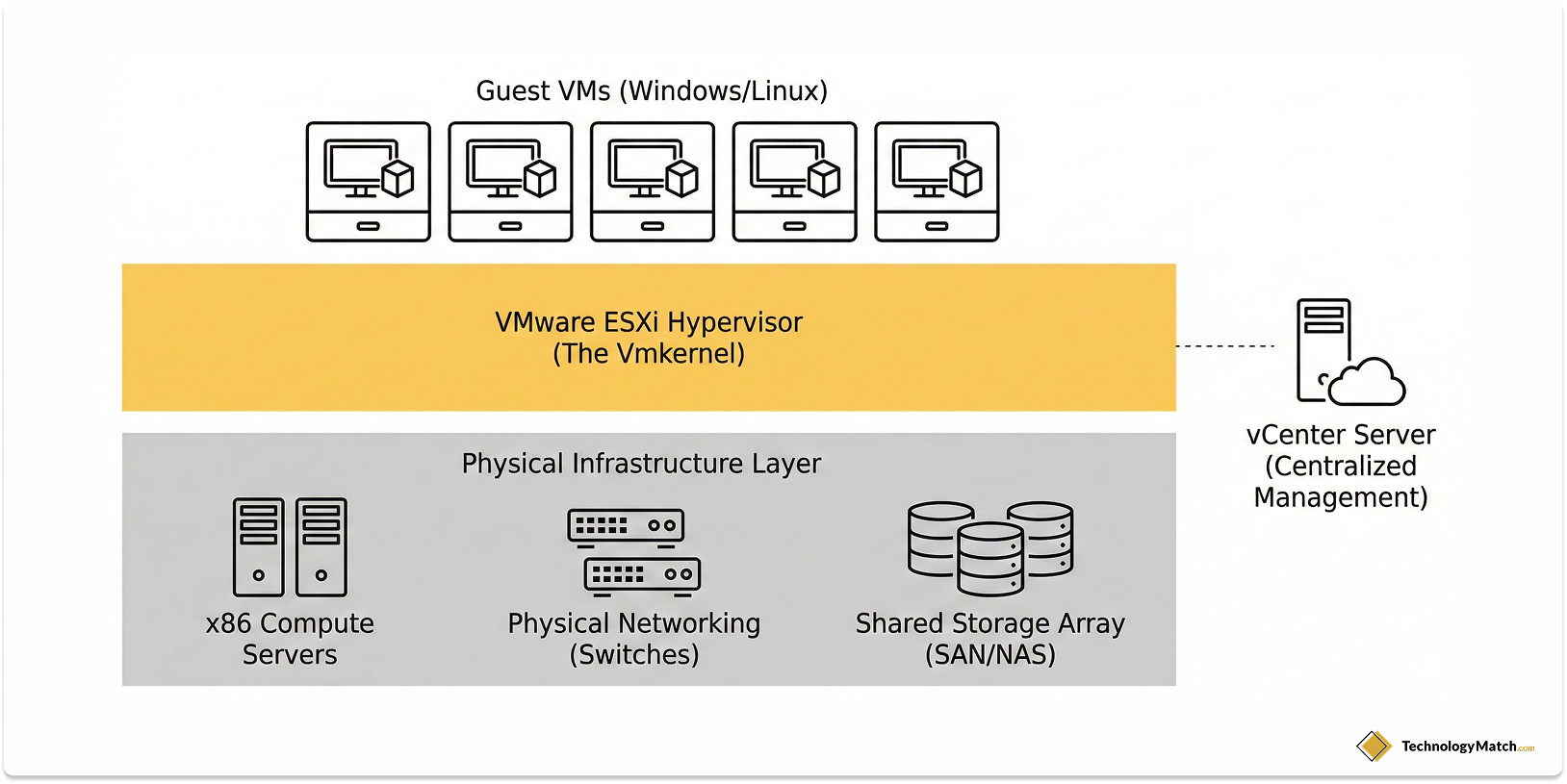
A Complete Private Cloud Implementation
The "a la carte" menu is gone. You cannot simply buy vSphere Enterprise Plus anymore. You must purchase a bundle.
VMware Cloud Foundation (VCF) is the flagship. It includes vSphere, vSAN (storage), NSX (networking), and the Aria management suite. It is designed to be a complete private cloud implementation. If you utilize the full stack, the technical value is immense. You get intrinsic security, software-defined storage, and comprehensive management in a single validated design.
VMware vSphere Foundation (VVF) is the smaller bundle. It targets mid-sized deployments. It includes vSphere, Tanzu (containers), and limited Aria capabilities.
The Strategic Risk: Cost and Complexity
The risk with the new VMware model is over-provisioning. Many organizations only need a hypervisor. They do not need software-defined networking (NSX) or advanced cloud management tools.
Under the new model, you pay for these features whether you deploy them or not. This creates "shelfware"—software you own but do not use.
Furthermore, the hardware compatibility list (HCL) for the full stack is rigorous. Running VCF often requires specific hardware configurations to support vSAN and NSX. This can trigger a hardware refresh cycle earlier than anticipated.
Best Fit Scenarios
VMware is the correct choice if:
- Scale is Massive: You operate thousands of VMs and require the advanced load balancing (DRS) and high availability features that VMware perfected.
- Skill Sets are Entrenched: Your team has fifteen years of muscle memory with vCenter. Retraining them on a new stack represents a hidden cost higher than the licensing hike.
- Ecosystem Reliance: Your backup, monitoring, and security tools are deeply integrated with vSphere APIs.
Nutanix AHV
Nutanix built its reputation on Hyper-Converged Infrastructure (HCI). Their core philosophy is simplicity. They collapse the traditional "three-tier" architecture (compute, storage, and networking) into a single layer.
Historically, Nutanix ran on top of VMware vSphere. However, as VMware licensing costs have risen, Nutanix has aggressively pushed its own hypervisor: AHV.
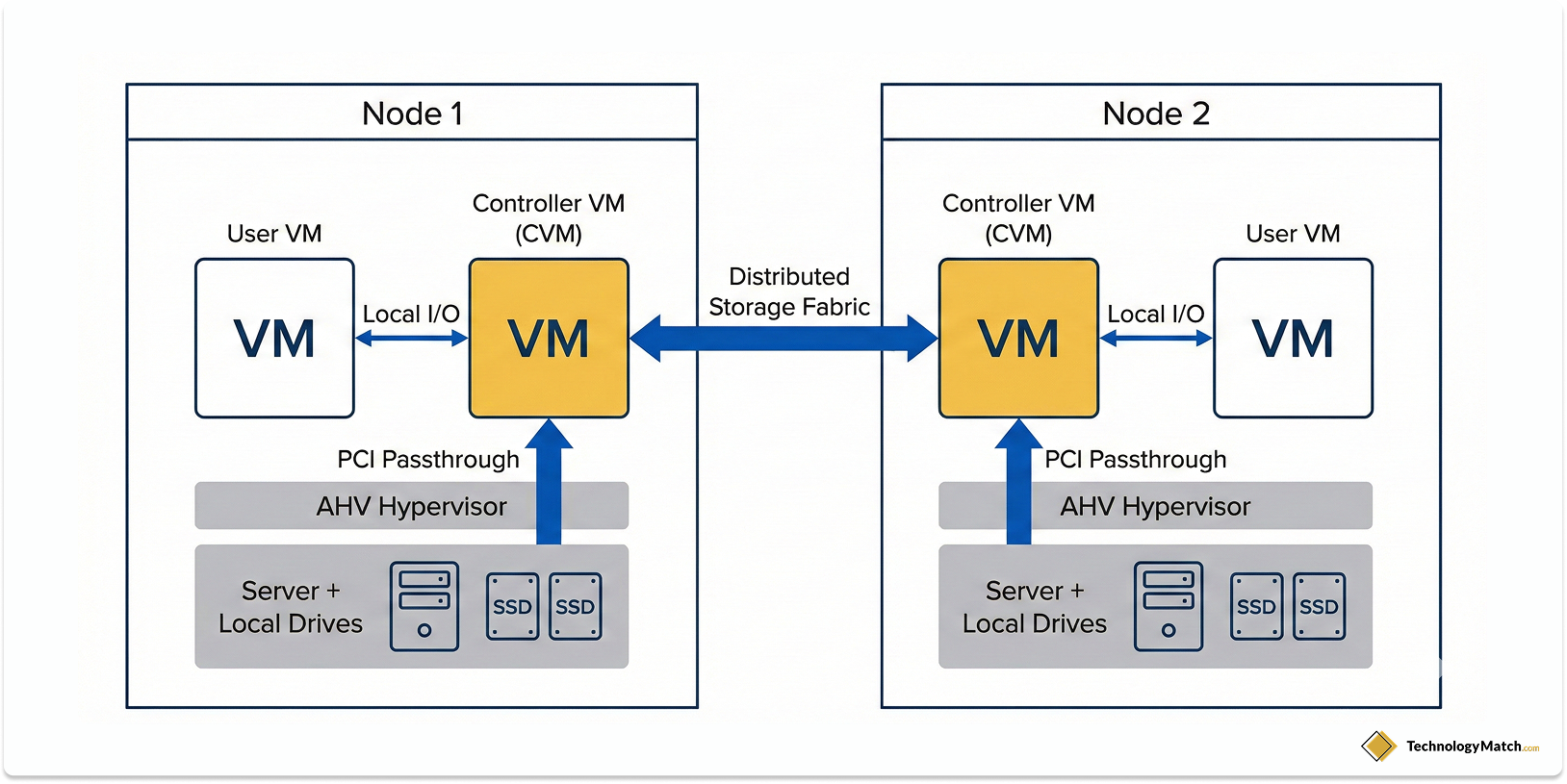
The Architecture of AHV
AHV is based on KVM (Kernel-based Virtual Machine), an open-source Linux hypervisor. Nutanix has wrapped KVM in an enterprise-grade management layer called Prism.
The primary selling point of AHV is that it is included in the cost of the Nutanix software. There is no separate line item for virtualization.
From an operational standpoint, AHV is "invisible." You do not manage the hypervisor separately from the storage or the hardware. Upgrades are automated and non-disruptive. The "one-click" upgrade process is not marketing hyperbole; it is a technical reality that saves countless hours of weekend maintenance windows.
How Does AHV Cover Virtualization Needs
Nutanix markets itself as the antidote to lock-in, but it creates a different type of lock-in.
If you move to Nutanix AHV, you are marrying the Nutanix platform. You generally must run it on certified nodes (though they support various hardware vendors like HP, Dell, and Lenovo).
Converting VMs from VMware to AHV is relatively simple using their "Move" tool. However, moving off Nutanix in the future is difficult. The storage format and management plane are proprietary.
Additionally, while AHV covers 95% of standard virtualization needs, it lacks some of the niche ecosystem integrations that VMware possesses. Certain legacy third-party backup tools or obscure security appliances may not fully support AHV.
Best Fit Scenarios
Nutanix is the correct choice if:
- Simplicity is Priority: You have a lean IT team that manages both server and storage. You want to reduce the administrative burden.
- VDI Deployments: Nutanix dominates the Virtual Desktop Infrastructure market due to its handling of storage I/O storms.
- Hybrid Cloud Ambitions: Nutanix Clusters (NC2) allow you to run the exact same Nutanix stack on AWS or Azure, providing true portability.
Microsoft Azure Stack HCI
We must clarify a critical distinction. There is "Hyper-V," the role you enable in Windows Server. Then there is "Azure Stack HCI," Microsoft's dedicated operating system for hyper-converged infrastructure.
Microsoft is steering customers toward Azure Stack HCI. This is not just a hypervisor; it is an Azure service that runs on your hardware.
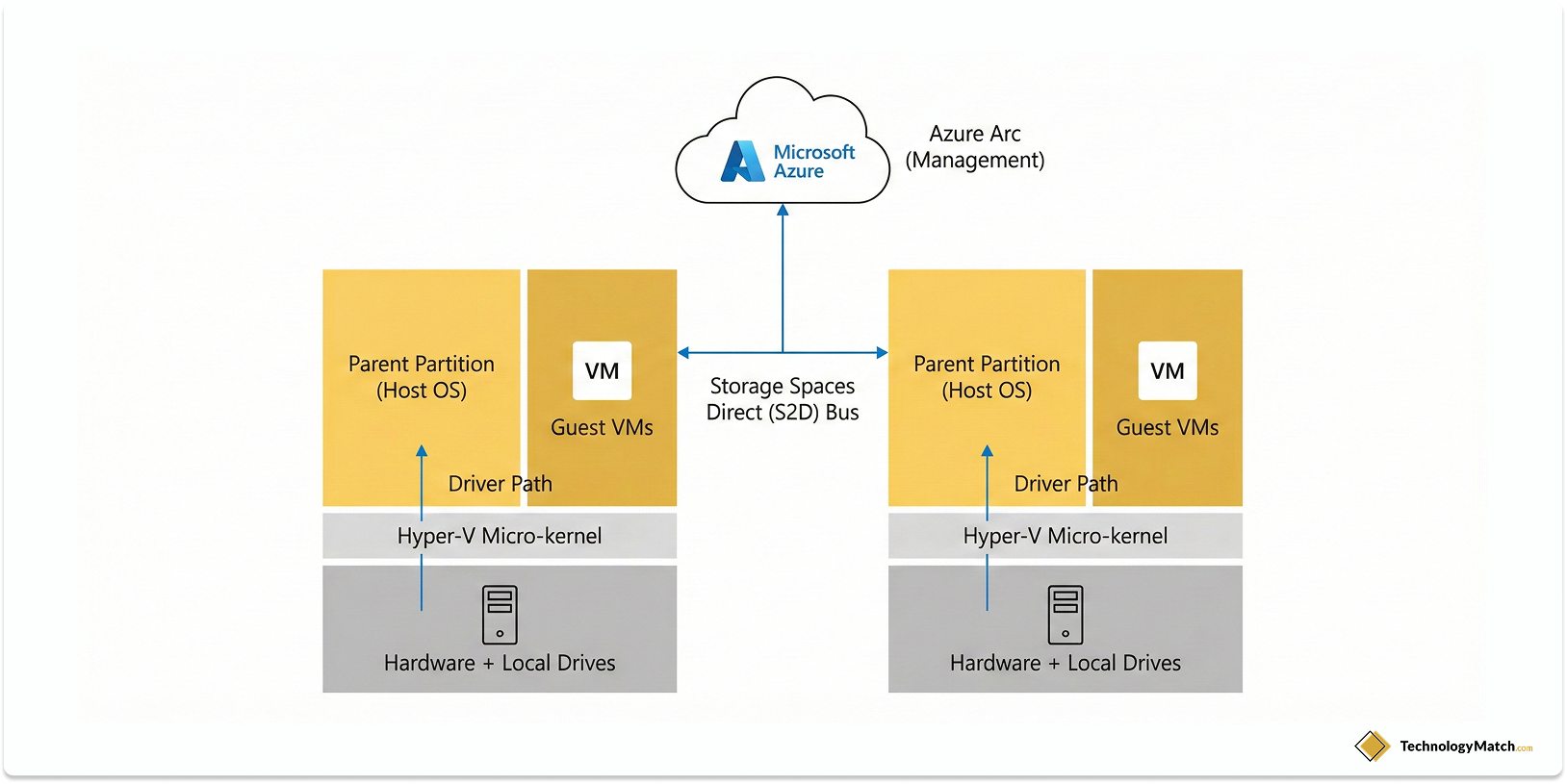
The Integration with Azure Arc
The value proposition of Azure Stack HCI is hybrid integration. Through Azure Arc, your on-premise clusters appear in the Azure portal just like any other cloud resource.
This allows for unified management. You can apply the same policies, security tags, and monitoring tools to your on-premise servers as you do to your cloud instances.
For organizations heavily invested in the Microsoft ecosystem, the licensing benefits are substantial. If you have Windows Server Datacenter Software Assurance, you can often run unlimited Windows guests on Azure Stack HCI at a minimal additional cost.
Operational Maturity with Microsoft and Hyper-V
Microsoft's weakness has historically been the management plane. While the core Hyper-V hypervisor is robust, the management tools have been fragmented.
System Center Virtual Machine Manager (SCVMM) is powerful but complex and aging. Windows Admin Center (WAC) is the modern web-based interface, but it can suffer from performance consistency and lacks the "snappiness" of VMware's vCenter.
Furthermore, Azure Stack HCI is billed as a subscription service through your Azure account. If your internet connection breaks for 30 days, and the cluster cannot sync with Azure for billing, the infrastructure enters a degraded state. This creates a dependency on connectivity that some air-gapped or high-security environments cannot tolerate.
Best Fit Scenarios
Azure Stack HCI is the correct choice if:
- You are a Microsoft Shop: You already own Windows Server Datacenter licenses and use Azure for other services.
- Cost is the Primary Driver: The TCO (Total Cost of Ownership) for Microsoft environments is generally lower than VMware or Nutanix, specifically regarding guest licensing.
- Branch Offices: You need to deploy small 2-node clusters in retail or remote locations and manage them centrally from the cloud.
Comparative Analysis Between These Virtualization Tools
When evaluating these three platforms, we must look beyond the brochure. We need to compare them based on the friction points that IT teams encounter daily.
1. Management Overhead
- VMware: High complexity, but high control. Requires deep expertise. The interface is the industry standard.
- Nutanix: Low complexity. The "consumer-grade" interface (Prism) allows generalist sysadmins to manage complex storage and compute.
- Microsoft: Medium-High complexity. Requires knowledge of Failover Clustering, PowerShell, and Azure Arc. Troubleshooting often requires deep diving into Windows event logs.
2. Licensing and Cost Structure
- VMware: High upfront cost. The new subscription bundles force you to buy the full stack.
- Nutanix: Moderate-High cost. You pay for the software (based on cores/capacity) and the hardware.
- Microsoft: Low-Moderate cost. The OS subscription is inexpensive ($10/core/month roughly), but the real savings come from reusing existing Windows Server licenses.
3. Disaster Recovery and Resilience
- VMware: Site Recovery Manager (SRM) is the gold standard for automated DR, but it is expensive and complex to configure.
- Nutanix: Built-in "Metro Availability" and easy DR orchestration are core strengths. It is easier to set up a synchronous replication cluster in Nutanix than in the other two.
- Microsoft: Stretched Clustering works well, but Azure Site Recovery (ASR) is the preferred method, pushing you to use the cloud as your DR site.
How to Choose Between VMware, Hyper-V, and Nutanix
Do not make this decision based on features. All three hypervisors can run a virtual machine, handle live migration, and manage high availability.
Make the decision based on your organizational constraints and future strategy. Use the following framework to guide your internal discussions.
The "Talent Density" Test
Look at your team.
- If you have dedicated storage engineers and network engineers, VMware fits that siloed expertise.
- If you have "IT Generalists" who handle everything from helpdesk to servers, Nutanix is the force multiplier that allows them to manage infrastructure without burnout.
- If your team lives in PowerShell and manages Azure Active Directory, Azure Stack HCI will feel like home.
The "Cloud Exit" Strategy
Consider your relationship with the public cloud.
- If you are repatriating workloads from the cloud back to on-premise to save money, Nutanix offers the softest landing.
- If you are aggressively moving to the cloud and only keeping a small footprint on-premise, Microsoft facilitates that bridge.
- If you are building a private cloud because regulatory requirements forbid public cloud usage, VMware VCF provides the most compliant, hardened stack.
The "Hidden Cost" Analysis
When modeling the TCO, you must include the secondary costs:
- Backup Software: Does your current backup vendor charge differently for AHV vs. VMware? (Some charge per socket, others per VM).
- Training: How much will it cost to send three engineers to a boot camp for the new platform?
- Consulting: Will you need to hire a partner to perform the migration? Migration services often cost 50% of the first year's licensing.
The Migration Reality
Vendors will tell you that migration is seamless. They have tools that suck a VM from one platform and deposit it on theirs.
While the data moves easily, the ecosystem breaks.
When you change hypervisors, you break your backup chains. You break your disaster recovery scripts. You break your monitoring alerts. You often need to reinstall "VMware Tools" with "Nutanix Guest Tools" or Hyper-V integration services. This requires downtime.
We advise organizations to treat a hypervisor switch as a "re-platforming" project, not a "migration." It requires a maintenance window, a rollback plan, and extensive testing.
The Container Variable
We cannot ignore the elephant in the room: Kubernetes.
If your organization is refactoring applications into containers, the underlying hypervisor matters less. All three vendors have strong Kubernetes integrations (Tanzu for VMware, NKP for Nutanix, AKS for Azure Stack).
If your roadmap is 80% containers in three years, do not over-invest in a premium hypervisor license today. Choose the platform that runs Kubernetes most efficiently for your budget.
Closing Thoughts
The era of default choices is over. The "safe bet" of buying VMware is now a high-stakes financial decision.
VMware remains the premium choice for complex, large-scale private clouds where performance and feature depth justify the cost.
Nutanix is the logical successor for the mid-to-large enterprise that values operational simplicity and wants to reduce the "infrastructure tax" on their IT teams.
Microsoft Azure Stack HCI is the pragmatic choice for Windows-centric organizations that view on-premise infrastructure as a mere extension of their Azure tenant.
As an IT leader, your responsibility is to align the infrastructure choice with the business goal. If the goal is cost reduction, look at Microsoft. If the goal is operational speed, look at Nutanix. If the goal is maintaining a massive, complex legacy estate with minimal friction, pay the VMware premium.
The technology works on all three. The difference lies in the contracts, the specialized skills required, and the strategic direction of your cloud journey. Choose the path that gives you the most leverage, not just the best features.
Looking for virtualization vendors?
Before you commit to a vendor, it's worth seeing your options and exploring if there are others who might be a better fit. Tell us what you're working with. We'll match you with the the ones worth your time.
FAQ
Is Nutanix AHV actually cheaper than VMware vSphere after the Broadcom acquisition?
For most mid-sized enterprises, yes. While Nutanix software and hardware bundles are not "cheap," the Total Cost of Ownership (TCO) is often lower because the AHV hypervisor is included at no additional cost. VMware’s new subscription model requires purchasing full-stack bundles (VCF or VVF) which can increase licensing costs by 2x to 5x for smaller deployments. However, for massive private clouds that already use VMware’s full storage and networking stack, the price difference narrows.
How difficult is it to migrate from VMware to Microsoft Azure Stack HCI?
The technical migration of data is straightforward, but the operational shift is difficult. Tools like Azure Migrate can move Virtual Machines (VMs) effectively. The challenge lies in "re-platforming" your ecosystem. You must rebuild your backup strategies, disaster recovery workflows, and monitoring alerts to work with Azure Arc and Windows Admin Center instead of vCenter. Teams without strong PowerShell or Azure skills will face a steep learning curve.
Can I still buy perpetual licenses for VMware vSphere in 2026?
No. Broadcom has officially ended the sale of perpetual licenses and Support and Subscription (SnS) renewals. All VMware products are now sold as subscriptions. You must transition to a term-based subscription model (usually 1, 3, or 5 years) for either VMware Cloud Foundation (VCF) or VMware vSphere Foundation (VVF). If you stay on old perpetual keys, you will lose access to security patches and support.
Does Nutanix AHV support all the same features as VMware vSphere Enterprise Plus?
Nutanix AHV covers approximately 95% of the core virtualization features that enterprises use daily, such as high availability (HA), live migration, and dynamic resource scheduling. However, it may lack parity in niche areas like specific fault tolerance modes or broad support for legacy, non-standard operating systems. It is critical to check the Nutanix Hardware Compatibility List (HCL) for your specific third-party backup and security tools before switching.
What is the main risk of switching from VMware to Azure Stack HCI or Nutanix?
The primary risk is trading one form of lock-in for another. Moving to Nutanix locks you into their specific storage architecture and management plane (Prism). Moving to Azure Stack HCI tethers your on-premise infrastructure to your Azure subscription and billing. While you escape Broadcom’s pricing, you lose the "universality" of VMware, which is supported by virtually every software vendor and cloud provider in the market.