What is Snowflake, How it Works, and What it Does for IT Leaders
Snowflake explained for IT leaders: its three-layer architecture, virtual warehouse credit model, governance, and where it fits your data stack.
What Is Snowflake?
Snowflake is a cloud data platform delivered as a fully managed service. You do not install it, patch it, or provision servers for it. You connect it to AWS, Azure, or Google Cloud, load your data, and run SQL against it.
It began life as a cloud data warehouse, built for analytical queries that scan wide ranges of rows across a handful of columns. It has since grown into a broader platform that also handles data engineering pipelines, machine learning, and generative AI on the same engine and the same data.
In practice, Snowflake:
What is Snowflake used for across the enterprise? Consolidating scattered data into a single analytics platform, powering business intelligence and reporting, running ELT pipelines, sharing governed data with partners, and serving as the data foundation for AI and machine learning.
How Does Snowflake Work? The Three-Layer Architecture
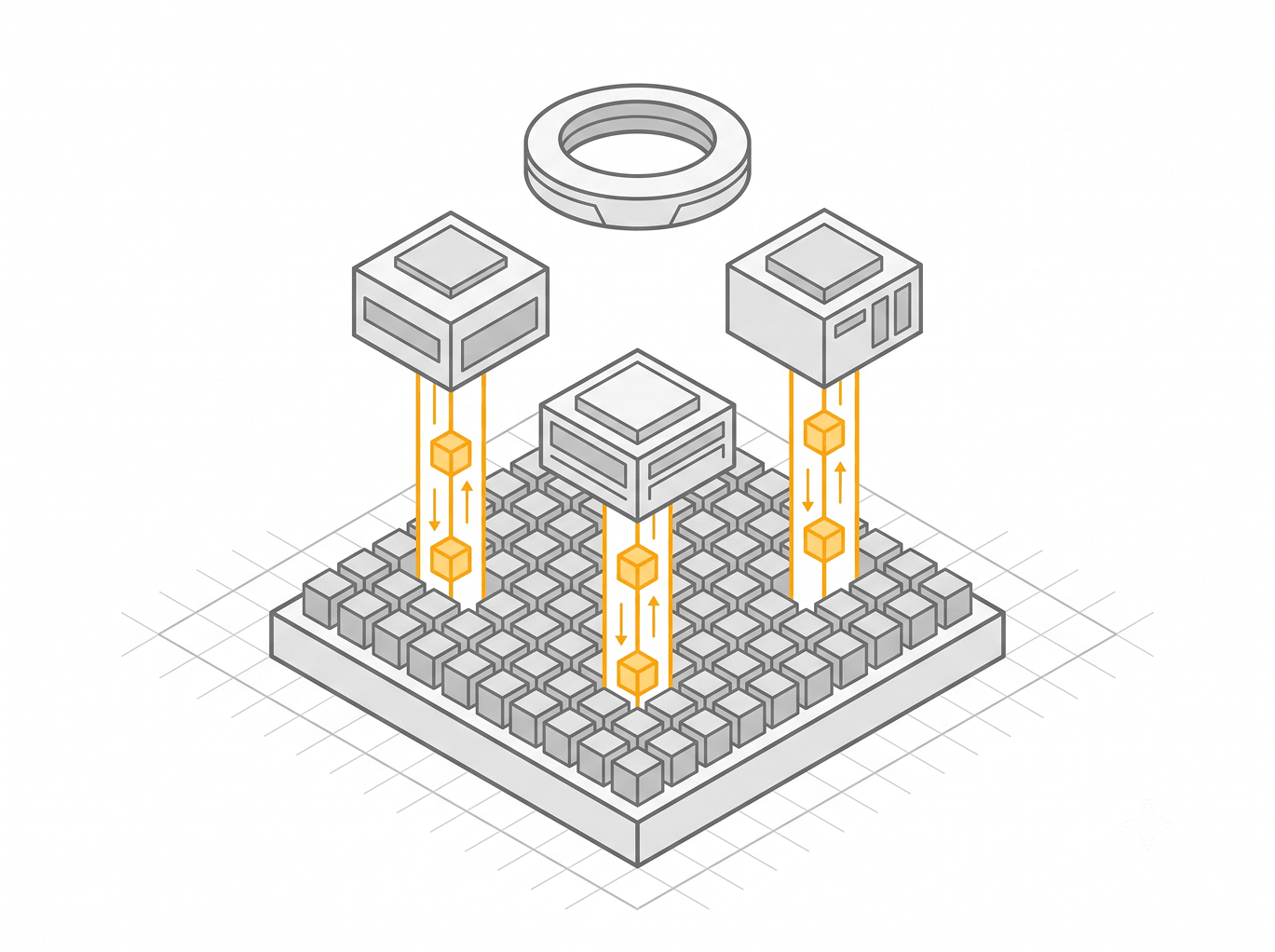
Traditional data warehouses bolt storage and compute onto the same machines, so every query competes for the same fixed hardware. Snowflake pulls those functions into three independent layers. Storage holds the data, compute processes it, and a cloud services layer coordinates everything, and each layer scales without touching the others.
The design blends a shared-disk model, one central copy of the data, with a shared-nothing model, many parallel compute clusters. That hybrid is what makes elastic scaling and zero-copy features possible rather than bolted-on afterthoughts.

1. Storage Layer: Micro-Partitions and Columnar Format
When you load data, Snowflake rewrites it into compressed, columnar micro-partitions and stores them in cloud object storage, Amazon S3 on AWS, Blob on Azure, or Google Cloud Storage. You never touch these files directly and you never tune them.
Each micro-partition also stores metadata, including the minimum and maximum value of every column it holds. Snowflake manages file sizing, compression, and encoding for you, so there are no indexes to build and no partitions to maintain by hand.
Because analytical queries usually read a few columns across millions of rows, the columnar layout lets the engine read only the columns a query needs instead of dragging entire rows off disk.
2. Compute Layer: Virtual Warehouses
A virtual warehouse is an independent, massively parallel compute cluster that reads micro-partitions and executes your SQL. You start one, run a query, and suspend it, and your stored data stays exactly where it is.
Warehouses are isolated from each other. Your finance team's month-end batch runs on one warehouse while BI dashboards run on another, hitting the same data with zero contention. In my experience this isolation is the single capability teams underestimate most before they migrate off a shared appliance.
Warehouses also cache the data they read, so a repeated query against warm data skips the round trip to object storage and returns faster on the second run.
3. Cloud Services Layer: Coordination and Metadata
The cloud services layer handles authentication, access control, query parsing and optimization, transactions, and the global metadata catalog. It runs continuously across the platform, and you never size or provision it.
This layer holds column statistics for every micro-partition. When a query arrives, the optimizer uses those statistics to prune, skipping any micro-partition whose value ranges cannot possibly contain the rows you asked for, before a warehouse reads a single byte.
4. How a Snowflake Query Runs, End to End
Nothing in that flow required you to build an index, hand-partition a table, or schedule a maintenance window.
5. Elastic Scaling and Concurrency
Snowflake gives you two independent scaling levers. You scale up by choosing a larger warehouse for a single heavy query, and you scale out with multi-cluster warehouses that add clusters automatically when queries start queuing and remove them when demand drops. Multi-cluster warehouses are an Enterprise Edition capability, and they are how you absorb a Monday-morning dashboard rush without paying for that capacity the other 167 hours of the week.
Snowflake Platform Architecture: Data Warehouse, Snowpark, and Cortex AI
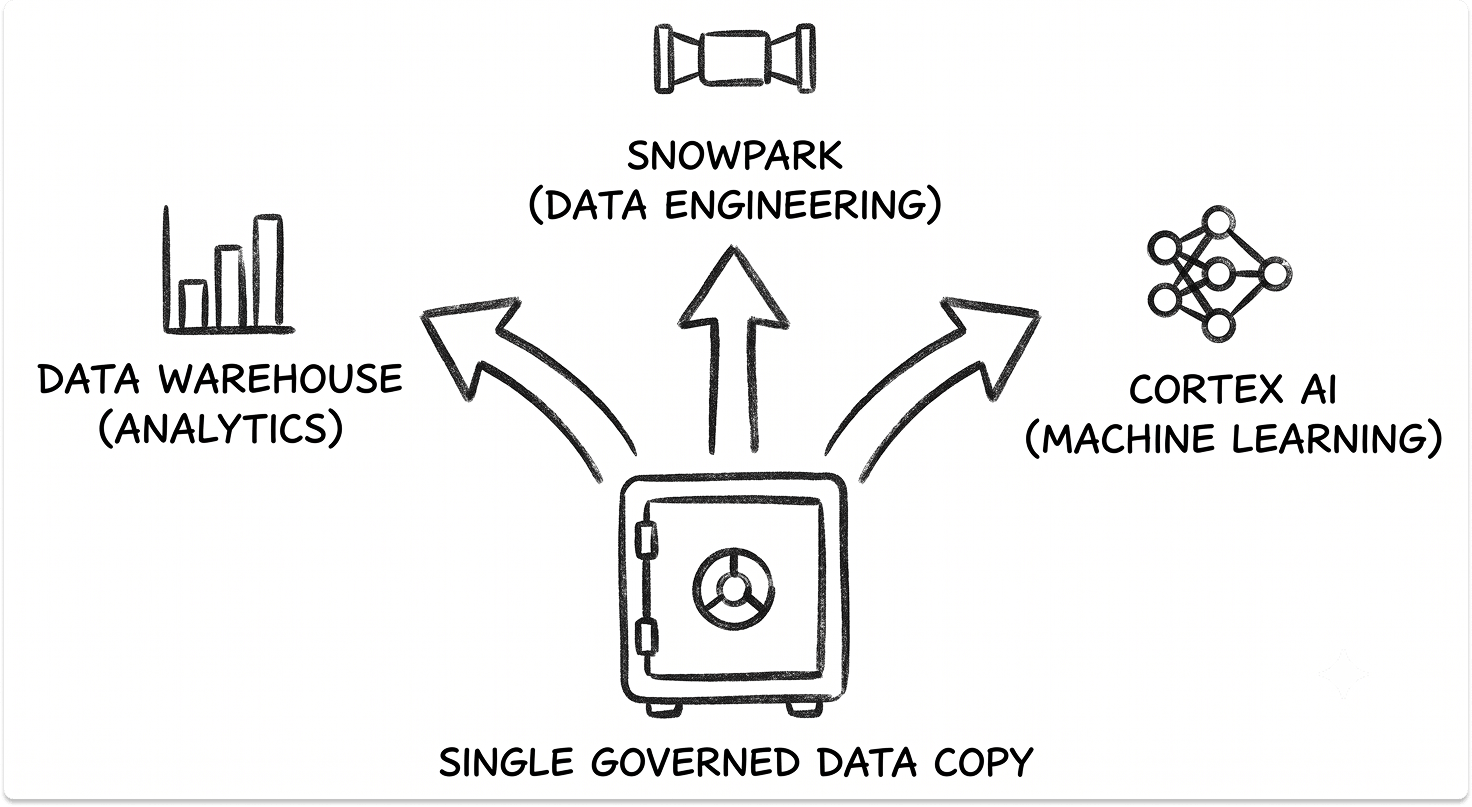
Snowflake is not a single-purpose warehouse anymore. Three workload engines run on the same storage and the same governance layer, and most evaluations focus on one without realizing the other two operate on the same data with no copying.
Snowflake Data Warehouse and Analytics
What it does: Runs SQL analytics, BI, and reporting at scale on structured and semi-structured data. This is the core engine, the one every other capability sits on top of.
Problems it replaces:
When you need it: Any organization consolidating reporting data out of disconnected systems, or replacing an aging warehouse whose renewal and hardware costs have stopped making sense.
Key capabilities:
Snowpark and Data Engineering
What it does: Runs data engineering and transformation workloads next to the data, in Python, Java, or Scala, without exporting it to a separate processing tier.
Problems it replaces:
When you need it: When your transformation logic outgrows SQL alone, or when your ingestion and modeling stack needs a rethink. The choice of loading and transformation tooling shapes both cost and latency, and it is worth weighing against dedicated data integration and ETL platforms before you commit.
Key capabilities:
Cortex AI and Machine Learning
What it does: Runs LLM inference, machine learning, and model fine-tuning directly against governed data, so sensitive content never leaves Snowflake's security perimeter for an external API.
Problems it replaces:
When you need it: When you want to classify, summarize, or extract from your own data with AI, and governance or residency rules mean that data cannot move. Snowflake states its managed Cortex Training can deliver up to twice as many fine-tuning runs per GPU budget, a claim worth validating on your own workloads before it anchors a business case.
Key capabilities:
Here is how the three engines map to common scenarios:
What Snowflake Offers IT Leaders
Snowflake is broad. For IT leaders, it is most useful to examine what it offers through four lenses:
Snowflake Cost Management and the Consumption Model
This is the lens that decides whether Snowflake is a controlled expense or a runaway one. Compute is billed in credits, consumed only while a warehouse runs, and the model rewards discipline and punishes neglect.
1. How Snowflake Credits and Warehouse Sizing Work
Warehouses follow a T-shirt sizing model, and credit consumption doubles at every size step. Snowflake bills per second with a 60-second minimum each time a warehouse starts or resumes, and a suspended warehouse costs nothing.
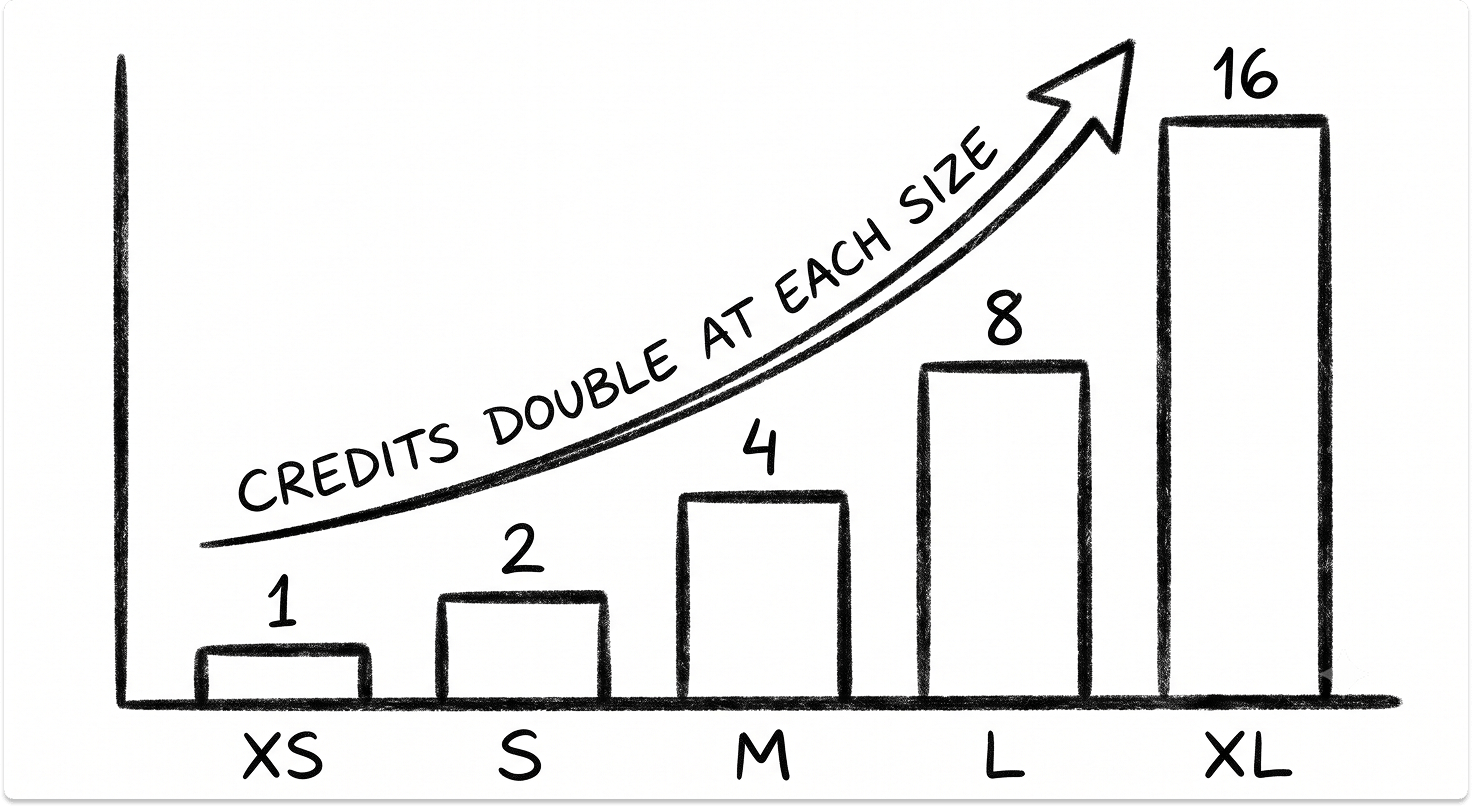
The per-second-with-a-minimum rule has a sharp edge. A warehouse that wakes, runs a three-second query, and suspends still costs a full minute of credits, so set auto-suspend too aggressively on a workload with short gaps and it lands in a constant suspend-resume cycle, paying the minimum over and over.
2. Where Snowflake Bills Get Out of Control
The bill has almost nothing to do with how much data you store and everything to do with how many warehouses run, how large they are, and how long they idle. The common leaks:
Each leak looks small on its own. Added across a quarter, they are routinely the difference between a bill that lands on forecast and one that quietly doubles, which is the same pattern that shows up when AI and ML workloads break a cloud budget.
3. Controlling Snowflake Consumption
Treating consumption as a governed line item rather than a monthly surprise is the same discipline covered in most cloud cost optimization practices.
Snowflake Data Protection: Time Travel, Zero-Copy Cloning, and Fail-Safe
Snowflake bundles three recovery features that change how you think about backups. All three work because micro-partitions are immutable, so older versions still exist after a change until they are garbage-collected.

1. Time Travel
Time Travel lets you query, clone, or restore data as it existed at an earlier point. The default retention is one day on all accounts, and it is configurable up to 90 days on Enterprise Edition and higher. An accidental DROP TABLE becomes a one-line UNDROP.
2. Zero-Copy Cloning
Zero-copy cloning creates a full logical copy of a table, schema, or database that initially points at the same micro-partitions as the source, so it consumes no extra storage until the data diverges. That makes a production-scale test environment nearly free to spin up, and periodic clones double as a lightweight backup.
3. Fail-Safe
Fail-safe is a fixed 7-day window for permanent tables that begins after Time Travel expires. You cannot query it, and only Snowflake Support can recover from it. It exists for genuine disaster scenarios, and it is a safety net rather than a backup strategy.
One caution worth stating plainly: extended Time Travel and redundant clones both retain old micro-partitions, and that storage adds up. These features reduce recovery risk, but they do not replace a deliberate backup and recovery plan for a platform this central.
Snowflake Security and Data Governance
Governance is where a data platform either earns an audit or fails one, and Snowflake concentrates its controls in a few primitives that reward being used well.
1. Role-Based Access Control (RBAC)
Snowflake's access model grants privileges to roles, then assigns roles to users and service accounts. The pattern that scales separates functional roles, representing job functions, from access roles, representing object permissions. Changing a role's grants propagates instantly to everyone who holds it, which keeps entitlement drift in check.
2. Dynamic Data Masking and Row Access Policies
Two policy types do most of the heavy lifting:
Row access policies add a predicate to every query, so align policy columns with clustering keys and test at production scale before rollout.
3. Object Tagging, Classification, and Snowflake Horizon
Object tagging ties the policies together. Tag a column as PII once, and tag-based policies apply masking wherever that classification appears. Automatic data classification detects sensitive columns for you, and the ACCESS_HISTORY view records who queried what. All of this now lives under Snowflake Horizon, the governance suite that adds a data catalog, a Trust Center for security-posture monitoring, and clean rooms for privacy-preserving collaboration. For teams standardizing controls across tools, it complements a broader data loss prevention strategy rather than replacing it.
4. Encryption, Editions, and Compliance
Encryption at rest with AES-256 is always on. Beyond that, the capabilities you get depend on edition, which makes the edition a compliance decision as much as a budget one.
If you handle PHI or need to bring your own encryption keys, Business Critical is the floor, not a nice-to-have.
Snowflake Open Interoperability and AI: Apache Iceberg, Cortex, and Data Sharing
Snowflake's direction over the past two years has been about reaching data it does not own and running AI where the data already sits. That shift matters for lock-in, because it means your data can stay in an open format you control.
1. Apache Iceberg and the Horizon Catalog
Snowflake support for Apache Iceberg reached general availability, including Snowflake-managed Iceberg storage on AWS and Azure. The Horizon Catalog, powered by Apache Polaris, provides bidirectional read and write across Snowflake and external lakes, so an engine like Spark can write an Iceberg table and Snowflake can query it live, with no copy and no sync.
2. Zero-Copy Integrations and Secure Data Sharing
Zero-copy integrations now connect systems like SAP, Salesforce, and Workday directly to Snowflake without duplicating data, which retires a class of brittle ETL pipelines. Secure data sharing lets you grant another account live, read-only access to your data without moving it, and you can now reshare data that was shared to you.
3. Bringing AI to Governed Data
Because Cortex runs inside Snowflake, AI operates under the same RBAC and masking policies as every human user. That keeps sensitive content inside the governance perimeter and answers the question that stalls most AI pilots, which is what the model can actually see.
This is the same pressure that is forcing a rethink of cloud, storage, and data fabrics everywhere, and it is often the difference between an AI project that ships and one that becomes an exercise in turning fragmented information into real value.
See Which Snowflake Edition and Architecture Best Suits Your Needs
Is Snowflake Right for Your Environment?
Snowflake fits organizations that need one governed analytics platform and have accepted that data volumes keep climbing, with worldwide data long projected by IDC to reach 175 zettabytes as analytical workloads absorb more of it every year. It is excellent at what it was built for and mediocre at a few things it was not, and honesty here saves you a painful migration later.
Snowflake is a strong fit if:
Consider alternatives or supplement with other tools if:
f any of those describe you, run a direct comparison against Databricks and BigQuery before you shortlist. The three have converged in 2026, and they still reward different organizations.
The evaluation question is not whether Snowflake is a good platform. It is whether your workloads, your compliance profile, and your appetite for consumption governance make it the right foundation for the next five years.
Also read: Talend vs. Informatica vs. Fivetran vs. dbt, Best Cloud Cost Optimization Solutions for IT Leaders
See which data platform fits your environment, before you talk to sales.
Tell us your workloads, compliance requirements, and how you plan to control spend. Find and compare pre-vetted data platform and implementation vendors on TechnologyMatch. You stay anonymous until you engage, so no cold calls, and it is free.
FAQ
What is Snowflake used for?
Snowflake is used to consolidate data from many systems into one cloud data platform, then run business intelligence, reporting, ELT pipelines, data sharing, and AI on it. It replaces legacy on-premises warehouses and disconnected analytics tools with a single managed platform across AWS, Azure, or Google Cloud.
Is Snowflake a database?
Snowflake includes a database engine, but it is broader than a traditional database. It is a cloud data platform that separates storage from compute, runs analytical SQL, and adds data engineering, governance, and AI on the same data. It is built for analytics rather than high-frequency transactional processing.
Is Snowflake a data warehouse or a data lake?
It started as a cloud data warehouse and now supports both patterns. With Apache Iceberg support and open table formats, Snowflake can operate as a data lakehouse, querying open-format data in place while still offering warehouse-grade performance and governance.
How is Snowflake priced?
Snowflake uses a consumption model. Compute is billed in credits that a virtual warehouse consumes only while running, per second with a 60-second minimum, and credit use doubles at each warehouse size. Storage is billed separately per compressed terabyte. Because the two meters are decoupled, cost control depends on right-sizing warehouses and tuning auto-suspend rather than on how much data you store.
Is Snowflake multi-cloud?
Yes. Snowflake runs natively on AWS, Azure, and Google Cloud with a consistent experience, and it can replicate and share data across regions and clouds. That flexibility is a common reason organizations with mixed-cloud footprints choose it.
How does Snowflake compare to Databricks and BigQuery?
All three separate storage from compute, bill by usage, and now add AI. Snowflake grew from the warehouse and leads on SQL simplicity and near-zero administration. Databricks grew from the data lake and Spark and leans toward code-first engineering and ML. BigQuery is Google's fully serverless option, strongest for teams already standardized on Google Cloud. The right choice depends on your dominant workload and your team's skills.