How to Evaluate IaaS Vendors and Choose the Right Cloud Infrastructure Provider
A practical guide for IT leaders on how to evaluate IaaS vendors before signing. Covers total cost of ownership, SLA structure, compliance scope, lock-in risk, and provider fit across AWS, Azure, GCP, and specialised providers.

The average enterprise cloud migration costs $1.2 million. That figure covers compute, storage, engineering hours, and tooling. It does not cover the re-platforming cost, the egress bill to move your data out, or the 18 months of engineering time spent working around a platform that was never designed for your workloads.
IaaS decisions are long-term infrastructure commitments dressed up as monthly subscriptions. The contract terms, the pricing structure, the compliance scope, and the exit economics all deserve the same scrutiny you would apply to any multi-million-dollar capital investment.
Four variables determine whether an IaaS vendor is the right fit for your organisation: workload profile, team capacity, compliance requirements, and exit feasibility. Every section of this guide maps back to those four variables.
Define Your Requirements Before You Shortlist a Vendor
The quality of your vendor shortlist depends entirely on the clarity of your requirements. A shortlist built on vague criteria produces vendor conversations that go in circles.
Workload Classification
Different workload types have fundamentally different infrastructure requirements, and the same provider can be the right answer for one workload type and the wrong answer for another.
Latency-sensitive workloads such as real-time processing, financial trading systems, and live video require proximity to end users and predictable network performance. Region coverage and edge infrastructure matter here more than raw compute pricing.
Compliance-bound workloads covering healthcare records, financial data, and government systems require infrastructure where specific services are certified in-scope for the relevant regulatory framework. Certification at the provider level does not automatically extend to every service within that provider's portfolio.
Burst-heavy workloads including seasonal e-commerce traffic, ML training jobs, and batch processing benefit from on-demand and spot pricing models. A provider with aggressive spot instance pricing and fast provisioning speeds is more relevant here than one with competitive reserved instance rates.
Legacy workloads built around IBM Power Systems, AS/400, and on-prem dependencies require either a hyperscaler with strong bare-metal or hybrid connectivity options, or a specialised IaaS provider built specifically for those environments. Forcing legacy workloads onto a cloud-native architecture adds cost and complexity that rarely justifies itself.
Map your workloads against these categories before opening a single vendor conversation. The output narrows your shortlist from five providers to two or three before any demos take place.
Team Capacity and Operational Fit
The gap between what a platform can do and what your team can operate effectively is a real cost. It shows up in engineering hours spent on configuration, in incident response times when something breaks, and in the accumulating technical debt of a platform being managed below its operational requirements.
Assess your team against three dimensions:
- Certification depth: AWS Solutions Architect, Azure Administrator, and GCP Professional certifications indicate deep platform expertise. Generalist infrastructure engineers operate these platforms at a higher operational overhead.
- Managed vs unmanaged preference: Unmanaged IaaS gives full control at lower base cost. Managed IaaS reduces operational overhead at the expense of flexibility and pricing.
- Incident response capacity: A lean team operating a complex hyperscaler environment without enterprise support coverage carries an operational risk that no pricing calculator reflects.
For organisations where team capacity is a constraint, specialised managed IaaS providers are worth evaluating alongside the hyperscalers. The top five specialised IaaS providers for enterprise IT in 2026 covers managed private cloud, healthcare-specific infrastructure, and legacy environment support in detail.
Compliance and Data Residency Requirements
Define your non-negotiable compliance requirements before shortlisting. The certifications relevant to your industry, including HIPAA, PCI-DSS, FedRAMP, ISO 27001, and SOC 2 Type II, determine which providers and which specific services within those providers are viable.
The distinction between provider-level certification and service-level certification matters. AWS holds HIPAA eligibility, but only specific services within AWS are on the HIPAA-eligible services list. If your workload touches a service not on that list, the provider's overall certification status is irrelevant to your compliance posture.
Ask every vendor the same question during initial conversations: "Which specific services are currently in-scope for [certification] in [region]?" Request the documentation. A current, service-level compliance scope document is a baseline deliverable from any serious provider.
Data residency requirements add another layer. Some organisations have legal or regulatory obligations to keep data within specific geographic boundaries. Verify that the provider's region infrastructure genuinely meets those requirements, and confirm that replication, backup, and logging services do not move data across those boundaries by default.
The 6 Criteria That Determine IaaS Fit
1. Pricing Structure and Total Cost of Ownership
The compute price in a pricing calculator is the starting point for your cost calculation, not the end point.
On-demand pricing carries a premium for flexibility. Reserved instances and committed use discounts reduce that premium by 30-60% in exchange for 1 or 3-year commitments. Spot and preemptible instances offer the lowest compute cost for workloads that can tolerate interruption.

The costs absent from pricing calculators are the ones that drive budget overruns.
Egress fees are charged when data leaves the provider's network. AWS charges $0.09 per GB for the first 10TB per month of outbound data transfer. Azure charges $0.087 per GB. GCP charges $0.11 per GB. At scale, these figures compound significantly. Moving one petabyte of data out of AWS costs approximately $90,000 in egress fees alone, before any engineering or migration costs are added.
Inter-region data transfer is a separate charge from internet egress. Architectures that distribute workloads across multiple regions for resilience accumulate those transfer costs on every billing cycle.
Support tier costs are frequently underestimated. AWS Enterprise Support starts at 10% of monthly spend with a $15,000/month minimum. For an organisation spending $50,000/month on compute, that is an additional $60,000 per year before a single support ticket is raised.
Licensing costs deserve specific attention for Microsoft-heavy environments. AWS charges full Windows Server and SQL Server licensing on top of compute costs. Azure Hybrid Benefit allows organisations with existing Microsoft volume licensing to apply those licences to Azure VMs, reducing costs by up to 40% on eligible workloads. For environments running significant Windows Server and SQL Server workloads, this is a material factor in the TCO calculation.
Build your total cost of ownership across five components: compute + storage + egress + support + engineering overhead. A $10,000/month compute bill routinely reaches $16,000-$20,000/month when all five are included.
2. SLA Structure and What It Covers
The uptime percentage in a provider's SLA headline is one data point in a more complex document. Read the definitions alongside the percentages.
Uptime SLA covers whether the service is reachable. Availability SLA covers whether the service is performing within defined parameters. A service can be technically reachable and still be degraded below usable performance, and uptime SLAs do not cover that scenario.
The practical implications of uptime percentages:
- 99.9% uptime = 8.7 hours of allowable downtime per year
- 99.95% uptime = 4.4 hours per year
- 99.99% uptime = 52 minutes per year

Verify which specific services carry which uptime guarantees. Core compute may carry a 99.99% SLA while dependent services including managed databases, load balancers, and DNS carry 99.9%. Your application's actual availability is bounded by the weakest SLA in your stack.
Credit structures define what you receive when a provider misses their SLA commitment. Standard SLA credits across the major hyperscalers compensate 10-30% of the affected period's charges. They do not compensate for the business impact of the outage. For revenue-generating or operationally critical workloads, evaluate whether the credit structure is commensurate with your actual downtime cost.
Ask every provider: "What is the credit structure if you miss the SLA, and what is the process for claiming it?" The claims process matters as much as the credit amount. Some providers require a support ticket within a specific window to qualify for any credit at all.
3. Compliance Coverage: Certification vs Scope
The shared responsibility model defines where provider responsibility ends and yours begins. Every major IaaS provider publishes a shared responsibility diagram. Read it for your specific service configuration.
Infrastructure security, covering physical data centre security, network isolation, and hypervisor integrity, sits with the provider. Operating system patching, application security, data encryption in transit and at rest, and identity and access management sit with you in an IaaS model, regardless of provider.
For regulated workloads, verify compliance scope at the service level. AWS, Azure, and GCP each publish compliance programme pages listing which services are in-scope for which certifications. Cross-reference your architecture's service dependencies against that list before signing.
Two questions to bring into every vendor compliance conversation:
- "Can you provide a current list of services in-scope for [certification] in [region]?"
- "What is your process for notifying customers when a service is added to or removed from a compliance scope?"
For a broader vendor compliance framework, the IT Vendor Management Guide covers contract governance and ongoing compliance tracking in detail.
4. Lock-In Risk and Exit Feasibility
Every IaaS provider creates switching friction. The degree of that friction depends on how deeply your architecture uses provider-specific services.
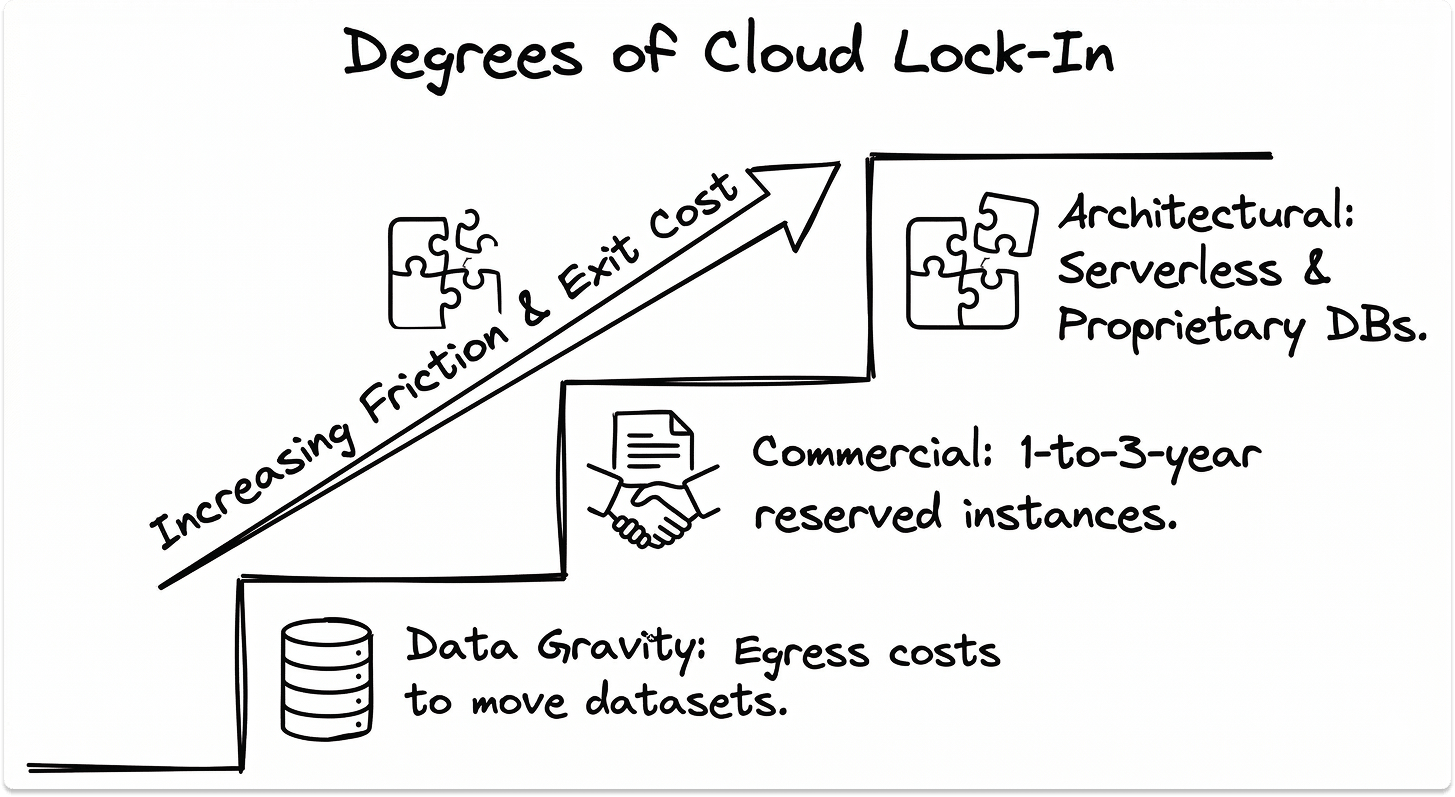
Data portability is the baseline. Your data can be moved from any major provider. At $0.09/GB in egress fees, a 500TB dataset costs $46,000 to move, before any engineering or re-architecture work.
Architectural lock-in runs deeper than data portability. Managed databases such as AWS RDS, Aurora, and Azure SQL Managed Instance, serverless platforms including Lambda and Azure Functions, and proprietary AI/ML services like SageMaker and Azure ML require re-engineering to migrate away from, not just data transfer.
Commercial lock-in comes from committed use discounts and reserved instance agreements. A 3-year reserved instance commitment at a 60% discount is financially attractive until you need to change direction. The exit economics of breaking that commitment are unfavourable.
Architectural approaches that preserve optionality:
- Containerise workloads using Kubernetes where possible, as container orchestration is portable across providers
- Use open-standard database engines where compliance and performance requirements allow
- Evaluate managed services against their migration complexity before adopting them
Before signing any multi-year agreement, ask: "What does our exit look like at our projected data volume in year three, and what will it cost?"
5. Support Quality and Escalation Access
Support tier structure follows a consistent pattern across providers: community support at the base, business support in the middle, and enterprise support at the top. The differences between tiers are significant in a P1 incident.
AWS support tier response times for a P1 (production system down) incident:
- Developer: No P1 SLA
- Business: Less than 1 hour
- Enterprise: Less than 15 minutes
Azure and GCP follow similar structures. At developer and basic tiers, P1 response is measured in hours. For production workloads, business or enterprise support is an operational requirement.
Named TAM (Technical Account Manager) access is available at enterprise support tiers. A TAM provides proactive architectural guidance, early access to new services, and a known escalation path. The value of that relationship becomes apparent when something breaks at an inconvenient time.
The question to ask before signing: "Who is our escalation contact for a P1 incident outside business hours, and what is their documented response time at our contracted support tier?"
6. Geographic Footprint and Latency
Region availability, availability zones, and edge locations are three distinct infrastructure layers with different implications for your architecture.
Regions are independent geographic areas containing multiple data centres. Data residency requirements are enforced at the region level. Selecting a region commits your data to that geographic boundary for all services running within it.
Availability Zones (AZs) are physically separate data centres within a region. Distributing workloads across multiple AZs provides resilience against data centre-level failures. Multi-AZ deployment is the baseline for production workloads and carries inter-AZ data transfer costs.
Edge locations serve cached content and DNS resolution closer to end users. They do not provide compute or storage for application workloads.
Latency performance varies meaningfully across providers by geography. AWS leads on North American latency due to region density. Azure leads on European latency due to more granular region coverage. GCP leads on inter-region network performance due to its private fibre backbone. Test actual latency from your users' locations to candidate regions during the POC.
For government and regulated industries, evaluate sovereign cloud offerings. AWS GovCloud, Azure Government, and GCP Assured Workloads each provide isolated environments for FedRAMP and equivalent compliance frameworks.
Matching Evaluation Criteria to Provider Strengths
When AWS Is the Right Fit
AWS offers the broadest service catalogue of the three hyperscalers, with over 200 services across compute, storage, database, AI/ML, networking, and security. For organisations with complex, cloud-native workloads and dedicated engineering teams, that breadth is a genuine advantage.
AWS has the widest global region coverage, making it the strongest choice for organisations with latency or data residency requirements across multiple geographies. Egress pricing is the most aggressive of the three, so factor this into TCO calculations early.
Best fit: Enterprise organisations with mature cloud engineering capability, complex workload requirements, and a need for the deepest available service catalogue.
When Azure Is the Right Fit
Azure's primary differentiator is Microsoft ecosystem integration. Active Directory federation, Office 365 integration, Defender for Cloud, and native hybrid connectivity via Azure Arc and Azure Stack make Azure the most coherent choice for organisations running Microsoft-centric infrastructure.
Azure Hybrid Benefit is financially significant for organisations with existing Windows Server and SQL Server volume licensing. For a 100-server Windows environment, licensing savings over three years can exceed the compute cost differential between Azure and competing providers.
Best fit: Organisations with significant Microsoft infrastructure dependencies, existing Enterprise Agreement licensing, and teams with Windows and Azure expertise.
When Google Cloud Is the Right Fit
GCP's differentiated strengths are in data and AI/ML workloads. BigQuery's serverless analytics architecture, Vertex AI's managed ML platform, and Google's TPU hardware for training large models are differentiated against equivalent AWS and Azure offerings.
GCP's private global fibre network delivers strong inter-region performance and more transparent egress pricing than AWS or Azure for equivalent data volumes.
Best fit: Organisations with data-intensive analytics workloads, AI/ML development at scale, or requirements for high-performance inter-region data transfer.
When a Specialised IaaS Provider Is the Right Fit
Hyperscalers are designed for cloud-native workloads. IBM Power Systems and AS/400 environments require managed private cloud providers with the hardware expertise to run those workloads without full re-architecture.
Healthcare organisations running Epic or Meditech EHR systems benefit from providers with pre-built HIPAA-compliant infrastructure and EHR integration experience. Organisations with lean IT teams benefit from fully managed IaaS where operational responsibility sits with the provider.
The top five specialised IaaS providers for enterprise IT in 2026 covers these categories in detail.
Due Diligence Checklist Before You Sign
How to Run a Proof of Concept That Reflects Production
A POC structured around your actual workloads and production conditions produces results you can make a decision from.
Define success criteria before the POC starts. Document the performance thresholds, latency targets, compliance validations, and cost benchmarks the POC needs to meet. Evaluate results against those criteria.
Test your actual workloads. Run representative samples of your production workload types, including latency-sensitive applications, compliance-bound data processing, and burst scenarios, in the POC environment.
Include support responsiveness as an evaluated dimension. Open test support tickets at different severity levels during the POC. Document actual response times against the provider's published SLA. The gap between published and actual response times is information you want before signing.
Measure real egress costs. Run the POC at a scale that generates measurable egress data. Project that figure to your anticipated annual data transfer volume. A provider that looks cost-competitive on compute alone can shift materially in the TCO calculation once egress is factored in at production scale.
Set a hard time limit with a defined decision gate. Thirty to sixty days is a sufficient POC window for most environments. Define the gate criteria before the POC starts: approve, reject, or extend with specific documented conditions.
Contract Terms to Review Before Signing
Auto-renewal clauses define the default renewal behaviour when a contract term expires. Multi-year agreements frequently include automatic renewal provisions with 60-90 day notice windows. Missing that window commits you to another full term at existing pricing.
Price escalation caps specify whether and by how much the provider can increase pricing within a multi-year agreement. An uncapped escalation clause in a three-year commitment is an open-ended financial exposure.
SLA credit caps limit total compensation when a provider misses their uptime commitment. The standard structure across major providers caps total credits at one month's service fees for the affected service, regardless of business impact. For revenue-critical workloads, understand this ceiling before relying on the SLA as a risk mitigation mechanism.
Data deletion timelines define how long the provider retains your data after contract termination and what certification of deletion looks like. In regulated industries, the ability to produce evidence of deletion on a defined timeline is a compliance requirement. Verify that the provider's standard terms meet your obligation, and negotiate specific terms if they do not.
Audit rights define your contractual right to verify the provider's security and compliance posture. Some providers grant audit rights directly. Others satisfy this through third-party attestation reports such as SOC 2 and ISO 27001 audit reports. Confirm which approach applies to your agreement and whether the available attestation reports cover your specific compliance requirements.
Closing Thoughts
The four variables from the introduction, workload profile, team capacity, compliance requirements, and exit feasibility, are the frame for every decision in this process.
The right IaaS vendor maps to your specific workload requirements, aligns with your team's operational capacity, covers your compliance obligations at the service level, and gives you a viable exit path at a cost you have quantified before signing.
AWS, Azure, GCP, and the leading specialised providers are all credible infrastructure choices. The differentiator is fit. Get the four variables right, and the vendor decision follows from the evidence.
If you are working through the shortlisting process, the TechnologyMatch marketplace provides a structured way to identify and compare providers against your specific requirements. For the specialised provider landscape, Best IaaS Solutions for 2026 covers the top five managed and specialised IaaS providers in detail. The IT Vendor Management Guide covers contract governance, SLA management, and ongoing vendor performance tracking.
Looking for IT partners?
Find your next IT partner on a curated marketplace of vetted vendors and save weeks of research. Your info stays anonymous until you choose to talk to them so you can avoid cold outreach. Always free to you.
FAQ
What is the most important factor when choosing an IaaS provider?
Workload fit. The provider whose infrastructure architecture, compliance scope, and service catalogue align with your specific workload requirements is the right starting point. Pricing and support tier are secondary considerations once fit is established.
How do I calculate the true cost of an IaaS provider?
Add five components: compute (on-demand, reserved, or spot), storage, egress fees, support tier costs, and internal engineering overhead. Egress fees and support costs are the two variables that most frequently cause budget overruns relative to initial estimates.
What SLA uptime should I require from an IaaS vendor?
99.99% for production workloads where downtime has direct business or revenue impact. 99.99% equates to approximately 52 minutes of allowable downtime per year. Verify that the SLA applies at the individual service level for every service in your production stack.
What is cloud vendor lock-in and how do I avoid it?
Lock-in is the accumulated cost and complexity of migrating away from a provider. It has three components: data egress costs, architectural dependencies on proprietary services, and commercial commitments via reserved instances or committed use discounts. Containerising workloads, using open-standard database engines, and quantifying exit costs before signing are the three most effective mitigations.
When should I choose a specialised IaaS provider over AWS, Azure, or GCP?
When your workloads require infrastructure expertise that hyperscalers do not optimise for, including IBM Power and legacy systems, EHR-native healthcare infrastructure, or fully managed environments for lean IT teams. Best IaaS Solutions for 2026 covers the leading specialised providers in each category.
What compliance certifications should an IaaS provider have?
The certifications relevant to your industry and data types: HIPAA for healthcare, PCI-DSS for cardholder data, FedRAMP for US federal workloads, and ISO 27001 and SOC 2 Type II as baseline security certifications for enterprise environments. Verify certification scope at the service level.
How long should an IaaS proof of concept take?
30 to 60 days for most environments. Define success criteria and a decision gate before the POC starts. A POC without a defined endpoint and evaluation criteria tends to extend without producing a clear decision.