


IT Vendor Discovery: How to Find the Right Technology Vendors (2026)
Vendor discovery decides most IT purchases before the first sales call. Learn the channels, platforms, a 6-step process, and what to screen before any demo.
Summary:
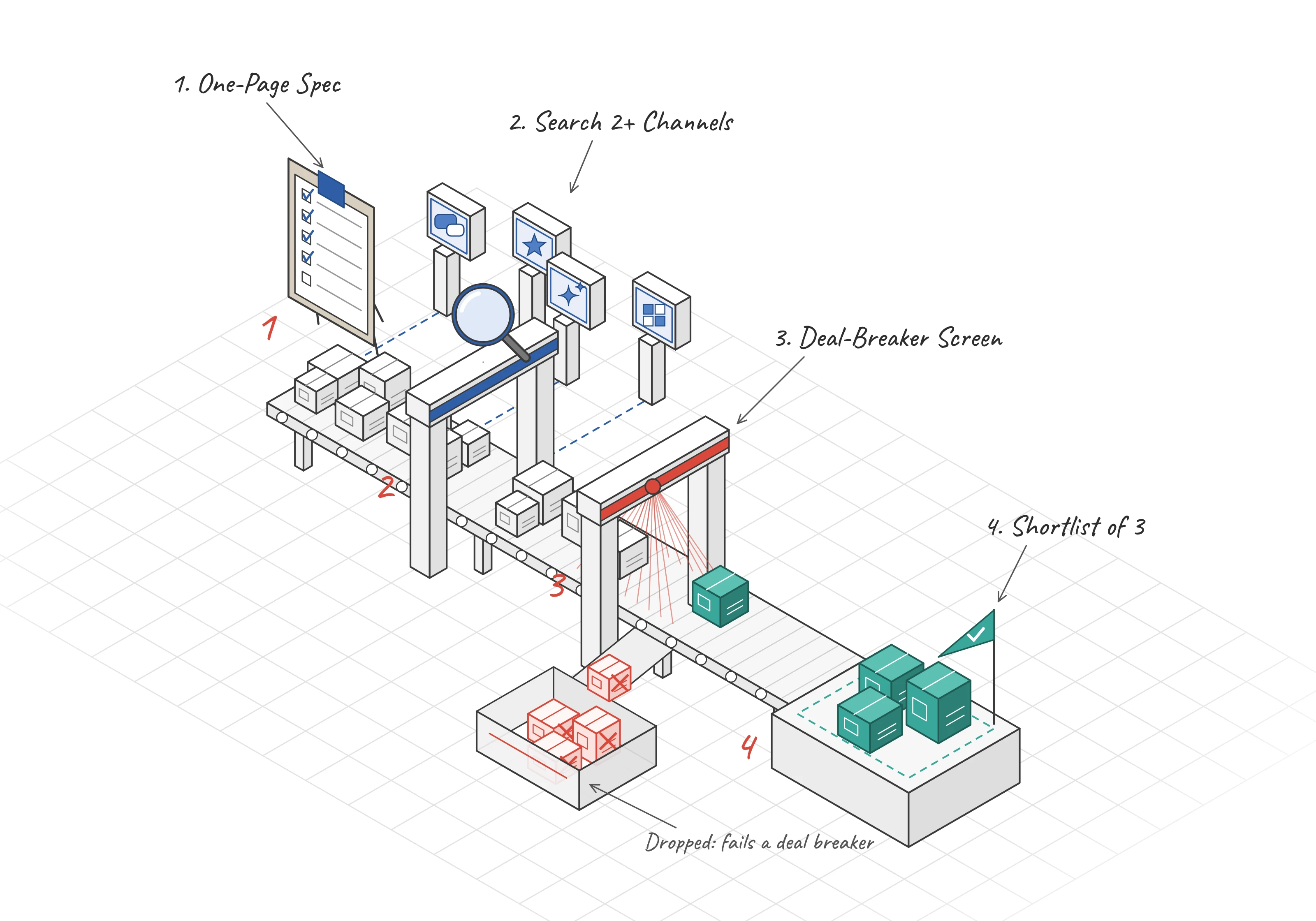
Vendor discovery is the stage where an IT team finds and qualifies the vendors that can solve a defined problem, before any RFP, demo or proof of concept. Its output is a screened longlist that you cut to a shortlist of about three.
Most of the decision forms here, so your discovery sets the ceiling for the whole purchase.
By the time a sales rep joins the first call, the buyer usually knows who they want. In the 6sense 2025 B2B Buyer Experience Report, a survey of about 4,000 B2B buyers, buyers had ranked their preferred vendors before first contact 94% of the time. The vendor they preferred going in won 80% of deals.
That makes discovery the cheapest place to get a purchase right. It is also the easiest place to get it wrong.
A weak longlist produces a weak RFP. You end up picking the better of two flawed options and calling it a process. In my experience, the damage rarely shows up during evaluation. It shows up a year later, at renewal, when someone asks why we never looked at anyone else.
The chart below shows how much of the journey happens before a vendor hears from you.
The term has a second meaning. In third-party risk management, vendor discovery means finding the vendors and SaaS apps already in use across your company. I cover that at the end. Everything before it is about finding new vendors to buy from.
What is vendor discovery?
Vendor discovery is the work of finding which vendors can credibly solve a problem you have already defined. It starts with a problem statement and ends with a short, screened list.
In plain terms: Vendor discovery is the first stage of a purchase. You find vendors that can solve your problem. You check each vendor against your must-haves. You keep the best three for evaluation.
Good discovery produces three things:
- A written search spec that security, finance, and the business owner agreed to
- A longlist of 8 to 12 vendors, with a note on where each name came from
- A shortlist of about three vendors that cleared your deal breakers
Expect the list to move. In Gartner Digital Markets' 2025 Software Buying Trends survey of about 3,500 software buyers, 83% changed their initial list after research. Buyers then actively engaged an average of 2.5 vendors. So plan for a wide first list and a narrow final one.
The same survey found that 59% of buyers regretted a software purchase from the past 18 months. Discovery is where you reduce that risk, because nobody on your team is attached to a vendor yet.
Vendor discovery vs vendor sourcing vs vendor selection
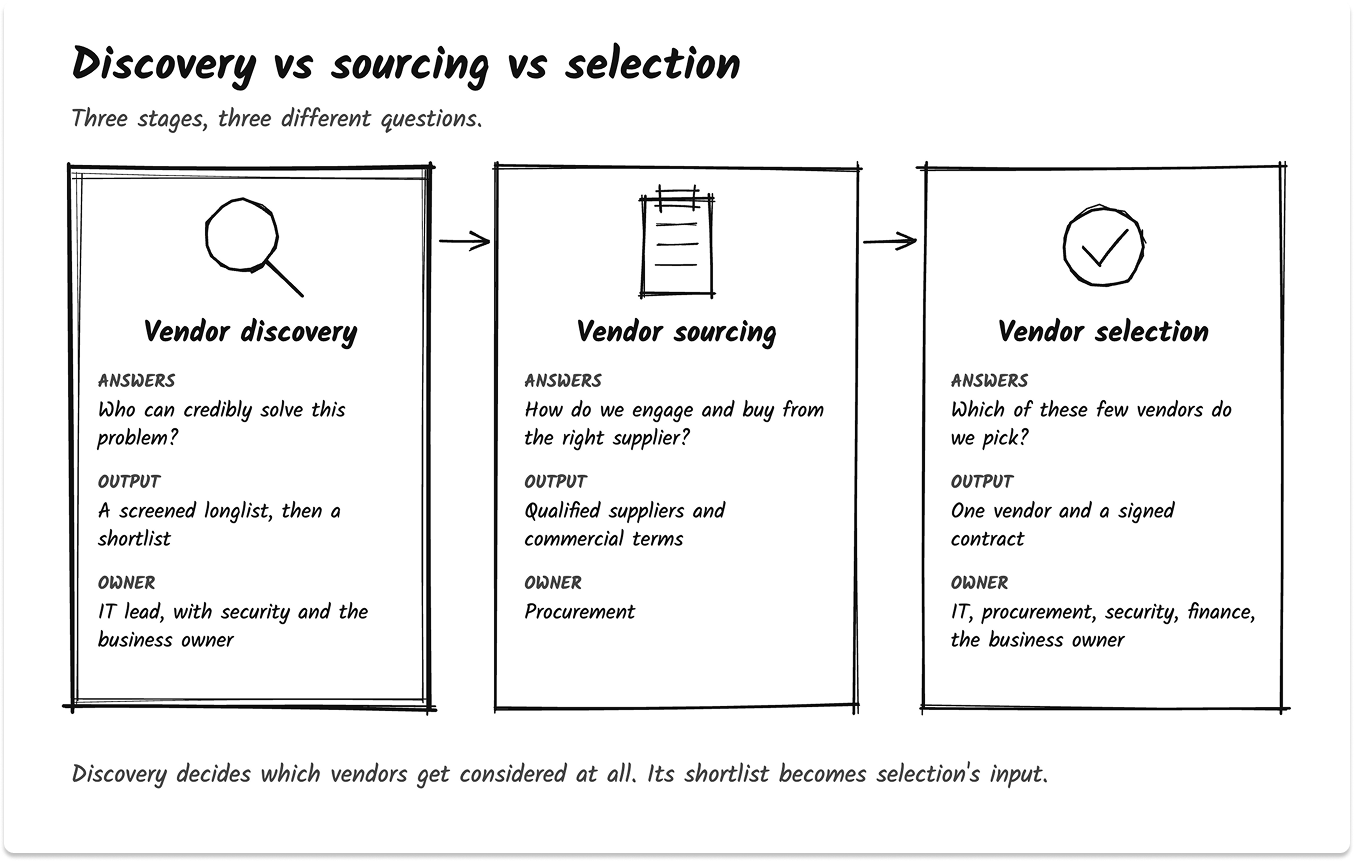
Discovery finds the candidates. Sourcing runs the commercial process to engage and buy from a supplier. Selection picks the winner from a short list.
The three terms get used interchangeably, and that causes real problems. When a team calls everything "selection," it jumps straight to demos with whoever showed up first. When procurement calls everything "sourcing," IT loses the early say on technical fit.
Here is how I separate them.
An RFI can sit at the edge of discovery when the market is unfamiliar. The RFP, scripted demos, and the proof of concept belong to selection. If you send an RFP to vendors you have not screened, you will spend weeks reading answers from vendors who could never pass your security review.
Once discovery hands over a shortlist, the IT vendor selection process takes it from there.
When IT teams start vendor discovery
Discovery almost never starts on a calendar. Something forces it, and that trigger sets your deadline.

These are the triggers I see most often:
- A renewal with a price increase. The quote arrives, the number is higher, and someone asks what else is out there. In my experience, it is the trigger with the least lead time.
- End of life. Windows 10 reached end of support on October 14, 2025. Every product that falls out of support forces a choice between paying to extend it and replacing it. I walked through that math in Windows 10 ESU Year 2.
- A licensing change. After Broadcom acquired VMware in 2023, it moved customers to subscription bundles. IDC reported renewal increases of 100% to as much as 800% for some customers. That one change pushed many teams to look at alternatives to VMware.
- An incident or an audit finding. A breach review or an audit report names a gap, and leadership wants a tool in place by a date.
- A new regulation or a customer demand. The SEC adopted its cybersecurity disclosure rules on July 26, 2023. Public companies must generally disclose a material incident within four business days of deciding it is material. Rules like that put detection and response tooling under review. A large customer asking for your SOC 2 report has the same effect.
- A new project or an acquisition. A new business unit, a merger, or a platform consolidation creates a need with no incumbent vendor.
The trigger matters because it decides how much time discovery gets. A renewal 60 days out leaves room for a quick search and little else. Where I can, I put renewal dates on a calendar and start discovery at least two quarters before the larger ones.
Here is where discovery sits between the trigger and the contract.
How do IT leaders find new vendors? The discovery channels
IT leaders find vendors through eight main channels, and each one has a business model that shapes what you see. The safest approach is to use at least two channel types with different business models, so one channel's blind spot gets covered by the other.
Peer review sites
G2, Capterra, and Gartner Peer Insights are best at telling you how known products hold up in practice. Filter reviews by company size and industry, and read the three-star reviews first. Sites such as G2 and Capterra earn revenue from vendors through sponsored placements and leads, so visibility can be paid for. I compared the main sites in G2 vs Capterra vs Trustpilot vs TechnologyMatch.
Analyst research
Gartner Magic Quadrants and Forrester Waves help you define a market and its serious players. Gartner says only its analysts decide who gets included, and vendors cannot opt in or withdraw. The trade-off is coverage. Smaller and newer vendors often fall below the inclusion criteria. Whether a subscription pays off depends on how often you buy, which I covered in Is a Gartner Subscription Worth It.
Practitioner communities
Reddit communities such as r/sysadmin, vendor-neutral Slack groups, and local user groups tell you what breaks in production. You get upgrade pain, support quality, and real workarounds. You cannot always verify who is posting, so trust detailed posts over popular ones.
Peer networks and CIO groups
A 20-minute call with a peer who runs a similar stack is still the most honest reference you can get. The limit is coverage. Your peers only know what they happen to use.
Cloud marketplaces
AWS Marketplace, Microsoft Marketplace and Google Cloud Marketplace matter most if you have a committed spend agreement. Microsoft, for example, counts eligible marketplace purchases toward an Azure consumption commitment when you buy through the Azure portal. Rules differ by cloud and by offer, so confirm eligibility with your account team before you shortlist on that basis.
Current vendors and resellers
Your existing vendors, VARs and MSPs can suggest options that fit your stack quickly. They also recommend what they sell. Use them to widen your options, then check what they suggest against an independent channel.
AI assistants
ChatGPT, Perplexity, Gemini, Claude, and Google's AI Mode are fast at mapping a category. They are also the least reliable channel on this list. I cover how to use them safely further down.
Vetted matchmaking
Matchmaking services screen vendors and match them to your requirements. TechnologyMatch, the publisher of this guide, works this way: it is free for buyers, and vendors only reach out when the buyer agrees. The limit is the same as any curated catalog. You only see vendors that take part. If staying anonymous during research matters to you, read how to build a shortlist without talking to sales.
The channels side by side
Find your starting channels
Not sure which two channels to start with? The picker below asks four quick questions: how well you know the category, whether you need to stay anonymous, whether you have committed cloud spend, and how regulated the purchase is.
It then shows the two or three channel types that fit your situation, with what to watch for in each. It suggests channel types only, never vendor names, and takes under a minute.
Vendor discovery platforms compared
Vendor discovery platforms differ on three things that matter more than feature lists: how they check their content, who funds them, and whether you stay anonymous while you look.
One change reshaped this market in 2026. On January 29, 2026, G2 announced it would acquire Capterra, Software Advice, and GetApp from Gartner. The same announcement introduced new pay-per-lead offerings and more buyer intent signals for vendors.
Gartner Peer Insights stayed with Gartner. So four of the best-known review sites are coming under one owner, and Capterra's own vendor terms already name G2 Digital Markets. I would not treat them as four independent opinions anymore.
In plain terms: Buyer intent data is information about what you research online. Some review sites sell this information to vendors. A vendor can then see that a company like yours is researching its category.
That matters if you want to stay quiet during research. If you need anonymity, prefer channels where you decide when a vendor learns about you.
Here is how the main platforms compare, based on each one's published policies.
A few things this table tells you:
- Review sites are free for you because vendors pay. That is fine, as long as you treat placement as advertising.
- Incentives are common. Gartner Peer Insights and TrustRadius both allow small incentives for reviews and label them. Read the labeled and unlabeled reviews separately.
- Clutch is the clearest case of paid placement. Its own sponsorship page says sponsorship tiers determine directory placement. Sort by reviews instead of the default order.
If you want more options beyond the big review sites, see the best G2 alternatives for IT leaders. For tools that help after discovery, when you score and compare a shortlist, see vendor evaluation and selection software.
How to run IT vendor discovery in 6 steps
To run IT vendor discovery, define the problem, write a one-page search spec, search at least two channel types, build a longlist of 8 to 12 vendors, screen each one against your deal breakers, and cut to three. Each step has a clear output, so you always know when it is done.

Step 1: Define the problem before the product
Write down what has to be true when this is done, and what it costs if nothing changes. "Cut endpoint patch time from three weeks to five days" is a problem. "We need a new RMM tool" is a guess at the answer.
Starting with the outcome keeps adjacent categories in play. Sometimes the right fix is a feature you already own.
Step 2: Write a one-page search spec
The spec is the most useful page you will write in the whole purchase. Keep it to one page:
- The problem statement from step 1
- Must-haves and nice-to-haves, kept separate
- Deal breakers, agreed with security
- A budget band and a target date
- The systems it must connect to
- Who signs off
Get security and the business owner to agree before anyone searches. Arguments about requirements are cheap now and expensive after a demo. The same spec later shapes what you tell vendors before the first demo.
Step 3: Search at least two channel types
Pick channels that make money in different ways. Reviews plus a peer call is a good pair. AI research plus a matchmaking service is another.
Record where each vendor name came from. If every name on your list came from one channel, you have that channel's view of the market.
Step 4: Build a longlist of 8 to 12
In plain terms: A longlist is every vendor that might fit. A shortlist is the few vendors you will evaluate in detail. Discovery turns the first list into the second.
I aim for 8 to 12 names. Fewer than that and you are probably still inside one channel's view. More than that and screening takes longer than it should.
Step 5: Screen the deal breakers
Check each vendor against your deal breakers using its public pages, plus one email for anything you cannot find. A vendor that fails a deal breaker leaves the list, however good its demo might be. The next section lists what to check.
Step 6: Cut to three and hand over
Keep the three strongest fits. That matches how buyers behave anyway: in the Gartner Digital Markets survey above, buyers actively engaged an average of 2.5 vendors.
Write one line on why each other vendor dropped out. That note saves you from repeating the search at renewal. From here, use the IT vendor selection criteria checklist to score the three, and compare their proposals side by side.
What to screen for before any demo
Screen every longlisted vendor for security evidence, identity support, data location, integrations and a predictable pricing model before you book a demo. Demos create attachment. Once a team has seen a slick interface, nobody wants to hear that the vendor fails the security review.
In my experience, this screening takes under an hour per vendor if you use the vendor's public pages and one follow-up email.
Security evidence: SOC 2 Type 2 or ISO 27001
Ask for a current SOC 2 Type 2 report or an ISO 27001 certificate. The AICPA's SOC 2 framework covers controls for security, availability, processing integrity, confidentiality, and privacy.
In plain terms: A SOC 2 Type 1 report checks that controls are designed correctly on one date. A SOC 2 Type 2 report checks that the controls worked over a period of months. For a vendor that will hold your data, ask for Type 2.
For a regulated purchase, I treat a vendor without either as a deal breaker. If you are the one being asked for a SOC 2 report, see SOC 2 readiness when a customer requires the report.
SSO and SCIM on the plan you will actually buy
Check that single sign-on is included in the tier you plan to buy. Many SaaS vendors put SSO behind an enterprise plan. The SSO Wall of Shame tracks this. Slack, for example, charged 72% more for the tier with SSO when it was last checked in June 2023.
In plain terms: SSO (single sign-on) lets your staff sign in with their company account. SCIM is a standard that creates and removes user accounts automatically. With SCIM, a person who leaves the company loses access to the app on the same day.
If SCIM is missing, someone on your team removes leavers by hand. That is a real cost, and a real risk.
Data location, integrations and pricing model
Confirm three more things in writing:
- Where your data is stored and processed, including the vendor's subprocessors
- How it connects to your must-have systems, through a native integration or a documented API
- How the price grows: per seat, per unit of usage or by tier, and whether the vendor will cap renewal increases
The last point matters more than it used to. The VMware licensing change showed that terms you agreed to can change after an acquisition. A written renewal cap is your best protection.
Red flags at the discovery stage
- No public security page and no vulnerability disclosure policy
- SSO available only through a custom enterprise quote
- References offered only after you sign an NDA or start a paid pilot
- Pricing the vendor can change on its own during the term
One more signal is CISA's Secure by Design pledge, which asks software makers to commit to seven goals, such as increasing MFA use and publishing a vulnerability disclosure policy. Treat a signature as a good sign only. CISA states that it does not enforce or verify adherence.
Run the screening checklist
The interactive checklist below turns this section into a quick test you can run on each vendor. Type the vendor's name, tick each item you confirmed from public pages or in writing, and the result tells you whether the vendor stays on your longlist. Six items are deal breakers, and four are strong signals. Use the button at the bottom to clear it and check the next vendor.
For the deeper checks that come after the shortlist, such as financial health, insurance, and contract review, use the IT vendor due diligence process.
How to use AI assistants for vendor discovery
Use AI assistants to map a category and draft a first longlist, then verify every vendor and claim outside the chat. For many buyers, they are now the first stop in software research. They are also the easiest channel to manipulate.
AI is where discovery starts now
In G2's 2026 survey of 1,076 software buyers, 51% said they now start research with an AI chatbot more often than with Google. 69% had chosen a different vendor than they planned because a chatbot recommended it. G2 runs a review site and sells to vendors, so read those numbers with that in mind. The direction is still hard to ignore.
That kind of influence is worth something, and people are already trying to buy it.
What can go wrong with AI vendor research
- Wrong sources. In a March 2025 test by Columbia's Tow Center for Digital Journalism, eight AI search tools gave wrong answers about the source of news articles more than 60% of the time. The test covered news articles. Still, it shows how confidently these tools can cite the wrong page.
- Ads inside answers. Google announced ads in AI Mode in May 2025. OpenAI started testing labeled ads in ChatGPT for Free and Go users in the US in February 2026.
- Planted recommendations. In February 2026, Microsoft's security team reported finding more than 50 prompts from 31 companies, including SaaS businesses, that told AI assistants to remember them as a trusted source. Some arrived through "Summarize with AI" buttons on web pages.
In plain terms: AI recommendation poisoning is a hidden instruction in a link or a web page. It tells your AI assistant to prefer one company. The assistant can then recommend that company in later chats, even when it is not the best fit.
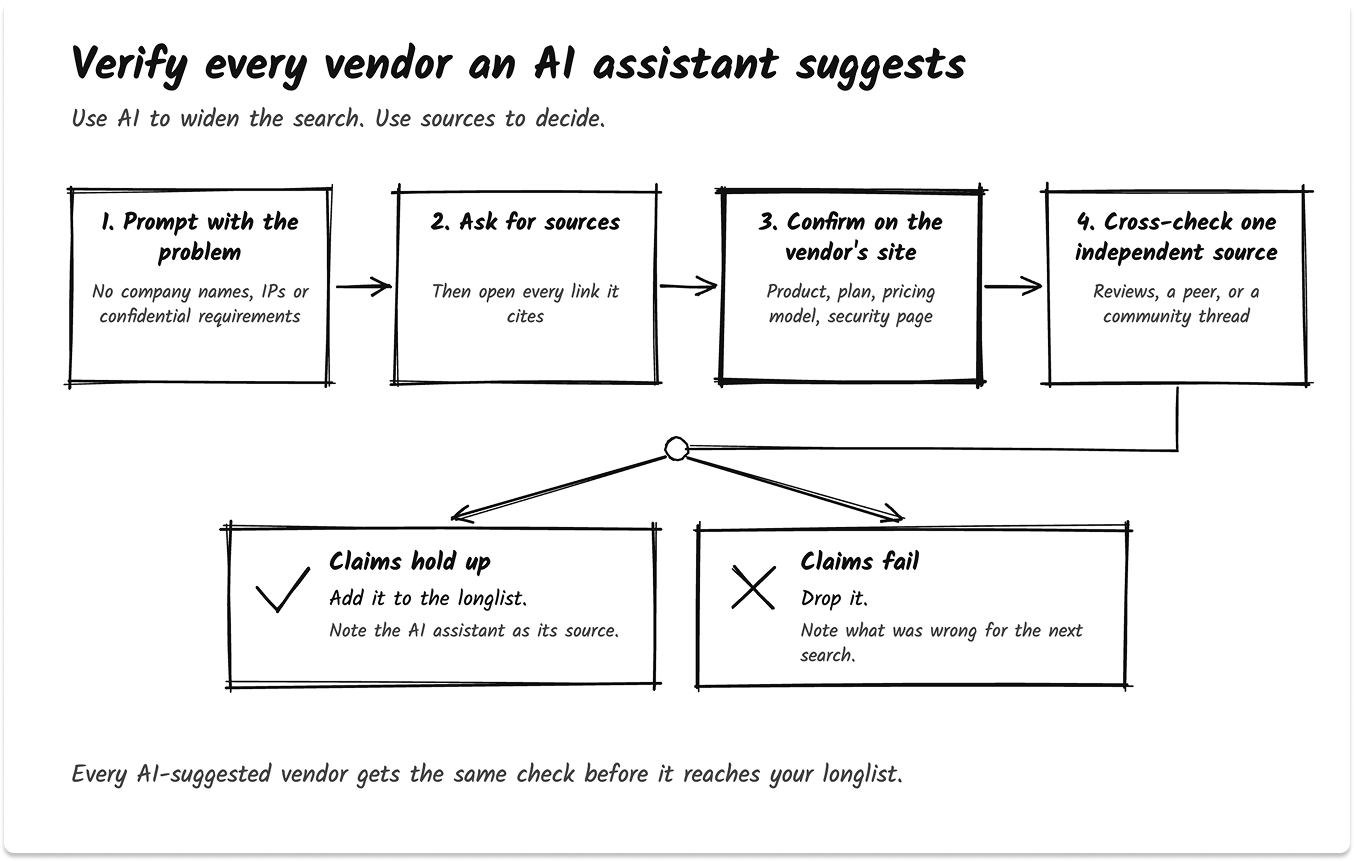
A short verification habit for AI suggestions
The fix is a short loop. Run it for every vendor an AI assistant suggests, before the name goes on your longlist.
Two more habits help. Check your assistant's saved memories now and then, and delete anything that names a vendor you never asked it to remember. And watch for "Sponsored" labels in AI answers, the same way you would on a search results page.
For prompts that work at each stage, see how to use ChatGPT, Perplexity, Gemini, and Claude to build an IT vendor shortlist.
Third-party vendor discovery: finding the vendors you already have
In security and risk management, vendor discovery means building an inventory of every vendor and SaaS app already connected to your systems and data. It answers a different question: who do we already depend on?
The NIST Cybersecurity Framework 2.0 states the goal plainly in outcome GV.SC-04: "Suppliers are known and prioritized by criticality." You cannot assess a vendor you have not found.
The risk is real. Verizon's 2025 Data Breach Investigations Report found that third-party involvement in breaches doubled to 30%.

In plain terms: Shadow IT is software that people use for work without IT approval. Third-party vendor discovery finds this software. It also finds approved vendors that nobody recorded.
No single data source finds everything. Combine at least two of these:
SaaS management platforms automate much of this. I compared them in the best SaaS management platforms for IT leaders. Once you know who your vendors are, a vendor risk assessment tells you which ones need attention first.
A good discovery output fits on one page
When discovery is done well, the output is small. One page holds the search spec, the longlist with where each name came from, the screening result for each vendor, and the three you are taking forward.
That page does two jobs. It gives the selection team a clean start. And at the next renewal, it shows exactly what you looked at and why you chose what you did.
If you want pre-screened vendors matched to your search spec, with no sales contact until you agree to it, you can join TechnologyMatch free as an IT buyer. Use it as one of your two channels, alongside a peer call or a review site.
Looking for IT partners?
Find your next IT partner on a curated marketplace of vetted vendors and save weeks of research. Your info stays anonymous until you choose to talk to them so you can avoid cold outreach. Always free to you.
FAQ
What is vendor discovery?
Vendor discovery is the stage of a purchase where you find and qualify the vendors that can solve a defined problem. It starts with a problem statement and ends with a screened shortlist, before any RFP or demo. In security and risk management, the term also means finding the vendors already connected to your systems.
What is IT vendor discovery?
IT vendor discovery is vendor discovery for software, cloud, infrastructure and IT services. It adds technical screening early: security reports such as SOC 2 Type 2, SSO and SCIM support, data location, integrations with your current systems, and a pricing model you can forecast.
What is the difference between vendor discovery and vendor sourcing?
Vendor discovery finds the vendors that can solve your problem and produces a shortlist. Vendor sourcing is the procurement-led process of engaging and buying from a supplier, often through an RFI or RFQ. Discovery usually comes first and is led by IT.
What are the best vendor discovery platforms for IT buyers?
The main options are peer review sites such as G2 and Gartner Peer Insights, analyst research, cloud marketplaces, IT services directories such as Clutch, and vetted matchmaking services such as TechnologyMatch. Each has a different business model, so use at least two with different funding sources.
How do I find software vendors for a new project?
Define the problem, write a one-page search spec, and search at least two channel types. Build a longlist of 8 to 12 vendors, screen each one against your deal breakers, and cut to three for evaluation. Record where each vendor name came from.
How many vendors should be on a shortlist?
About three. That leaves enough choice to compare, while keeping demos and proofs of concept manageable. It also matches buyer behavior: in Gartner Digital Markets' 2025 survey, software buyers actively engaged an average of 2.5 vendors.
Can I use ChatGPT or other AI tools for vendor discovery?
Yes, to map a category and draft a first longlist. Then verify every vendor outside the chat: open each cited source, confirm the product and pricing on the vendor's own site, and cross-check one independent source. AI answers can cite the wrong source and can be influenced by ads and planted prompts.
What is third-party vendor discovery?
Third-party vendor discovery is building an inventory of every vendor and SaaS app your organization already uses, including ones IT never approved. Teams combine identity provider logs, OAuth grants, expense data and contract records. NIST CSF 2.0 lists it as an outcome: suppliers are known and prioritized by criticality.


