Windows 10 ESU Year 2 for Organizations: The Cost, and When Replacing the PC Is Cheaper
Windows 10 extended support (ESU) Year 2 costs organizations $122 per device, or $183 to join late. Compare ESU, a new PC and Windows 365 with our calculator.

Windows 10 ESU Year 2 costs organizations $122 per device, because Microsoft doubles its $61 Year 1 price each year. Year 2 coverage runs from October 14, 2026 to October 12, 2027. ESU is cumulative, so a device that did not have Year 1 costs $183 to join now.
Windows 365 Cloud PCs and Windows 10 virtual machines in Azure get ESU at no additional cost. These prices apply to organizations that run Windows 10, version 22H2 on business PCs. A personal PC uses the consumer ESU program, which has different rules and ends on October 12, 2027.
Each Windows 10 device has three exits in Year 2. You can pay for ESU, replace the PC, or move the user to a Windows 365 Cloud PC.
The correct exit depends on the device's Windows 11 eligibility, its age and how long you need it. Use the Windows 10 ESU cost calculator below to compare the three exits with your own numbers.
Windows 10 ESU cost calculator: pay, replace or move to Windows 365
Use this calculator to compare three exits for Windows 10 devices that cannot run Windows 11. Enter your device count, your Year 1 status, your end date and your own PC quote.
The calculator shows the total cost of each exit and names the exit with the lowest cost. It also shows how many months of Windows 365 equal the price of one new PC.
Open How this calculator works under the results to see each formula and its source.
Leave Windows 11-capable devices out of the count. They upgrade in place at no ESU cost.
IT Leaders Report 2026
What are your IT peers investing in 2026?
We spoke to about 1,300 IT leaders from various organisations to understand what they're evaluating. Most of it is the kind of thing you'd only hear from a peer you know well enough to ask, so we've put it in one place.
Read the report
How much Windows 10 ESU Year 2 costs for organizations
Windows 10 ESU Year 2 costs organizations $122 per device. Microsoft sets the Year 1 price at $61 per device and states that the price doubles every consecutive year. Year 3 costs $244 per device. You buy ESU through Microsoft Volume Licensing, by the full year, with a minimum of one license.
Microsoft does not print the Year 2 and Year 3 prices on its ESU program page. They follow from its rule: $61 × 2 = $122, and $122 × 2 = $244.
Education customers pay much less. Microsoft prices education ESU at $1, $2 and $4 per license for the three years.
Why joining Windows 10 ESU late costs $183 per device
ESU is cumulative. The Lifecycle FAQ states that you must buy Year 1 before you can buy Year 2. A device that joins now costs $61 for Year 1 plus $122 for Year 2, which is $183.
The Year 1 payment adds no coverage after October 12, 2027. It is the entry price for Year 2.
Microsoft also sells ESU by the full year only. You cannot buy six months. A device that you keep only until January 2027 still costs the full Year 2 price.
What Windows 10 ESU Year 3 adds: $244 per device and a hard stop on October 10, 2028
Year 3 costs $244 per device and ends on October 10, 2028. After that date, a Windows 10 PC gets no more security updates.
The totals per device through Year 3 are:
- $366 for a device that already had Year 1 ($122 + $244)
- $427 for a device that joins in Year 2 ($61 + $122 + $244)

Microsoft calls ESU "a temporary bridge" and states that the program "does not extend the product's lifecycle." Plan every ESU device with an exit date. Do not plan for a Year 4.
Windows 10 extended support end dates for Year 1, Year 2 and Year 3
Windows 10 commercial ESU Year 1 ended on October 13, 2026. Year 2 ends on October 12, 2027. Year 3 ends on October 10, 2028, and Microsoft has published no commercial ESU after that date. The consumer ESU program also ends on October 12, 2027, but it is a separate program with separate rules.
The dates come from Microsoft's Lifecycle FAQ for Extended Security Updates. When you read news about a Windows 10 extension, note that Microsoft extended the consumer program for personal PCs only.
What Windows 10 ESU covers, and what it does not cover
Windows 10 ESU gives critical and important security updates to PCs that run Windows 10, version 22H2. It gives no new features, no non-security fixes and no general technical support. Microsoft support for ESU covers only license activation, installation and regressions that the ESU updates cause, and it requires an active support plan.
The Lifecycle FAQ adds that ESU covers "only the named product and the components that shipped with it."
Other Microsoft software on Windows 10 follows its own dates. You get these updates with or without ESU:
- Microsoft 365 Apps: security updates until October 10, 2028. Feature updates stop at Version 2608.
- Microsoft Edge and WebView2: updates until at least October 2028, and Microsoft states that ESU is not required.
- Microsoft Defender Antivirus: security intelligence updates through October 2028.

Is Windows 10 still safe with ESU?
Yes, for the operating system. Drivers, firmware and third-party apps follow the support dates of their own vendors.
A PC without ESU misses fixes that attackers already use. A Windows kernel flaw was fixed in the first month of ESU and CISA added it to its Known Exploited Vulnerabilities catalog. The fix for Windows 10, version 22H2 shipped only to ESU devices.
Pay, replace or move to Windows 365: choose an exit for each Windows 10 device
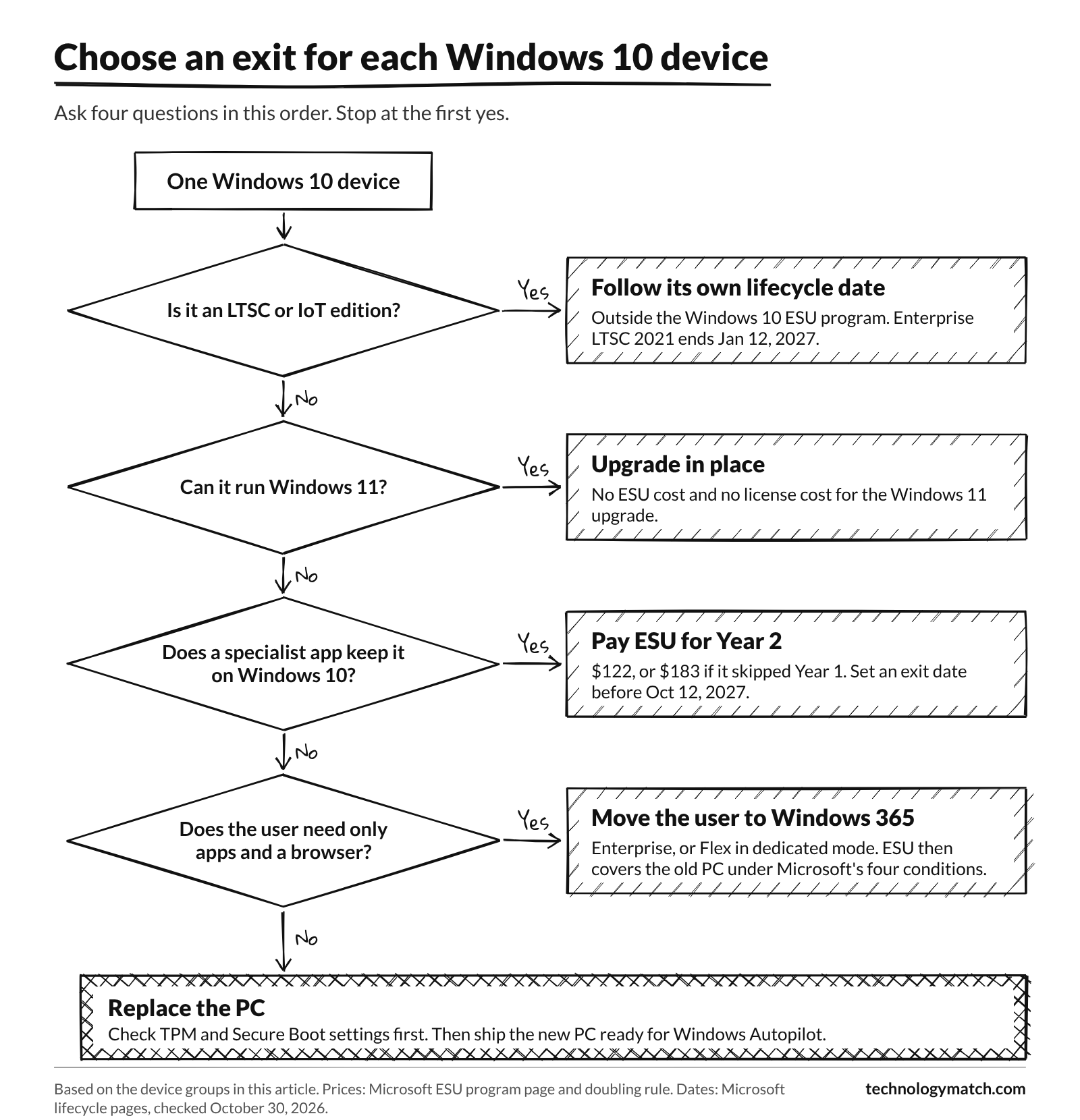
Sort your Windows 10 devices into groups, then choose one exit for each group. Upgrade Windows 11-capable PCs in place. Replace old PCs that cannot run Windows 11. Pay for ESU only when a specialist app or a delivery date keeps a device on Windows 10. Move users who need only apps and a browser to Windows 365.
The table gives the usual exit for each group. Your own prices decide the final answer, so run each group through the calculator.
Upgrade in place when the PC meets Windows 11 hardware requirements
A PC that meets the Windows 11 minimum requirements upgrades at no license cost and needs no ESU. The requirements include TPM 2.0, UEFI firmware with Secure Boot, 4 GB of RAM, 64 GB of storage and a processor on Microsoft's compatible list.
Microsoft states that the minimum requirements remain unchanged. A PC that runs Windows 11 without meeting them "won't be entitled to receive updates." Do not use that route for business PCs.
To check eligibility for many devices at once, open the Intune admin center and go to Reports > Endpoint analytics > Work from anywhere. The Windows tab shows each device as Capable or Not capable, with the hardware requirement that blocks it. Some PCs fail only because TPM or Secure Boot is turned off in the firmware settings. Check those settings before you replace the device.
Replace the PC when it cannot run Windows 11 and is near the end of its life
If you will replace a device before October 2028 anyway, every ESU dollar for it is an extra cost. Compare your PC quote with the ESU totals of $366 and $427 per device.
Ask the hardware partner to register each new PC for Windows Autopilot before shipment. The user signs in, and Intune installs the apps and settings. Our SCCM to Intune migration guide covers the Autopilot and Intune side of this work.
Pay for Windows 10 ESU Year 2 when an app or the schedule is not ready
ESU is the correct choice for a device that a specialist app keeps on Windows 10. It is also correct when replacement PCs cannot arrive before you need them. One year of ESU costs $122 per device, or $183 for a device that joins now.
Give each ESU device a written exit date before October 12, 2027. Put the device on a separate network segment when you can. Buy Year 3 only for a device whose app vendor has a firm date after October 2027.
Move the user to a Windows 365 Cloud PC
Windows 365 runs Windows in Microsoft's cloud, and the user connects from the old Windows 10 PC. Microsoft entitles that PC to ESU at no additional cost when all of these conditions are true:
- The user has a Windows 365 Enterprise license, or a Windows 365 Flex Cloud PC in dedicated mode.
- The Windows 10 PC is Microsoft Entra joined or Microsoft Entra hybrid joined.
- The user signs in to the PC with the same Entra ID account at least once every 22 days.
- IT deploys a custom policy that turns on the EnableESUSubscriptionCheck setting, through Intune or another MDM.
Microsoft's conditions do not name Windows 365 Business. Windows 365 Enterprise also requires Windows E3, Intune and Microsoft Entra ID P1 licenses for each user. Our list of Windows 365 and other DaaS options compares the main cloud PC services.
Windows 10 ESU vs replacing the PC: which costs less over two years
Replacing the PC now costs less over two years when you will replace the PC anyway. ESU through October 10, 2028 adds $366 per device ($427 for a late joiner) on top of the PC that you buy later. ESU costs less only for a device that you will retire with no replacement.
There is one more case for ESU. If this year's budget cannot pay for new PCs, one year of ESU moves the purchase to the next budget year for $122 per device.
Windows 10 ESU vs Windows 365: which costs less per user
ESU costs less in cash. Windows 365 Enterprise with 2 vCPUs, 8 GB of RAM and 128 GB of storage lists at $41 per user per month. That is $492 for 12 months. ESU Year 2 costs $122 per device.
Windows 365 also gives the user a Windows 11 desktop, so the better comparison is Windows 365 against a new PC.
To make that comparison, divide your PC quote by the monthly Windows 365 price. The result is the number of months after which Windows 365 costs more than the PC. The calculator shows this number for you.
How to buy and activate Windows 10 ESU for Year 2
Buy Year 2 ESU licenses through Microsoft Volume Licensing, and buy Year 1 too for devices that skipped it. Get the ESU Multiple Activation Key (MAK) from the Microsoft 365 admin center. On each device, install the key and activate it with the Year 2 activation ID. Devices that you activated for Year 1 need this Year 2 step too.
Microsoft's ESU enablement guide has the exact commands. Follow these steps in this order:
- Buy Year 2 licenses for each device that needs ESU, plus Year 1 licenses for devices that skipped Year 1.
- Make sure that each device runs Windows 10, version 22H2 and has the prerequisite updates that the enablement guide lists.
- Get the MAK. In the Microsoft 365 admin center, go to Billing > Your products > Volume licensing > View contracts > View product keys. Your account needs the Product Key Reader or VL Administrator role.
- Install the MAK on each device. Then activate it with the Year 2 activation ID: 1043add5-23b1-4afb-9a0f-64343c8f3f8d. The ID is the same for all eligible editions and all devices.
- Verify the result. The license details must show the Windows 10 ESU Year 2 program with the status Licensed.
- For devices with no internet access, use phone activation or the Volume Activation Management Tool (VAMT).
Use your device management tool to run steps 4 and 5 on many devices.
Windows 10 ESU not showing up: four checks
When a device does not get ESU updates, check these four items first:
- Version. The device runs Windows 10, version 22H2.
- Prerequisite updates. The device has the updates that the enablement guide lists, in the order that it lists them.
- Key. The device has the ESU MAK installed, and it can reach Microsoft's activation servers.
- Activation ID. The device is activated with the Year 2 ID. A device that has only the Year 1 ID is not licensed for Year 2.
For a PC that gets ESU through Windows 365, also check the 22-day sign-in rule, the join type and the EnableESUSubscriptionCheck policy.
Windows 10 devices outside the ESU program: LTSC, IoT and consumer PCs
Windows 10 LTSB and LTSC editions follow their own lifecycles, and the Windows 10 ESU program does not cover them. Kiosks, lab PCs and shop-floor machines can run these editions. Check the edition of each of these devices before you buy ESU, because the correct date and the correct exit can be different.
The dates come from Microsoft's lifecycle pages for Enterprise LTSC 2021, IoT Enterprise LTSC 2021, Enterprise LTSC 2019 and IoT Enterprise LTSC 2019.
Windows 10 Enterprise LTSC 2021 reaches end of support on January 12, 2027, inside the next 90 days. Microsoft made a separate ESU offer for this edition available for purchase from September 1, 2026. Ask your licensing partner for its price and term.
Personal PCs use the consumer ESU program. Microsoft states that it "can't be used in commercial scenarios." It does not enroll devices joined to Active Directory or Microsoft Entra.
Windows Server follows its own dates too. Read our guides to Windows Server 2016 and 2012 end of support and to plan a Windows Server upgrade or move to Azure.
Cyber insurance and audits when Windows 10 is unsupported
Read the questions about unsupported software in your cyber insurance application before renewal. Then ask your auditor how they treat ESU devices. A Windows 10 device with active ESU gets security updates from the vendor. A device without ESU gets none, and that gap is what insurers and audit frameworks ask about.
Our trigger map lists one event that forces IT buyers to act: a cyber insurer refuses to cover machines on an unsupported operating system. Policy wording is different for each insurer. Check your own policy, and do not assume a rule for the whole industry.
Three public frameworks address unsupported software directly:
- CISA lists the use of unsupported or end-of-life software as Bad Practice #1 for critical infrastructure. CISA encourages all organizations to address its Bad Practices.
- NIST SP 800-53, control SA-22 tells organizations to replace system components when vendor support ends, or to provide another source of continued support.
- PCI DSS v4.0.1, Requirement 12.3.4 asks for a review of hardware and software at least once every 12 months. The review confirms that vendors still ship security fixes and includes a plan for technologies at end of life. The full text is in the PCI SSC document library.
Ask your broker and your auditor these questions:
- Which question on our application covers unsupported or end-of-life software?
- Does a Windows 10 device with paid ESU count as supported under that question?
- Is there an exclusion or a lower limit for claims that involve unsupported systems?
- What evidence do you want: ESU license records, activation reports or patch compliance reports?
A 90-day Windows 10 plan for the rest of ESU Year 2
Use the next 90 days to give every Windows 10 device an exit, and buy ESU only for the devices that need a bridge. The plan runs from November 2026 to the end of January 2027. It includes the January 12, 2027 end date for Windows 10 Enterprise LTSC 2021.

- Weeks 1 to 2: make an inventory. Export every Windows 10 device with its edition, version, last check-in date and owner.
- Weeks 1 to 2: check Windows 11 eligibility. Run the Work from anywhere report in Intune.
- Weeks 2 to 3: sort the devices into groups. Give each device one exit and one exit date.
- Weeks 3 to 4: price each exit. Run each group through the calculator with your own PC quote.
- Weeks 3 to 6: buy ESU for the bridge group only. Activate those devices with the Year 2 ID.
- Weeks 4 to 8: order PCs or Windows 365 licenses. Register new PCs for Windows Autopilot at purchase.
- Weeks 6 to 12: upgrade and migrate. Upgrade the Capable devices in waves, and move users to new PCs with Autopilot.
- Before January 12, 2027: act on Enterprise LTSC 2021. Migrate those devices, or buy the separate LTSC 2021 ESU offer.
- Weeks 10 to 13: retire the old PCs. Wipe the data, remove the devices from Intune, Microsoft Entra ID and Active Directory, and update the asset register.
If you need a partner for the work, our guide to hiring a managed service provider covers the questions to ask. If you change partners in the middle of the project, read how to switch IT partners without downtime.
Comparing Windows 365, Virtual Desktop or another DaaS?
Tell us what you're looking for and we'll get back to you with a shortlist of vendor who fit. If you'd like to move forward, we'll introduce you to those vendors and prep them before your conversation so it starts where it left off with us.
FAQ
Is Windows 10 ESU available now?
Yes. Commercial Windows 10 ESU Year 2 runs from October 14, 2026, to October 12, 2027, and organizations can buy it now through Volume Licensing. Consumer enrollment stays open until October 12, 2027.
How much is Windows 10 extended support for businesses?
Windows 10 extended support costs $61 per device for Year 1, and the price doubles each year: $122 for Year 2 and $244 for Year 3. A device that joins in Year 2 pays $183, because ESU is cumulative.
Can I get Windows 10 ESU for free?
Organizations get ESU at no extra cost for Windows 10 in Windows 365, Azure Virtual Desktop and Azure virtual machines. Physical PCs that connect to Windows 365 Enterprise or Flex dedicated Cloud PCs also qualify, under four conditions. The free consumer routes exclude domain-joined, Entra-joined and MDM-enrolled devices.
Is Windows 10 still safe with ESU?
Windows 10 with ESU gets Critical and Important security updates for the operating system until your coverage ends. Firmware, drivers and third-party apps follow their own vendors' support dates. Check those dates for each device that you keep.
Will Windows 10 extended support go beyond 2027?
For organizations, yes. Commercial Year 3 runs to October 10, 2028, at $244 per device. Consumer ESU ends on October 12, 2027, and Microsoft has published no commercial coverage after October 10, 2028.
Can I buy only Year 2 of Windows 10 ESU?
No. ESU is cumulative, so you must also buy Year 1 for that device. A device that joins in Year 2 costs $183.
Does Windows 365 include Windows 10 ESU?
Yes. Windows 10 Cloud PCs get ESU at no extra cost. A physical Windows 10 PC that connects to a Cloud PC gets ESU with Windows 365 Enterprise or Flex in dedicated mode. The PC must be Entra joined or hybrid joined, the user must sign in at least every 22 days, and IT must deploy the subscription check policy.
What happens when Windows 10 ESU ends in 2028?
After October 10, 2028, commercial Windows 10 devices get no more security updates for the operating system. Security updates for Microsoft 365 Apps on Windows 10 also end on that date. Replace or move every remaining device before then.