What is Veeam? How it Works, and What it Does for IT Leaders
What Veeam is, how Veeam Backup & Replication works, what each product does, and what Veeam 13.1 and the v12 end of support in February 2027 mean for IT leaders.

Veeam Backup & Replication v12 has a fixed end date. Veeam lists February 2027 as the last month of support and security fixes for v12. After that month, v12 gets no support and no security updates.
The next version also changes the platform. Version 13 adds the Veeam Software Appliance, a hardened Linux deployment of the backup server. If you upgrade a Windows server to 13.1 first, you lose the supported route to that appliance.
I treat this as an architecture decision with a deadline. Your license type, your current build, and the features you use decide which paths stay open.
What is Veeam?
Veeam is a software company that makes data resilience products. Its core product, Veeam Backup & Replication, backs up, replicates, and recovers data across virtual, physical, cloud, and SaaS workloads.
The name now covers a wider portfolio. Veeam completed its acquisition of Securiti AI on December 11, 2025. It now calls itself the Data and AI Trust Company, and it sells data security posture management (DSPM) and AI governance next to backup.
In practice, Veeam does these jobs:
- Backup and restore for VMware vSphere, Microsoft Hyper-V, Nutanix AHV, Proxmox VE, Red Hat OpenShift Virtualization, and other platforms.
- Replication of virtual machines to a second site, with continuous data protection (CDP) for a low recovery point objective (RPO).
- Immutable copies on hardened Linux repositories and on object storage with object lock.
- Malware detection in backup data, before and during a restore.
- SaaS backup for Microsoft 365, Entra ID, and Salesforce.
- Data security and AI governance through Securiti.
The core product runs on infrastructure that you own and operate. Veeam Data Cloud adds managed services for SaaS data and off-site storage, so you can mix both models.
How does Veeam Backup & Replication work?
Veeam Backup & Replication uses one backup server to control a set of separate components. Each component does one job: it reads data, moves it, stores it, tests it, or recovers it.
This design lets you scale each part on its own. You add proxies for more throughput and repositories for more capacity, and the backup server stays the single point of control.

1. The backup server controls every job
The backup server holds the configuration database and starts each job on its schedule. In v13, it runs on Windows Server or on the Veeam Software Appliance.
On Windows, the configuration database uses Microsoft SQL Server or PostgreSQL. On the appliance, it always uses PostgreSQL. Veeam ONE, a separate product, watches the backup server and reports on job results.
2. Proxies, agents, and plug-ins capture the data
Backup proxies are data movers. They read the source data, compress it, and send it to the repository.
For virtual machines, Veeam reads data through the hypervisor API and uses changed block tracking (CBT). CBT identifies the blocks that changed since the last job, so an incremental backup reads less data.
For physical servers and cloud instances, Veeam uses agents for Windows, Linux, macOS, AIX, and Solaris. Plug-ins for Oracle RMAN, SAP HANA, SQL Server, and IBM Db2 back up through the native tools of each application.
3. Repositories store the backup files
A backup repository is the storage location for backup files. Veeam supports Windows and Linux servers, deduplication appliances, and object storage on site or in AWS, Azure, and Google Cloud.
A scale-out backup repository (SOBR) groups repositories into tiers. The performance tier keeps recent backups on disk, the capacity tier copies them to object storage, and the archive tier keeps long-term data.
Immutability blocks changes and deletion for a set period. Use the hardened Linux repository or object storage with object lock to make immutable copies.
4. SureBackup and malware detection verify the backups
A backup has value only if it recovers. SureBackup starts virtual machines from backup files in an isolated virtual lab and tests them.
Malware detection uses five methods: an inline entropy scan, file system activity analysis, Veeam Threat Hunter, antivirus software, and YARA rules. Secure Restore scans the data before Veeam writes it back to production.
5. Recovery returns workloads to service
Instant Recovery starts a workload directly from the backup file. Users get service back before the full restore completes.
Veeam Explorers recover single items, such as a mailbox, a database, or an Active Directory object. Veeam can also restore a workload to a different hypervisor or to AWS, Azure, or Google Cloud.
6. Replication and Recovery Orchestrator cover a site failure
Replication keeps a ready copy of a virtual machine on a second host or site. CDP replicates changes continuously, which gives the lowest RPO in the product.
Veeam Recovery Orchestrator runs failover plans in the correct order. It also tests the plans and documents the results for auditors.
The Veeam product portfolio: what each product does
Veeam sells separate products for on-site infrastructure, Kubernetes, SaaS data, cloud storage, and data security. Each product below has the same four labels, so you can compare them quickly.
Veeam Backup & Replication and Veeam Data Platform
- What it does: Backs up, replicates, and recovers VMs, physical servers, cloud workloads, applications, and file and object data.
- Problems it replaces: A separate backup tool for each hypervisor or workload type.
- When you need it: You run your own infrastructure on one or more hypervisors.
- Key capabilities: CBT image backup, immutable repositories, malware detection, Instant Recovery, replication, and CDP. Veeam sells it in Veeam Data Platform editions, and some features need the Advanced or Premium edition.
Veeam ONE and Veeam Recovery Orchestrator
- What they do: Veeam ONE watches and reports on backup and virtual infrastructure. Recovery Orchestrator runs, tests, and documents disaster recovery plans.
- Problems they replace: Manual job checks, spreadsheet reports, and recovery runbooks that nobody tests.
- When you need them: An auditor, insurer, or regulator asks for proof of backup success and tested recovery.
- Key capabilities: Alarms and compliance reports in Veeam ONE. Ordered failover, scheduled tests, and recovery reports in Recovery Orchestrator.
Veeam Kasten for Kubernetes
- What it does: Backs up and recovers Kubernetes applications and their data.
- Problems it replaces: Scripts and storage snapshots that miss the application configuration.
- When you need it: You run stateful applications on Kubernetes in production.
- Key capabilities: Application-aware backup and restore in the cluster. For VMs on OpenShift Virtualization, Veeam Backup & Replication 13.1 adds a separate KubeVirt plug-in.
Veeam Data Cloud and Veeam Backup for Microsoft 365
- What they do: Veeam Data Cloud backs up Microsoft 365, Entra ID, and Salesforce as a managed SaaS service. Veeam Backup for Microsoft 365 is self-managed software for Microsoft 365.
- Problems they replace: Dependence on the native retention settings of the SaaS provider.
- When you need them: Choose Veeam Data Cloud if you want no backup servers. Choose the software if the backup data must stay on your own storage.
- Key capabilities: Backup of mailboxes, OneDrive, SharePoint, and Teams, plus Entra ID object recovery.
Veeam Data Cloud Vault and Vault Archive
- What it does: Gives you managed, immutable cloud storage as a backup target. Veeam announced Vault Archive on July 29, 2026, as a lower-cost tier for cold data.
- Problems it replaces: A second site, or a cloud bucket that your team must configure and lock.
- When you need it: You need an off-site immutable copy and do not want to manage cloud storage.
- Key capabilities: Immutable storage that Veeam operates. In 13.1, Veeam agents can back up directly to Vault.
Securiti by Veeam
- What it does: Finds and classifies sensitive data, then applies privacy, governance, and AI controls to it.
- Problems it replaces: Separate DSPM, privacy, and AI governance tools.
- When you need it: You must prove where sensitive data lives before AI tools can use it.
- Key capabilities: DSPM, privacy operations, data governance, and AI trust controls. Veeam also lists Agent Commander to govern AI agents, so confirm its availability with Veeam.
Object First appliances
- What it does: Ootbi is an on-site storage appliance that Object First built as an immutable Veeam backup target.
- Problems it replaces: A hardened Linux repository that your team must build, harden, and patch.
- When you need it: You want an immutable on-site target with less Linux administration.
- Key capabilities: Immutable object storage for Veeam backups. Veeam confirmed the acquisition to Blocks & Files on January 14, 2026, and neither company issued a press release.
Veeam also offers a free Community Edition of Veeam Backup & Replication and a Cyber Extortion Response service for incident response.
What changed in Veeam v13: the Linux appliance and a new architecture
Version 13 gives the backup server a second platform. Veeam shipped the first v13 build on September 3, 2025, as an appliance only, and the Windows installer followed on November 19, 2025.
The main v13 changes are:
- Veeam Software Appliance (VSA): A hardened Linux deployment of the backup server. Veeam builds it on Veeam JeOS, based on Rocky Linux from CIQ, with FIPS 140-3 validated packages. You install it from an ISO on local disks with hardware RAID.
- Veeam Infrastructure Appliance (VIA): The same hardened base for proxies, hardened repositories, and other roles.
- Web UI and Host Management Console: Browser-based management for the backup server and for the appliance operating system.
- High availability: A cluster option for the backup server on the appliance.
- PostgreSQL: The appliance uses PostgreSQL. Windows deployments use Microsoft SQL Server or PostgreSQL, and SQL Server instances with case-sensitive collations are unsupported.
- Dropped operating systems: v13 does not support Windows Server 2012 or 2012 R2 for the backup server, the console, or Enterprise Manager.
The web UI still has gaps. Veeam's own migration guide calls the web UI limited and recommends the Windows-based console for full access to appliance features.
Veeam 13.1: what is new and why it matters now
Veeam released 13.1 on July 29, 2026, and the current build is 13.1.1.18 from August 12, 2026. Veeam states that 13.1 adds more than 70 new features and enhancements.
For a v12 customer, the support date matters more than any single feature. The chart below shows why.
The Veeam 12 end of support date: February 2027
The Veeam Product Lifecycle page gives v12 two dates. End of Fix was November 2025, and End of Support and Security Fix is February 2027.
During End of Fix, Veeam still supports v12 and still releases security updates. Veeam creates no new patches or hotfixes for other issues, except case by case.
Veeam kept that policy in 2026. It released v12 security builds in March, June, and October 2026, and the latest, build 12.3.2.4934, shipped on October 6, 2026.
After February 2027, v12 gets no support and no security fixes. Any new vulnerability in v12 stays open.
Some third-party trackers show September 2025 as the v12 End of Fix date. Veeam's lifecycle page shows November 2025, and I use Veeam's date.
What Veeam 13.1 adds, grouped by impact
Identity recovery. 13.1 adds automated Active Directory forest recovery for single-domain, multi-domain, and multi-tree forests. Veeam states that the wizard replaces more than 40 manual steps from Microsoft's documentation. It recovers to vSphere or Hyper-V and needs a paid Veeam Universal License edition.
Entra ID protection now covers organization contacts, device objects, and BitLocker recovery keys. It also adds role-based access control for Entra ID data.
Platforms. Red Hat OpenShift Virtualization support uses the Veeam Plug-in for KubeVirt on OpenShift 4.20 to 4.22. The release also adds XenServer, XCP-ng, and Sangfor aSV, plus a Universal Hypervisor API (UHAPI) that Platform9 and VergeOS use first.
Large databases. Veeam Snap Scale Backup uses the Universal Storage API to back up databases larger than 100 TB from storage snapshots. Epic EHR on InterSystems IRIS uses this method.
Security. Malware detection now covers unstructured data, AIX, Solaris, and Azure VMs. A new worker image meets FIPS and DISA STIG requirements, and backup events now go to syslog SIEM tools and the Incident API.
Appliance. The appliance adds drive expansion, Fibre Channel and iSCSI with multipath, a Hyper-V image, and cross-subnet HA clusters. Prometheus-compatible metrics need a Veeam Universal License.
Install 13.1.1 instead of 13.1.0. Build 13.1.1.18 fixed appliance services that failed behind an HTTP or HTTPS proxy. It also fixed an immutability mismatch on direct-to-immutable object storage and Cloud Connect tenant copy-job failures.
How to upgrade to Veeam 13.1: the paths and the trap between them
You have three main paths to 13.1, plus a server move if your operating system is too old. Your target platform, license type, and current build decide which paths you can use.
Path A: Upgrade Veeam in place on Windows
Veeam KB2053 sets the minimum source build. From build 12.3.1.1139 or later, you can upgrade directly to 13.1.1.
If you run 12.0, 12.1, 12.2, or 12.3.0, upgrade to 12.3.2 first. Versions 11 and 10a need more steps, and KB2053 lists each one.
Examine the operating system before you start. v13 supports Windows Server 2016 through 2025 for the backup server. If the server runs Windows Server 2012 R2, move it to a supported server first. Use a configuration backup and restore for the move.
Use the Upgrade Checklist in the Veeam User Guide for the full prerequisites. In my upgrade plans, Veeam ONE always goes first, because Veeam ONE 13.1 can monitor v12 and later.
Path B: Migrate from Windows to the Veeam Software Appliance
Veeam's migration guide, KB4800, supports the Windows-to-appliance migration from 13.0.x only. Veeam modified the guide on October 1, 2026, after 13.1.1 shipped, and the 13.0.x rule did not change.
The supported sequence has five steps:
- Upgrade the Windows server to 13.0.3 (build 13.0.3.63). Get the build from the Veeam Previous Versions page.
- Deploy a Veeam Software Appliance at 13.0.3. Install the license, and give the Support ID to Veeam Support.
- On the Windows server, disable the scheduled jobs and create an encrypted configuration backup. Stop only the services that KB4800 lists.
- Restore the configuration on the appliance. Veeam converts the SQL Server or PostgreSQL database to the local PostgreSQL instance.
- Upgrade the appliance to 13.1.1.
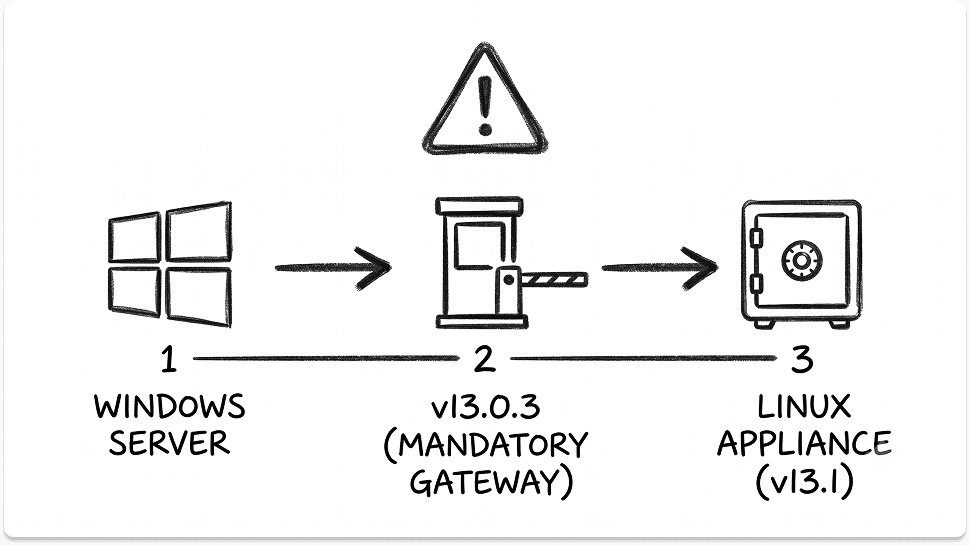
The migration is one-way. Veeam does not support a return from Linux to Windows, and it has no plan to add one.
Veeam runs these migrations as support-assisted projects. Before you start, turn on Receive proactive support and complete the checklist on the VSA Conversion Portal.
Path C: Build a new Veeam Software Appliance
A new deployment fits when you cannot migrate. For example, you already run 13.1 on Windows, or your configuration includes items that cannot migrate.
Deploy the 13.1.1 appliance, add your infrastructure, and import the current backups. You must re-create the jobs, so size the project by job count and policy complexity.
Your license decides if the appliance is an option
The appliance accepts only instance-based Veeam Universal License (VUL) keys, including VCSP rental keys. KB4800 states that socket licenses and licenses with Cloud Connect do not work on the appliance.
v13 on Windows still accepts socket licenses and VUL. A Veeam product manager confirmed this split on the Veeam Community forum, and the Veeam licensing policy limits legacy socket licenses to Windows installs.
To convert, follow KB4550. Remove the socket license first, and the server runs as Community Edition until you install the VUL key.
Do not install a key that combines socket and VUL licenses, because it restricts VUL functions. Your reseller or the Veeam Renewals Team handles the commercial side of the conversion.
What does not migrate to the Veeam Software Appliance
KB4800 lists these limits:
- Veeam Cloud Connect: Deployments cannot migrate.
- oVirt KVM plug-in: The configuration cannot migrate. Stay on Windows until a later appliance release supports it.
- Google Cloud plug-in: The configuration does not migrate.
- CDP jobs: The job configuration does not migrate.
- Agents: The appliance supports v13 agents only.
- Hyper-V: SCVMM high availability and Hyper-V workgroup clusters do not work with a Linux backup server.
- NetApp ONTAP: The appliance supports it in the NAS filer role only.
KB4800 also lists configuration problems that stop a migration. Complete the checklist below before you open the support case.
Compatibility dependencies to check before any Veeam upgrade
The components around the backup server have their own version rules. Check each one before the upgrade window.
A decision rule for each Veeam upgrade path
- You stay on Windows: Upgrade in place to 13.1.1.
- You may want the appliance later: Stop at 13.0.3 and migrate soon. Veeam develops hotfixes only for the most recent public build.
- You want the appliance and have a socket license: Convert to VUL first, or stay on Windows.
- You want the appliance, have VUL, and use no Cloud Connect or oVirt: Upgrade to 13.0.3, migrate with Veeam Support, then upgrade to 13.1.1.
- You already run 13.1 on Windows: Stay on Windows, or build a new appliance and re-create the jobs.
Find your Veeam 13.1 upgrade path
Five answers decide your path. The tool applies the rules in KB2053, KB4800, and KB4550, and it shows each step in order with the check to do before it.
The tool uses hard gates for the conditions that block the appliance: Cloud Connect, the oVirt KVM plug-in, and a Windows server already on 13.1. A socket license becomes a first step, because you can convert it.
What Veeam offers IT leaders
Four questions decide if Veeam fits your data protection plan. Can it recover clean data after ransomware? Can it follow your workloads across hypervisors and clouds? Does it protect SaaS and identity data? Can it help you govern sensitive data and AI?
Veeam ransomware resilience and clean recovery
Veeam handles ransomware in three layers: immutable copies, malware detection, and tested recovery. Hardened Linux repositories, object lock, and Veeam Data Cloud Vault keep copies that attackers cannot change.
Entropy scans, Threat Hunter, and YARA rules look for threats in backup data. SureBackup then proves that a restored machine starts, and Secure Restore scans data before it goes back to production.

The backup server is also a target. CVE-2024-40711, a critical flaw that Veeam fixed in build 12.2.0.334, is on the CISA Known Exploited Vulnerabilities catalog. CISA added it on October 17, 2024, and marks it as known for use in ransomware campaigns.
Veeam ships critical fixes often, so patch speed is part of your recovery plan. I recommend a monthly review of Veeam security advisories and a written target date for each critical fix.
For RPO and RTO comparisons across backup vendors, see our enterprise backup software comparison.
Veeam flexibility across hypervisors and clouds
Veeam Backup & Replication 13.1 protects a wide set of virtualization platforms from one backup server. The User Guide lists vSphere, Hyper-V, Nutanix AHV, Proxmox VE, OpenShift Virtualization, XenServer, XCP-ng, Sangfor aSV, and more.
This matters if you plan to leave VMware. You can keep one backup tool through the move, and you can restore a workload to a different hypervisor when you are ready.
The Universal Hypervisor API changes who builds the integration. The hypervisor vendor builds and certifies it, and Platform9 and VergeOS are the first two.
Some new platform functions are experimental in 13.1. Test restores on each new platform before you move production workloads to it.
For the backup side of a VMware exit, read what happens to your backup strategy when you leave VMware. For the hypervisor choice itself, see our guide to VMware alternatives.
Veeam SaaS and identity protection
Veeam protects SaaS data in two ways. Veeam Data Cloud is a managed service for Microsoft 365, Entra ID, and Salesforce, and Veeam Backup for Microsoft 365 is software that you run.
Identity recovery is the larger change in 13.1. Automated Active Directory forest recovery targets the worst case, a full forest loss after an attack. If you also move identity to the cloud, read our guide to migrating from on-prem Active Directory to Microsoft Entra ID.
Microsoft 365 backups need action now. Microsoft started to retire Exchange Web Services (EWS) in Exchange Online on October 1, 2026. Veeam KB4820 states that this blocks mailbox backups in tenants that did not enable EWS.
Veeam still uses EWS because Microsoft Graph does not yet give the delta sync that incremental backup needs. A Veeam staff post says Veeam plans a full move to Graph before April 2027. Our EWS retirement guide covers the tenant settings in detail.
Data security and AI governance through Securiti
Securiti adds a data security layer next to backup. It finds and classifies sensitive data, and it applies privacy, governance, and AI controls to that data.
Veeam describes the combined offer as one platform for visibility, security, governance, privacy, compliance, and resilience across data, AI, and identities. Veeam has not published which Securiti integrations with Veeam Data Platform are generally available.
Ask for that list, with dates, before you plan around it. If you compare Securiti as a privacy platform, see OneTrust vs TrustArc vs Securiti. If your goal is DSPM before an AI rollout, see Cyera vs Varonis vs BigID.
Is Veeam right for your environment?
Veeam fits best when you need broad workload coverage and you want to run your own backup infrastructure. It fits less well when you want on-site workload backup with no servers to operate.
The v13 appliance changes the operations picture. It takes Windows out of the backup server role, but it needs an instance-based VUL license and a support-assisted migration.
Patch speed is the other test. Veeam shipped critical v12 fixes in March, June, and October 2026, so your team must apply fixes quickly on whichever platform it runs.
Planning a Veeam upgrade or a backup platform change?
Whether you stay on Windows, move to the appliance, or compare Veeam with other platforms, tell us your environment and priorities. We will match you with the vendors and partners worth talking to.
FAQ
What is Veeam used for?
Organizations use Veeam to back up, replicate, and recover data across virtual machines, physical servers, cloud workloads, SaaS applications, and Kubernetes. It also makes immutable copies and scans backups for malware to support ransomware recovery. Since December 2025, Veeam also sells DSPM and AI governance through Securiti.
Is Veeam free?
Veeam offers a free Community Edition of Veeam Backup & Replication. Paid editions use the Veeam Universal License, or legacy socket licenses on Windows. If you remove a paid license, the product returns to Community Edition until you install a new key.
What is Veeam Backup & Replication?
Veeam Backup & Replication is the core product of Veeam Data Platform. A backup server controls proxies and repositories that back up, replicate, and restore workloads. It runs on Windows or on the Linux-based Veeam Software Appliance, and the current build is 13.1.1.18.
What is new in Veeam 13.1?
Veeam states that 13.1 adds more than 70 features and enhancements. They include automated Active Directory forest recovery, wider Entra ID protection, OpenShift Virtualization support, and Snap Scale backup for databases larger than 100 TB. Install build 13.1.1.18, which fixed several upgrade problems in 13.1.0.
When does Veeam 12 support end?
Veeam lists February 2027 as the last month of support and security fixes for v12. v12 reached End of Fix in November 2025, but Veeam continues to release v12 security updates until support ends.
Can I upgrade directly from Veeam 12 to 13.1?
Yes, if you run build 12.3.1.1139 or later on Windows. Earlier v12 builds must upgrade to 12.3.2 first. If you want the appliance, upgrade to 13.0.3 instead, migrate, and then upgrade the appliance to 13.1.1.
What is the Veeam Software Appliance?
The Veeam Software Appliance is a hardened Linux deployment of Veeam Backup & Replication. Veeam builds it on Veeam JeOS, based on Rocky Linux from CIQ, with a web UI, high availability, and FIPS mode. It requires an instance-based Veeam Universal License.
Does Veeam back up Microsoft 365?
Yes. Veeam backs up Microsoft 365 through the managed Veeam Data Cloud service or the self-managed Veeam Backup for Microsoft 365 software. Both still use EWS for Exchange Online, so you must enable EWS and allow the Veeam app IDs in your tenant.
Is Securiti part of Veeam?
Yes. Veeam completed its acquisition of Securiti AI on December 11, 2025. Veeam now sells Securiti as its data and AI security product line, next to Veeam Data Platform.