Best Enterprise Backup Software Comparison by RPO & RTO in 2026
Looking for enterprise backup software? I compare Veeam, Rubrik, Cohesity, Commvault, Druva, Zerto, and Acronis based on true RPO and RTO to survive a disaster.

I've spoken to enough IT leaders on enterperise backup solutions to know that when your primary data center goes dark, nobody at that table cares about your backup software's clean user interface. Nobody cares about the deduplication ratio.
They only ask two questions:
- How much data did we just lose?
- How long until the business is back online?
Those two questions represent your Recovery Point Objective (RPO) and your Recovery Time Objective (RTO). In the enterprise space, these aren't just IT metrics; they are the physical boundaries of your corporate survival.
If you evaluate enterprise backup software based purely on feature checklists, ticking boxes for multi-cloud support or API integrations, you are doing your organization a massive disservice. You must evaluate these platforms based on how their underlying architecture dictates their recovery physics under maximum stress.
In this guide, I am going to directly compare the seven heavyweights in the market—Veeam, Rubrik, Cohesity, Commvault, Druva, Acronis, and Zerto—based strictly on their realistic RPO and RTO performance.
The Physics of Recovery: Why Marketing RTO is a Lie
Before we compare the vendors, we need to establish the ground rules of recovery physics.
RPO (Data Loss Tolerance) looks backward. If your RPO is four hours, your backup system must capture a snapshot of your environment every four hours without causing a "stun" effect that crashes your production servers. Achieving a low RPO is a battle of storage input/output operations per second (IOPS).
RTO (Downtime Tolerance) looks forward. If your RTO is two hours, the software must locate the data, rehydrate it from its compressed state, transfer it across the network, and boot the virtual machines within 120 minutes. Achieving a low RTO is a battle of compute orchestration and network bandwidth.
When you land on a vendor's website, you will see claims of "Instant Recovery" and "Sub-Minute RTOs." As an IT leader, you must view these claims with intense operational skepticism.
When a vendor demonstrates "instant restore," they are usually booting a single Virtual Machine directly from their backup appliance. It's a parlor trick. In a real ransomware event, you don't need to boot one VM; you need to boot 500. Standard backup appliances do not have the CPU or RAM to run 500 VMs simultaneously. Your actual RTO is determined by how fast you can rehydrate that deduplicated data and move it off the backup appliance back to your primary flash storage.
If a vendor relies heavily on the public cloud, their RTO is fundamentally limited by the physical size of your internet pipe. You cannot download 100 terabytes of data over a 1 Gbps connection in two hours. The math simply does not allow it.
With the physics established, let’s look at how the top seven vendors actually architect their recovery.
The 7 Enterprise Backup Giants: An RPO & RTO Breakdown
I evaluate backup vendors based on their architectural intent. A platform designed to perfectly protect cloud-native applications will inherently struggle to provide a 5-minute RTO for a massive on-premises monolithic database.
Here is how the major players stack up when your job is on the line.
1. Zerto (HPE): The Continuous Data Protection (CDP) Standard
If you operate a Tier-1 financial trading platform or a critical healthcare Electronic Health Record (EHR) system where losing even five minutes of data is a fireable offense, Zerto is the gold standard. Zerto doesn't really do "backups" in the traditional sense; they do Disaster Recovery.
- Architecture: Hypervisor-level journal-based replication. It sits in the hypervisor (like VMware) and continuously intercepts and copies every single write-operation to a secondary site or cloud in near real-time.
- The RPO Profile: Near-Zero (Seconds). Because it is continuous, there are no backup "windows." If a server crashes at 2:14:32 PM, you can roll back your environment to exactly 2:14:30 PM.
- The RTO Profile: Sub-Minute to Minutes. The data is already waiting at the disaster recovery site in an uncompressed, native state. There is no massive rehydration penalty. You simply execute an automated failover script.
- The Catch: Zerto is expensive and highly complex to design. Because it constantly replicates data, it requires significant bandwidth between your primary and secondary sites. Most of my clients use Zerto exclusively for their "Crown Jewel" VMs and use something like Veeam or Rubrik for the rest of the data center.

2. Rubrik: The Immutable Hardware Fortress
Rubrik popularized the modern hyper-converged backup appliance. You buy their physical blocks, rack them in your data center, and their software handles the rest. Their primary architectural philosophy is built around Zero Trust and speed of local recovery.
- Architecture: Hyper-converged, append-only proprietary file system. Once data is written to a Rubrik appliance, it cannot be modified, encrypted, or deleted—even by someone with administrative credentials.
- The RPO Profile: 15 Minutes to Hours. Because they use high-speed flash storage on their ingest tier, they can take very frequent snapshots without stunning the primary storage arrays.
- The RTO Profile: Exceptional for local recovery. Rubrik excels at "Live Mount." Because their physical appliances have significant onboard compute power, you can instantly mount massive databases (SQL, Oracle) directly on the Rubrik hardware while you rebuild your primary servers in the background.
- The Catch: Rubrik is a hardware-heavy investment. If your physical data center burns down (or is fully compromised), you must rely on their cloud replication. Pulling petabytes of data back from an AWS S3 bucket will severely bottleneck your RTO, regardless of how fast the Rubrik software is.

3. Cohesity: The Scale-Out Mass Restore Engine
Cohesity often goes head-to-head with Rubrik. They are also a hyper-converged appliance vendor, but their architectural philosophy is slightly different. Cohesity treats backup data as a usable asset rather than a dark archive, utilizing their proprietary SpanFS file system.
- Architecture: Distributed, scale-out file system. You can infinitely add Cohesity nodes to a cluster, and the compute and storage resources scale linearly.
- The RPO Profile: 15 Minutes to Hours. Similar to Rubrik, they can ingest data incredibly fast.
- The RTO Profile: Built for Mass Restores. Where Cohesity truly shines is when you need to restore hundreds of VMs simultaneously. Because their file system spans across all nodes in the cluster, the rehydration CPU load is distributed. They don't suffer from the single-controller bottlenecks that plague legacy backup storage.
- The Catch: Cohesity’s interface and configuration can be significantly more complex than Rubrik's. If you don't need their advanced data management and analytics features, you might find the platform slightly over-engineered for basic backup and restore.

4. Veeam: The Software-Defined Swiss Army Knife
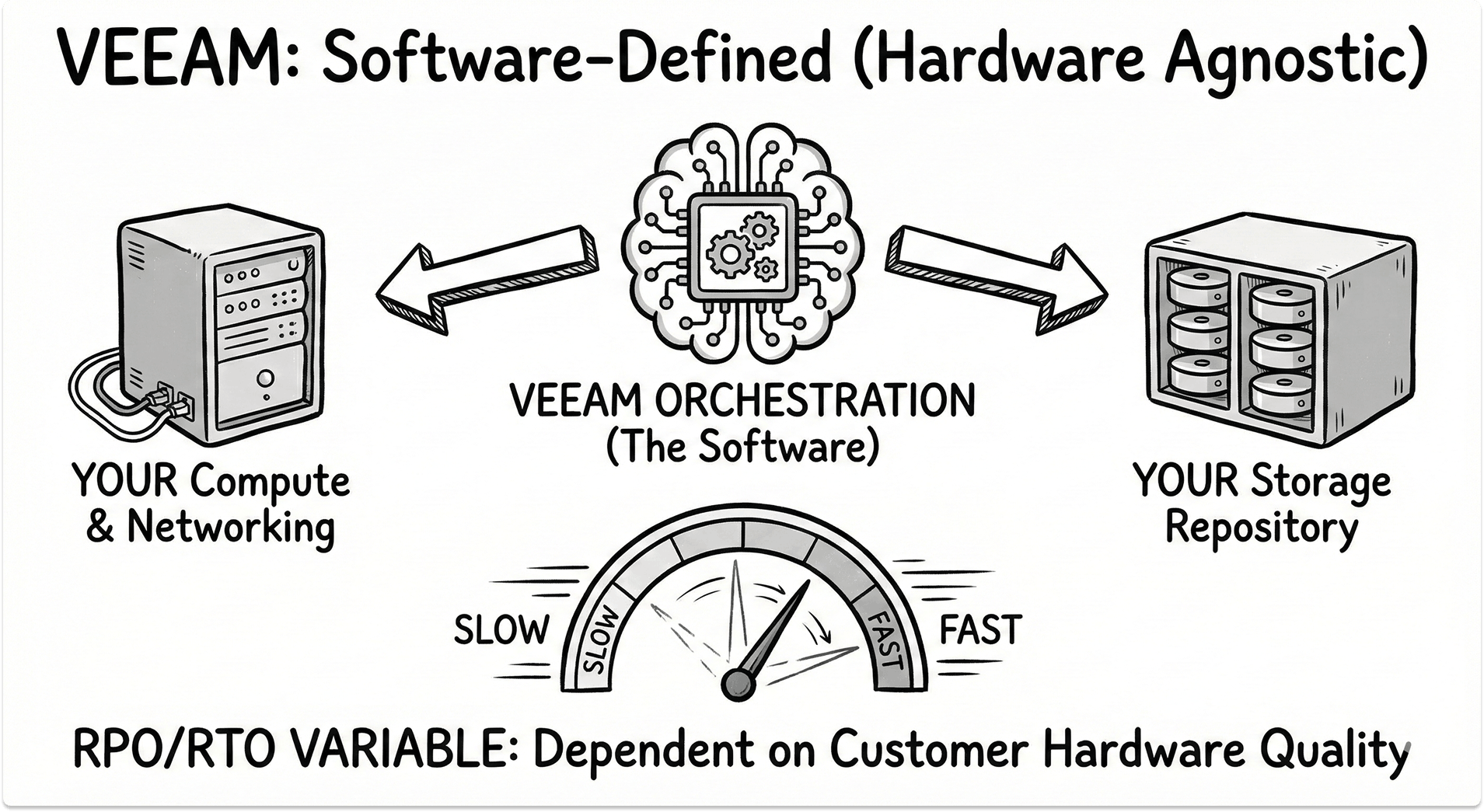
Veeam is arguably the most widely deployed virtualization backup software on the planet. Unlike Rubrik or Cohesity, Veeam is fundamentally a software company. You bring your own servers and your own storage, and Veeam provides the orchestration.
- Architecture: Software-defined, hardware-agnostic. Recently, Veeam has aggressively expanded their Continuous Data Protection (CDP) engine to compete with Zerto, moving beyond just scheduled snapshots.
- The RPO Profile: Highly Variable. Your RPO with Veeam is entirely dependent on the horsepower of the hardware you provided. If you under-provision your proxy servers or use slow, cheap spinning disks for your repository, your backup windows will stretch, increasing your RPO.
- The RTO Profile: Excellent, if architected correctly. Veeam invented the "vPower NFS" concept, allowing you to instantly boot a VM directly from the compressed backup file.
- The Catch: Because you build the underlying hardware, you own the integration risk. If your RTO is slow, Veeam support will likely point out that your underlying storage array lacks the IOPS to rehydrate the data quickly. You must design the architecture flawlessly to get enterprise-grade RTO out of it.
Note: If you're looking for migrate between Rubrik and Veeam, we have a detailed migration guide to help you make the move with little disruption and downtime.
5. Commvault: The Complex Enterprise Behemoth
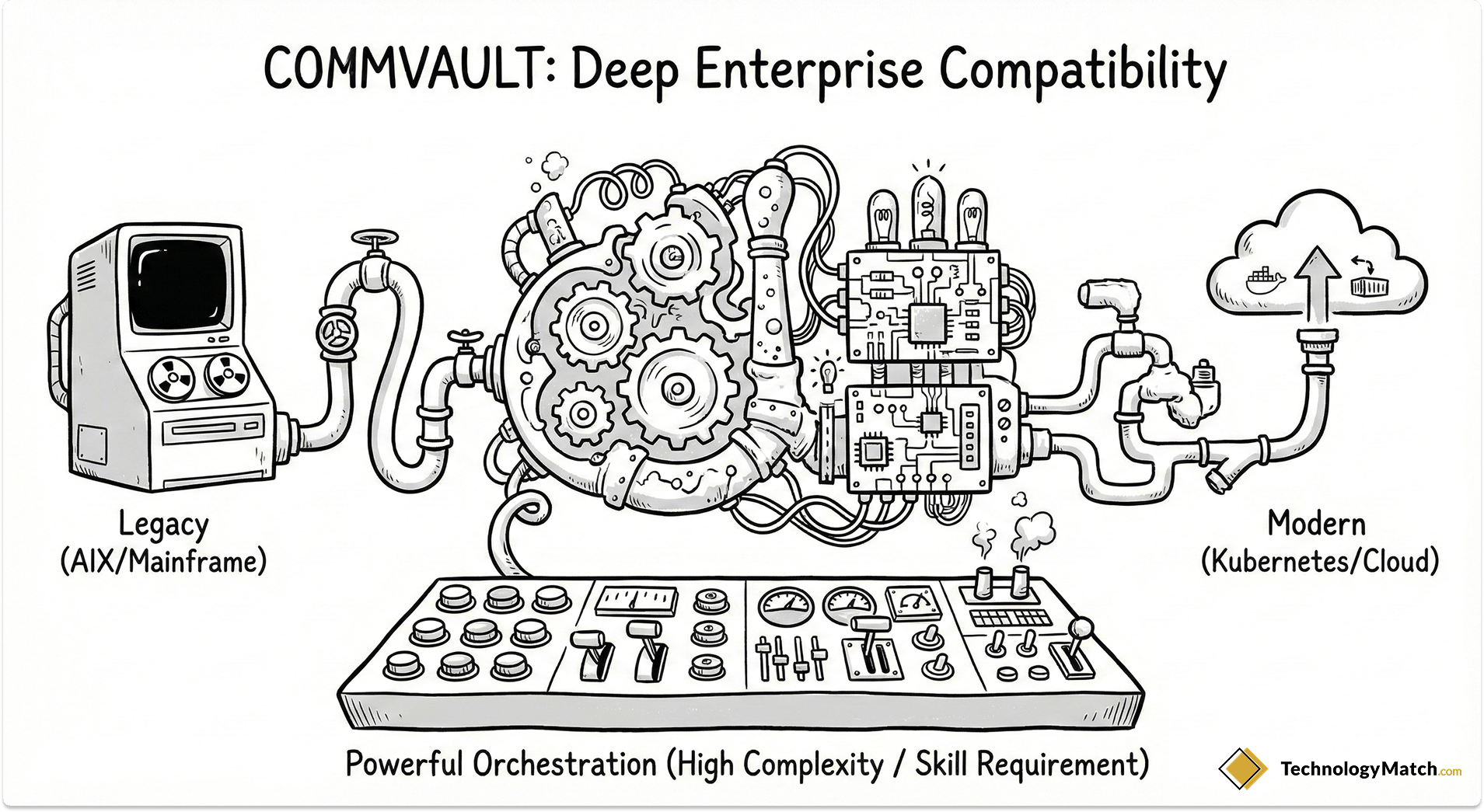
When I audit massive Fortune 500 environments with 20-year-old AIX mainframes sitting next to modern Kubernetes clusters, Commvault is almost always the incumbent.
- Architecture: Deep, agent-based enterprise platform. Commvault has recently pivoted hard into SaaS with their "Commvault Cloud" (formerly Metallic) offering, but their legacy strength is their unmatched compatibility matrix.
- The RPO Profile: Solid, but highly reliant on job scheduling and deduplication database performance.
- The RTO Profile: Highly dependent on the environment. Commvault can orchestrate incredibly complex, multi-tiered restores (e.g., booting the database server, waiting for it to spin up, then booting the application server).
- The Catch: Complexity. Commvault is notorious for its steep learning curve. Managing Commvault often requires a dedicated, certified engineer. If an un-trained IT admin tries to execute a mass restore during a crisis, they will likely configure the job incorrectly, inadvertently extending the RTO by hours.
6. Druva: The 100% SaaS Cloud-Native
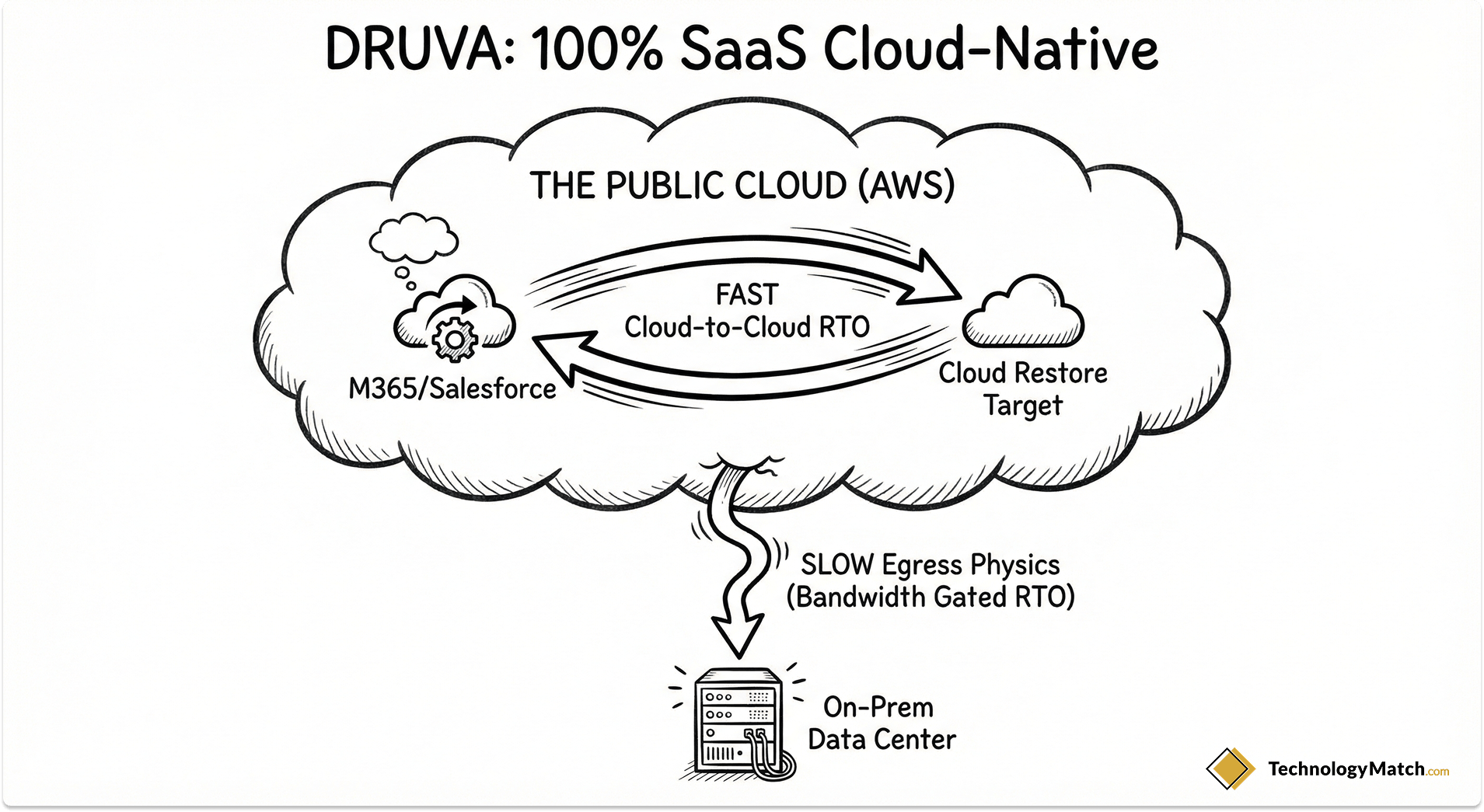
If you want to completely exit the business of managing backup hardware, Druva is the premier choice. They don't sell appliances. They are a fully managed SaaS platform built natively on AWS.
- Architecture: Cloud-native, direct-to-cloud SaaS. You install a lightweight agent on your endpoints or servers, and it backs up directly to Druva's AWS-hosted vault.
- The RPO Profile: Excellent for endpoints (laptops), SaaS applications (Microsoft 365, Salesforce), and cloud-native workloads (AWS EC2).
- The RTO Profile: The Bandwidth Bottleneck. If you are restoring a compromised AWS server back into AWS, Druva's RTO is lightning-fast. However, if you are backing up a massive on-premises SQL server directly to the cloud, your RTO to restore that server back to your physical data center is entirely gated by your internet download speed.
- The Catch: To fix this exact RTO physics problem, Druva recently introduced "TurboTier"—a local caching mechanism that keeps recent backups on-premises for fast local RTO, while tiering older data to the cloud. If you use Druva for on-prem data, you must deploy TurboTier to achieve a viable enterprise RTO.
7. Acronis Cyber Protect: The Edge & Security Hybrid
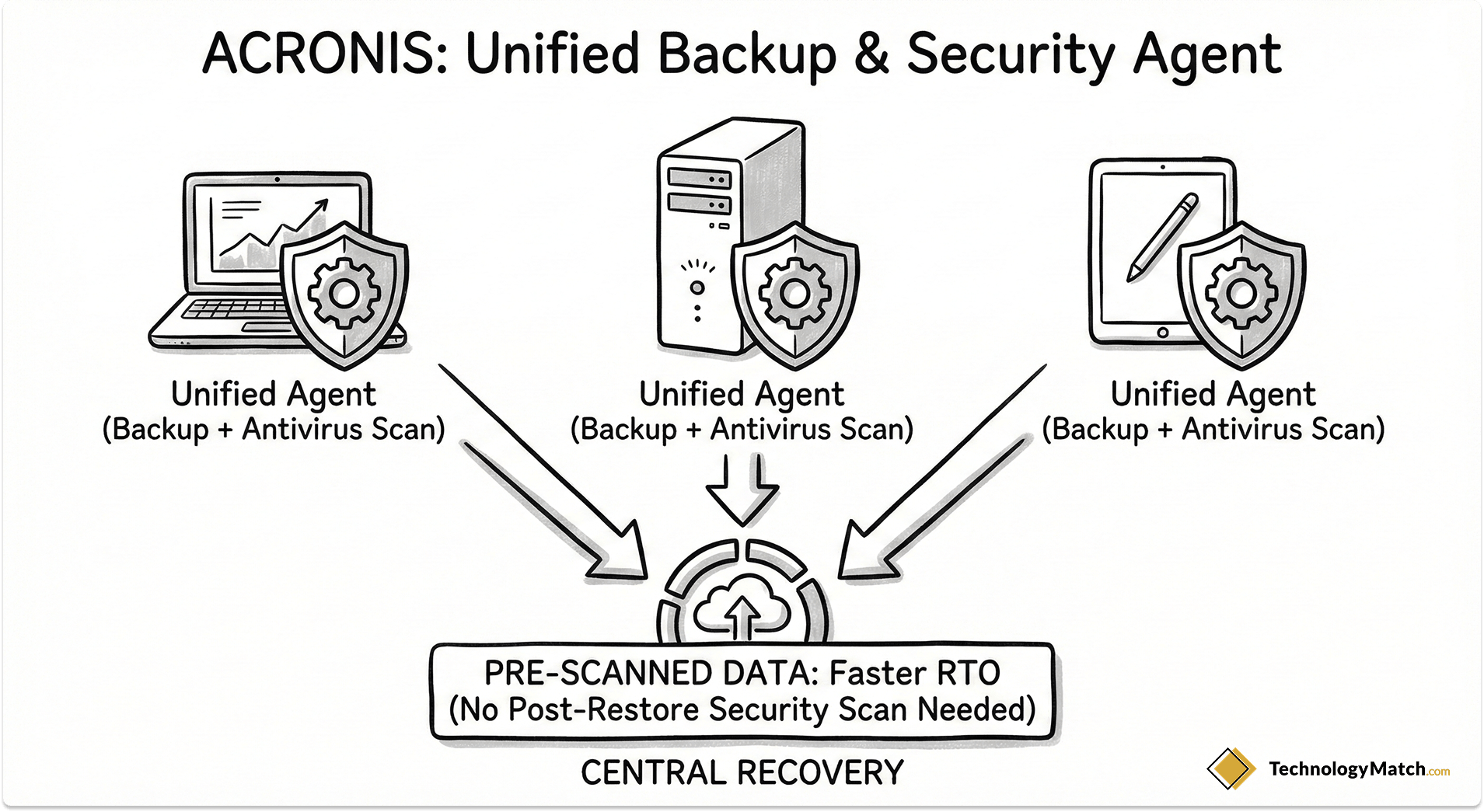
Acronis took a different path than the rest of the market. They realized that backup and cybersecurity are two sides of the same coin, so they merged them. Acronis Cyber Protect is an all-in-one agent that provides backup, next-generation antivirus, and vulnerability management.
- Architecture: Unified agent, heavily focused on Edge, ROBO (Remote Office/Branch Office), and SMB/Mid-market deployments.
- The RPO Profile: Reliable for standard intervals. Because it is also an antivirus scanner, it has deep hooks into the OS to monitor file changes.
- The RTO Profile: Fast for decentralized environments. Because it integrates malware scanning directly into the backup stream, it eliminates the need to separately scan backups before restoring them, effectively shortening the incident response timeline.
- The Catch: While Acronis is incredible for protecting thousands of distributed laptops, retail stores, or mid-sized environments, it is rarely the primary data center choice for Fortune 500 companies managing petabytes of monolithic Oracle databases. It scales wide brilliantly, but scales deep less effectively than Commvault or Cohesity.
Note: Keep in mind that these metrics represent the architectural design intent. A badly configured Zerto environment will fail just as spectacularly as a poorly provisioned Veeam server. The software only performs as well as the infrastructure you give it.
The Ransomware Stress Test: When RTO Drops to Zero
We cannot discuss RPO and RTO in 2026 without addressing the elephant in the room. Cyberattacks fundamentally break traditional recovery calculations.
In a standard disaster (e.g., a hardware failure), you buy new servers, you click "Restore," and you wait for the progress bar to finish. Your RTO is purely a factor of data transfer speed.
In a ransomware attack, clicking "Restore" immediately is exactly what the attackers want you to do. Advanced Persistent Threats (APTs) dwell in your network for months, quietly infecting your production systems and your backups. If you suffer a strike and blindly restore your environment to yesterday's backup, you are simply re-installing the ransomware payload.
When this happens, your theoretical 2-hour RTO instantly becomes a 3-day nightmare.
When evaluating these seven vendors, you must ask how they handle Pre-Recovery Validation:
- The Clean Room: Do they offer an isolated "Clean Room" feature? This allows you to mount the backup data into an isolated, fenced-off network sandbox, scan it with YARA rules to ensure the payload is removed, and then push it to production. (Rubrik and Cohesity excel here).
- True Immutability: Are the backups truly air-gapped or WORM (Write Once, Read Many) protected? If a compromised Domain Admin can log into your Veeam server and delete the backup repository, your RTO is infinite because you have nothing left to restore.
- Anomaly Detection: Does the software use machine learning to monitor the backup stream? If a server that normally compresses at a 2:1 ratio suddenly drops to a 1:1 ratio (because encrypted data cannot be compressed), does the software immediately alert you and quarantine the backup?
If a vendor cannot guarantee that you are restoring clean data, their RTO claims on their datasheet are meaningless.
The RPO/RTO Evaluation Checklist
Do not allow the vendor's sales engineers to dictate the terms of your proof-of-concept. When you bring Veeam, Rubrik, or Druva into your environment for a test, force them to answer these specific operational questions:
- "What is your guaranteed RPO during our peak production hours?" Many software-defined solutions can hit a 15-minute RPO at 2:00 AM. Ask what happens to your primary hypervisor latency if you enforce a 15-minute RPO at 2:00 PM when your ERP is under maximum load.
- "Is your stated RTO measured for a single VM, or for a full-environment recovery?" Force them to explain the compute and IOPS bottlenecks when you attempt to mass-restore 200 VMs simultaneously. (This is where scale-out architectures like Cohesity pull ahead).
- "How does your deduplication method penalize our recovery speed?" Inline deduplication saves storage money, but rehydration costs compute cycles. Demand to know the exact data rehydration CPU penalty during a mass restore event.
- "Does your immutable storage architecture require us to purchase proprietary hardware?" If you want hardware-agnostic flexibility, ensure the vendor doesn't lock their best ransomware protection features behind an expensive physical appliance.
Stop Guessing. Start Shortlisting.
Evaluating enterprise backup software is arguably the most exhausting IT procurement process you will undertake. You are not just buying a tool; you are buying the insurance policy that dictates whether your company survives a targeted attack.
To conduct this evaluation properly, your team would need to set up extensive lab environments, simulate ransomware attacks, stress-test data rehydration speeds, and carefully analyze the physics of cloud egress across Veeam, Rubrik, Commvault, and the rest.
Most IT teams simply do not have the operational bandwidth to run a six-month, highly technical evaluation process. Consequently, they often settle for the vendor with the best marketing presentation, only discovering the architectural flaws during an actual disaster.
If your downtime costs exceed $50,000 an hour, or if you view ransomware as a primary operational threat, you cannot afford evaluation fatigue.
This is where a vendor research and evaluation platform can help you find vendors who match your infrastructure requirements.
Looking for backup solutions?
Explore a catalog of pre-vetted vendors on our platform. Match with vendors who match your architecture, requirements, and budget. Only reach out when you're ready. This service is free and private.
FAQ
What is a realistic RTO for a massive enterprise environment?
If you are relying on modern appliance technology (like Rubrik or Cohesity), a realistic RTO for booting a critical subset of VMs locally is 15 to 30 minutes via "Live Mount" capabilities. However, if you are executing a full site-wide recovery that requires rehydrating petabytes of data, configuring networks, and orchestrating boot sequences, you should realistically model a 12 to 48-hour RTO.
Which backup software provides the lowest RPO?
If your goal is near-zero data loss, you must use Continuous Data Protection (CDP). Zerto is the historical gold standard here, offering RPOs measured in seconds because it continuously replicates hypervisor writes rather than relying on scheduled snapshots. Veeam has also built a highly competitive, native CDP engine that rivals this for Tier-1 workloads.
How does a ransomware attack impact my vendor's RTO claims?
Ransomware completely breaks traditional RTO. You cannot simply hit "restore" after an attack, or you will just reinstall the dormant malware payload. You must first mount the backups into an isolated clean room, scan the datasets, and verify data integrity. This forensic validation process often extends a vendor's advertised 2-hour RTO into a multi-day recovery effort.
Why is my cloud-to-on-premises RTO so much slower than local recovery?
It all comes down to the physics of network egress. If you use a cloud-native tool like Druva (or rely on Rubrik's CloudOut archive), your backup data lives in a public cloud data center. Pulling 100 terabytes of data back down to your physical server room is entirely bottlenecked by the size of your internet pipe. You cannot download massive datasets instantly.
Should I choose a hyper-converged appliance or software-defined backup?
I advise clients to choose hyper-converged appliances (Rubrik, Cohesity) if they want a simplified, "plug-and-play" deployment with incredibly fast local recovery speeds. I advise clients to choose software-defined solutions (Veeam, Commvault) if they have highly complex, hybrid environments and want the financial flexibility to provide their own storage arrays and compute servers.