What Is Databricks, How It Works, and What It Does for IT Leaders
What is Databricks? A technical guide for IT leaders on how the lakehouse platform works, what it does, and where Delta Lake, Unity Catalog, and Photon fit.

Summary:
Databricks is a cloud data and AI platform built on the lakehouse architecture, which runs data-warehouse features like reliable transactions, governance, and fast SQL directly on cheap cloud object storage, so one governed copy of data serves engineering, analytics, and AI.
It splits into a Databricks-managed control plane and a separate compute layer, while your data stays in your own cloud storage in open formats.
What Is Databricks?
Databricks is a data and AI company, and its product is the Databricks Data Intelligence Platform. When people say Databricks in a buying conversation, they usually mean the platform, and I will use the two interchangeably here.
The platform is built on an idea Databricks calls the lakehouse. The name is a blend of data lake and data warehouse, and it describes exactly what the design does. A data lake stores raw files cheaply but has weak guarantees around reliability and structure.
A data warehouse is fast and reliable for analytics but stores data in a closed format and costs more. The lakehouse puts warehouse-grade features on lake-grade storage.
The one thing to understand first is the separation between storage and compute. Your data sits in one governed place. The compute that reads it is a separate layer you turn on when you need it and turn off when you don't. Almost everything else in this guide follows from that split.

That separation is also why the platform matters most to teams trying to move on AI. AI work is only as good as the data behind it, and a governed single copy of that data is the foundation the rest of the work stands on.
If you are weighing how to turn scattered information into something an AI project can actually use, our guide on turning fragmented information into real AI value covers the wider problem.
How Does Databricks Work?
Databricks replaces the model of copying data between a lake and a warehouse with a single layer that does both. Data lands once, governance wraps around it, and compute reads it directly. Here is the flow, step by step.
1. Data lands in open storage as Delta Lake tables
Your data lives in your own cloud object storage: Amazon S3, Azure Data Lake Storage, or Google Cloud Storage. Databricks writes it in an open table format called Delta Lake, which stores the data as standard Parquet files plus a transaction log that records every change in order.
That log is what turns a pile of files into a reliable table. It brings ACID transactions to object storage, so two jobs writing at once won't corrupt the data, a failed write won't leave half-written results, and you can query the table as it looked at an earlier point in time.
The data files stay in an open format the whole time, which is the part that matters for avoiding lock-in.
2. The control plane and compute plane split the work
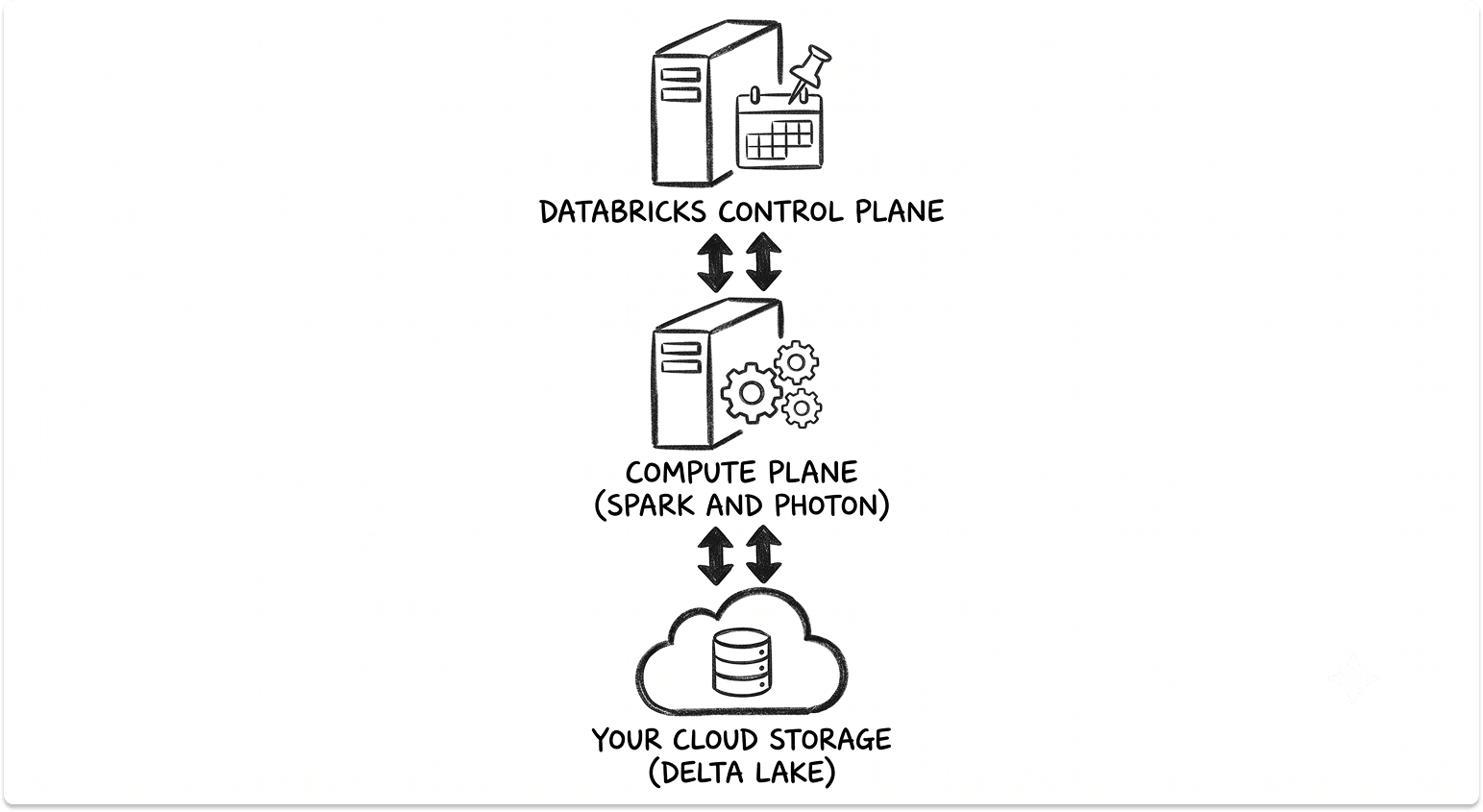
Databricks runs in two planes. The control plane is managed by Databricks and holds the web interface, notebooks, the job scheduler, the cluster manager, and the governance metadata. The compute plane is where your data is actually processed.
With classic compute, that processing runs on virtual machines inside your own cloud account, described in the Databricks architecture documentation. With serverless compute, the machines run in Databricks' account and start almost instantly.
In both cases your source data stays in your storage. Databricks orchestrates the work but does not hold your data in the control plane.
3. Spark and Photon run the queries
The compute engine underneath is Apache Spark, which spreads a job across many machines by breaking it into tasks that each handle a slice of the data. Spark is mature and widely used, and Databricks was founded by its original creators.
On top of Spark, Databricks built Photon, a query engine written in C++ and designed for speed on SQL and DataFrame work. In the peer-reviewed benchmark, Photon reached an average speedup of about 4 times per query against the older engine, with a maximum near 23 times on the workloads tested. Real numbers vary by workload, so treat these as controlled results rather than a promise.
4. Unity Catalog governs everything
Governance is a layer, not an add-on. Unity Catalog sits beneath every data interaction and controls who can read what, records where data came from, and logs activity for audit.
It uses a three-level naming structure, catalog.schema.table, and applies permissions down to the column and row. It also captures column-level data lineage automatically, so you can trace a figure in a report back to the exact source tables it came from.
That last point is the difference between guessing where sensitive data lives and being able to prove it.
5. Governed data feeds analytics and AI in one place
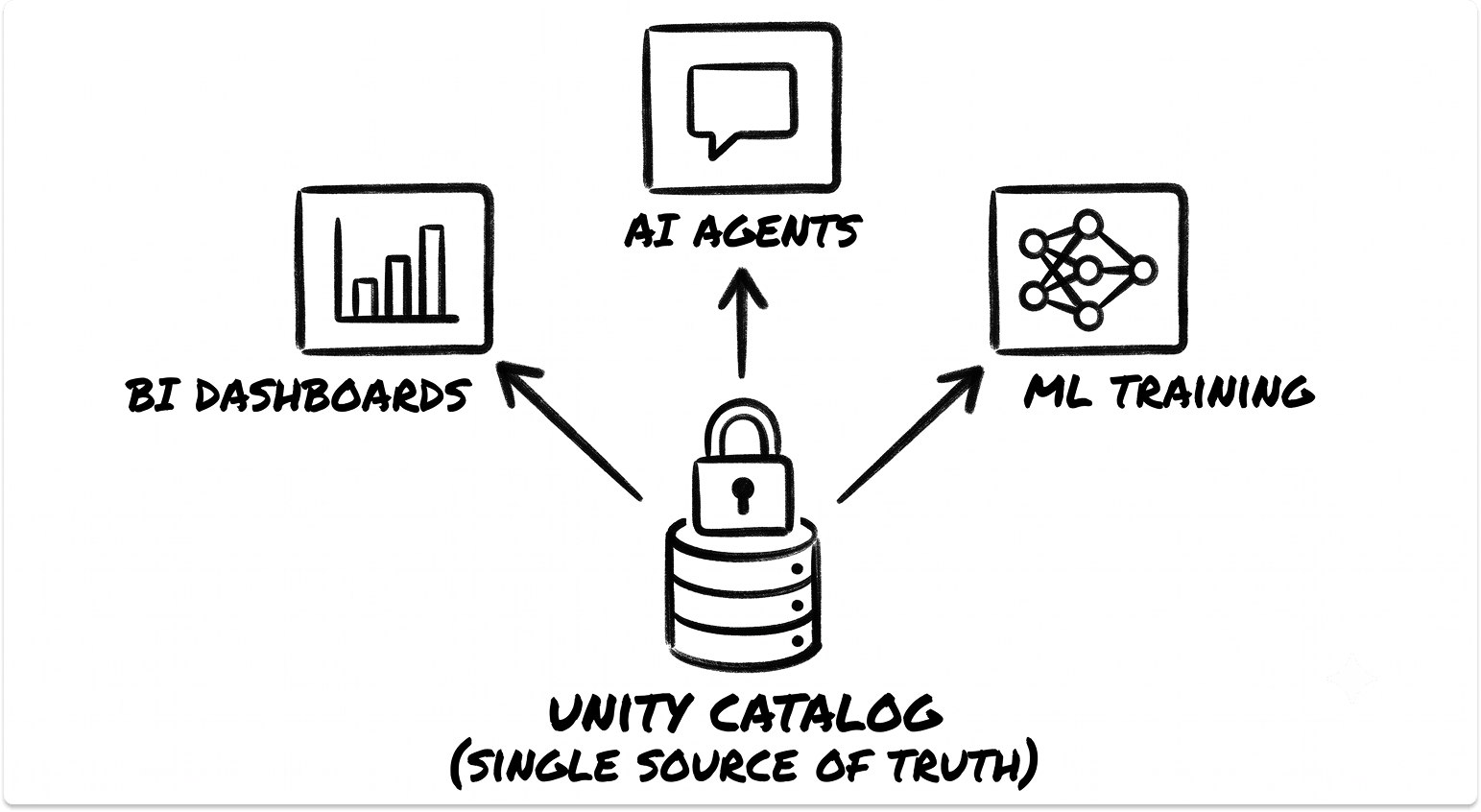
Because the data, the governance, and the compute all sit together, the same governed copy serves BI dashboards, data engineering pipelines, model training, and AI applications. There is no separate export step to feed the AI side. The permissions and lineage that protect the data follow it into the AI work.
Databricks Platform Architecture: The Core Layers
The platform is broad, so it helps to look at it as a stack of layers, each doing one job. From the storage up, these are the pieces you will actually work with.
Delta Lake and the medallion architecture
Delta Lake is the storage foundation. Beyond transactions and time travel, it includes performance features that keep large tables fast: OPTIMIZE compacts small files, liquid clustering keeps related data physically close so queries can skip what they don't need, and data-skipping statistics let the engine ignore irrelevant files.
Teams usually organize Delta tables in three tiers, a pattern Databricks calls the medallion architecture.
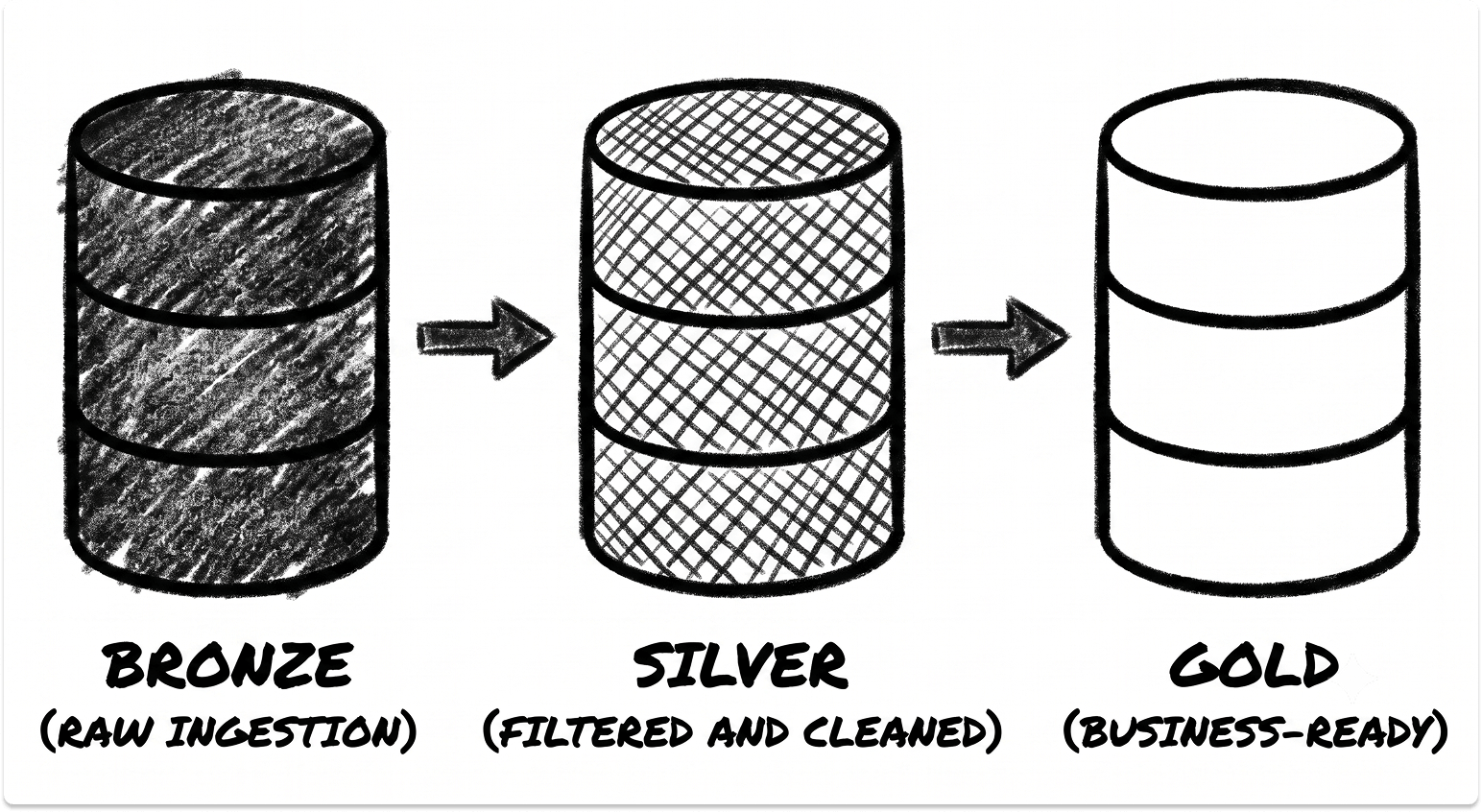
It is a convention rather than a feature, and it keeps the flow from ingestion to reporting easy to reason about.
Unity Catalog and Delta Sharing
Unity Catalog governs tables, files, machine learning models, and functions under one system. One metastore serves a whole region and can be attached to many workspaces, giving the organization a single consistent view of its data.
For sharing data outside the organization, Delta Sharing is an open protocol that lets a partner read your data directly from cloud storage without you copying it to them, and without them needing to be on Databricks. Access is granted, revoked, and audited centrally.
Compute: clusters, SQL warehouses, and serverless
Compute comes in a few shapes, and picking the right one is where cost is won or lost.
Lakeflow and orchestration
For building pipelines, Lakeflow Declarative Pipelines, formerly known as Delta Live Tables, lets you describe the tables you want and lets the system work out the order, the dependencies, and the retries. You can attach data-quality rules called expectations that either warn, drop bad rows, or stop the pipeline when data fails a check.
Auto Loader handles incremental file ingestion, picking up only new files as they arrive rather than rescanning everything. Databricks Workflows orchestrates multi-step jobs across notebooks, SQL, and pipelines on a schedule.
The AI and ML stack
The AI layer sits on the same governed data. MLflow tracks experiments and manages the model lifecycle, with models registered as governed objects in Unity Catalog.
Mosaic AI covers model serving, vector search for retrieval, and frameworks for building AI agents. Genie provides natural-language querying, so a business user can ask a question in plain English and get a governed SQL answer back.
What Databricks Offers to IT Leaders
A Single Governed Copy of Your Data
1. One platform instead of a stitched-together stack
When finance data sits in one system, sales in another, and operations in a third, someone ends up copying numbers into spreadsheets by hand to get a single report. The numbers drift, and a wrong figure often surfaces only after a decision has been made on it.
Databricks addresses this by holding one governed copy that engineering, analytics, and AI all read from. The consolidation is the point. Getting several systems to share data reliably is its own discipline, and our comparison of data integration and ETL tools covers the pieces that feed a platform like this.
2. Open formats and what they mean for lock-in
Your data stays in Delta Lake and Parquet, which are open formats. If you decide to leave, the data does not need converting out of a closed warehouse format first. That lowers the switching cost on the storage side, though as I note later, some of the performance and AI features on top are Databricks-only.
3. Trusted data for decisions
A single governed copy means the report a leader reads and the data a model trains on come from the same source. That consistency is quietly one of the most valuable things the design provides, because it removes the arguments about whose numbers are right.
Governance, Lineage, and Compliance Control
1. Fine-grained access and automatic lineage
Unity Catalog controls access down to individual columns and rows, and captures lineage automatically as queries run. When an auditor asks where a piece of regulated data lives and who can reach it, you can answer from the catalog instead of guessing across shared drives.
2. Where your data lives and data residency
Because your source data stays in your own cloud storage, you keep control over its physical location. For regulated industries with rules about which country data may sit in, that control matters. If data privacy is the pressing concern, our guide on safeguarding data privacy in AI projects goes deeper on the controls involved.
3. Governing data and AI together
AI raises the stakes on governance. When teams build AI on real company data without rules for how that data is handled, or an AI assistant can suddenly read years of over-shared files, the exposure is immediate and hard to walk back.
Governing the data and the AI under one system, with the same permissions and lineage, is how you keep an AI rollout from stalling at the security review. The parallel risk of staff quietly using ungoverned tools is one we cover in why shadow AI will outpace shadow IT.
Feeding AI and ML From Trusted Data
1. Governed data plus compute in one place
A common failure pattern is expensive GPUs sitting idle while data is wrangled into shape, which makes a first AI project look slow and over budget right when finance is deciding whether to fund more. Keeping the governed data and the compute on one platform removes the handoffs that cause that stall.
2. Vector search, model serving, and agents on the lakehouse
Mosaic AI builds a vector search index straight from a Delta table and keeps it in sync as the source changes, so a retrieval-based assistant answers from current data rather than a stale copy. Models are served as endpoints governed by the same catalog.
The wider shift in how AI is changing storage and data design is covered in how AI is forcing a rethink of cloud, storage, and data fabrics.
3. Multi-cloud consistency
The same platform, the same Delta format, and the same governance run across AWS, Azure, and Google Cloud. For an organization spread across more than one cloud after acquisitions, that consistency is worth weighing against the cost of data transfer between them.
Performance, Cost, and Operational Control
1. Photon and query performance
Photon speeds up SQL and DataFrame workloads, and it is on by default for SQL warehouses and serverless compute. It does not accelerate everything. Very fast queries see little benefit, and some user-defined functions fall back to Spark.
The gain is real but workload-dependent, so measure it on your own data rather than assuming a headline number.
2. The consumption model
Databricks bills compute in units called DBUs, measured per second of processing. With classic compute you also pay your cloud provider directly for the underlying machines and storage, so there are two bills to watch. Serverless folds the infrastructure into the Databricks charge.
Autoscaling and auto-termination are the main cost levers. An idle cluster left running is the single most common way teams overspend, and running production batch jobs on expensive all-purpose clusters is a close second.
AI and analytics workloads are notorious for surprising a cloud budget, a problem we break down in why AI/ML workloads are breaking your cloud budget.
3. The controls you own
You set cluster policies, idle timeouts, and autoscaling limits, and you monitor spend through system tables that report usage. These controls work, but they are yours to configure. The platform will happily run an idle cluster all weekend if you let it.
See Which Databricks Deployment Best Suits Your Needs
The clearest way to place Databricks is against the two older approaches it sits between: a classic data warehouse and a raw data lake. The table below compares them on the things IT leaders tend to ask about.
Key capabilities
The strengths that hold up under scrutiny are the single governed copy, ACID reliability on cheap storage, strong lineage and access control through Unity Catalog, fast SQL through Photon, and a genuine multi-cloud footprint. These are the reasons a team consolidates onto it.
Deployment considerations
Classic compute runs in your own cloud account and gives you the most network control, at the cost of cluster startup time and machines you manage. Serverless removes both but hands infrastructure control to Databricks. Most organizations run a mix, using serverless for interactive SQL and classic job clusters for heavy sustained pipelines.
If you are comparing platforms rather than architectures, our Snowflake vs Databricks vs BigQuery guide puts the main options side by side.
Is Databricks Right for Your Environment?
Databricks fits organizations that have accepted their data and AI work belong on one governed platform, and that have the discipline to manage cloud consumption actively. It fits best where you have varied workloads, engineering, analytics, and machine learning, that all benefit from reading the same data.
It is a weaker fit in a few cases. If your need is a simple, low-maintenance SQL warehouse for straightforward reporting, the platform can be more than you require. Cost governance is a real ongoing job, not a one-time setup. And while the file formats are open, several of the features that make the platform fast and capable, Photon among them, are proprietary, so leaning on them raises your switching cost even as the data stays portable.
A few of the newest capabilities, including agent frameworks and natural-language tooling, arrived recently and are still maturing. They are worth piloting on a non-critical use case before you build production work on them.
The honest summary is that the technology is strong and the architecture is sound, but the value comes from the implementation. Getting the data foundation and the governance right is where teams either succeed or stall, and that work matters more than the platform badge. If you are at the stage of deciding how to approach it, and who should help you do it, we can help you match with the right partners for your environment rather than the loudest one.
Decide on your terms, before a deadline decides for you.
Databricks is a strong platform, but the right choice depends on your data, your team, and what is driving the timeline. The best position to buy from is before a renewal, an audit, or a stalled project forces your hand. Browse pre-vetted data and AI platform vendors on TechnologyMatch, matched to your environment, and compare them side by side. No cold outreach, no sales pressure, and no cost.
FAQ
What is Databricks used for?
Databricks is used to store, process, and govern data and to build AI and machine learning on top of it, all on one platform. Teams use it for data engineering pipelines, BI and SQL reporting, data science, and production AI, reading from a single governed copy of data held in cloud object storage.
What does Databricks actually do?
Databricks turns raw files in cloud storage into reliable, governed tables using the Delta Lake format, then runs fast SQL, pipelines, and AI on them with Apache Spark and its Photon engine. Unity Catalog controls who can access what and tracks where data came from, so analytics and AI run on trusted, auditable data.
What is the difference between a data lakehouse and a data warehouse?
A data warehouse stores data in a closed, vendor-specific format that is fast for reporting but costly and hard to use for AI. A lakehouse, the architecture Databricks is built on, adds warehouse features like reliable transactions and governance directly onto low-cost open storage, so one copy of data serves both BI and machine learning without copying it between systems.
Where is Databricks data stored and is it secure?
Your source data stays in your own cloud account (Amazon S3, Azure Data Lake Storage, or Google Cloud Storage) in open formats. Databricks orchestrates the work through its control plane but does not hold your data there. Access is controlled down to the column and row through Unity Catalog, with automatic lineage and audit logging, and you keep control over which region your data physically sits in.
Is Databricks difficult to manage and expensive to run?
Databricks is capable but needs active management. Compute is billed in units called DBUs, and with classic clusters you also pay your cloud provider for the machines, so idle clusters are the most common source of overspend. Auto-termination, cluster policies, and serverless compute are the main controls, and the platform suits teams with varied data and AI workloads more than those needing a simple reporting warehouse.