What Is CNAPP? Cloud-Native Application Protection Explained for IT Leaders
What is CNAPP? A vendor-neutral guide to cloud-native application protection platforms: the pillars, costs, when you need one, and when point tools are enough.
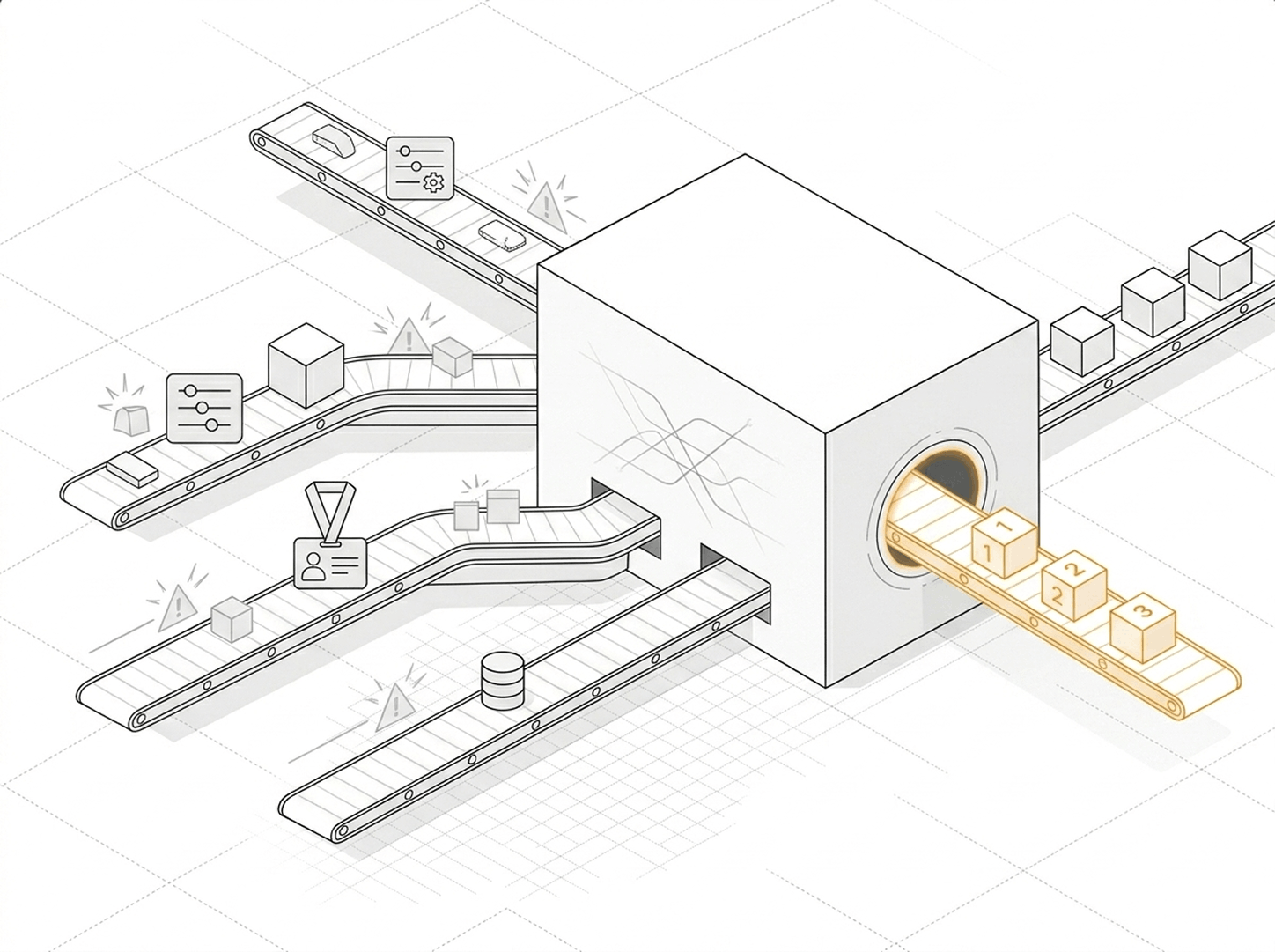
Cloud security tooling has multiplied faster than the teams running it. You likely run one product for posture, another for workloads, a third for identities, and a fourth for data, each with its own console and its own blind spots in between.
What is CNAPP?
CNAPP stands for Cloud-Native Application Protection Platform. It is a single platform that brings the core cloud security functions together, posture management, workload protection, identity analysis, and data security, and correlates their findings into one prioritized view of risk.
The defining feature is correlation, not the count of features. A misconfiguration, a vulnerable container, an over-permissioned role, and a database of sensitive records each look minor on their own. A CNAPP connects them into a single attack path and tells you that the combination is what an attacker would actually use.
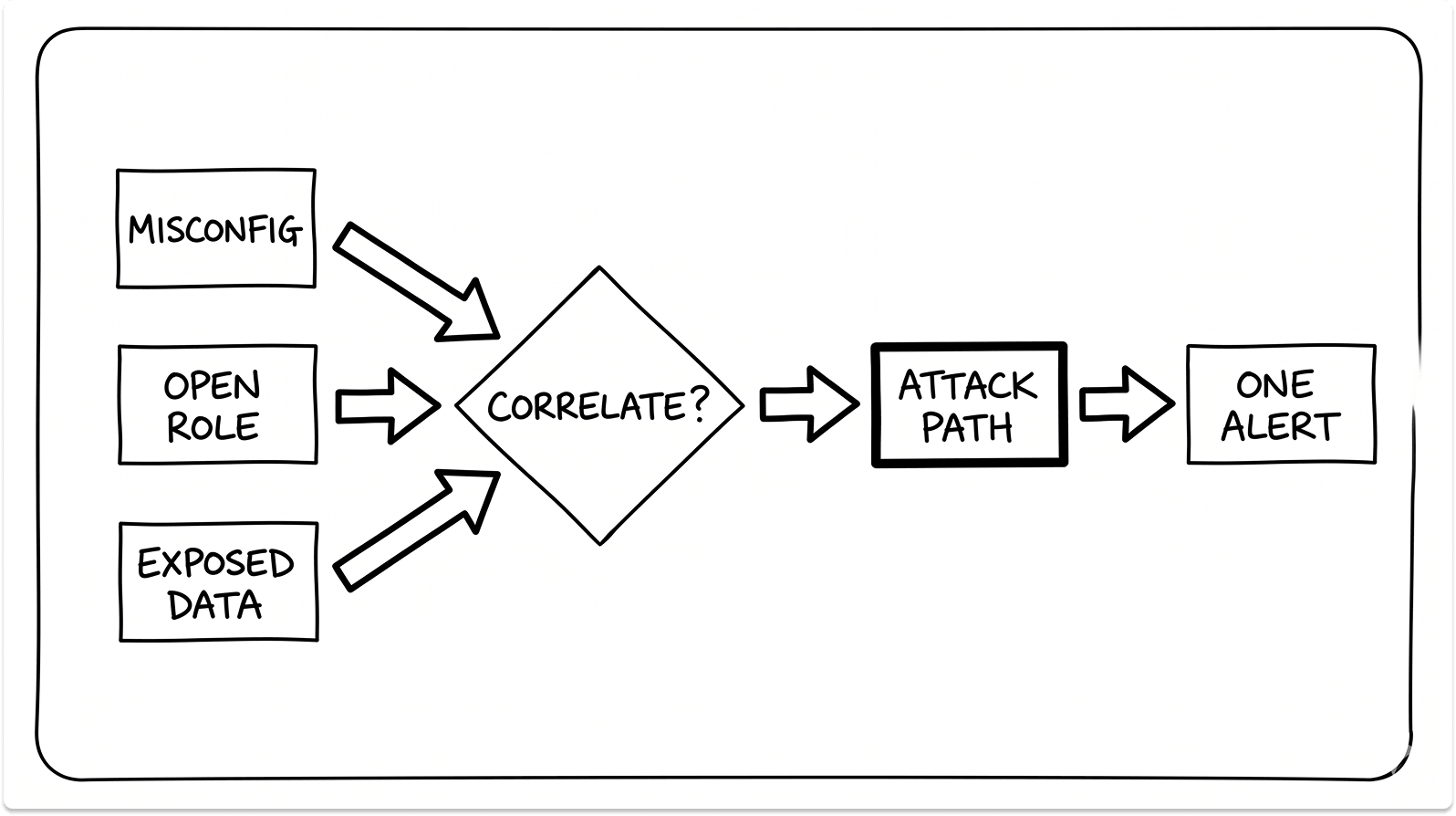
That is the value in one line. Instead of thousands of disconnected alerts across four consoles, you get a short, ranked list of the exposures that genuinely threaten the business, plus the context to fix them.
The market has moved decisively toward this model. Gartner projected that 60% of enterprises would consolidate workload protection and posture management to a single vendor by 2025, up from 25% in 2022, and a Cloud Security Alliance survey of 1,201 practitioners found 75% already using a CNAPP or planning to.
The pillars of a CNAPP
A cloud-native application protection platform is built from a set of capabilities that used to be sold as separate products. Understanding each one tells you what the platform actually does.
CSPM: configuration and compliance
Cloud Security Posture Management scans your cloud configuration for misconfigurations and compliance drift. It catches the public storage bucket, the security group left open to the internet, and the unencrypted disk. This is the baseline layer almost every team starts with.
CWPP: workload protection
Cloud Workload Protection Platform secures the workloads themselves: virtual machines, containers, and serverless functions. It finds vulnerabilities, malware, and exposed secrets, and on the runtime side it can flag or block malicious behavior while a workload is running.
CIEM: identity and entitlements
Cloud Infrastructure Entitlement Management answers a deceptively hard question: who and what can do what. It maps effective permissions across human and machine identities, then flags the dormant admin role or the over-permissioned service account that widens your blast radius.
IaC scanning and KSPM: shift-left and Kubernetes
Infrastructure-as-code scanning checks Terraform, CloudFormation, and similar templates for misconfigurations before they ever deploy, which is the shift-left part of the platform. Kubernetes Security Posture Management, or KSPM, extends those posture checks into your clusters, nodes, and container workloads.
DSPM: data security
Data Security Posture Management discovers and classifies sensitive data, including PII, health records, and financial data, then assesses how exposed it is. It tells you which exposures actually sit next to data worth stealing, so a public server holding test data ranks below an internal one holding customer records.
CDR and the emerging pillars
Cloud Detection and Response correlates runtime and cloud signals to catch active threats. The category is now absorbing application security posture management (ASPM), AI security posture management (AI-SPM), and API security as cloud workloads and AI usage grow.
Here is the part the acronym lists miss. A CNAPP is the correlation layer across these functions, not a folder that holds them. A suite that runs CSPM, CWPP, and CIEM as separate modules with separate dashboards gives you the components without the one capability that defines the category.
How a CNAPP actually works
Two collection methods do most of the work. Agentless scanning connects through cloud provider APIs and reads snapshots of your workloads out of band, which delivers broad visibility within hours and adds no load to production.
Lightweight sensors built on eBPF, a Linux kernel technology that runs security code safely without kernel modules, add real-time detection and blocking on the workloads that need it.
The agentless-versus-agent argument that shaped early buying decisions has largely settled. The common model now is agentless everywhere for posture and visibility, with eBPF sensors placed selectively on high-value workloads for runtime depth.
What matters in 2026 is what a platform detects and correlates, not which collection label it wears.

Everything feeds one engine that scores and ranks risk. The output you care about is a single prioritized queue ordered by real exploitability, rather than four separate streams your team reconciles by hand.
CNAPP vs CSPM vs CWPP vs CIEM vs SIEM vs SASE vs CASB vs XDR
The acronyms blur together, so here is where each one fits.
The short version: CSPM, CWPP, CIEM, and DSPM are capabilities a CNAPP unifies. SIEM, SASE, CASB, and XDR solve adjacent problems and sit alongside a CNAPP rather than inside it.
A SIEM aggregates logs across your entire estate, and a CNAPP often feeds findings into it. SASE and CASB secure network and SaaS access, a different surface from your cloud workloads. XDR centers on endpoints and is converging with CNAPP at the platform vendors, but the two still cover different ground today.
Do you actually need a CNAPP?
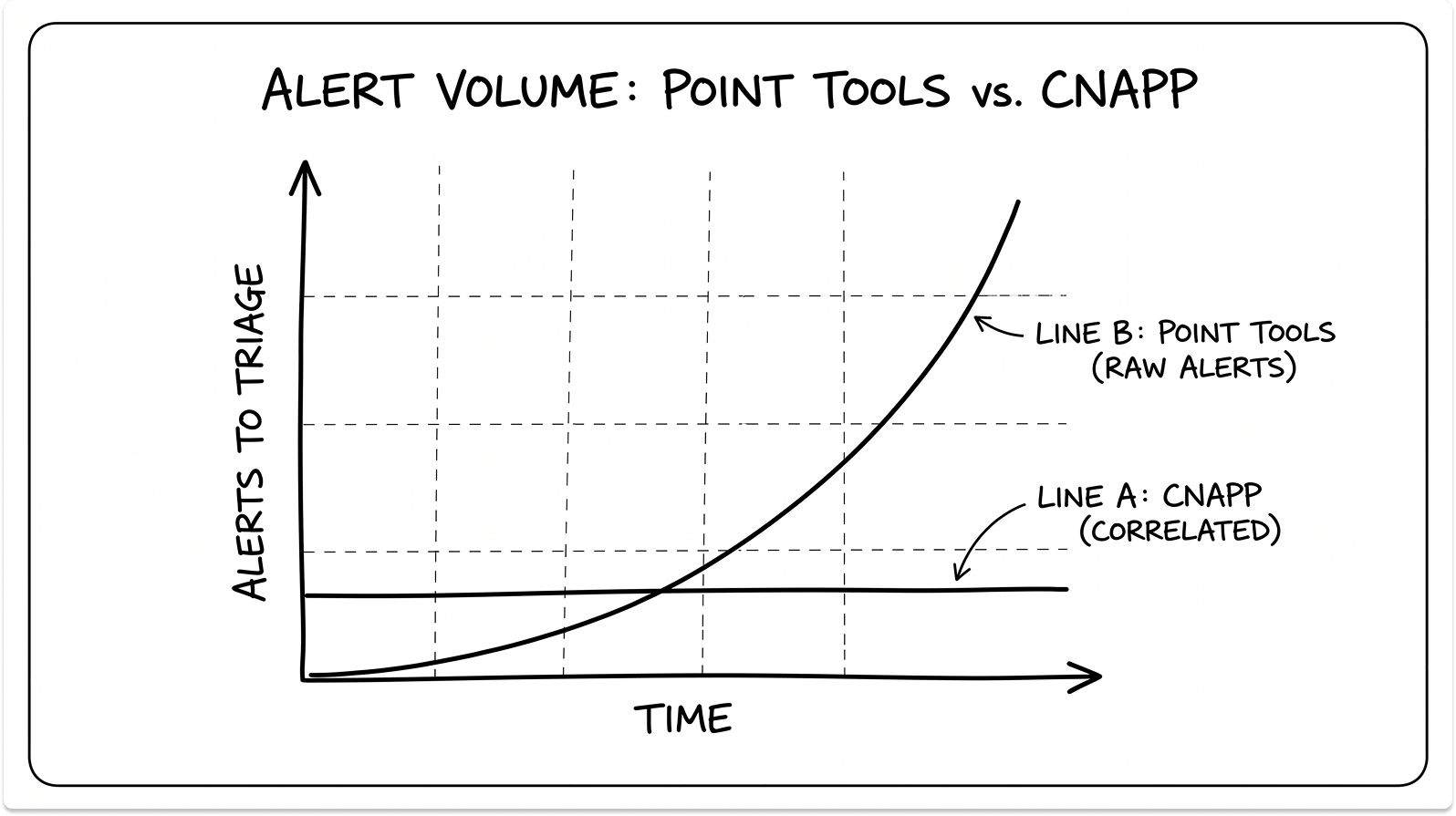
A CNAPP earns its cost when complexity crosses a threshold. Below that threshold, point tools or cloud-native services do the job at a fraction of the price.
You are likely past the threshold if several of these are true:
- You run containers or Kubernetes in production.
- You operate across more than one cloud, such as AWS plus Azure or GCP.
- You have heavy identity sprawl, including many machine identities and service accounts.
- You face regulatory or audit pressure that demands continuous compliance evidence.
- Your security team is too small to correlate alerts across separate tools by hand.
- You scale fast, with ephemeral workloads that appear and disappear daily.
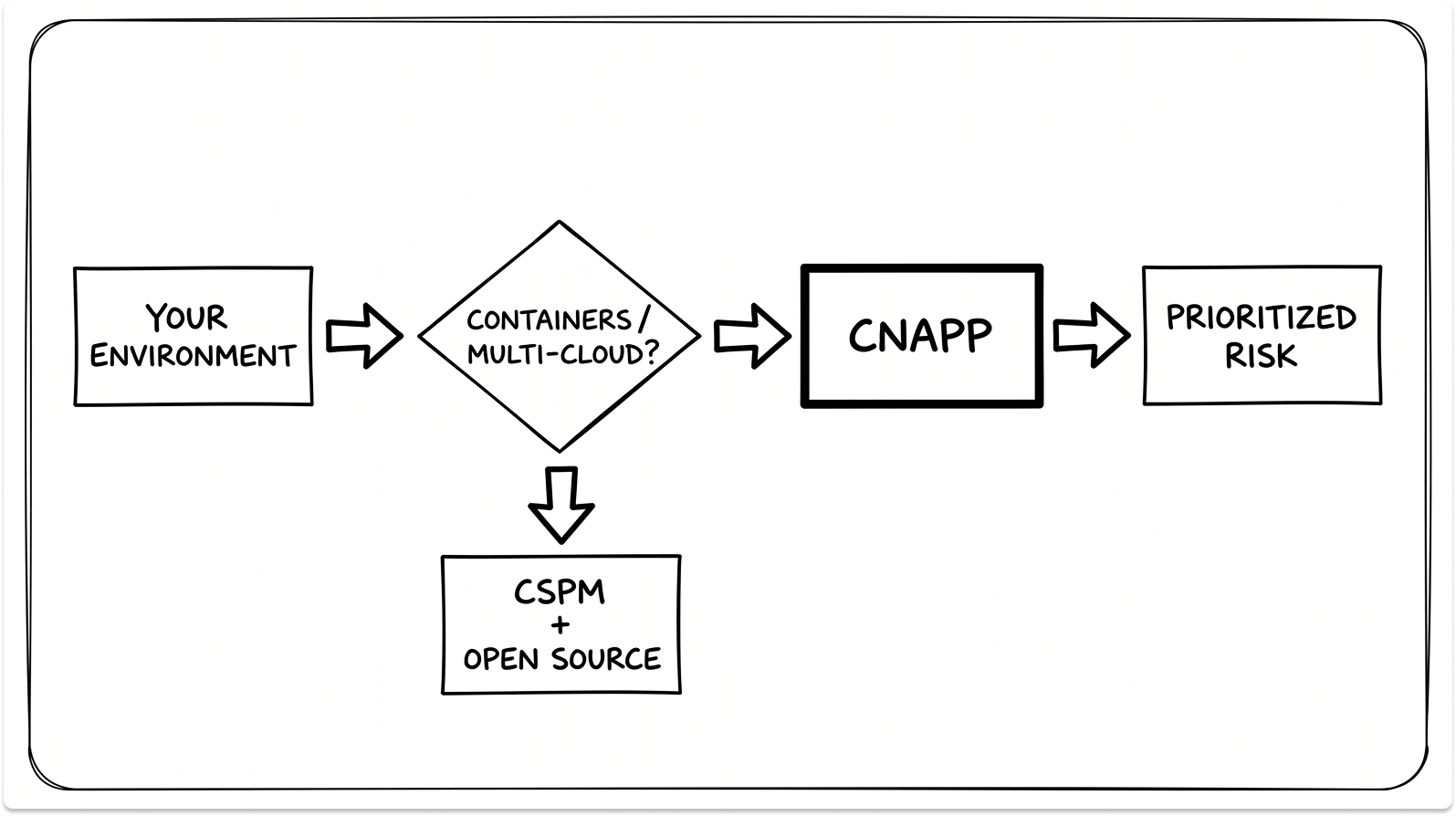
You can wait if your footprint is simpler. A single cloud with a modest number of workloads is often well covered by the cloud-native posture tools you already pay for: AWS Security Hub, Microsoft Defender for Cloud, or Google Security Command Center. An engineering-heavy team can extend that with open-source tools like Trivy for image and IaC scanning, Checkov for Terraform, and Falco for runtime detection.
I have watched teams buy a six-figure platform to protect a handful of workloads, then spend months tuning alerts they did not have the staff to action.
If your environment is one cloud and a dozen workloads, start with the free posture tooling your provider already gives you, and revisit when containers, multi-cloud, or audits force the question.
What a CNAPP costs, and the hidden TCO
Public pricing is scarce because most CNAPP vendors quote custom enterprise deals. The directional ranges from public sources look like this:
- Cloud-native CSPM: free to low cost, included with your cloud provider.
- Standalone third-party CSPM: roughly $5,000 to $15,000 a year for small environments.
- CNAPP entry level: around $20,000 a year.
- CNAPP at enterprise scale: $100,000 to $500,000 or more a year.
- Wiz: custom quotes, roughly $30,000 to $50,000 a year at the small end, scaling per workload.
- Prisma Cloud: credit-based at about $1.20 per credit, with a single module like CSPM near $18,000 a year and a fuller suite near $45,000, plus onboarding and professional services that can add $10,000 to $30,000 or more.
Treat these as planning ranges and not quotes.
The licence is the visible cost. The hidden ones decide your real total:
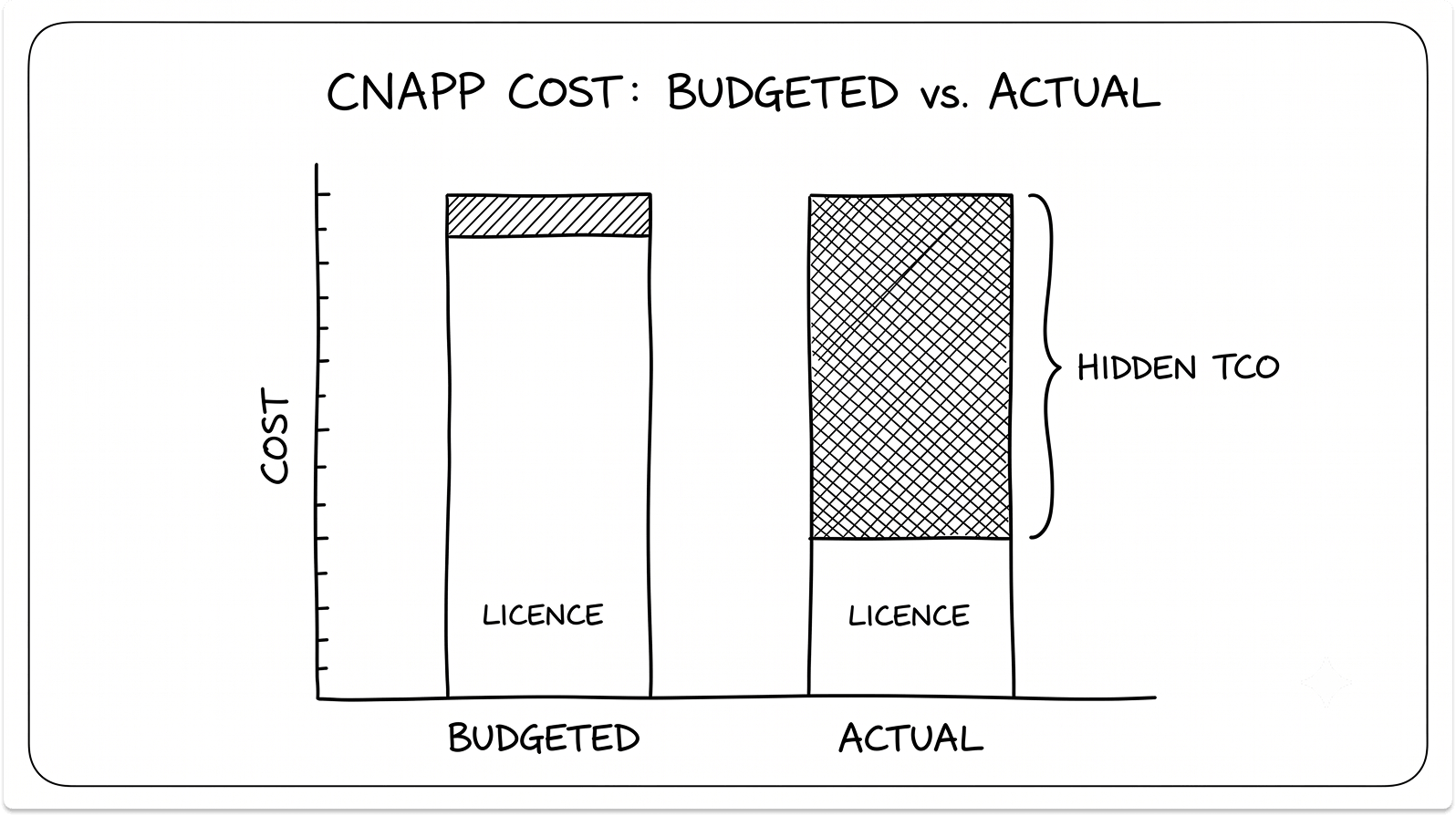
- The team-time budget. The first scans surface thousands of findings, and someone has to triage them, assign ownership, and tune the rules. This labor is the largest recurring cost and the one most often left out of the business case.
- Supporting cloud services. Some platforms need extra log sources or provider security services switched on, and those carry their own fees.
- Cloud API and egress costs. Heavy agentless scanning makes a lot of API calls, which can hit throttling limits or add cost at scale.
- Professional services. The heavier platforms often need paid engagements for initial deployment and ongoing tuning.
- Pipeline time. Shift-left scanning adds steps to CI/CD that cost developer minutes on every build.
The 2024 to 2026 consolidation and what it means for buyers
The vendor you evaluate today may belong to someone else tomorrow. Three moves reshaped the market in under two years.
Google closed its $32 billion all-cash acquisition of Wiz in March 2026, its largest deal ever, after Wiz crossed $1 billion in annual recurring revenue. Wiz says it will stay multi-cloud and keep its brand inside Google Cloud. The open question for AWS and Azure-heavy buyers is whether that neutrality holds over time.
Fortinet acquired Lacework in 2024 and rebranded it FortiCNAPP. Forrester estimated the price at roughly $200 to $230 million for a company that had raised more than $1.3 billion and once carried an $8.3 billion valuation, which says something about the economics of a standalone CNAPP.
Palo Alto Networks is folding Prisma Cloud into Cortex Cloud, merging cloud security with its detection-and-response platform. Existing Prisma Cloud customers should confirm in writing what carries forward to the new platform.
Check Point has partnered with Wiz and is steering customers away from its own CloudGuard CNAPP. SentinelOne bought PingSafe. The pattern is consolidation toward a few large platforms, which raises real questions about roadmap stability, pricing, and lock-in.
If you are weighing the leaders against each other, I compared the four most common finalists in detail in Wiz vs Prisma Cloud vs Orca vs FortiCNAPP, including architecture, pricing, and how each one has changed since its acquisition.
The limits, and what practitioners actually say
A CNAPP solves real problems, and it brings its own. The honest version, drawn from practitioner reviews and forums:
- Alert noise is real even on strong platforms. Prioritization helps, but you still tune.
- Cost surprises happen, especially with credit-based models that spike under auto-scaling.
- Neutrality distrust has grown after the acquisitions, particularly around Wiz under Google.
- Executive and audit reporting on some platforms lags dedicated GRC tools.
- A vocal group of engineers treats posture tooling as a compliance checkbox and prefers open-source stacks they control.
None of this makes the category a bad buy. It means the platform is a tool your team operates, and the operating discipline matters as much as the feature list.
How to evaluate a CNAPP without the sales pressure
Match the tool to where you are, then grow into it.
- Start with hygiene. Turn on cloud-native CSPM and add IaC scanning so misconfigurations get caught before they deploy.
- Add workload and identity coverage. Layer in CWPP and CIEM as containers and multi-cloud increase your blast radius.
- Consolidate to a full CNAPP when the number of tools, clouds, and alerts passes what your team can correlate by hand.
When you do run a proof of concept, keep it honest:
- Run the finalists in parallel on the same real slice of your estate for two to four weeks.
- Time onboarding from the moment access is granted to the first complete risk picture.
- Plant a known toxic combination and see which platform reports one attack path versus several disconnected alerts.
- Trigger a runtime event on a sensor-protected workload and record what is detected, what is blocked, and how fast.
- Count actionable findings against total findings after a week of tuning.
- Export a compliance report and hand it, unedited, to whoever owns your audit.
Which CNAPP is right for you?
The right platform depends on your architecture, your team, and the ecosystem you already run. A developer-heavy multi-cloud shop, a Palo Alto estate, a Fortinet shop, and a lean team with a hybrid footprint will each land somewhere different.
We have a guide breaking down the four leaders, Wiz, Prisma Cloud, Orca, and FortiCNAPP (formerly Lacework), in a separate comparison that covers architecture, prioritization, pricing, and vendor stability, with a questionnaire that points you to the best fit for your environment. Read the full comparison here before you shortlist.
Find CNAPP Vendors Anonymously
Browse pre-vetted CNAPP and cloud security vendors on TechnologyMatch. Filter for your cloud stack and operating model, and match with vendors who fit. Start conversations when you're ready. And it's free.
FAQ
What does CNAPP stand for?
CNAPP stands for Cloud-Native Application Protection Platform. It is a single platform that combines cloud posture management, workload protection, identity analysis, and data security, then correlates their findings into one prioritized view of risk across your cloud environment.
What is the difference between CNAPP and CSPM?
CSPM is one capability inside a CNAPP. CSPM finds misconfigurations and compliance drift in your cloud setup, while a CNAPP adds workload protection, identity analysis, and data security on top, and correlates all of it into attack paths. If you only need configuration hygiene on a single cloud, CSPM alone may be enough.
Is a CNAPP the same as a SIEM?
No. A SIEM aggregates and correlates logs across your entire enterprise for detection and response, while a CNAPP focuses on securing cloud infrastructure, workloads, and applications. They are complementary, and a CNAPP often forwards its findings into a SIEM.
Do I need a CNAPP?
You probably need one if you run containers or Kubernetes in production, operate across more than one cloud, manage heavy identity sprawl, or face audit pressure that a small team cannot meet with separate tools. If you run a single cloud with a modest footprint, cloud-native posture tools and open-source scanners often cover the basics until complexity grows.
How much does a CNAPP cost?
Entry-level CNAPP pricing starts around $20,000 a year, and enterprise deployments commonly run from $100,000 to $500,000 or more. Beyond the licence, budget for the team time to triage and tune findings, supporting cloud services, and any professional services, since those hidden costs often exceed the sticker price.
Can a CNAPP replace my existing security tools?
A CNAPP can replace standalone CSPM, CWPP, CIEM, and DSPM point tools by consolidating them into one platform. It does not replace your SIEM, SASE, CASB, or endpoint tooling, which cover adjacent problems and sit alongside it.
Agentless or agent-based: which is better?
Most modern platforms use both. Agentless scanning gives broad visibility in hours with no production impact, and lightweight eBPF sensors add real-time detection and blocking on the workloads that need it. The practical answer in 2026 is to judge what a platform detects and correlates, not the collection method on its own.
What are the main components of a CNAPP?
The core components are CSPM for configuration, CWPP for workloads, CIEM for identity, IaC scanning for shift-left, KSPM for Kubernetes, and DSPM for data. Many platforms now add cloud detection and response, API security, and AI security posture management.
Can a CNAPP work across multiple clouds?
Yes. Multi-cloud coverage is one of the main reasons organizations adopt a CNAPP, since it provides a single view across AWS, Azure, Google Cloud, and often hybrid or on-premises environments. Coverage depth varies by vendor, so confirm support for every environment you run.
Is a CNAPP worth it for a small team?
It depends on complexity, not headcount alone. A small team running containers across multiple clouds benefits from the consolidation and prioritization a CNAPP provides. A small team on a single cloud with few workloads is often better served by cloud-native tools and open-source scanners until the environment grows.