Jenkins vs. GitLab CI vs. CircleCI vs. GitHub Actions: The CI/CD Decision Guide in 2026
CI/CD automates the building, testing, and deployment of code. This guide compares Jenkins vs. GitHub Actions vs. GitLab CI vs. CircleCI to help IT leaders decide on pricing, performance, and maintenance trade-offs.
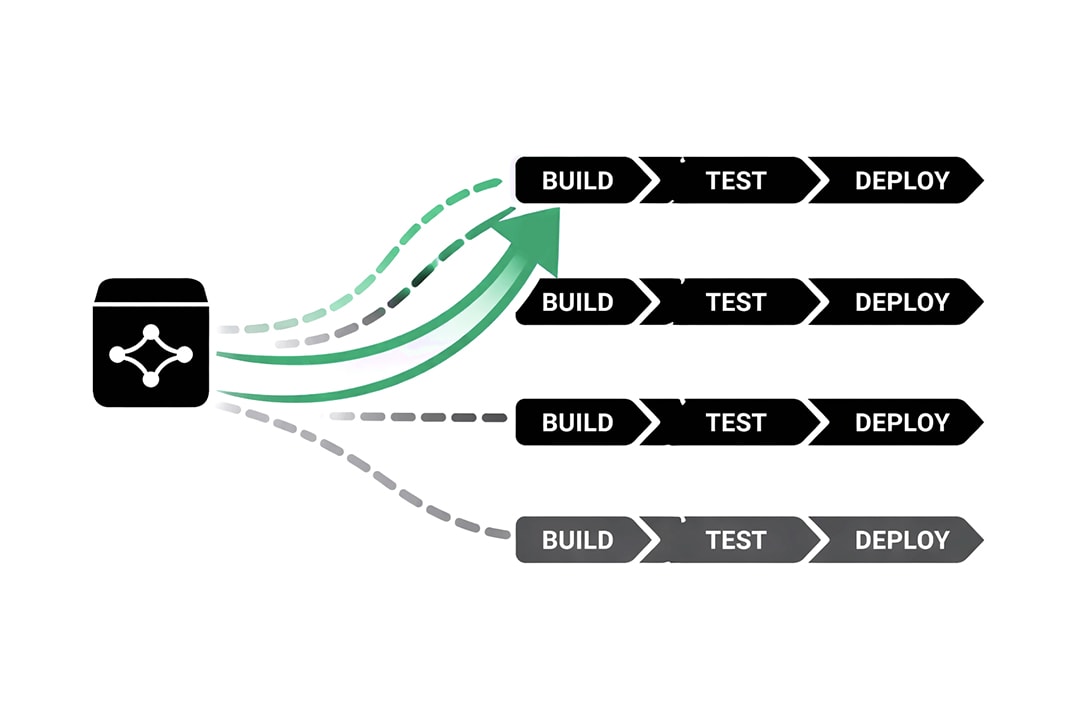
Summary:
- Choose GitHub Actions if your code is on GitHub, which resolves the decision for most teams.
- Choose GitLab CI if you want source control, pipelines, and security scanning in one platform, or need a self-hosted option.
- Choose CircleCI if build speed is a measurable constraint and you need the tooling to fix it.
- Choose Jenkins only when a specific constraint forces it: air-gapped environments, bare-metal access, or hardware-attached builds.
Automation is the standard. The debate has shifted from why we automate to where we automate.
For IT leaders, this decision is often framed incorrectly. Teams debate features or syntax when they should be debating maintenance models. The choice of a CI/CD platform is not just about which tool builds code faster. It is a decision about how much engineering time you are willing to invest in maintaining the tool itself versus building your product.
You have Jenkins, the legacy standard that offers infinite control at the cost of high maintenance. You have GitHub Actions, the default choice that removes friction by living next to your code. You have GitLab CI, the integrated powerhouse that visualizes the entire lifecycle. And you have CircleCI, the specialist focused purely on speed and performance.
This guide provides a technical analysis of these four architectures to help you determine which trade-offs align with your operational maturity.
The Core Conflict: Platform Gravity vs. Control
Before analyzing specific features, you must understand the two forces driving the CI/CD market in 2026.
The Rise of Platform Gravity
The most significant trend in modern DevOps is Platform Gravity. This rule states that the best CI/CD tool is usually the one closest to your source code.
This explains the meteoric rise of GitHub Actions and GitLab CI. When the pipeline is integrated into the source control management (SCM) system, authentication is handled automatically. Developers do not need to manage webhooks or secret keys to connect two separate systems. The friction of setting up a new pipeline drops to near zero.
The Cost of Control
The opposing force is the need for granular control. This is the domain of Jenkins. While integrated tools are convenient, they are opinionated. They force you to work within their constraints regarding runner types, timeout limits, and available hardware.
If you are building standard web applications, integrated tools are superior. However, if you are compiling firmware for medical devices, managing complex embedded systems, or navigating strict air-gapped security environments, the constraints of a cloud-native platform may be a dealbreaker. You pay for this control with maintenance hours.
Jenkins
Best For: Large enterprises with unique, complex hardware requirements or strict on-premise security mandates.
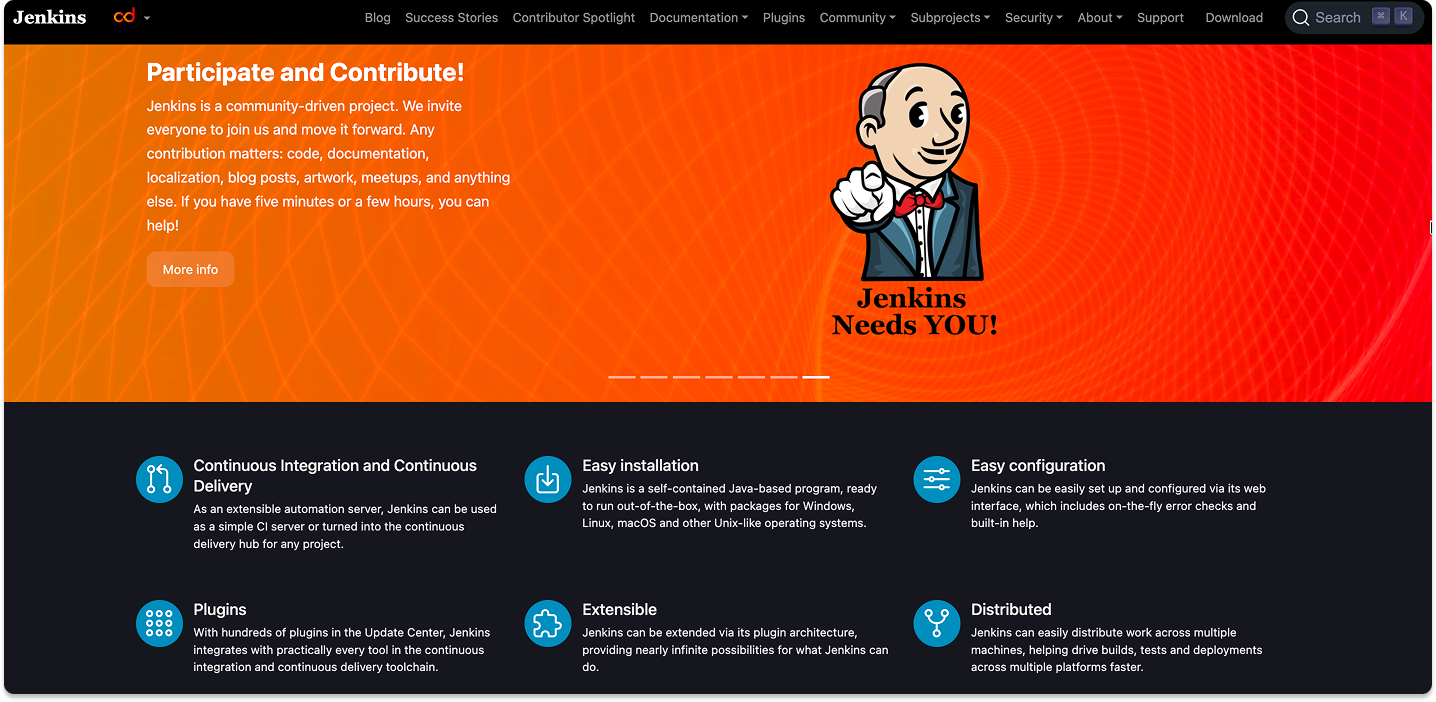
Jenkins is the oldest player in this space. It is open-source, free to use, and self-hosted. It operates on a Master/Agent architecture where one server orchestrates the work and delegates tasks to multiple agents.
The Architecture of Infinite Flexibility
Jenkins does not care what you are building. Because you host the infrastructure, you have total access to the underlying hardware. This allows for workflows that are impossible in SaaS tools.
- Hardware Access: You can connect a Jenkins agent physically to a hardware test bench. This is critical for industries like automotive or robotics where "testing" involves flashing a chip rather than running a script.
- Plugin Ecosystem: There is a plugin for everything. If you need to integrate with a legacy mainframe or a 20-year-old issue tracker, a Jenkins plugin likely exists.
The Maintenance Tax
The flexibility of Jenkins comes with a steep price known as "Plugin Hell." Jenkins relies on a vast web of community-maintained plugins.
- Dependency Conflicts: Updating one plugin often breaks another. This forces teams to treat their CI server like a fragile production asset. You cannot simply auto-update Jenkins; you must test the update to ensure it does not take down your pipelines.
- Security Burden: Because it is self-hosted, you own the security. If a vulnerability is discovered in a Jenkins plugin, your team must patch it immediately. In large organizations, managing Jenkins often requires the equivalent of a full-time engineer.
The Verdict on Jenkins
Use Jenkins only if you have a specific constraint that forces you to. If you require bare-metal access, air-gapped environments, or zero licensing costs for massive scale, Jenkins is the only viable option. For everyone else, the labor cost usually outweighs the licensing savings of a modern tool.
GitHub Actions
Best For: The 90% of development teams who already host their code on GitHub and want to minimize friction.
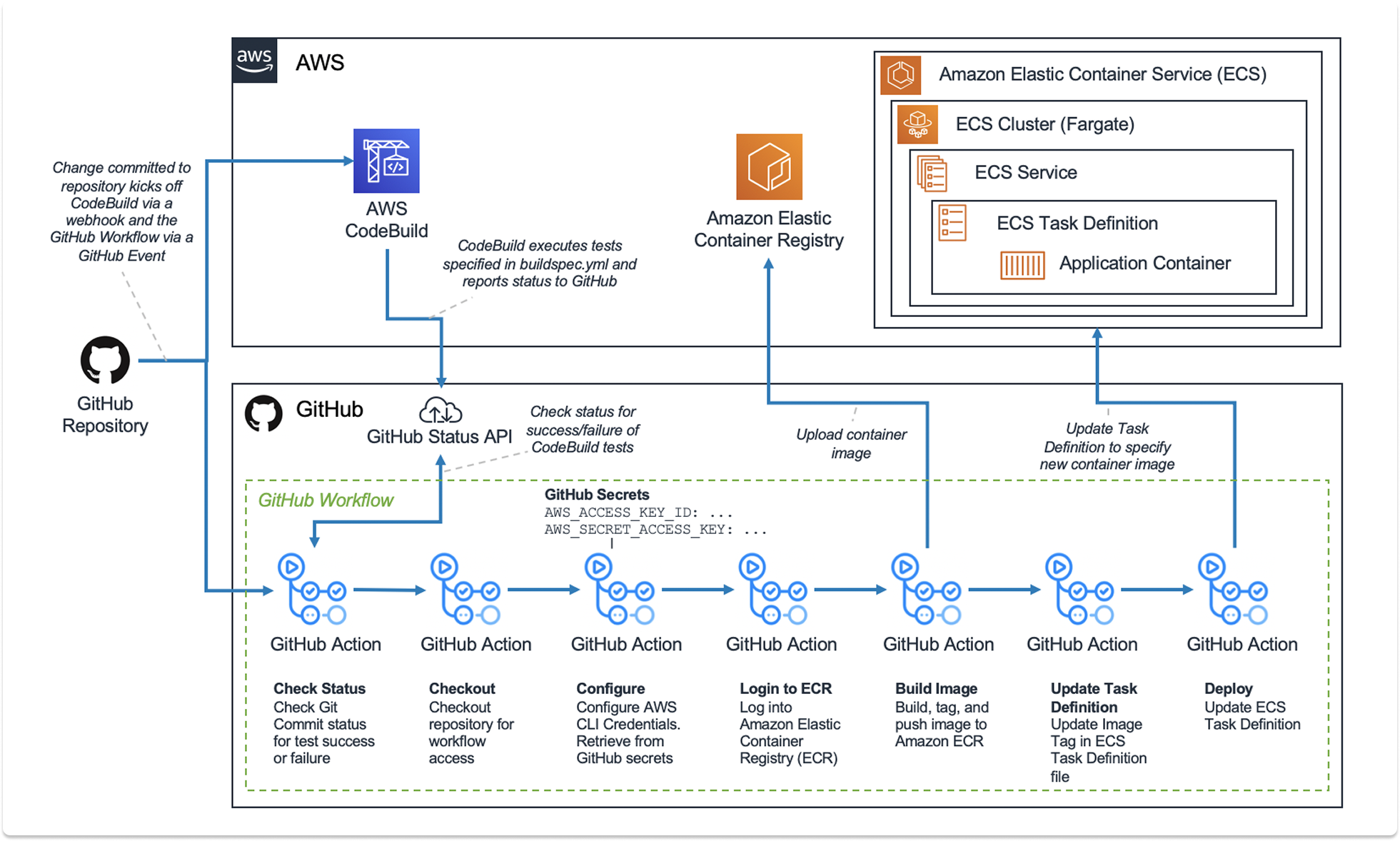
GitHub Actions has fundamentally changed the CI/CD market by leveraging Platform Gravity. It is not a separate tool; it is a feature of the repository.
The Architecture of Convenience
GitHub Actions uses a YAML-based workflow defined directly in your repository. It runs on Microsoft-hosted runners (Azure VMs) or self-hosted runners that you connect to the platform.
- The Marketplace: This is the primary differentiator. GitHub allows the community to publish "Actions"—reusable blocks of code. If you need to deploy to AWS, authenticate with Docker Hub, or run a security scan, you do not need to write the script. You simply reference an Action from the marketplace.
- Identity Federation: GitHub creates a secure identity link between your repository and cloud providers (AWS, Azure, Google Cloud). This eliminates the need to store long-lived static credentials (like AWS Access Keys) in your CI secrets, significantly improving security posture.
The Visibility Gap
While convenient, GitHub Actions struggles with observability compared to its competitors.
- Debugging: When a complex pipeline fails, visualizing the flow can be difficult. The interface lists jobs in a linear or tree format, but it lacks the rich visualization of dependencies found in GitLab.
- Local Testing: Testing a GitHub Action workflow locally on a developer's machine is difficult. While third-party tools exist to simulate it, there is no official, reliable way to run a pipeline on your laptop before pushing it. This leads to a cycle of "commit, push, fail, repeat" when building new workflows.
The Verdict on GitHub Actions
This is the default choice for modern software development. If your code is on GitHub, the friction of using a different CI provider is rarely justified. The cost of runners can scale up, but the savings in developer time are substantial.
GitLab CI
Best For: Organizations that want a single application for the entire software lifecycle, from planning to security to deployment.
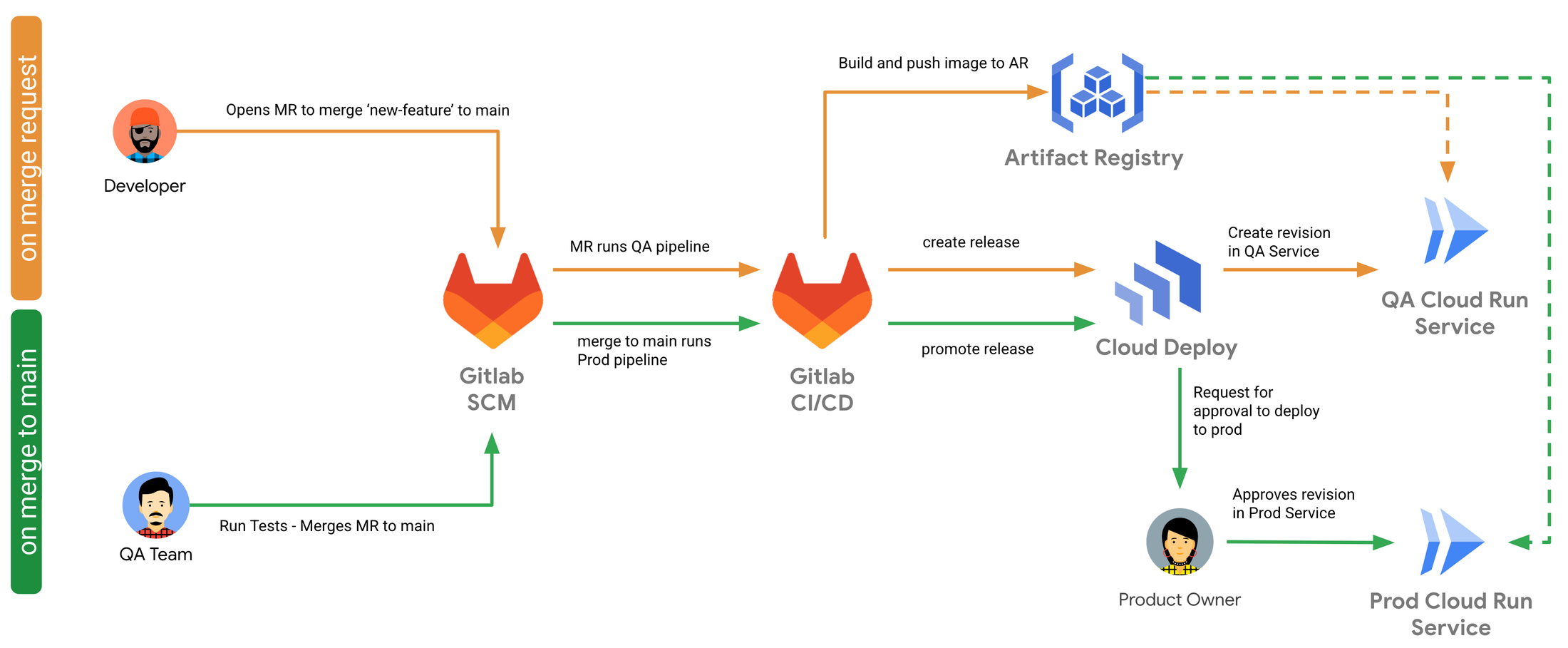
GitLab takes a holistic view of DevOps. It does not treat CI/CD as a feature; it treats it as the backbone of the entire product.
The Architecture of Visibility
GitLab CI is famous for its visual approach to pipelines. It uses a Directed Acyclic Graph (DAG) to visualize dependencies.
- Pipeline Views: You can see exactly which stage failed, which jobs were skipped, and which jobs are running in parallel. This visual feedback is superior to GitHub Actions for complex, multi-stage deployments.
- Container Registry: GitLab includes a built-in container registry. This integration is tight and mature. Pushing a Docker image to the registry and pulling it in the next stage of the pipeline feels seamless and faster than configuring external registries.
Security and Compliance
GitLab CI excels in regulated environments. Its "Auto DevOps" features can automatically scan every commit for security vulnerabilities, license compliance issues, and code quality problems without manual configuration.
- Governance: You can enforce compliance pipelines that run on every project, regardless of what the developer defines in their YAML file. This ensures that security scans happen even if a developer tries to bypass them.
The Integration Constraint
GitLab CI shines when you go "all in." If you use GitLab for code, issues, and CI, the experience is polished. However, if you host code on GitHub but want to use GitLab CI, the integration is clumsy. It requires mirroring repositories and managing cross-platform status updates.
The Verdict on GitLab CI
If you are looking for a comprehensive DevOps platform to replace Jira, GitHub, and Jenkins simultaneously, GitLab is the clear winner. Its CI engine is arguably the most mature and feature-rich of the SaaS options.
CircleCI
Best For: Scale-ups and performance-obsessed teams that need the fastest possible build times.
CircleCI is a specialist. It does not host code. It does not manage tickets. It focuses entirely on being the fastest and most reliable runner of builds.
The Architecture of Performance
CircleCI has optimized its infrastructure to shave seconds and minutes off build times.
- Docker Layer Caching: CircleCI has advanced logic for caching Docker layers. If you build heavy container images, this feature alone can reduce build times by 50% or more compared to GitHub Actions.
- Test Splitting: CircleCI can automatically analyze your test suite and split it across multiple parallel runners to finish faster. While other tools can do this, CircleCI makes it a first-class feature that is easy to configure.
The Developer Experience
CircleCI offers features that developers love, specifically around debugging.
- SSH Debugging: When a build fails in CI, it is often hard to reproduce the error locally. CircleCI allows you to SSH directly into the failing runner instance. You can poke around the file system, check environment variables, and run commands to diagnose the issue live. This drastically reduces the time it takes to fix a broken pipeline.
The Pricing Complexity
CircleCI uses a credit-based pricing model. You pay for the compute class (RAM/CPU) and the duration of the run. This allows for granular control; you can use a massive machine for a heavy compile job and a tiny machine for a linting job. However, it also makes billing unpredictable. A bad configuration can burn through credits rapidly, leading to budget surprises.
The Verdict on CircleCI
Choose CircleCI if your team is frustrated by slow builds on GitHub or GitLab. If your primary metric is "time to deploy," the performance optimizations of CircleCI justify the extra cost and the friction of using a separate tool.
How to Decide on a CI/CD Platform
Use these four scenarios to align your choice with your organizational needs.
Scenario A: The Modern Standard
Context: You are building a web application using React, Node, or Python. Your code is hosted on GitHub. You want to start deploying immediately.
Recommendation: GitHub Actions.
Why: It offers the lowest barrier to entry. The Marketplace allows you to assemble a pipeline in minutes. The integration with your repository simplifies security and authentication.
Scenario B: The Legacy or Hardware Build
Context: You are a manufacturer or a bank. You need to compile C++ code for specific hardware. You have strict security requirements that prevent code from leaving your physical network.
Recommendation: Jenkins.
Why: You need the control of self-hosted infrastructure. Jenkins allows you to lock down the environment completely and interface with physical hardware in ways that cloud runners cannot.
Scenario C: The Unified Platform
Context: You want to simplify your toolchain. You are tired of paying for Jira, GitHub, and Artifactory separately. You want one tool for the whole team.
Recommendation: GitLab CI.
Why: It provides the best end-to-end visibility. The built-in security scanning and container registry reduce the number of integrations you need to manage.
Scenario D: The Performance Optimization
Context: Your developers are complaining. Their builds take 45 minutes on GitHub Actions, slowing down their feedback loop. You are willing to pay for speed.
Recommendation: CircleCI.
Why: Features like SSH debugging and intelligent test splitting will reduce developer frustration and wait times. The productivity gain offsets the cost of a specialized tool.
What CI/CD actually costs: minutes, credits, seats, and engineering hours
The four platforms meter in four different units, which makes headline rates almost useless for comparison. GitHub Actions bills compute by the minute on top of a cheap seat. GitLab charges a substantial per-user subscription and includes a pool of minutes. CircleCI bills credits that drain at a rate set by machine size. Jenkins bills nothing and consumes engineering time instead.
All figures below reflect published list pricing as of August 2026, following GitHub's January 2026 rate reduction. Enterprise agreements are routinely negotiated below list.
The unit each platform actually charges for
- GitHub Actions: $4 per user per month on Team with 3,000 included minutes, then $0.006 per standard Linux minute. Public repositories run free with no cap.
- GitLab CI: $29 per user per month on Premium with 10,000 compute minutes, then $10 per additional 1,000 minutes. Ultimate is now sales-quoted rather than publicly listed.
- CircleCI: Performance from $15 per month covering five active users, then $15 per additional active user. Credits cost $0.0006 each, and a Medium Linux class burns 10 credits per minute, which works out to $0.006 per minute.
- Jenkins: no license fee. You pay for controller and agent infrastructure, plus the engineering hours spent patching, upgrading, and resolving plugin conflicts.
Two of those numbers are identical. A standard Linux build minute costs $0.006 on GitHub Actions and $0.006 on CircleCI. Compute rate is not the differentiator between them. Fixed seat cost is.
Where the money actually goes at different team sizes
The model below assumes 20 engineers running standard Linux builds, priced at list. Jenkins figures assume a modest cloud controller with two agents, plus a labour estimate that you should replace with your own fully loaded engineering rate.
The pattern holds across most team sizes. GitLab's cost is driven by headcount, so it rises whether or not those people trigger pipelines. GitHub Actions and CircleCI track build volume, so a large team with light pipelines pays far less. Jenkins looks free in every row and is not, which is the point the invoice never shows.
Jenkins total cost of ownership
Jenkins costs nothing to license and something real to operate. The line items are the controller and agent infrastructure, storage for artifacts and build history, and the engineering time spent on version upgrades, plugin conflicts, security patches, and runner capacity.
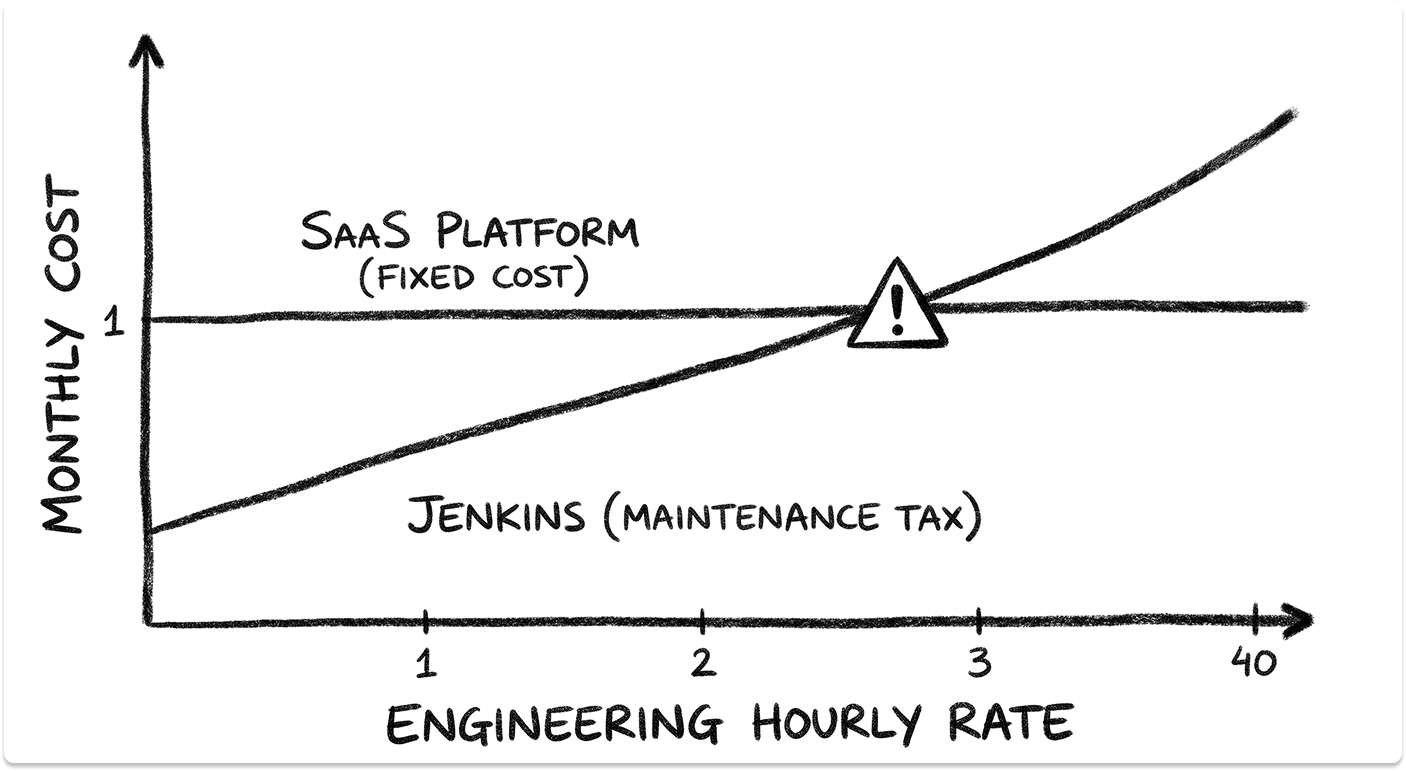
That last item is the one that decides the comparison. At 20 engineers, GitLab Premium costs $580 a month. If maintaining Jenkins consumes eight engineering hours a month, Jenkins is more expensive than GitLab at any fully loaded rate above roughly $73 an hour. At four hours a month it breaks even nearer $145. Run that calculation with your own rate and your own honest hour count before treating Jenkins as the budget option.
There is a second cost that never appears in either column. Jenkins knowledge tends to concentrate in one or two engineers, and when they leave, the pipeline becomes an operational risk rather than a line item.
The billing traps that produce surprise invoices
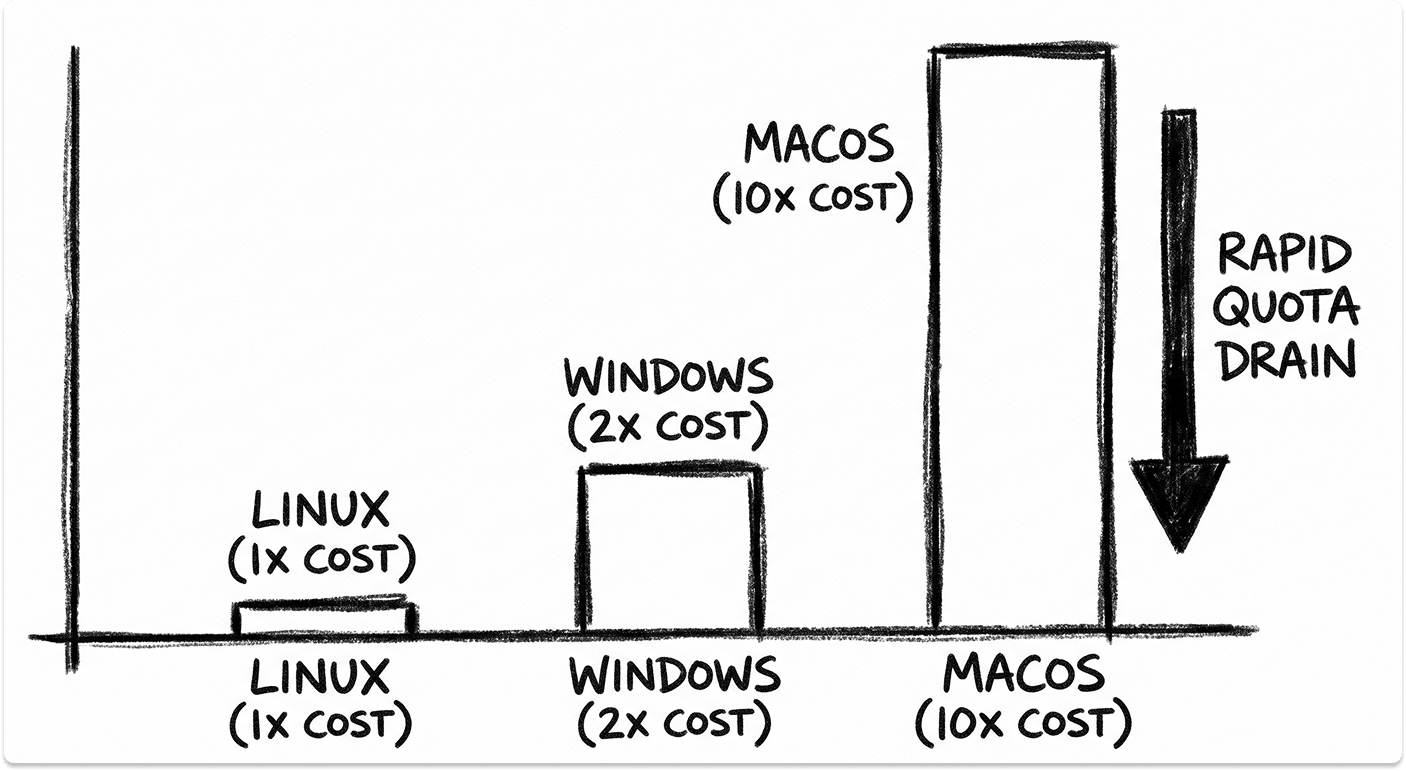
- GitHub operating system multipliers. Included minutes are Linux-equivalent. Windows drains the quota at twice the rate and macOS at ten times. A mostly-macOS workload exhausts a 3,000-minute Team allowance in 300 wall-clock minutes.
- Matrix builds fanning across operating systems by habit. A test suite spread across Linux, Windows, and macOS when only Linux coverage was needed pays the macOS premium on every single run.
- CircleCI resource classes. Credits drain by machine size. Moving from Medium to XLarge quadruples the per-minute cost. Docker layer caching adds a flat credit charge per job, and macOS classes burn many times a Linux rate.
- GitLab included minutes are a namespace pool, not a per-user grant. A five-person team and a fifty-person team on Premium both start from the same 10,000 minutes, so the allowance gets tighter as you grow even though your bill rises.
- Nothing rolls over. Monthly allowances reset on all three hosted platforms. Paid CircleCI credits are the exception and carry forward.
- Self-hosted runners consume no platform metering on GitHub Actions, GitLab CI, or CircleCI. You pay only for the underlying compute, which changes the arithmetic considerably at high build volume.
When self-hosted runners start to pay off
Self-hosted runners let you keep a managed control plane while paying wholesale for compute. The break-even depends on volume and on how much engineering attention the runner fleet needs, which is the same tax Jenkins charges, just applied to a smaller surface.
For predominantly Linux workloads, hosted minutes stay cheap enough that self-hosting rarely justifies the operational overhead until build volume is very high. For macOS, the calculation inverts quickly, because hosted macOS carries the steepest premium on every platform. A dedicated Mac build machine often pays for itself within months for teams running daily iOS builds.
CI/CD platform comparisons
The four-way decision rarely happens in practice. Your source control host already eliminates two options, and the real choice comes down to a pair. Here is how each matchup resolves.
Jenkins vs. GitLab CI
This is a comparison between two different eras of the same idea. Both give you self-hosted control. Jenkins gives it to you as a build server you assemble from plugins, where the pipeline definition lives in Groovy and the integration surface is whatever you configure. GitLab CI gives you the same control inside a platform that already knows about your repository, your merge requests, and your security scans.
The deciding factor is where your engineering hours go. Jenkins consumes them on plugin conflicts, controller upgrades, and runner management. GitLab CI consumes them on pipeline logic. Both are self-hostable and both work air-gapped, so control is not the differentiator people assume it is.
Use Jenkins if you need bare-metal access, hardware-attached builds, or you have an existing plugin dependency with no GitLab equivalent. Use GitLab CI for everything else, and expect Premium at $29 per user per month to cost less in total than a Jenkins installation once you price the engineering time it absorbs.
GitLab CI vs. CircleCI
These two compete on opposite axes. GitLab CI wins on breadth, since one subscription covers source control, CI, security scanning, and deployment in a single interface. CircleCI wins on depth of build performance, with intelligent test splitting, Docker layer caching, and SSH access into a failed build.
Cost separates them more than features do. GitLab charges per user per month, so a 50-person team pays for 50 seats whether or not they trigger pipelines. CircleCI charges for compute credits plus active users, so cost tracks build volume rather than headcount. A large team with modest build frequency usually pays less on CircleCI. A small team with heavy pipelines often pays less on GitLab.
Use GitLab CI if you want to consolidate tools and your code already lives in GitLab. Use CircleCI if build speed is a measurable constraint and your source control stays elsewhere.
Jenkins vs. CircleCI
The honest framing is free software against free engineering time. Jenkins has no license cost. CircleCI has no maintenance cost. Which one is cheaper depends entirely on what an engineer-hour is worth to you.
CircleCI also delivers build performance that Jenkins reaches only through deliberate tuning. Test splitting and layer caching are native features rather than plugins you configure and maintain.
Use Jenkins when licensing cost must be zero at large scale, or when builds need physical hardware. Use CircleCI when you want fast pipelines without staffing a build team.
GitHub Actions vs. CircleCI
Compute pricing no longer separates these two. Since GitHub's January 2026 rate reduction, a standard Linux minute costs $0.006 on GitHub Actions and $0.006 on a CircleCI Medium resource class. The difference sits in fixed costs and capability.
GitHub Actions charges $4 per user per month on Team with 3,000 included minutes. CircleCI Performance starts at $15 per month covering five active users, then $15 for each additional active user. Past roughly five engineers, GitHub Actions is usually cheaper. Below that, with heavy build volume, CircleCI competes well.
Capability runs the other way. CircleCI gives you SSH debugging, finer resource class granularity, and stronger parallelism controls. GitHub Actions gives you a marketplace of prewritten actions and zero integration work if your code is already on GitHub.
Use GitHub Actions if your repositories are on GitHub, which resolves this comparison for most teams. Use CircleCI if you are debugging slow builds and need the tooling to fix them.
Jenkins vs. GitHub Actions
This is the most common migration path in 2026, and it is usually a one-way trip. Teams leave Jenkins because the maintenance tax became visible: a plugin broke an upgrade, or the one engineer who understood the controller left.
GitHub Actions removes that burden and puts pipeline definitions next to the code. What you lose is the arbitrary flexibility Jenkins offered, along with any plugin that has no marketplace equivalent. Cross-repository orchestration is also weaker, which matters if Jenkins was coordinating builds across many repositories.
Use Jenkins only for air-gapped environments or hardware-dependent builds. Use GitHub Actions if your code is on GitHub and your pipelines are conventional.
GitLab CI vs. GitHub Actions
Your source control host settles this in most organizations, and fighting that gravity costs more than it returns. Where a genuine choice exists, the question is consolidation against ecosystem.
GitLab CI bundles security scanning, compliance, and pipeline visualization into the tiers you already pay for, and its DAG view is the best pipeline visualization of the four. GitHub Actions has the larger action marketplace and lower entry cost at $4 per user per month against GitLab Premium at $29.
Use GitLab CI if integrated SAST, DAST, and compliance reporting would otherwise mean buying separate tools. Use GitHub Actions if your code is on GitHub and you prefer assembling best-of-breed tools around it.
CI/CD alternatives beyond the big four
Jenkins, GitHub Actions, GitLab CI, and CircleCI cover most of the market, but they are not the only credible options. These platforms show up on shortlists for specific reasons, and each one exists because it solves a problem the big four handle awkwardly.
Buildkite
Buildkite splits the architecture in a way none of the big four do. The control plane is hosted, and every build runs on your own infrastructure. You get a managed interface and scheduling without sending source code to a vendor's runners.
That model appeals to teams with strict data residency requirements, unusual hardware needs, or build volumes where hosted per-minute pricing becomes painful. Pricing is per user rather than per minute, so cost stops scaling with build volume entirely. The trade is that you still run and maintain the compute, which is a lighter version of the Jenkins tax rather than its elimination. Worth evaluating if you left Jenkins for maintenance reasons but need builds to stay on your own machines.
Argo Workflows and Argo CD
Argo is Kubernetes-native and belongs in a different category from the rest of this list. Argo Workflows runs pipelines as Kubernetes resources. Argo CD handles GitOps deployment, where the cluster continuously reconciles itself against a declared state in Git.
Teams typically add Argo CD alongside a conventional CI tool rather than replacing it. GitHub Actions or GitLab CI builds and tests the artifact, then Argo CD deploys it. If your platform team already runs Kubernetes and thinks in manifests, this pairing is the current default for cloud-native deployment. If you do not run Kubernetes, Argo solves a problem you do not have.
Azure DevOps Pipelines
Azure Pipelines is the same platform-gravity argument as GitHub Actions, pointed at Microsoft's enterprise estate. It matters most where Azure Repos, Azure Boards, or Team Foundation Server history is already embedded, or where an enterprise agreement makes it effectively bundled.
Microsoft's investment has clearly shifted toward GitHub Actions since the acquisition, so treat Azure Pipelines as a strong incumbent rather than a growth platform. New greenfield projects inside Microsoft-aligned organisations increasingly land on GitHub Actions instead.
Tekton
Tekton is a Kubernetes-native building block rather than a finished product. It provides pipeline primitives that platform teams assemble into an internal CI/CD service, and it underpins several commercial platforms.
Choose Tekton if you are deliberately building a platform for other engineering teams to consume and you have the staff to own it. It is the wrong answer for a team that just needs pipelines running this quarter.
Travis CI
Travis CI was the default for open-source CI for years, and it still appears in evaluations largely through legacy projects and habit. Its position weakened considerably after pricing changes to the open-source tier pushed most public repositories toward GitHub Actions.
It remains functional and some teams are perfectly happy on it. New evaluations rarely select it over GitHub Actions or CircleCI, and existing users are the main population still comparing it.
Which alternative fits which constraint
- Builds must run on your infrastructure, but you want a managed interface: Buildkite.
- Kubernetes-native deployment and GitOps: Argo CD, paired with a conventional CI tool.
- Deep existing Microsoft and Azure estate: Azure DevOps Pipelines.
- Building an internal developer platform for other teams: Tekton.
- Air-gapped, bare-metal, or hardware-attached builds: Jenkins remains the practical answer.
The pattern across all of these is the same one that separates the big four. Platform gravity decides the default, and you only pay to escape it when a specific constraint makes the default unworkable.
Migrating off Jenkins: what the work actually involves
Jenkins to GitHub Actions or GitLab CI is the most common CI/CD migration happening right now, and it usually starts for one of two reasons. An upgrade broke a plugin, or the engineer who understood the controller left. Neither is a good moment to begin planning, which is why the work tends to be underestimated.
What migrates easily and what does not
Straightforward builds port in an afternoon. A Jenkinsfile that checks out code, runs a build command, executes tests, and publishes an artifact maps almost directly onto a YAML workflow. The syntax differs, the concepts do not.
The difficulty sits in everything Jenkins accumulated around those builds:
- Plugins with no equivalent. Some of the roughly 1,800 Jenkins plugins have no marketplace action or GitLab component counterpart. Each one becomes a scripting job or a dropped capability.
- Shared libraries. Groovy shared libraries encoding years of internal build logic have to be rewritten as reusable workflows, composite actions, or CI/CD components. This is usually the largest single chunk of work.
- Credentials and secrets. Every credential in the Jenkins store needs recreating in the new platform's secrets management, and anything injected through a plugin needs rethinking.
- Cross-repository orchestration. If a Jenkins job triggered builds across many repositories in sequence, that pattern does not translate cleanly. GitHub Actions in particular is weaker here.
- Agent labels and hardware pinning. Builds pinned to a specific machine, an attached device, or a licensed toolchain need self-hosted runners configured to match.
- Build history. It does not migrate. Decide early whether you need to keep the Jenkins controller running read-only for audit purposes, and for how long.
A sequence that works
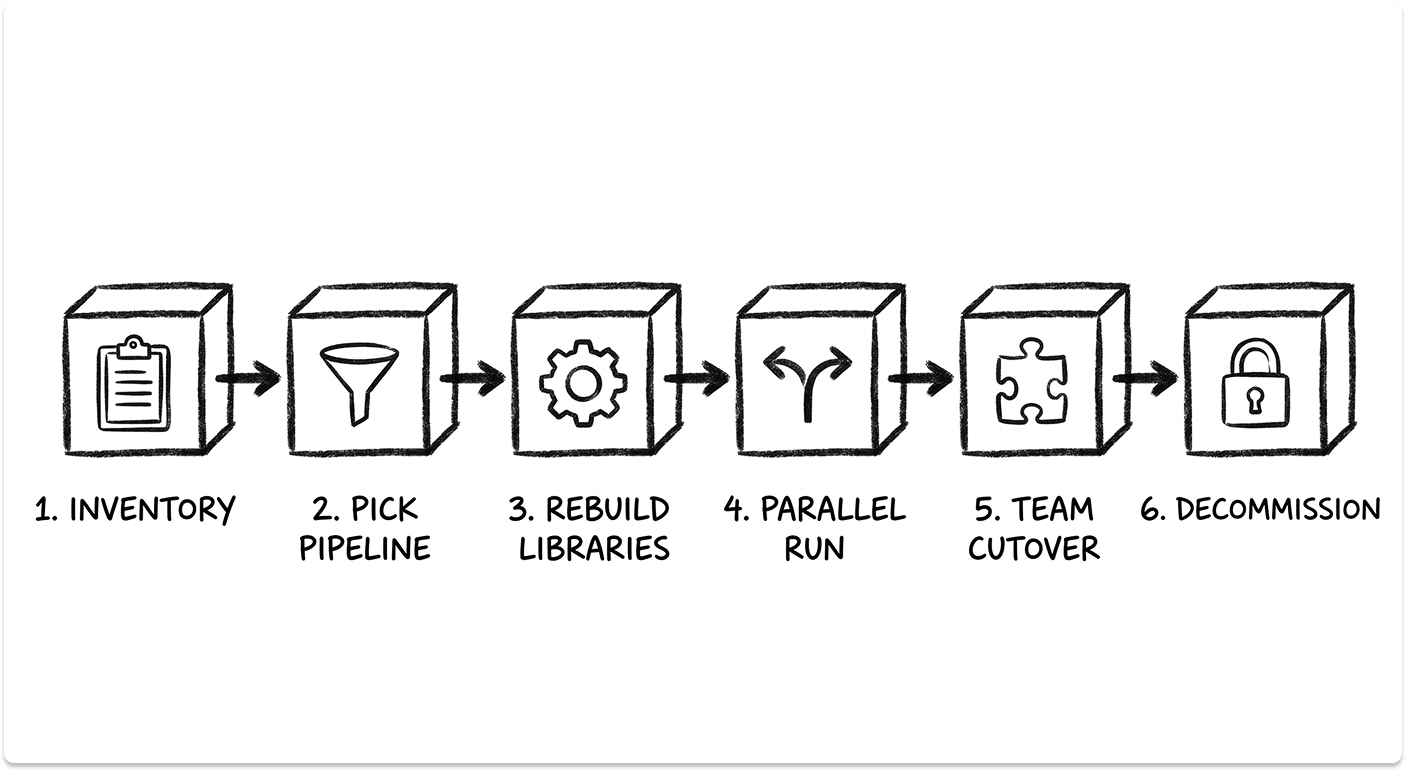
- Inventory before you plan. List every job, every plugin actually in use, every credential, and every agent label. Teams consistently find jobs nobody owns and plugins nobody remembers installing. Some of that can simply be deleted.
- Pick one representative pipeline, not the easiest one. Migrating the simplest job proves nothing. Choose one that exercises your real patterns, such as a build with test parallelism and a deployment step, so the effort estimate means something.
- Rebuild shared libraries as reusable workflows first. Everything else depends on them. Doing this before bulk migration prevents the same logic being reimplemented twenty times.
- Run both systems in parallel on real commits. Have Jenkins and the new platform build the same commits and compare outputs. This is where you find the environment assumptions nobody documented.
- Cut over by team, not all at once. Move one team, let them work in it for a sprint, collect what broke, then move the next.
- Decommission deliberately. Keep Jenkins read-only until audit and compliance requirements are satisfied, then shut it down properly. A half-decommissioned controller still needs patching, which means you are paying the maintenance tax for a system nobody uses.
What to budget
Migration cost is engineering time, and the variable that matters is how much custom logic accumulated in Jenkins rather than how many jobs you have. Fifty near-identical pipelines migrate faster than five heavily customised ones.
Two costs are routinely left out of the plan. Parallel-run periods mean paying for both platforms at once, and every hour engineers spend on migration is an hour not spent on product. Neither shows up in a licence quote, and both belong in the business case.
The honest counterargument is worth stating. If Jenkins is stable, your builds are conventional, and nobody is fighting it, migration may not clear the bar this year. The cost of moving is real and immediate, while the maintenance tax is spread thin enough to tolerate. The calculation changes when the Jenkins knowledge sits with one person, or when an upgrade you cannot postpone is due.
Choosing the destination
Source control decides this for most teams. Code on GitHub goes to GitHub Actions, code on GitLab goes to GitLab CI, and fighting that gravity adds work for no return. Where a genuine choice exists, GitLab CI is the closer match to Jenkins in operating model, since both are self-hostable and both support air-gapped environments. Teams that left Jenkins specifically to stop managing infrastructure usually land on hosted GitHub Actions instead.
Closing Thoughts
The era of defaulting to Jenkins is over. In 2026, the cost of engineering time is far higher than the cost of compute.
- Choose GitHub Actions if you want the path of least resistance. It is the new standard for a reason.
- Choose GitLab CI if you want a powerful, integrated platform that enforces security and compliance.
- Choose CircleCI if you are scaling rapidly and need raw performance to keep developers productive.
- Choose Jenkins only if you absolutely must. If you have unique hardware constraints or legacy requirements that modern SaaS tools cannot handle, Jenkins remains the only tool flexible enough to say yes to everything.
Strategic Final Thought: Do not fight Platform Gravity. Start with the CI tool provided by your code host. Only introduce the complexity of a third-party tool if you have a specific, measurable problem that the default option cannot solve.
Also Read: Github Copilot vs Cursor vs Amazon Q Developer: Comparing AI Coding Assistants for IT Leaders
We can help you find CI/CD vendors
Find your next CI/CD partner on a curated marketplace of vetted vendors and save weeks of research. Your info stays anonymous until you choose to talk to them so you can avoid cold outreach. Always free to you.
FAQ
Can I use Jenkins for Free?
The software is free and open-source. However, the Total Cost of Ownership (TCO) is high. You pay for the servers to host it, the electricity to run it, and most importantly, the engineering hours required to patch, update, and fix it. For many companies, "free" Jenkins is more expensive than paid CircleCI.
Can I use GitHub Actions if I host code on GitLab?
Technically yes, but it is not recommended. You lose the primary benefit of Platform Gravity. You would have to mirror your code or manage complex webhooks. If your code is on GitLab, you should almost certainly use GitLab CI.
Why is CircleCI considered faster?
CircleCI specializes in runner optimization. They offer features like intelligent test splitting (running tests in parallel based on timing data) and advanced Docker layer caching. While you can configure these things in other tools, CircleCI makes them native features, often resulting in faster builds out of the box.
Which tool is best for security?
GitLab CI is generally considered the leader in integrated security. Its Ultimate tier includes comprehensive scanning (SAST, DAST, dependency scanning) that runs automatically in the pipeline and displays results directly in the merge request. GitHub Actions also has strong security features via "CodeQL," but GitLab's integration feels more cohesive.
What is the "Marketplace" advantage of GitHub Actions?
The Marketplace allows you to use code written by others. Instead of writing a 50-line script to log in to Amazon ECR and push an image, you can use the official "Configure AWS Credentials" action. This speeds up the setup of new pipelines significantly, as you are assembling pre-built blocks rather than writing scripts from scratch.
Which is better, Jenkins or GitLab CI?
GitLab CI is the better choice for most teams. Both are self-hostable and both work in air-gapped environments, so control is not the real differentiator. The difference is where engineering hours go: Jenkins consumes them on plugin conflicts and controller upgrades, GitLab CI consumes them on pipeline logic. Jenkins remains the right answer when you need bare-metal access, hardware-attached builds, or have a plugin dependency with no GitLab equivalent.
Is CircleCI better than GitLab CI?
They compete on different axes. CircleCI is better for build performance, with intelligent test splitting, Docker layer caching, and SSH access into failed builds. GitLab CI is better for consolidation, bundling source control, CI, security scanning, and deployment into one platform. Cost separates them more than features do: GitLab charges per user per month regardless of build volume, while CircleCI charges for credits plus active users, so cost tracks build frequency instead of headcount.
How does CircleCI cost compare with GitLab cost?
The billing units differ, so the answer depends on your team shape. GitLab Premium is $29 per user per month with 10,000 included compute minutes, and the bill rises with headcount whether or not those people trigger pipelines. CircleCI Performance starts at $15 per month covering five active users, then $15 per additional active user, with credits consumed per build minute. A large team with light build volume usually pays less on CircleCI. A small team with heavy pipelines often pays less on GitLab. All figures are published list pricing as of August 2026.
What are the best CircleCI alternatives?
GitHub Actions is the closest alternative on price and now matches CircleCI at $0.006 per standard Linux minute, making seat cost the real difference. GitLab CI is the alternative if you want to consolidate tooling. Buildkite suits teams that want a managed control plane while builds run on their own infrastructure. Jenkins remains the option for air-gapped or hardware-dependent builds. The right alternative depends on whether you are replacing CircleCI's build performance or its credit-based pricing.
Is GitHub Actions cheaper than CircleCI?
Usually yes, past about five engineers. Compute rates are identical at $0.006 per standard Linux minute since GitHub's January 2026 price reduction, so the difference is fixed cost. GitHub Team is $4 per user per month with 3,000 included minutes. CircleCI Performance covers five active users at $15 per month, then charges $15 for each additional active user. Below five users with heavy build volume, CircleCI competes well. For macOS-heavy workloads, GitHub Actions is currently the cheaper hosted option.
How long does it take to migrate from Jenkins to GitHub Actions or GitLab CI?
Simple pipelines port in an afternoon, because a checkout, build, test, and publish sequence maps almost directly onto a YAML workflow. The timeline is driven by how much custom logic accumulated in Jenkins, not by how many jobs you have. Fifty near-identical pipelines migrate faster than five heavily customised ones. Rewriting Groovy shared libraries is usually the largest chunk of work, and a parallel-run period where both systems build the same commits is where undocumented environment assumptions surface.