



M&A IT Integration Tooling: A Technical Guide to Tenant Migration and Consolidation Platforms
A technical guide to M&A tenant migration and consolidation tooling. Compare Quest, BitTitan, AvePoint, ShareGate, and native Microsoft options by scenario.

Summary:
M&A tenant migration tooling should be chosen by deal pattern, not datasheet. Classify the deal first: full absorption, carve-out/divestiture, or tenant-to-tenant consolidation, because each pulls different capabilities to the front.
All tools work inside Microsoft's fixed limits (throttling, un-migratable Teams chat, no cloud SID history, no Intune device migration), so fit depends on architecture, workload coverage, identity, coexistence, security, and pricing.
The deal closes, and now you own two of everything. Two identity providers, two Microsoft 365 tenants, two file estates, two device fleets, two sets of security policies that disagree with each other. The board sees one company. Your directory sees two, and it will keep seeing two until someone moves the data.
That someone is you, and you are working against a clock. In an absorption, the pressure is Day 1 collaboration: people who now share a payroll cannot share a calendar.
In a divestiture, the clock is the Transition Services Agreement, where every month the separated unit runs on the parent's systems is a month of stranded cost and audit exposure.
The deal thesis is not usually what fails. Roger Martin's oft-cited figure puts M&A failure at 70 to 90 percent, and integration execution sits near the center of that number.
Tool choice is one of the few variables you fully control. Pick the wrong platform and you discover, three weeks before a hard cutover, that it cannot preserve permissions, cannot run coexistence long enough, or routes regulated data through a cloud your legal team never approved.
This guide breaks down the tooling by what it actually does under load, not by what the datasheet promises.
The three M&A integration patterns that decide your tooling
Before you compare a single product, classify the deal. The three patterns pull different capabilities to the front, and a tool that dominates one can be irrelevant in another.

Full absorption: folding an acquired estate into the parent
You are migrating the acquired company's identity, mail, files, and endpoints into your existing tenant and domain. The hard problems are identity mapping, SID history where on-premises Active Directory and file servers persist, and running coexistence long enough that users keep working while waves move.
Absorption rewards breadth. You want one control plane that handles directory, mailboxes, SharePoint, OneDrive, Teams, and device re-association together, because sequencing them across four disconnected tools is where timelines slip.
Carve-out and divestiture: extracting a unit before the TSA clock runs out
Here you extract only the divested population and stand it up independently, or exit a TSA by a fixed date. The priorities invert. Instead of breadth, you need surgical scoping (move these users and nothing else), a hard security boundary so no data leaks between the separating entities, and speed.
Tools that keep content inside your own security boundary matter more here, because the whole point is separation. A carve-out that accidentally copies the parent's data into the child's tenant is a legal problem, not a migration ticket.
Tenant-to-tenant consolidation: merging two Microsoft 365 estates
Two or more tenants become one. The dominant concern is coexistence during the transition: a unified Global Address List, cross-tenant free/busy, and mail routing so the two populations behave like one company weeks before the mailboxes actually move.
Identity collisions (two jsmith@ accounts, overlapping UPNs) and licensing overlap round out the risk list. Get coexistence wrong and users see a fractured address book and bounce-backs, which erodes confidence in the whole program.
The platform limits every migration tool works inside
No vendor can outrun Microsoft's service protection. Understanding these ceilings tells you which vendor claims are real engineering and which are marketing.
Throttling is by design and cannot be switched off. Exchange Online applies EWS throttling that Microsoft does not publish and does not let you fully disable.
For SharePoint and OneDrive, Microsoft applies tighter limits on background migration apps during weekday daytime hours and returns HTTP 429 with a Retry-After header when you push too hard.
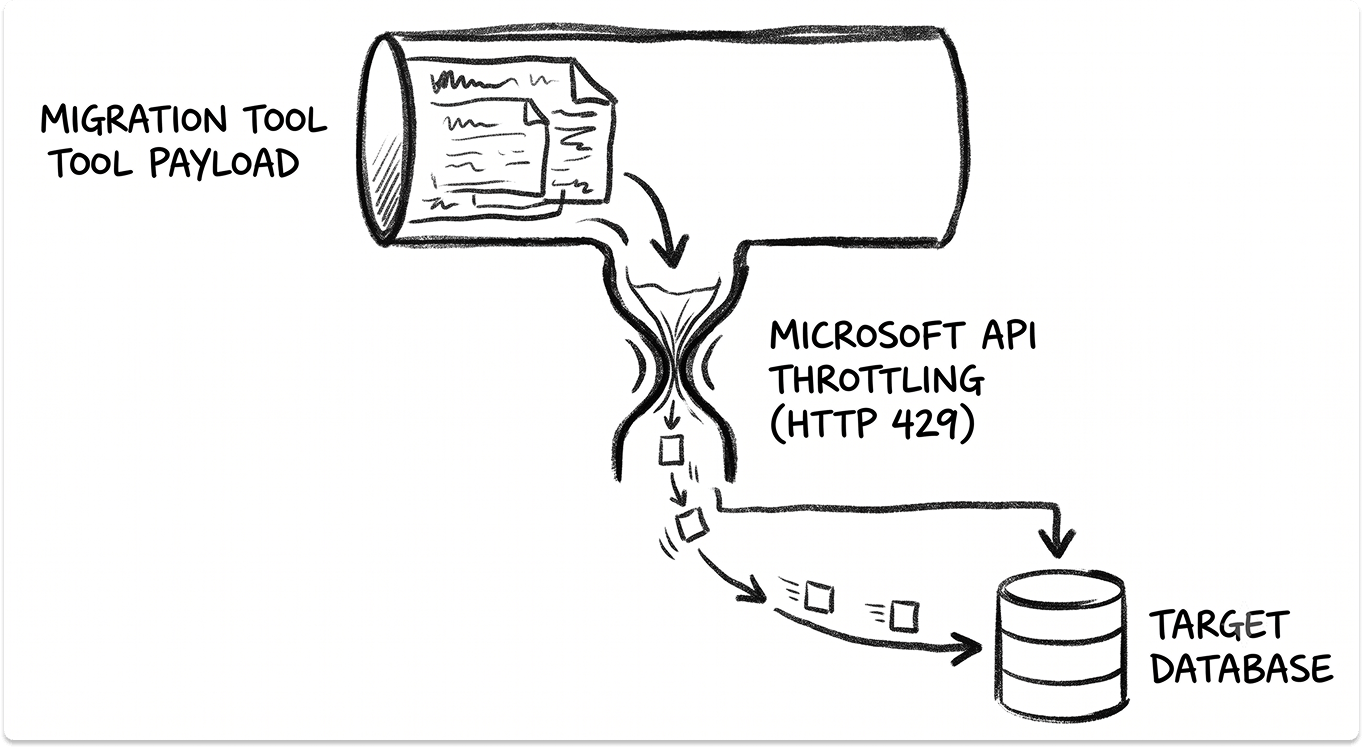
A well-built tool honors that back-off, stages content in Azure BLOB storage, and schedules heavy waves for evenings and weekends. A poorly built one hammers the API and gets throttled harder. Either way, the ceiling is Microsoft's, so treat any "unlimited speed" claim as a claim about queuing, not physics.
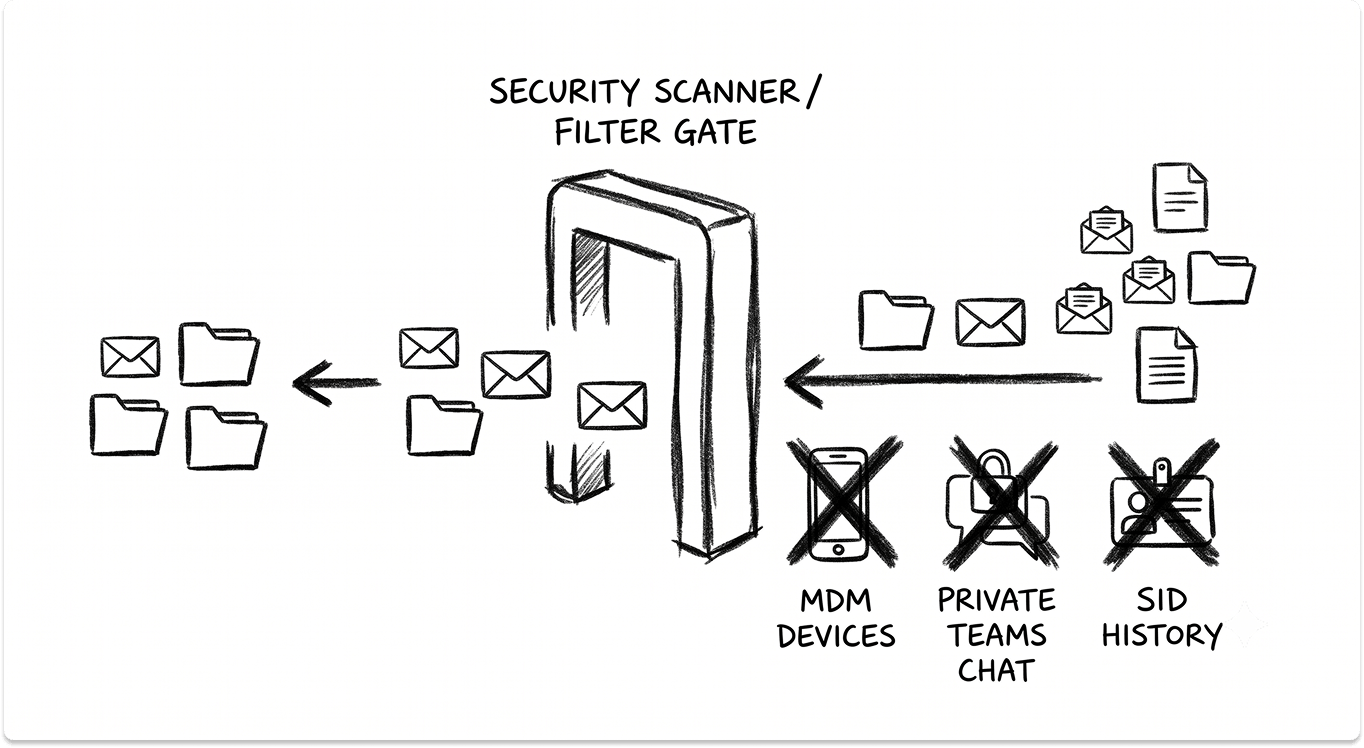
Teams private chat barely migrates at all. One-to-one and private chat is not portable at the platform level. Vendors either recreate it or export it to read-only HTML.
BitTitan's own migration documentation states its private-chat projects run at a concurrency limit of 20 users and generate history only for messages within the last 30 days, capped at 250 MB per HTML file. Plan to tell users their chat history is coming across as an archive, not a live thread.
Some things no tool can carry:
- SID history into the cloud. ADMT, Microsoft's own tool, is unsupported on current Windows Server and Windows 11, and SID history cannot be written into Entra ID at all. On-premises AD-to-AD SID history requires a commercial tool. Cloud-only identity has no equivalent, so file-server permissions get re-stamped, not inherited.
- Devices. Microsoft has confirmed that tenant migration is not supported for Intune. Endpoints must be reset and re-enrolled through Autopilot in the target, and the source hardware-hash registration has to be released first. This is a universal M&A tax, and it drives most of the end-user pain on cutover weekend. The mechanics mirror a standard SCCM-to-Intune migration, with an added tenant boundary in the way.
- Power Platform and signatures. Power Apps, Power Automate flows, and Forms generally get rebuilt in the target. Mailbox signatures do not migrate cross-tenant natively.
Every credible vendor lives with the same list. The differences show up in how gracefully each handles what it can move.
The parameters that separate migration tools
Six technical dimensions decide fit. Weight them by your deal pattern.
Architecture and data flow. Does content transit the vendor's cloud, or stay inside your boundary? ShareGate documents that content moves source to destination through a local engine and does not pass through ShareGate's servers.
Archive specialist TransVault makes the same in-boundary claim. By contrast, BitTitan, AvePoint's SaaS edition, and Quest On Demand route content through vendor-hosted Azure for temporary processing before purging it. For a carve-out with strict data-leakage rules, this single distinction can decide the shortlist.
Workload coverage. Mail is the easy part. The real spread is in OneDrive, SharePoint sites, Teams standard and private channels, permissions and ACL fidelity, versioning, sensitivity labels, public folders, and archives. A tool that moves mailboxes cleanly but flattens SharePoint permissions will cost you weeks of remediation.
Identity handling. Cross-tenant identity mapping, on-premises SID history, UPN transformation, and how the tool coordinates with an Active Directory to Entra ID migration all belong here. Identity is where a full suite earns its premium over a per-workload mover.
Coexistence. How long can the tool sustain GAL sync, free/busy, and cross-tenant mail flow? Consolidations and phased absorptions live or die on this. A big-bang tool with no coexistence forces a weekend cutover that large estates rarely survive.
Security, residency, and government cloud. Data residency selection, encryption in transit and at rest, the admin-consent model, and whether the vendor holds SOC 2 or ISO 27001 attestations matter to your CISO. If you run GCC or GCC High, coverage narrows sharply, and you should verify current authorization directly rather than trust a marketing page.
Rollback, delta sync, and pricing model. Can you re-run delta passes after the initial copy, and is cutover reversible? And is the tool priced per user, per gigabyte, or as an annual platform license? The pricing model shapes behavior: per-user tools reward tight scoping, platform licenses reward large one-shot moves.

The tool classes and where each earns its place
The market sorts into five classes. Match the class to your pattern first, then compare products inside it.
Full-suite identity and workload platforms
Quest On Demand Migration with Binary Tree Power365 is the one platform that migrates Exchange, OneDrive, SharePoint, Teams, and Active Directory or Entra ID identity under a single control plane.
Quest documents preservation of document versions and metadata, on-premises AD SID history and permission re-stamping through its directory agents, long-running GAL and free/busy coexistence, and, as of 2025, migration of sensitivity-labeled content between tenants.
Quest states ISO/IEC 27001 is in scope and that GCC High is supported as a target. This is the class that fits absorption and multi-tenant consolidation at scale, and it carries the heaviest administrative overhead of the group. For a small mailbox-only move, the setup cost outweighs the benefit.
Per-user workload movers
BitTitan MigrationWiz is an agentless broker: only project metadata sits in BitTitan's control plane, while content moves through region-selectable Azure processing.
It covers Microsoft 365, Google Workspace, on-premises Exchange, and several file platforms, which gives it the widest source coverage in the class. BitTitan's published pricing lists a Mailbox license at 14 dollars per user and a User Migration Bundle (mailbox, archive, documents, and Teams private chat) at 17.50 dollars per user, each valid for twelve months.
It shines on aggressive-timeline mail, file, and Teams moves where identity is straightforward. DNS and coexistence configuration remain your job.
AvePoint Fly ships as a hosted SaaS and a self-hosted Fly Server for regulated environments. AvePoint documents full-fidelity migration of Exchange Online, SharePoint, OneDrive, Teams including private and shared channels, and Google Workspace to Microsoft 365, with preservation of permissions, versions, and sensitivity labels.
AvePoint holds SOC 2 Type II and ISO 27001 attestations and lists FedRAMP Moderate authorization covering its government clouds. Pricing is per object or per user. It is a strong choice when SharePoint and Teams permission fidelity is the make-or-break requirement.
CloudM Migrate is the cross-platform specialist, strongest on Google Workspace to Microsoft 365 in both directions, available as hosted SaaS or self-hosted. Its documentation is unusually candid about what shifts during a cross-platform move, such as Gmail label to Outlook folder mapping and rewritten mail headers. If your deal joins a Google shop to a Microsoft shop, this class belongs on the list.
SharePoint and Teams content specialists
ShareGate Migrate runs as a desktop application, and its defining trait is that content never transits ShareGate's servers. It handles SharePoint, Teams, and Planner, with higher tiers adding Exchange Online, Google Drive, file shares, and sensitivity-label migration. ShareGate is licensed as an annual platform subscription with unlimited data, users, and workloads.
It is not an identity or mailbox platform, so it usually pairs with one of the movers above. For carve-outs that demand in-boundary data flow and heavy SharePoint cleanup before cutover, it is hard to beat on that specific axis.
Coexistence and niche tools
CodeTwo and Cloudiway solve narrow problems well. When you only need the address-book and calendar bridge between tenants, a focused GAL sync and free/busy tool is lighter than a full platform.
Cloudiway additionally offers Intune configuration migration, moving Autopilot profiles and Conditional Access policies between tenants, which fills a real gap Microsoft leaves open. Reach for this class when the job is coexistence or device-config portability, not bulk content movement.
Archive migration
Legacy email archives (Enterprise Vault, SourceOne, and similar) defeat general migration tools. TransVault and Quest Archive Shuttle preserve chain of custody with source-to-target ID mapping and hash validation, which matters when the archive is subject to legal hold. If the acquired or divested estate carries a journaling or compliance archive, budget for a dedicated archive tool regardless of your primary platform.
Microsoft native capabilities
Native tooling is genuinely sufficient in narrow, supported cases. Cross-tenant mailbox migration moves mail, calendar, and contacts under a one-time per-user license (roughly 15 dollars, also covering OneDrive), then deletes the source mailbox, which gives clean separation at the cost of reversibility.
Cross-tenant synchronization provisions users as B2B objects for collaboration, but Microsoft notes its sync interval is fixed at 40-minute cycles and it is a coexistence bridge, not a migration engine.
Native OneDrive cross-tenant moves run once with no incremental passes and exclude government clouds. Use native tooling for single-workload, Microsoft-supported moves with no coexistence or identity complexity. Everything beyond that is where third-party tooling earns its cost.
Matching the tool to the deal scenario
Read this table against the pattern you classified at the start. The right answer changes entirely depending on which of the three you are running.
A four-stage selection method
Stage one, classify and set the clock. Fix the pattern (absorption, carve-out, consolidation), count users, devices, mailbox and file volume, and inventory every workload including archives, journaling, and on-premises AD. Lock the hard date. If you must exit a TSA in under six months for an estate above a thousand seats, assume you need a full suite and coexistence from Day 1.
Stage two, shortlist by scenario, not by brand. Use the scenario table. Where identity is heavy, a per-workload mover will not save you. Where the job is coexistence, a full platform is overkill. Where content cannot leave your boundary, a SaaS broker is off the list before you look at features. Overlapping license costs during the transition also belong in the budget, and are worth modeling alongside your cloud cost plan so the double-pay window does not surprise finance.
Stage three, pilot against your own tenant. Run a small pilot of 3 to 25 users. Measure real throughput against throttling in your environment, not the vendor's benchmark. Test delta sync, cutover, and coexistence, then validate fidelity against the known breakage list: Teams chat, permissions, versioning, delegation, shared mailboxes, and sensitivity labels. If pilot throughput at safe concurrency will not clear your window, add coexistence runway or split waves. Do not assume you can raise the ceiling.
Stage four, plan the un-migratables out loud. Budget explicitly for Teams chat as an archive, device reset and re-enrollment, Power Platform rebuilds, signature redeployment, and the license-overlap window. These are the items that generate cutover-weekend tickets, and naming them early is the difference between a controlled move and a war room.

Where to go from here
The tool is one decision inside a program that also spans security policy reconciliation, network integration, and the human side of two IT teams becoming one.
The right platform depends on facts specific to your estate: which clouds, which identity model, how much regulated data, and how hard the deadline. Those facts, not a vendor's feature grid, should drive the shortlist.
TechnologyMatch exists to shorten that shortlisting. It maps requirements like these against pre-vetted vendors so you can compare the ones that fit your pattern, your compliance boundary, and your timeline, without wading through marketing to find the two or three that genuinely apply. When the deal has closed and the clock is already running, that is time you do not have to spend.
The deal closed. The clock is already running.
Every month two tenants run in parallel is double license spend and open audit exposure. Tell TechnologyMatch your scenario, your stack, and your deadline, and get a shortlist of vendors built for it.
FAQ
Which migration tool is best for a Microsoft 365 tenant-to-tenant consolidation?
It depends on how much you need to move versus bridge. For full content movement across mail, files, and Teams with long-running coexistence, Quest ODM with Power365 and BitTitan MigrationWiz are the common choices. If you only need a unified address book and free/busy between the two tenants, a focused coexistence tool such as CodeTwo or Cloudiway is lighter, and Microsoft's native cross-tenant synchronization can provide B2B presence when full consolidation is not yet required.
Can Microsoft's native tools handle an M&A migration without a third-party product?
For narrow, supported cases, yes. Native cross-tenant mailbox migration moves mail, calendar, and contacts under a one-time per-user license, and native OneDrive cross-tenant migration covers personal files. The gaps show up fast: no incremental OneDrive passes, no SharePoint site or Teams content migration through those paths, no SID history into the cloud, and no support for government clouds on the OneDrive path. Complex absorptions and carve-outs are where third-party tooling earns its cost.
Does any tool migrate Microsoft Teams chat history?
Not like-for-like. One-to-one and private chat is not portable at the platform level, so vendors either recreate it or export it to read-only HTML. As one example, BitTitan's documentation states its private-chat projects run at a 20-user concurrency limit and generate history only for the last 30 days, capped at 250 MB per file. Plan to tell users their chat is coming across as an archive rather than a live thread.
Why does SID history matter, and can it be preserved during a merger?
SID history lets migrated accounts keep access to resources permissioned to their old identity, which avoids re-stamping every file-server ACL. On-premises Active Directory to Active Directory SID history can be preserved with a commercial tool such as Quest or BitTitan's AD tooling. It cannot be written into Entra ID, and Microsoft's own ADMT is unsupported on current Windows Server, so cloud-only identity means permissions get re-applied rather than inherited.
What is the biggest hidden cost in an M&A IT integration?
Devices and the license-overlap window. Microsoft does not support Intune tenant migration, so every endpoint must be reset and re-enrolled through Autopilot in the target, with the source hardware-hash registration released first. On top of that, running two tenants in parallel during coexistence means paying for both, so the transition window belongs in the budget from the start. Teams chat archiving, Power Platform rebuilds, and signature redeployment round out the items that generate cutover-weekend tickets.


