What Jira Service Management (JSM) Cannot Do Out of the Box
JSM is not a plug-and-play ITSM. Before you sign, here is what it cannot do out of the box and what it costs you in configuration time, Marketplace spend, and licensing upgrades to close the gaps.
%20Cannot%20Do%20Out%20of%20the%20Box.png)
In December 2025, Atlassian moved change management and problem management out of the Jira Service Management Standard plan. Both features were available on Standard at the start of 2024.
Teams that had already configured change queues and CI/CD approval workflows found them greyed out after the transition. Existing data was preserved, but no new changes or edits were permitted.
That single decision redraws the JSM evaluation for any IT team that needs more than a ticket queue. Change management, problem management, AI-powered ticket deflection, and asset tracking all sit behind the Premium tier at approximately $47 to $53 per agent per month. Standard, at $20 per agent per month, covers ticketing.
JSM is a capable ITSM platform for the right environment. It is also a build-it-yourself one, and the gap between what it does at Standard on day one and what a functioning IT service operation actually requires has a specific shape, a specific cost, and in several cases a Marketplace app or scripting dependency attached to it. What follows maps that gap.
Jira Service Management Ships With Only a Framework
A fresh JSM project gives you four things: a customer portal, a ticket queue, a default request type set, and basic automation triggers.
There are no pre-built ITIL workflows, populated service catalog, or SLA rules configured for your team's operating hours. Every one of those elements is a configuration task that sits between you and an operationally useful platform.
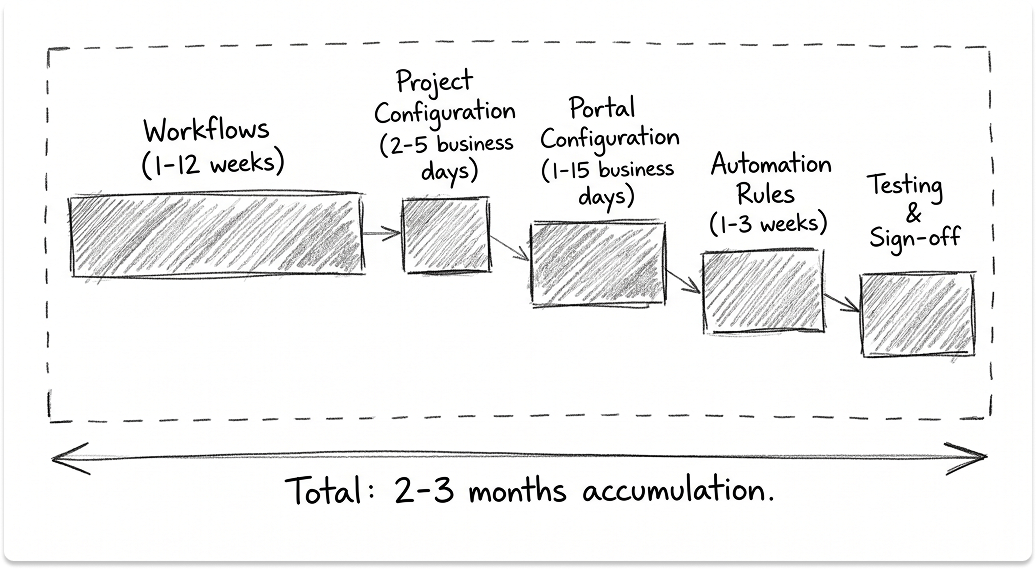
How long does configuration actually take? Based on practitioner estimates from the Atlassian Community:
These are additive. A realistic full deployment for a 500-person environment runs 2 to 3 months when you account for stakeholder sign-off, process decisions, and testing cycles.
Teams coming from a pre-configured ITSM like Freshservice will find this gap wider than expected. Full implementations typically require a certified Atlassian Partner, and solo admin deployments consistently underestimate the timeline.
The customer portal has its own constraints.
Even after JSM itself is configured, the portal your end-users interact with has hard limits that cannot be configured away:
- Portal filters are hard-coded and admins cannot change what the portal surfaces to customers.
- Customers have no visibility into SLA timers or expected resolution times by default.
- Request forms are not conditional out of the box. A hardware request form shows every field (laptop, monitor, phone) regardless of what the customer selects. Dynamic field behavior requires additional configuration or a paid Marketplace app.
- The "My Requests" screen has a fixed column set that customers cannot customize.
A polished, user-friendly portal is a separate configuration project from configuring JSM itself.
What JSM Standard Actually Covers in 2026
This is the section most JSM evaluations skip, and it is the one that creates the most expensive surprises post-contract.
Standard is approximately $20 per agent per month. Premium runs approximately $47 to $53 per agent per month depending on seat count and billing cycle. That is a 2 to 2.5x jump.
Here is what makes that jump critical: as of December 6, 2025, Atlassian moved change management, problem management, and advanced incident management from Standard to Premium.
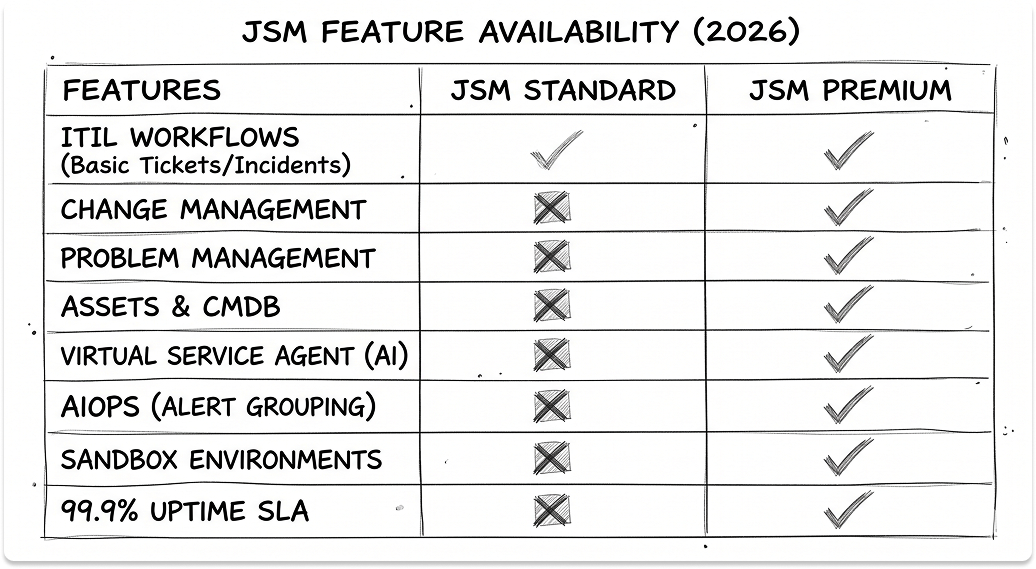
These features were available on Standard at the start of 2024 and are fully disabled today.
Teams that had configured these workflows saw their change queues hidden and CI/CD integrations greyed out after the transition. Existing data was preserved, but no new changes or edits were permitted.
What Standard covers today:
- Basic ticket creation, queues, and customer portal
- Request types and basic SLA rules
- Incident queues and on-call schedules (without major incident workflows)
- 5,000 automation rule runs per month
- Core Atlassian Intelligence features (in-agent drafting and summarization only)
What requires Premium:
- Change management with approval gates, change calendar, and automated risk assessments
- Problem management
- Major incident workflows and post-incident reviews
- Asset and configuration management (Assets)
- Virtual Service Agent for AI ticket deflection
- AIOps for alert grouping and incident correlation
- 99.9% uptime SLA and sandbox environments
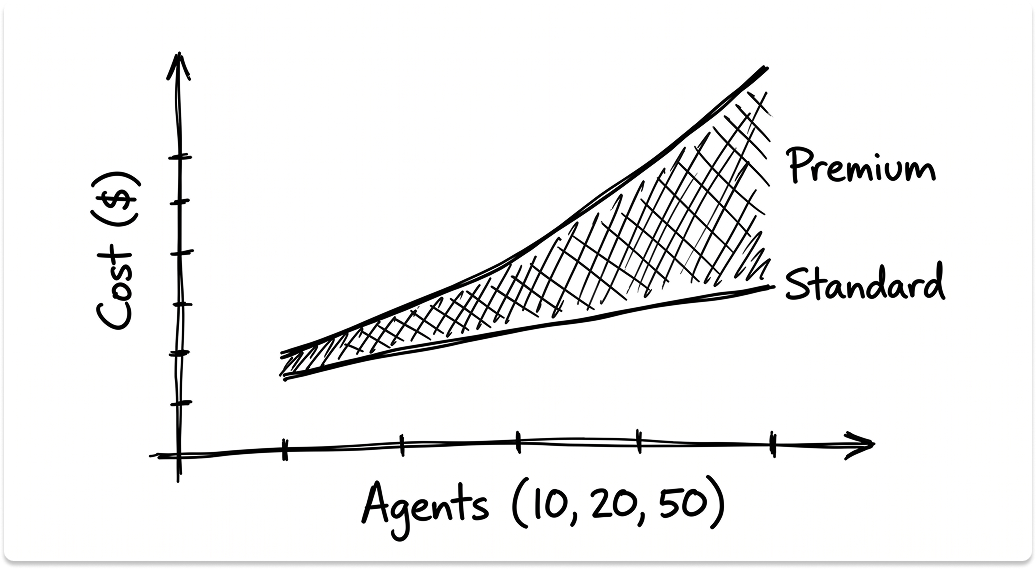
The cost reality at three common seat counts:
Approximate figures. Use the Atlassian pricing calculator for exact numbers at your seat count.
For a 300-person IT environment that needs change management, problem management, and asset tracking, Premium is the entry point. Standard covers ticketing only.
One more cost most evaluations miss: JSM has no native knowledge base. It integrates with Confluence, and customers can read KB articles for free, but every person authoring content needs a Confluence license.
For a team building a substantive knowledge base, that is an additional licensing line item that does not appear in the JSM pricing conversation.
What Breaks in Daily Operations, Not Just Setup
Configuration gaps are one problem. What follows is a different category: operational traps that surface after go-live and require ongoing workarounds.
Queue routing works differently than most helpdesk teams expect.
In JSM, queues are filter-based. A ticket surfaces in a queue only when its field values match the queue's filter criteria, with no mechanism to manually assign tickets to queues.
For teams running tiered IT support, this is a structural mismatch. A 1st-line agent cannot look at a ticket and move it to the 3rd-line queue. They update a field (category, priority, assignee), and if the queue filter picks up that value, the ticket surfaces there.
Teams coming from systems where you explicitly assign tickets to groups will find this counter-intuitive, and in high-volume environments, it is prone to routing errors.
Sending email to a third party from a ticket is not a native feature.
Looping in a hardware vendor, a software support team, or an external contractor directly from a JSM ticket requires a Marketplace app or a workaround outside the tool. For IT teams that manage vendor escalations as a standard part of incident resolution, this gap surfaces constantly.
Ticket merging does not exist.
When a system outage generates 40 tickets from 40 different users, JSM has no native merge function. The workflow is: mark tickets as duplicates, then manually add each affected user to the primary ticket as a request participant. In a high-volume incident, that is meaningful agent overhead at the worst possible time.
"Waiting for Customer" and "Waiting for Support" status transitions are not pre-built.
This is a foundational SLA workflow that most IT leaders assume ships configured. Triggering an automatic status transition when an agent comments (moving to Waiting for Customer) or when the customer responds (moving to Waiting for Support) requires a custom automation rule.
Teams that deploy without building it produce SLA data that does not accurately reflect actual response accountability.
Time-based automation requires scripting.
Scheduling a follow-up task 7 days after ticket closure, triggering a post-incident review 48 hours after resolution, sending a license renewal reminder 30 days before an asset record expires — none of these work out of the box.
Time-based tasks that activate after an event require either a Marketplace app or custom scripting that goes beyond JSM's native automation builder.
JSM Assets: Where the CMDB Capability Starts and Where It Stops
Assets is a legitimate CMDB capability. It is also Premium-only, with structural limits that matter at mid-market scale.
Object limits by tier:
A 500-person organization modeling laptops, mobile devices, network equipment, cloud workloads, and SaaS licenses as individual objects can approach the 50,000-object ceiling faster than expected, particularly if software licenses or cloud instances are tracked as objects.
Structural limits from Atlassian's documentation:
- 100 schemas globally
- 120 attributes per object type
- 2 unique constraints per object type
- Automation "Lookup Objects" action capped at 100 objects per rule execution
That last limit has real operational consequences. Exceeding 100 objects in an automation lookup requires a multi-step workaround: GET request to the Assets API to retrieve the object key, extract the workspace ID, use advanced branching, then nest a second Lookup Objects action inside the branch. This is a scripting task, not a configuration task.
Two additional gaps worth understanding before you deploy:
No native real-time sync. Connecting Assets to an external CMDB, SQL database, or discovery tool (Lansweeper, SolarWinds, Snipe-IT) requires REST API integration with custom scripting or a paid Marketplace app. The practical guidance from the Atlassian community is to treat Assets as a representation layer that is periodically synced, not a live operational CMDB.
Asset discovery is LAN-based. Native discovery scans operate on-network, so for fully remote or hybrid-remote organizations, devices off the corporate network are invisible to native discovery without an agent-based tool layered on top.
The Slack and Teams Integration: What the Demo Does Not Show
JSM has a native Slack integration. It is free, requires no Marketplace app, and does useful things: incident notifications pushed to Slack channels, basic request creation from prompted fields, and priority and status updates during active incidents.
Beyond that, the gaps add up quickly.
What the native Slack integration does not do:
- Two-way thread sync — Slack replies do not post to the JSM ticket timeline
- SLA visibility inside Slack
- Queue management or agent workload view within the channel
- Skill-based or availability-based routing
- Attachment and URL field support in request forms, which are explicitly unsupported in the native integration
There is also a hard architectural constraint: one Jira site connects to one Slack workspace. Post-acquisition environments or organizations running separate Slack workspaces for contractors cannot connect multiple workspaces to a single JSM instance.
The Teams gap is wider. Several Slack-only capabilities, including automatic incident channel creation, private chat requests, EmojiOps, and automatic issue creation from messages, have no Teams equivalent. The Virtual Service Agent is available in Teams on Premium, but the two integrations are not at feature parity.
Third-party tools like ClearFeed and Troopr close most of these gaps: two-way thread sync, SLA visibility inside Slack, and queue management within the channel. All are paid at per-agent monthly rates that add to the effective cost of the JSM stack.
Reporting: Where the Metrics Stop Telling the Full Story
JSM's native reporting covers the basics: SLA compliance per project, ticket volume by type and status, time-in-status, a workload pie chart by agent (issue count only), and a basic CSAT table.
For a team of five agents on a single project, that is enough. At 20 agents across multiple service projects, it is not.
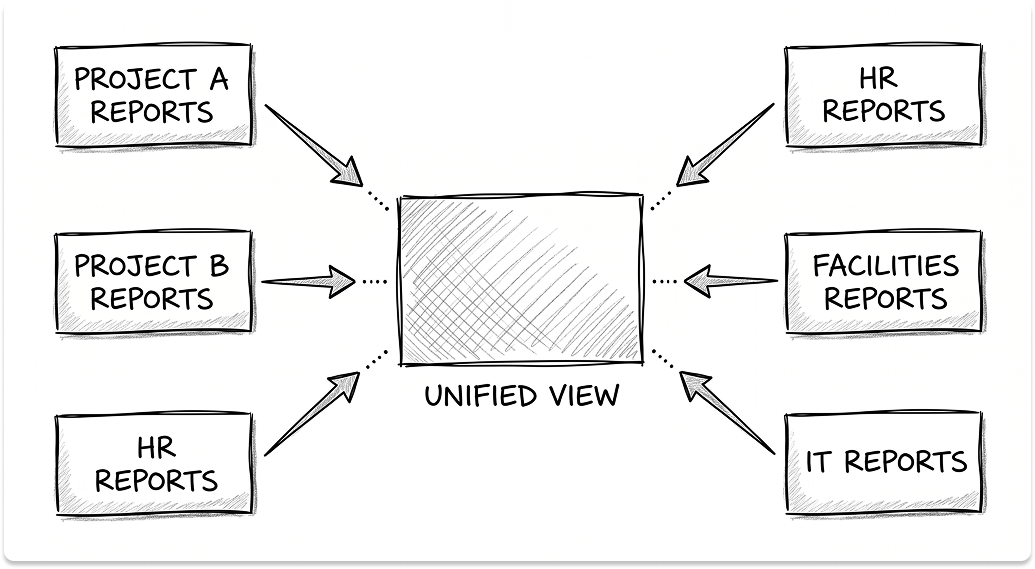
What native reporting cannot do:
- Cross-project reporting. JSM's reporting is project-scoped. A unified view across IT, HR, and Facilities service projects requires custom JQL dashboards or a BI tool, not a configuration option.
- CSAT by assignee. You cannot chart customer satisfaction scores against individual agent performance natively.
- SLA breach by organization. There is no native way to identify which business unit or customer group is driving the most SLA failures.
- Dashboard configuration from the dashboard itself. Reports must be created inside each individual project first, then pulled into the dashboard. In a five-project environment, that is a manual maintenance task.
The practical consequence is what I call the watermelon effect: your SLA compliance dashboard is green on the outside, but the actual customer experience data is red and buried in the system. JSM produces the data. Its native reporting does not surface the picture you need to act on.
Atlassian Analytics solves this cleanly. It connects to the Atlassian Data Lake, supports cross-product reporting, and is included in the Enterprise plan at no additional cost, but it is not available to Standard or Premium customers.
For most teams reading this, the practical path is a Marketplace reporting app: EazyBI, Custom Charts for Jira, or Screenful. Each carries a per-user monthly cost on top of your per-agent JSM rate.
What JSM's AI Features Actually Cover at Each Tier
The AI-powered ITSM positioning is accurate at Premium. At Standard, it is a narrower picture.
As of April 2025, Rovo is bundled into all paid JSM plans. There is no separate Rovo license fee. The variable is the credit allocation:
Each Rovo Chat or Rovo Agent request costs 10 credits. A 20-agent team on Standard has a pool of 500 credits per month, meaning 50 total AI interactions before the allowance runs dry.
At Standard, AI is an in-agent productivity layer. Atlassian Intelligence covers ticket drafting, summarization, JQL fixes, and triage suggestions inside the JSM interface. The Rovo Customer Service agent is also available, charged at $1 per ticket it resolves without human escalation.
Meaningful ticket deflection requires Premium. The Virtual Service Agent includes 1,000 assisted conversations per month, with overages at $0.30 per conversation. AIOps for alert grouping, automated incident prioritization, and post-incident review drafting are also Premium-only.
Teams evaluating JSM on AI deflection capabilities need Premium to access them.
Non-Atlassian Integrations: What "Integration" Means in Practice
JSM was built for the Atlassian ecosystem. For everything outside it (Okta, Jamf, Google Workspace, Datadog, PagerDuty), the path is one of three options:
- A paid Marketplace app (requires maintenance through JSM upgrades)
- Custom REST API integration, typically Groovy via ScriptRunner or a middleware layer like Workato or Make
- Native webhook-based alert ingestion for monitoring tools, with custom routing and enrichment logic configured on top
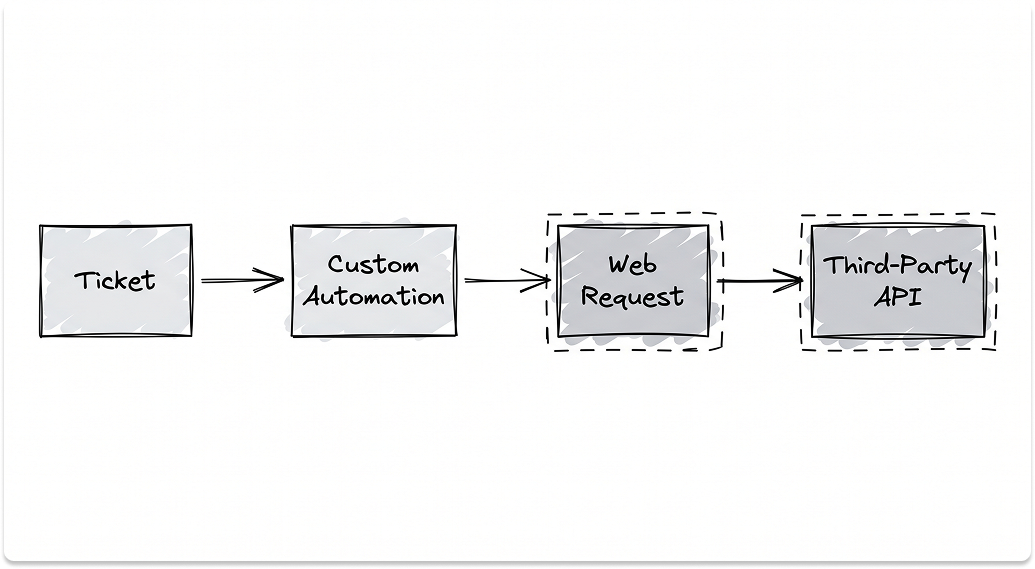
Two concrete examples of what "integration" actually requires:
Automating access request workflows that provision or deprovision Okta accounts from a JSM ticket requires a Marketplace app or a custom API build. There is no native Okta provisioning action in JSM automation.
Surfacing Jamf device compliance status, OS version, or enrollment state on a JSM ticket as live context requires scripting Assets to pull from Jamf's API or a third-party connector. It is not a point-and-click setup.
The orchestration gap is the bigger issue. JSM's ticket-centric architecture does not natively coordinate multi-system workflows. A chain like "ticket submitted, Okta account provisioned, Jamf policy updated, Slack notification sent, ticket closed" requires Jira Automation with multiple sequential web request actions, or a dedicated iPaaS tool positioned in front of JSM. IT leaders who expect their ITSM to act as an orchestration layer will find this a meaningful constraint.
Marketplace costs also accumulate. ScriptRunner alone, required for automation logic that exceeds native rule capabilities, is priced per user per month and appears in the majority of JSM deployments above 25 agents.
Add a reporting app, a chat integration tool, and an asset discovery connector, and the effective per-agent cost of a fully capable JSM stack is materially higher than the base license price suggests.
The Honest Fit Assessment
JSM earns its place when at least two of the following are true:
- Your team already runs Jira Software and Confluence. The shared permission model and Confluence-linked knowledge base remove real friction in dev-adjacent IT environments.
- You need change management with approval gates tied directly to Jira Software tickets and CI/CD pipelines. No other mid-market ITSM does this as natively. (Requires Premium.)
- You have a technical administrator comfortable with schema design, automation rule building, and REST API work. JSM rewards that depth.
- Your ITSM roadmap includes asset management linked to service requests, with device configuration, warranty status, and owner visible before the agent opens the ticket. (Requires Premium.)
JSM is a poor fit when:
- You run a tiered helpdesk with human routing decisions. The filter-based queue architecture is a persistent friction point for teams that need to explicitly assign tickets between support tiers.
- Your environment is Microsoft-first. The Teams integration lags behind Slack, and integrating Intune or Entra requires API work. Freshservice and ServiceNow have deeper ties to the Microsoft stack.
- You need pre-built ITIL processes operational on day one. Freshservice and Ivanti ship with pre-configured workflows. JSM ships with the capability to build them.
- Your organization is fully remote. Native asset discovery will not capture off-network devices without additional tooling.
- Your budget is constrained to Standard. After December 2025, Standard does not include change management, problem management, or AI deflection, and a 300-person environment that needs all three is on Premium.
Alternative routing by scenario:
JSM is a strong ITSM foundation for environments with existing Atlassian investment, technical admin capacity, and a realistic budget for Premium. Outside those conditions, the configuration overhead, the Standard plan limitations, and the Marketplace costs point toward tools built for a different operational model.
Looking for ITSM partners?
Find ITSM partners on a curated marketplace of vetted vendors and save weeks of research. Your info stays anonymous until you choose to talk to them so you can avoid cold outreach. Always free to you.
FAQ
Does Jira Service Management include change management out of the box?
Change management is not available on the Standard plan as of December 6, 2025. Atlassian moved change management, problem management, and advanced incident management to the Premium plan. On Standard, these features are fully disabled — existing configurations were deactivated after the transition. Change management with approval gates, a change calendar, automated risk assessments, and CI/CD deployment gating all require the Premium plan, which starts at approximately $47 to $53 per agent per month.
What is the difference between JSM Standard and Premium in 2025?
The Standard plan covers basic ticketing, queues, the customer portal, SLA rules, on-call schedules, and 5,000 automation rule runs per month. The Premium plan adds everything Standard lost in December 2025 — change management, problem management, major incident workflows, post-incident reviews — plus asset and configuration management (Assets), the Virtual Service Agent for AI ticket deflection, AIOps, a 99.9% uptime SLA, and sandbox environments. For a team of 20 agents, the monthly cost difference between Standard and Premium is approximately $570.
Can Jira Service Management integrate with Slack for a full service desk experience?
The native JSM Slack integration is free and supports incident notifications, basic request creation, and status updates. It does not support two-way thread sync, SLA visibility inside Slack, queue management, or skill-based routing. Attachment and URL fields in request forms are explicitly unsupported in the native integration. A single Jira site can also only connect to one Slack workspace. For a full service desk experience inside Slack, most teams use a paid third-party tool like ClearFeed or Troopr on top of the base JSM license.
Is Jira Service Management good for IT help desks?
JSM is well-suited for IT teams already embedded in the Atlassian ecosystem, particularly those who need change management linked to Jira Software tickets and CI/CD pipelines. It is a poor fit for traditional tiered helpdesks because its queue architecture is filter-based rather than assignment-based — agents cannot manually move a ticket from one queue to another. It also lacks native ticket merging, external email from a ticket, and pre-built "Waiting for Customer / Waiting for Support" SLA transitions. Teams that need an out-of-the-box helpdesk with human routing typically find Freshservice or HaloPSA a better operational match.
How much does Jira Service Management actually cost with all the features you need?
The base license is only part of the cost. A fully operational JSM deployment at Premium for 20 agents runs approximately $970 per month in licensing alone. On top of that, most mid-market deployments add ScriptRunner for advanced automation (priced per user per month), a reporting app like EazyBI or Custom Charts for Jira for cross-project reporting, and a Slack integration tool for two-way sync and SLA visibility inside chat. Asset discovery for remote devices requires an additional agent-based tool. Confluence author licenses are also required for anyone building out the knowledge base. The effective per-agent cost of a fully capable JSM stack is meaningfully higher than the per-seat license price suggests.