GitHub Copilot vs Cursor vs Amazon Q Developer: AI Coding Assistant Comparison for IT Leaders
GitHub Copilot vs Cursor vs Amazon Q Developer: compare architecture, models, codebase indexing, agents, and data controls for AI coding assistants.

Three years ago, an AI coding assistant meant autocomplete. It guessed the rest of your line, and you accepted it or you didn't.
That is no longer the job. GitHub Copilot, Cursor, and Amazon Q Developer now read across a whole repository, edit several files in one pass, run terminal commands, and open pull requests while you review the result.
That shift changes the decision in front of you. The question is rarely whether your engineers will use one of these tools. Many already are, often through personal accounts, which means your source code is already moving through systems no one has vetted.
The real question is which assistant fits how your team works and keeps your code where your policies say it belongs.
Three technical variables decide that fit:
What follows covers all three on architecture, model backends, codebase context, code completion, agentic behavio, and data handling, so you can weigh them against your own environment.
How Each AI Coding Assistant Is Delivered and Where It Runs
GitHub Copilot ships as extensions and plugins for VS Code, Visual Studio, the JetBrains family, Eclipse, Xcode, and Vim/Neovim, plus a command-line interface and a cloud agent that runs on GitHub itself. Nothing runs the model locally. Prompts travel through a GitHub proxy hosted on Azure, which applies pre-inference checks before a request reaches a model.
Cursor takes a different route. It is a fork of the open-source VS Code codebase, not an extension. Owning the editor lets Cursor hook the file system, the rendering path, and the extension host directly, which is how it delivers features an extension API cannot reach. The trade-off is that Cursor becomes your editor, and its team must continually merge upstream VS Code changes into a diverging build. All inference runs on Cursor's cloud or on third-party model providers. There is no self-hosted or air-gapped option.
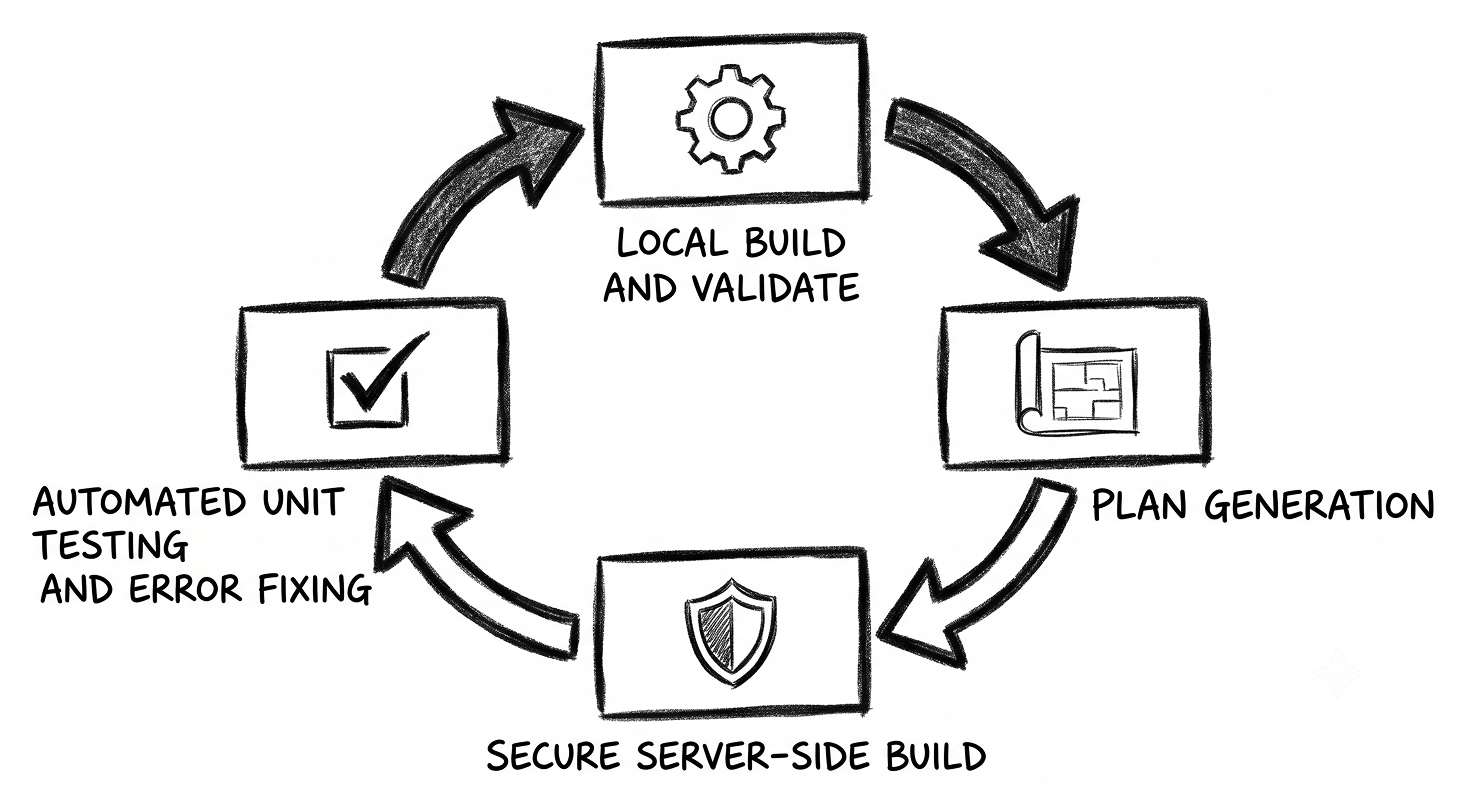
Amazon Q Developer is built on Amazon Bedrock and arrives as plugins for VS Code, the JetBrains IDEs, Visual Studio, and Eclipse, alongside a CLI, the AWS Console, and chat integrations. Its code transformation feature uses a hybrid flow: the initial build and validation happen locally in your environment, while the transformation itself runs in a secure server-side build environment.

The Models Behind GitHub Copilot, Cursor, and Amazon Q Developer
Copilot exposes an explicit model picker in chat and agent mode. It carries OpenAI GPT-5 series models, Anthropic Claude models, Google Gemini models, Microsoft's own MAI-Code-1-Flash, and selected open-weight models, and it lets you bring your own API key for chat.
Inline code completion runs on a separate GitHub-tuned model that you do not select in the interface. If you want the current roster with version numbers, GitHub keeps a model comparison reference in its docs.
Cursor is model-agnostic by design. It supports Anthropic, OpenAI, Google, and other providers, and it adds two of its own: Composer, the model behind its agent, and the Tab model that drives autocomplete. Cursor trains these for specific jobs rather than routing every task to a general chat model.
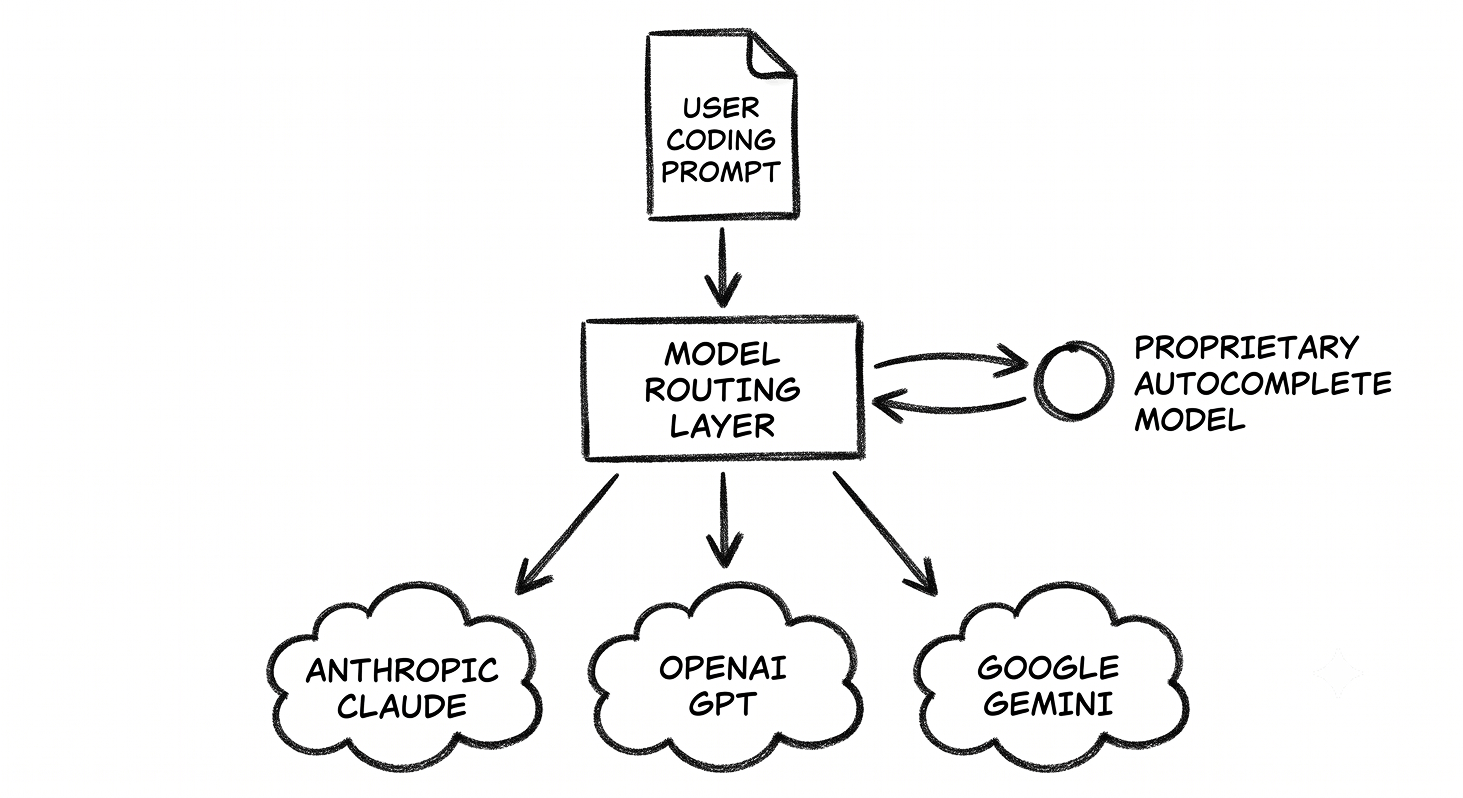
Amazon Q runs on Amazon Bedrock and routes work across more than one foundation model. It now lets you select among Anthropic Claude Sonnet versions from the CLI and IDE.
Because the Claude models sit at the core of Amazon Q and are also offered inside Copilot and Cursor, model choice alone will not separate these tools for many tasks.
Anthropic reports that Claude Sonnet 4 reached 72.7% on SWE-bench Verified, a benchmark that runs a model against real GitHub issues. Treat that as a figure for the underlying model, not a score any of the three assistants publishes for itself.
A practical note on benchmarks: Copilot and Amazon Q reference public model results, while Cursor has published no SWE-bench score and evaluates its own models on an internal benchmark. Take any single accuracy number as directional.
How Each Tool Reads and Indexes Your Codebase
Context handling separates these tools more than the model roster does. An assistant that only sees the open file gives shallow answers on a large repository. One that indexes the whole codebase can reason across modules.
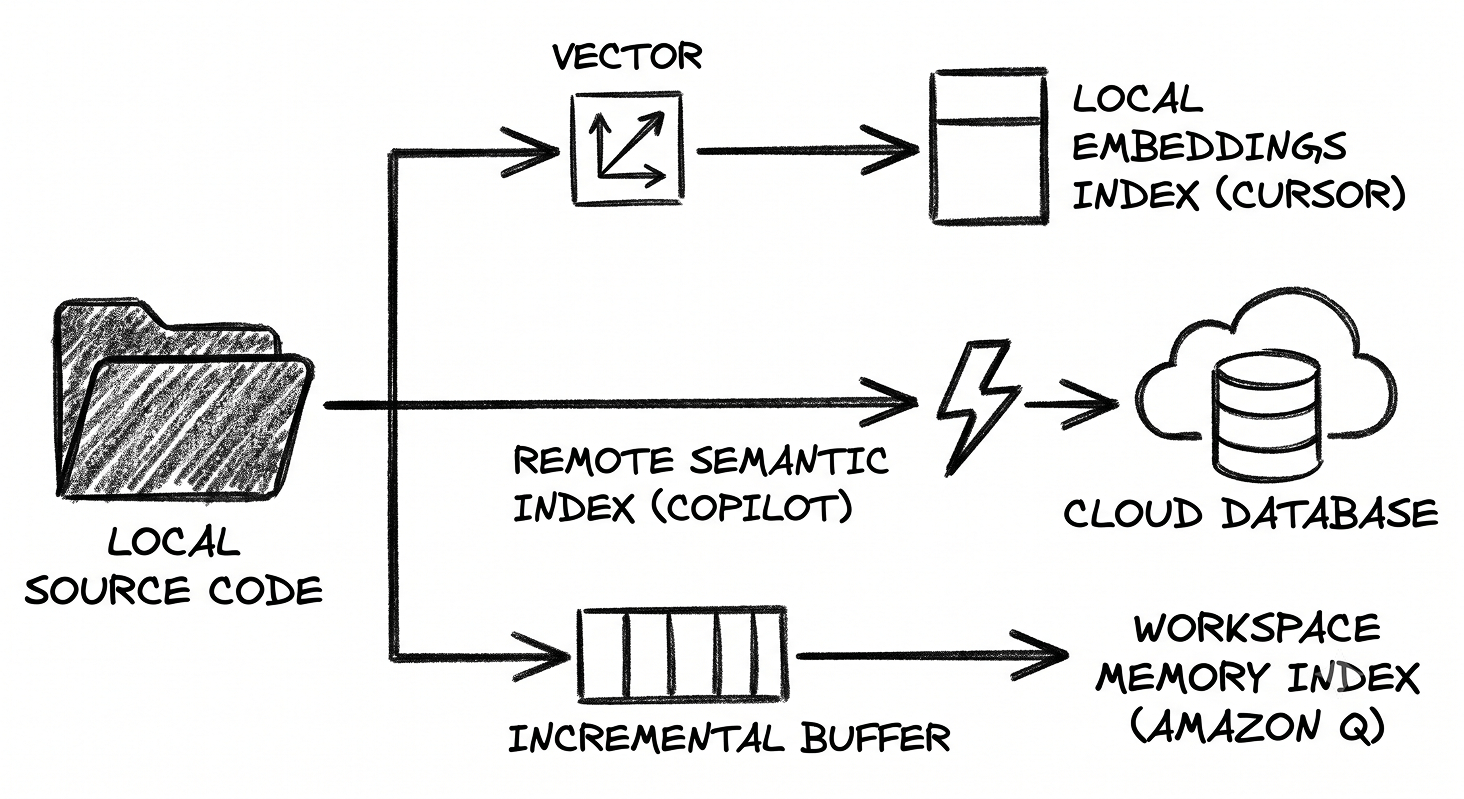
Cursor indexes the project into vector embeddings. It splits files into semantic chunks at function and class boundaries, computes embeddings, and stores them with encrypted file paths while the source stays local.
A periodic sync, documented at roughly every five minutes, re-indexes only changed files. Cursor's own research states that combining its semantic search with plain text search produced 12.5% higher accuracy on codebase questions than text search alone, with the largest gain on repositories above 1,000 files. You steer context manually with @-mentions such as @codebase, @file, and @folder, and exclude files with .cursorignore.
Copilot uses a tiered approach. For repositories hosted on GitHub, it queries a remote semantic index built from embeddings, which returns results in about a second on large codebases.
When no remote index exists, it falls back to a local index. You can add explicit hints with #codebase, and org-level exclusion rules block chosen files from ever reaching the model.
Amazon Q builds a local workspace index the first time you invoke @workspace. It indexes code, configuration, and project structure, skips binaries and .gitignore entries, refreshes when the index ages past a day, and updates incrementally as you edit. Larger workspaces take longer to index and stop at a memory threshold.
GitHub Copilot
Best for: teams whose code and workflow already live on GitHub, and mixed IDE fleets that need one assistant across VS Code, Visual Studio, and JetBrains.
Copilot's advantage is depth of integration with the platform many teams already build on. Its most distinct feature is the split between an in-IDE agent and a cloud agent.
The in-IDE agent plans, edits multiple files, runs commands, and iterates while you watch. The cloud agent works asynchronously: assign it a GitHub Issue and it spins up an ephemeral environment powered by GitHub Actions, applies CodeQL analysis and secret scanning, writes code, runs your tests, and opens a draft pull request for review.
Cursor
Best for: teams that will standardize on one editor and want the fastest inline editing and codebase-wide agents, with tight manual control over context.
Cursor's edge is speed inside the editor and the depth that comes from owning the whole application. Its Tab model predicts not just the next characters but the next multi-line edit and the next place your cursor should jump.
The technique behind fast edits is speculative editing, where the existing file serves as a set of draft tokens so the model accepts unchanged spans in bulk and only generates what changes.
Cursor's engineering team reported speeds near 1,000 tokens per second on a 70-billion-parameter model using this method, which is what makes large edits feel immediate rather than stuttering line by line.
Amazon Q Developer
Best for: AWS-centric estates and teams facing large modernization programes across old Java, .NET, mainframe, or VMware workloads.
Amazon Q covers the same ground as the others on completion, chat, and agents, and adds a set of purpose-built agents for feature development, tests, documentation, and code review. Its distinct strength is transformation.
The /transform agent performs automated upgrades of legacy code: it builds your project locally, generates a transformation plan, applies the changes in a secure build environment, and re-runs your unit tests to fix errors as it goes.
According to AWS, transformation covers Java version upgrades (8 or 11 to 17 or 21), .NET Framework to cross-platform .NET, mainframe COBOL, and VMware workloads.
The deeper mainframe and VMware paths run through a separate web experience, while Java and .NET upgrades run in the IDE. Q is also aware of AWS resources such as CloudFormation, CDK, IAM, and Terraform, which is useful when the code you write is infrastructure.
Where Your Code Goes: Data Handling and Security Controls
This is where the decision stops being about features. Engineers reach for these tools because they are faster. The risk is that speed pulls source code, credentials, and customer data into an external service with no record of what left, and once proprietary code has been sent to a model provider, you cannot pull it back.
Choosing an assistant with enforceable controls is how you keep sensitive code from leaving your environment while still giving your team the tool they want.
The controls differ in ways that matter for a regulated estate. Copilot's business and enterprise tiers do not use your code for training, and content exclusion rules block chosen files at the org level, though those exclusions do not yet reach every surface such as agent chat and the CLI.
Cursor's Privacy Mode, enforceable across an organization, holds code in memory and discards it, but all processing still transits Cursor's cloud, so there is no air-gapped path. Amazon Q keeps professional-tier content out of model training and runs inside your AWS trust boundary with IAM-based access control.
Agentic behavior widens the attack surface for all three. An agent that runs terminal commands and calls external tools can be steered by malicious content it reads, so it is worth auditing what an agent can touch before you let it run commands in a sensitive repository.
See Which AI Coding Assistant Suits Your IT Needs
How to Choose Between GitHub Copilot, Cursor, and Amazon Q Developer
A tool that does not match how your engineers work becomes shelfware. Seats get assigned, people log in once, and the value never shows up. These four questions point to the right fit before you commit.
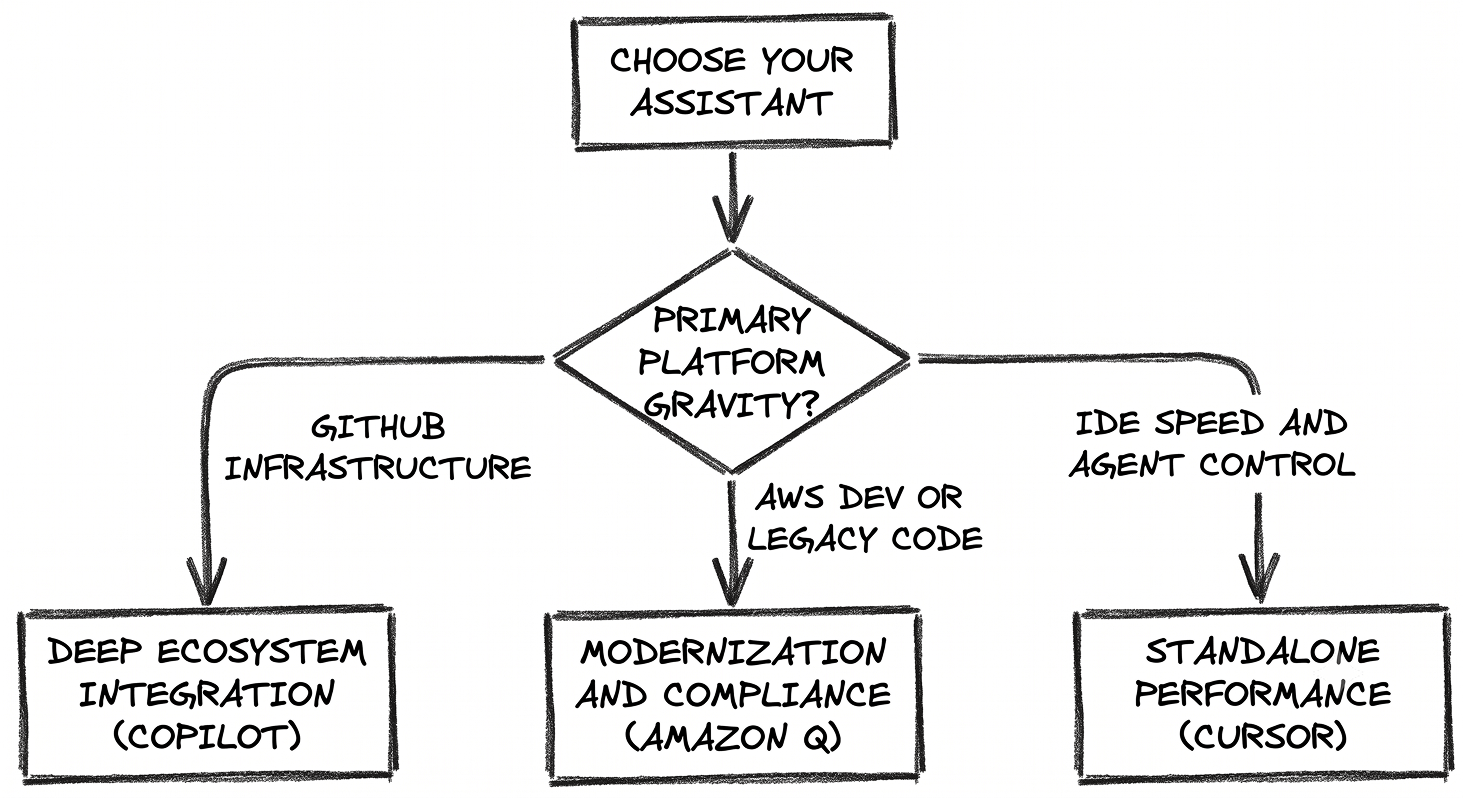
Where does your code and workflow live? If your repositories, issues, and pipelines are on GitHub, Copilot's cloud agent and native security scanning remove the most friction. If your estate is AWS, Amazon Q's resource awareness and IAM alignment do the same. If neither pulls hard and the priority is the editing experience itself, Cursor is built around that.
What do engineers spend their time doing? If the day is mostly writing and refactoring in the editor, Cursor's Tab and speculative editing lead on responsiveness. If the goal is offloading whole tickets to run in the background, Copilot's cloud agent is the most direct path. If the backlog is old code that has to move to a supported version, Amazon Q's transformation agent is the only one of the three that industrializes that work.
Which IDEs must you support? Copilot and Amazon Q slot into your existing editors. Cursor asks the team to adopt a new one. In a mixed fleet across VS Code, Visual Studio, and JetBrains, that difference is real.
How strict is your data control? If you need code kept out of training with enforceable admin policy, all three offer it on their business tiers. If you need an air-gapped path, none delivers a fully local product today, and Amazon Q's AWS boundary or Copilot's self-hosted agent runners are the closest options.
Closing Thoughts
The three tools have converged on the same primitives. All three carry model pickers, codebase indexing, agent modes, and Model Context Protocol support. What still separates them is where they sit relative to your existing world.
Copilot is the natural choice when your work already flows through GitHub and you want one assistant across a mixed IDE fleet. Cursor rewards teams willing to standardize on its editor in exchange for the fastest inline editing and the most direct control over context. Amazon Q fits an AWS estate and is the clear pick when a modernization backlog of old code is the problem in front of you.
Run all three against your own repositories before you decide. Measure completion acceptance, agent success on real tickets, and index build time on your largest codebase. The tool that wins on your code, with your policies enforced, is the one worth the seats.
Looking for AI coding assistant vendors?
Before you commit, it is worth seeing your options and checking whether a vendor is a better fit for your environment. Explore our catalog of pre-vetted vendors and talk to them only when you want to. It is free and private.
FAQ
What is the difference between GitHub Copilot, Cursor, and Amazon Q Developer?
GitHub Copilot is an assistant that plugs into your existing IDEs and integrates deeply with GitHub, including a cloud agent that turns issues into pull requests. Cursor is a standalone editor built as a VS Code fork, with its own autocomplete and agent models tuned for speed and codebase-wide editing. Amazon Q Developer runs on Amazon Bedrock, integrates with AWS, and adds an agent that upgrades legacy Java, .NET, mainframe, and VMware code.
Which AI coding assistant works across the most IDEs?
GitHub Copilot supports the widest range of editors, including VS Code, Visual Studio, the JetBrains family, Eclipse, Xcode, and Vim. Amazon Q Developer supports VS Code, JetBrains, Visual Studio, and Eclipse. Cursor is a single editor, so adopting it means moving your team onto Cursor itself rather than adding a plugin.
How do these tools understand a large codebase?
Cursor builds vector embeddings of the whole repository and keeps them synced as files change. GitHub Copilot queries a remote semantic index for repositories hosted on GitHub, with a local index as a fallback. Amazon Q builds a local workspace index the first time you invoke @workspace and refreshes it incrementally.
Is my source code used to train the models?
On their business and professional tiers, none of the three uses your code to train models. GitHub Copilot excludes business and enterprise content, Cursor excludes code when Privacy Mode is enabled, and Amazon Q excludes professional-tier content. Individual and free tiers can differ, so confirm the setting for the plan you deploy.
Which tool is best for upgrading legacy code?
Amazon Q Developer is the only one of the three with an agent built specifically for this. Its transformation feature upgrades Java from version 8 or 11 to 17 or 21, converts .NET Framework applications to cross-platform .NET, and handles mainframe and VMware workloads, building the project and re-running tests as it applies changes.
Can these assistants run tasks autonomously?
Yes. All three offer agent modes that edit multiple files and run commands. GitHub Copilot adds a cloud agent that works in the background and opens a draft pull request. Cursor runs multiple agents in parallel with isolated working trees. Amazon Q provides separate agents for feature development, tests, documentation, review, and transformation.