Server and Laptop Prices in the 2026 Memory Shortage: Refresh Now, Bridge, or Hardware as a Service
Server prices are up 33% and PCs 17% in the 2026 memory shortage. Use the Three-Clock Rule to choose refresh now, bridge, or hardware as a service.

Last year's refresh quote won't survive this year's budget meeting. Standard servers sold for about 33% more in Q2 2026 than a year earlier. Memory-heavy builds now cost multiples of their 2025 price, and PCs are on track to cost about 17% more this year.
The cause is memory, and memory won't get cheap before 2028.
In the conversations we've had with IT buyers, when a refresh gets approved, the quote comes in 60% or more above budget, and the project stalls.
One buyer saw $130,000 for a single server, about four to five times its 2024 price. Another watched a RAM quote for three servers climb by about $100,000 between two versions, and the CFO told the team to wait out the RAM bubble.
That leaves you three paths: refresh now, bridge what you have, or move to hardware as a service. My view is simple. Bridge most servers, keep laptops on schedule, and save as-a-service contracts for purchases you can't avoid. The rest of this guide explains why and gives you a calculator to test it on your own fleet.
Short answer: Refresh now only when an asset hits an end-of-support or capacity wall before memory prices ease, which Gartner expects between late 2027 and the first half of 2028. Bridge supported servers with third-party maintenance and memory right-sizing. Use hardware as a service when a purchase is forced and capex is frozen, with a term of 36 months or less.
Why server and laptop prices are rising in 2026: the memory shortage explained
Memory makers moved wafer capacity to high-bandwidth memory and server DRAM for AI data centers, which left conventional DRAM and NAND short.
Combined DRAM and SSD prices to rise 130% by the end of 2026. Memory is now the largest cost inside a server, so server prices rise faster than laptop prices.
Where the cost comes from: DRAM, NAND and the HBM shift to AI
It starts with a wafer. Every wafer that becomes high-bandwidth memory (HBM) for an AI accelerator is a wafer that never becomes the DDR5 in your next host. Hyperscalers sign multi-year supply deals first. Enterprise buyers get what's left, at the price that's left.
You can see it at every layer of the stack:
- Components: Gartner forecasts DRAM and SSD prices up 130% by the end of 2026 compared with 2025.
- Contract prices right now: TrendForce's Q4 2026 forecast puts conventional DRAM up another 10% to 15% and NAND up 15% to 20% quarter over quarter. Enterprise SSD is the only category where increases are speeding up.
- Finished servers: the average selling price of a standard, non-accelerated server rose from about $9,800 to nearly $13,000 in Q2 2026, up 33.5% year over year, per IDC's server tracker. US server revenue alone reached $112.2 billion that quarter.
The good news is that the increases are slowing. The bad news is that slowing increases are still increases. Prices keep climbing, more gently, from a much higher base, so any budget that assumes a quick return to 2025 prices is built on hope.
Servers vs. laptops: why the price increases are not the same

The gap comes down to how much of the box is memory. On HPE's March 2026 earnings call, CEO Antonio Neri said DRAM and NAND now make up over half the bill of materials of a traditional server. In a PC, Gartner puts memory at 16% of the bill of materials in 2025, peaking at 23%.
Put simply, the same DRAM shock hits a server two to three times harder per dollar. A virtualization host with 1 TB of RAM is mostly a memory purchase with a CPU attached. A business laptop with 16 GB is a laptop that happens to contain some memory.
That split shapes everything else in this guide, because it means servers and laptops need opposite playbooks. Storage behaves like servers here. With enterprise SSD prices still accelerating, an all-flash array refresh deserves the same scrutiny as a host refresh.
How long will the memory shortage last?
Plan for high prices through 2027, relief in 2028, and no return to 2025 levels. Gartner's October 2026 First Take dates DRAM price relief between late 2027 and the first half of 2028, with significant declines during 2028.
Suppliers sound gloomier. SK hynix said in October that demand will exceed supply through 2030. Micron and Samsung both describe 2027 as tighter than 2026, with most new fab capacity arriving in 2028.
I read the two views as compatible. Suppliers describe supply and demand, Gartner forecasts prices, and suppliers negotiating long-term contracts benefit from talk of scarcity. Gartner's October server outlook, as reported in Korean trade press, keeps server prices above 2025 levels through 2028 even in its optimistic case.
If prices stay high into 2028, when do I buy becomes the wrong question. The useful question is how long each asset can safely wait, and that's what the three paths answer.
The three paths: refresh now, bridge, or hardware as a service
Refresh now buys certainty at peak prices. Bridging buys time, at the cost of rising operational risk. Hardware as a service buys a smaller upfront bill and a fixed monthly rate, with 2026 component costs built in. No path wins in every case; the right one depends on how long each asset can wait.
The comparison table below puts the three paths side by side on six factors, from upfront cost to best fit. Read across a row to see a trade-off, or down a column to see what each path asks of you.

The Three-Clock Rule: how to choose a path for each asset
To sort a fleet, I use one rule, which I call the Three-Clock Rule. Every asset has three clocks running:
- Support clock: months until its OS, hypervisor or firmware loses vendor support.
- Capacity clock: months until its workload outgrows it, after you reclaim wasted memory.
- Price clock: months until memory prices are expected to ease. Today that's about 15 months, the midpoint of Gartner's late 2027 to first-half 2028 window.
If the support or capacity clock runs out before the price clock, you're at a wall. Refresh, or use a short service contract if capex is frozen. If both outlast the price clock, bridge, and read the clocks again next quarter.
The flowchart below walks through the rule. Start at the top with one segment of your fleet, answer one question, and follow the arrows to refresh, a short service contract or a bridge.
Laptops get a nudge toward buying. Memory is a smaller share of a laptop's cost, so waiting saves less, and a 5-year-old laptop fails in ways your users feel: a dead battery, a cracked hinge, a lost afternoon of work.
The next three sections take each path in turn, starting with purchases you can't avoid.
When to refresh servers and laptops now (and how to buy at today's prices)
Refresh now when an asset hits a wall you can't move before 2028: an operating system or hypervisor losing support, a workload out of capacity, or a compliance rule that requires vendor-patched firmware. Everything else can usually wait. When you do buy, buy narrowly and get the price in writing.
Signals that you should buy anyway: end of support, capacity and compliance
The calendar forces some purchases. Windows Server 2016 extended support ends January 12, 2027. Extended Security Updates run for up to three years, but they cost money and only buy time.
If a 2016 host can't run a newer OS, it's at a wall. Our Windows Server 2016 and 2012 end-of-support guide covers the upgrade-versus-ESU math, and the Windows Server upgrade or Azure planning guide covers the move itself.
Hypervisors follow the same logic. Hosts that can't run a supported version of your current or replacement hypervisor belong on the refresh list. So do hosts at a hard capacity ceiling after you've reclaimed memory, and any system whose compliance scope requires current OEM firmware.
Buying tactics: right-size memory, price holds and staged orders
Quote terms changed in 2026. Several OEMs cut quote validity to 14 to 30 days, and some reserved the right to reprice between order and shipment. A quote that expires twice before the PO clears is now a familiar story. Plan around it:
- Right-size memory before you request a quote. Spec RAM to observed peak use plus headroom, rather than last cycle's template. Memory is the most expensive line on the quote.
- Get the price hold in writing. Ask for the validity window, the repricing terms and the ship date in the quote itself.
- Stage orders. Buy for the hosts at a wall now, and put the rest on a dated review.
- Compare at least two partners on the same build. Pricing varies by channel right now. Our guide to comparing vendor proposals has a scoring method.
I'd push back on one popular instinct: buying ahead before it gets worse. Increases are slowing, and buying a year early at peak prices locks that peak into five or more years of depreciation.
Pull-forward buying makes sense only for assets that will hit a wall before prices ease. For everything else, the better move is to make what you own last.
How to bridge your current servers and laptops safely
Most well-maintained servers can run 6 to 8 years, the range Gartner reportedly now recommends, as long as the operating system and hypervisor stay supported. Hardware wear is manageable with third-party maintenance and spares. Software support is the hard limit, so bridge the hardware and never the software.
Server life extension and third-party maintenance: what is covered and what is not
Third-party maintenance (TPM) replaces OEM post-warranty support with an independent provider's break-fix service, spare parts and field engineers, often across several brands. Gartner's long-standing estimate puts the savings at 50% to 70% off net OEM support prices.
TPM has one hard gap. It can't deliver OEM firmware, BIOS or BMC updates, or security patches that sit behind vendor entitlement. Before you switch, install the last firmware your OEM contract covers. Then move any system that must stay on current vendor firmware for compliance onto the refresh list.
Two second-order effects matter in 2026, and they rarely come up in vendor conversations:
- Your old hardware is now an asset. Resale and refurbished values have climbed with memory prices. Before you retire a host, consider pulling its DIMMs and SSDs as spares or upgrades for the hosts you keep. An inventory of loose and installed memory could be the cheapest procurement your team does this year.
- TPM discounts may narrow. The spare parts a TPM provider stocks are memory and drives too, so expect the discount to shrink. It won't disappear.
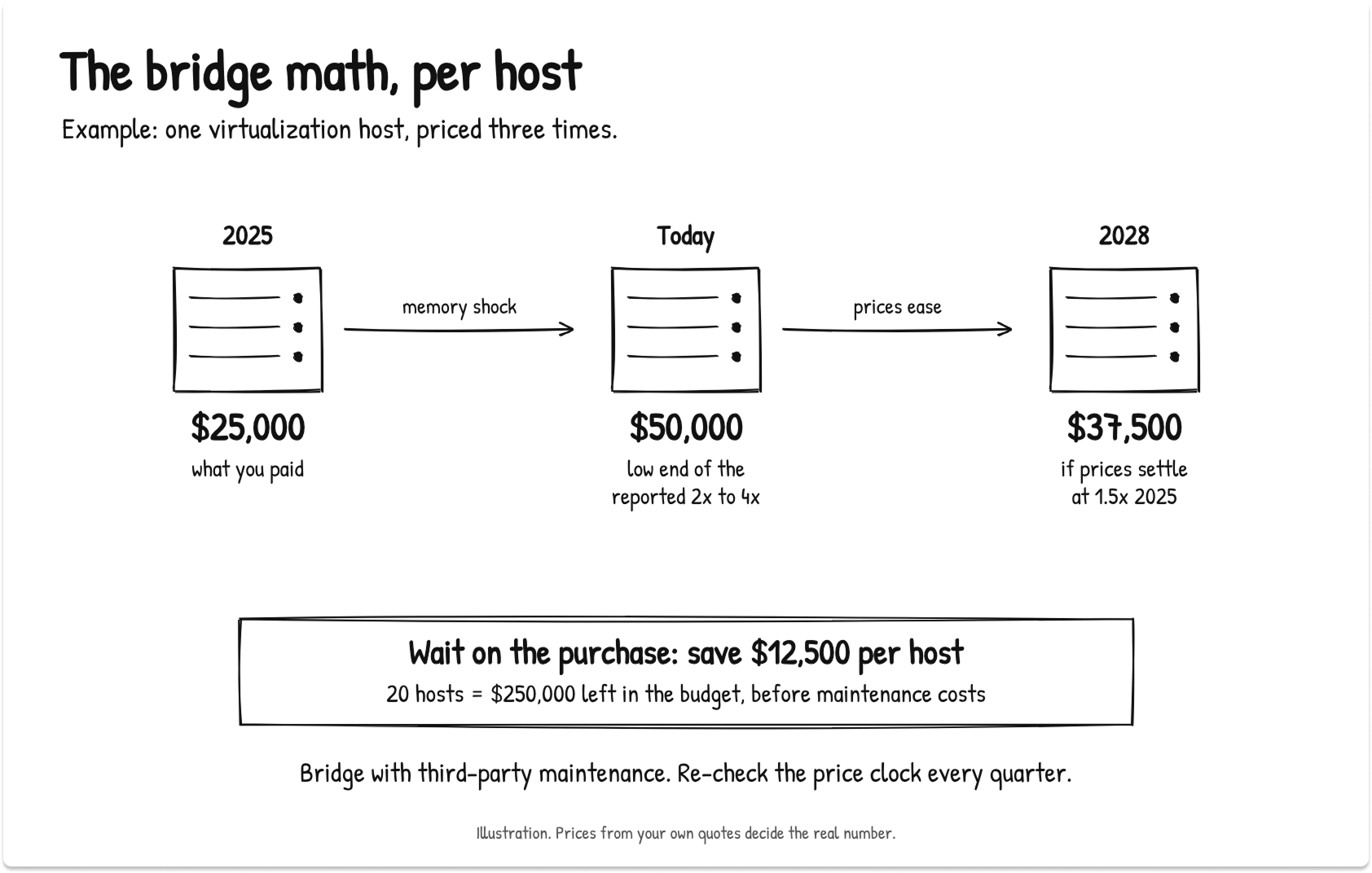
Here's an example. Picture an infrastructure team running 20 virtualization hosts that cost about $25,000 each in 2025. The same host costs $50,000 today, the low end of Gartner's reported range. If prices settle at 1.5 times 2025 levels by 2028, each host the team waits on saves $12,500 before maintenance costs. Across all 20 hosts, that's $250,000 left in the budget. We'll come back to this team in the calculator.
Laptop life extension: Windows 11, Windows 10 ESU and memory upgrades
Laptops bridge less well, so I'd extend them selectively. Business PC lifetimes are already stretching about 15%, per Gartner, which means many fleets are already on borrowed time.
Check three things before you extend a laptop cohort:
- Windows 11 support. Devices without TPM 2.0, Secure Boot and a supported CPU can't upgrade. Keeping them on Windows 10 means paying for ESU, which doubles each year: $61, then $122, then $244 per device. Our Windows 10 ESU Year 2 cost guide has the full breakdown.
- Memory upgradability. Many thin-and-light business models solder their memory. If a 16 GB device can't take more RAM, it can't stretch to a longer life.
- Battery and failure rates. A dead battery at year five costs a user a day of work on top of the part.
Supply is the other laptop risk. Ten buyers described a reseller that couldn't fill an order or honor an old price, and one national reseller couldn't supply 20 laptops at all. If you need devices by a date, order early and be ready to accept a second brand.
Bridge checklist: eight checks before you extend
Before you commit a segment to the bridge, run it through the interactive checklist below. It has eight checks covering software support, hardware certification, maintenance coverage, firmware, memory headroom, spares and compliance.
Click each check as you confirm it, and the progress bar counts how many you've passed. A segment that clears all eight is a safe bridge candidate.
Hardware as a service, device as a service and server leasing: what you actually pay for
Hardware as a service bundles devices, support, refresh and disposal into a monthly fee. In 2026 it rarely costs less than buying, because the provider pays the same memory prices and adds financing and margin. Its value is a smaller upfront bill and a fixed rate for the term, so compare 36-month totals before you sign.
What HaaS, PC as a service and server leases include
The labels overlap, so here's how I separate them:
- PC as a service (PCaaS) or device as a service: a per-seat, per-month price covering the laptop, deployment, support and end-of-life retrieval. Laptop leasing for business is the same idea without the services layer.
- Server lease: fixed monthly payments for a set term, with a fair-market-value or $1 buyout at the end.
- Consumption models: you pay for reserved capacity, plus metered use above it, on hardware installed in your data center.
How hardware-as-a-service contracts price memory inflation
None of the public contract terms I reviewed ties monthly rates to a memory price index. Providers set rates per deal, at signing, using that day's component costs. In at least one consumption model, compute is metered in gigabytes of RAM, so memory is literally the billing unit.
That leads to my main point about this path: hardware as a service moves timing risk, and the inflation risk stays with you. A provider that can't predict what a 2026 server will be worth in 2029 prices that uncertainty into your rate.
A 60-month contract signed at peak component costs carries the peak through 2028 to 2030, the very years Gartner expects prices to fall.
So I'd use this path for one job: a purchase you can't avoid, in a year when capex is frozen. Keep the term at 36 months or less, so the contract ends close to the expected relief window and you renegotiate from a better position.
Enterprise consumption models for servers and storage
The three largest server OEMs each sell an on-premises consumption model:
- HPE GreenLake: billed monthly on metered usage above a minimum monthly reservation.
- Dell APEX Flex on Demand: committed capacity plus buffer capacity, on terms of 12 to 60 months, with commitments of 70% to 80% on PowerEdge servers.
- Lenovo TruScale: subscription models for devices and infrastructure, in fixed or metered form, for one monthly payment.
Watch the commitment level. At 70% to 80%, you pay for memory you may never use, especially once right-sizing works.
Capex vs. opex and lease accounting: questions for your CFO
The tax picture favors buying more than many IT leaders realize. 100% bonus depreciation is now permanent for qualified property acquired and placed in service after January 19, 2025, and the 2026 Section 179 deduction limit is $2,560,000. Under ASC 842, most leases longer than 12 months go on the balance sheet as a right-of-use asset and a lease liability.
I'm not a tax advisor, and your finance team owns this call. Take these questions to them:
- Does immediate expensing of a purchase beat the cash-flow profile of a service contract for us this year?
- Does a consumption contract on dedicated, on-premises hardware contain an embedded lease under ASC 842?
- Is opex budget easier to approve than capex this year, and by how much?
Contract terms to check before you sign
- Term: 36 months or less.
- Rate hold: a written price for added units and mid-term refresh, on top of the starting fleet.
- Minimum commitment: the percentage of capacity you pay for whether you use it or not.
- Price adjustment clause: any good-faith renegotiation language needs a cap or a public index.
- Buyout and residual value: how the end-of-term buyout is calculated, and who keeps any resale upside.
- Return and data-wipe obligations: the certified-erasure method, the cost and the logistics.
- Exit terms: early termination fees and what happens to installed hardware.
By now you have the rule and the trade-offs. The calculator puts your own numbers through both.
Refresh path calculator: find your path in two minutes
The refresh path calculator applies the Three-Clock Rule to one segment of your fleet, using your own quotes. It returns a recommended path, a 36-month cost range for each path and the risks to manage, and it never names a vendor.
In the interactive calculator below, pick servers or laptops and enter units, average age, months until support ends, months until capacity runs out and your quoted price per unit.
OEM support and as-a-service quotes are optional. Click Get my path to see one of four paths (Refresh now, Refresh on cadence, Bridge or Hardware as a service), your three clocks in months, a 36-month cost range per path and your top three risks. Copy result puts the summary on your clipboard for a ticket or an email.
Here's an example. Back to the infrastructure team with 20 hosts. The hosts are five years old on average, the hypervisor stays supported for another 24 months, and capacity runs out in about 30 months. The latest quote is $50,000 per host, and OEM support runs $3,000 per host per year. Capex is approved, and the team's risk tolerance is medium.
The calculator returns Bridge. Refreshing now would cost $1,000,000. Bridging comes to $780,000 to $1,089,000 over 36 months, including third-party maintenance and a deferred purchase.
The low end keeps $220,000 in the budget. The high end costs more than buying today, and that's the honest risk of waiting: if prices don't ease and older hosts need more care, the team pays for it. That's why the team reads its clocks again every quarter, and why the next step costs nothing at all.
Cut memory demand before you buy more
Memory you already own is the cheapest capacity available in 2026. Right-size VM allocations to observed peak use, harvest DIMMs from retired hosts, use hypervisor memory reclamation, and move light users to virtual desktops so new laptops can ship with less RAM.
Think of this as the fourth path, the one nobody is selling. OEMs, resellers and as-a-service providers all earn more when you buy more memory. I'd make a right-sizing pass a required gate before any 2026 or 2027 server purchase order gets approved.
Where to look first:
- VM allocations vs. observed peak. Templates set years ago are the usual culprit. Compare allocated RAM with 90-day peak use per VM.
- Hypervisor reclamation. Ballooning, page sharing and compression recover memory on the hosts you keep. Test them on non-critical clusters first.
- Retired hosts. Pull compatible DIMMs before disposal and redeploy them as upgrades or spares.
- Virtual desktops for light users. A dozen buyers asked about VDI or desktop as a service so they could buy cheaper laptops. Our guide to moving to Azure Virtual Desktop or Windows 365 covers the trade-offs, and our roundup of VDI and DaaS options compares the platforms.
For the team in our example, a right-sizing pass that frees even a few months of capacity pushes the capacity clock further past the price clock and makes the bridge safer.
Public cloud is a weaker escape hatch than it looks. Providers tend to protect existing customers' prices first, so a memory-heavy workload that moves in 2026 arrives at new-customer rates. Use cloud as overflow capacity for 2026 and 2027.
A 90-day action plan for IT leaders
Use the next 90 days to inventory, segment and set triggers, and buy only for the segments at a wall. A quarterly review keeps you ready to switch paths when memory prices turn.
- Days 1 to 30: inventory. List every server, array and laptop cohort with its age, support dates and memory use. An IT asset management tool helps, and our 2027 IT end-of-life calendar has every major support date in one place.
- Days 31 to 60: segment and right-size. Run the Three-Clock Rule on each segment. Reclaim memory, then run the capacity clock again.
- Days 61 to 90: lock quotes and set triggers. Get written price holds for the segments at a wall, put TPM in place for the bridge segments, and set next quarter's review date. Our RFP template for IT leaders speeds up the partner comparison.
These are the signals I'd watch to know when to switch from bridging to buying:
- Quarterly DRAM contract forecasts turn flat or negative. TrendForce publishes them each quarter.
- Quote terms loosen. Validity windows return to 30 to 90 days and repricing clauses disappear. Terms usually loosen before list prices fall.
- New fab capacity arrives on schedule. Watch for Micron's Idaho fab in mid-2027 and Samsung's next Pyeongtaek line in 2028.
Last year's quote isn't coming back, and no path makes 2026 hardware cheap. What you can control is when you pay and for how much memory. Read your clocks, buy only what the walls force, and let everything else wait for better prices.
If you'd like a second set of eyes on your quotes, tell us your fleet and timeline, and we'll match you with vetted hardware, leasing and third-party maintenance providers.
Compare refresh, leasing and maintenance options side by side
Tell us your fleet and timeline, and we'll match you with vetted hardware, leasing and third-party maintenance providers.
FAQ
Why are servers so expensive in 2026?
Memory makers shifted capacity to high-bandwidth memory and server DRAM for AI data centers, and conventional DRAM and NAND fell short. DRAM and NAND now make up over half the bill of materials of a traditional server, so servers absorb most of the increase. Standard server selling prices rose 33.5% year over year in Q2 2026, and memory-heavy builds rose much more.
When will RAM prices go down?
Gartner expects DRAM price relief between late 2027 and the first half of 2028, with significant declines during 2028. Suppliers expect tight supply to last longer, through 2028 or even 2030. Plan for elevated prices through 2027 and no return to 2025 levels.
Should I buy servers now or wait for memory prices to drop?
Buy now only for servers at an end-of-support, capacity or compliance wall before 2028. Bridge the rest with third-party maintenance and memory right-sizing. Waiting won't get you a lower price next quarter, but it avoids locking peak prices into five years of depreciation.
How long can I safely extend a server's life?
Most well-maintained servers can run 6 to 8 years, provided the operating system and hypervisor stay supported. Third-party maintenance and spare parts handle hardware wear. Software support is the hard limit: Windows Server 2016, for example, loses extended support on January 12, 2027.
Is hardware as a service cheaper than buying?
Rarely over the full term. The provider pays the same 2026 component prices and adds financing and margin. Hardware as a service gives you a smaller upfront bill and a fixed monthly rate, which is worth paying for when capex is frozen and a purchase can't wait.
Does a device-as-a-service contract protect me from price increases?
Only for the devices and term already priced. The rate is set at signing, so a 2026 contract carries 2026 memory costs, and added seats or a mid-term refresh can be repriced. Ask for a written rate hold on adds and refresh, and cap any price-adjustment clause.
How much does third party maintenance save compared to OEM support?
Gartner's long-standing estimate is 50% to 70% off net OEM post-warranty support prices. Expect the discount to narrow in 2026, because spare memory and drives cost more too. Third-party maintenance can't deliver OEM firmware, BIOS or security patches behind vendor entitlement.
Is it cheaper to lease or buy servers in 2026?
Buying usually costs less over the asset's life, especially with 100% bonus depreciation now permanent for qualifying property. Leasing spreads the cost and can suit a forced purchase in a capex freeze. Keep any lease at 36 months or less so it ends near the expected price relief window, and confirm the accounting with your finance team.
What is the Three-Clock Rule for hardware refresh?
The Three-Clock Rule compares when an asset loses software support, when it runs out of capacity, and when memory prices are expected to ease, about 15 months from November 2026. Refresh only when support or capacity runs out first. Otherwise, bridge the asset or use a short service contract. The refresh path calculator in this guide applies the rule to your own fleet and quotes.