What Happens When You Move Off Citrix or VMware Horizon: Azure Virtual Desktop or Windows 365
Citrix moved to cloud license activation and Horizon now needs Omnissa keys. Compare staying with moving to Azure Virtual Desktop or Windows 365.

Citrix and VMware Horizon both changed their licensing rules in 2026. Citrix ended file-based licensing on April 15, 2026, so every on-prem Citrix Virtual Apps and Desktops (CVAD) site now depends on a cloud activation service.
Omnissa, the company that now owns Horizon, requires its own license keys from Horizon 8 2412 onward.
Then there is the hard date. CVAD 2203 LTSR reaches end of life on March 23, 2027.
That is why VDI is back on your agenda. The search for Citrix alternatives and VMware Horizon alternatives usually lands on two Microsoft services: Azure Virtual Desktop (AVD) and Windows 365.
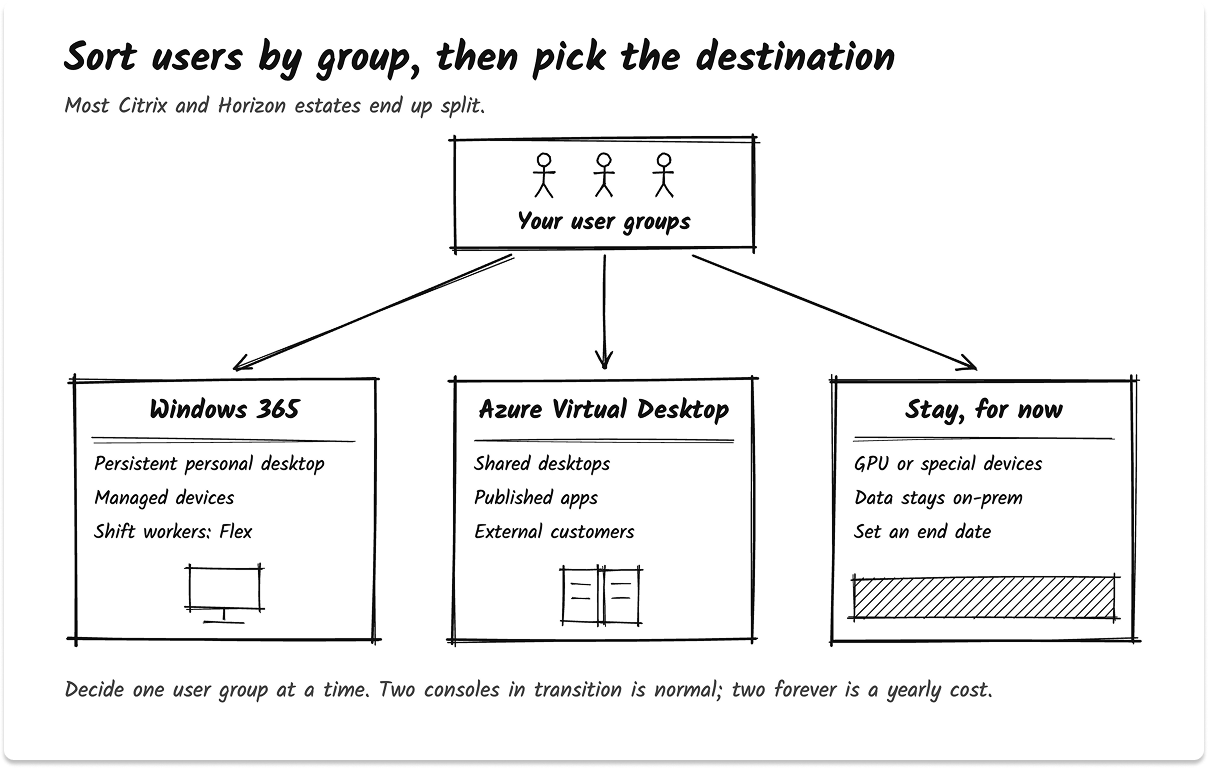
I have scoped and run these moves. The decision that holds up gets made one user group at a time. Most estates end up split: Windows 365 for people who need their own desktop, AVD for shared desktops and published apps, and a smaller Citrix or Horizon footprint where a hard requirement still needs it.
Sometimes staying is the right answer. The dates come first, because they set your schedule.
What Changed at Citrix in 2026: LAS, LTSR Dates and the Deadlines That Matter
Short answer: Citrix ended file-based licensing on April 15, 2026. On-prem Citrix Virtual Apps and Desktops now activates only through the cloud License Activation Service (LAS).
The second date is CVAD 2203 LTSR end of life on March 23, 2027. Citrix also cut LTSR support to three years from release, so newer LTSRs end sooner than you might expect.
How the Citrix License Activation Service (LAS) works
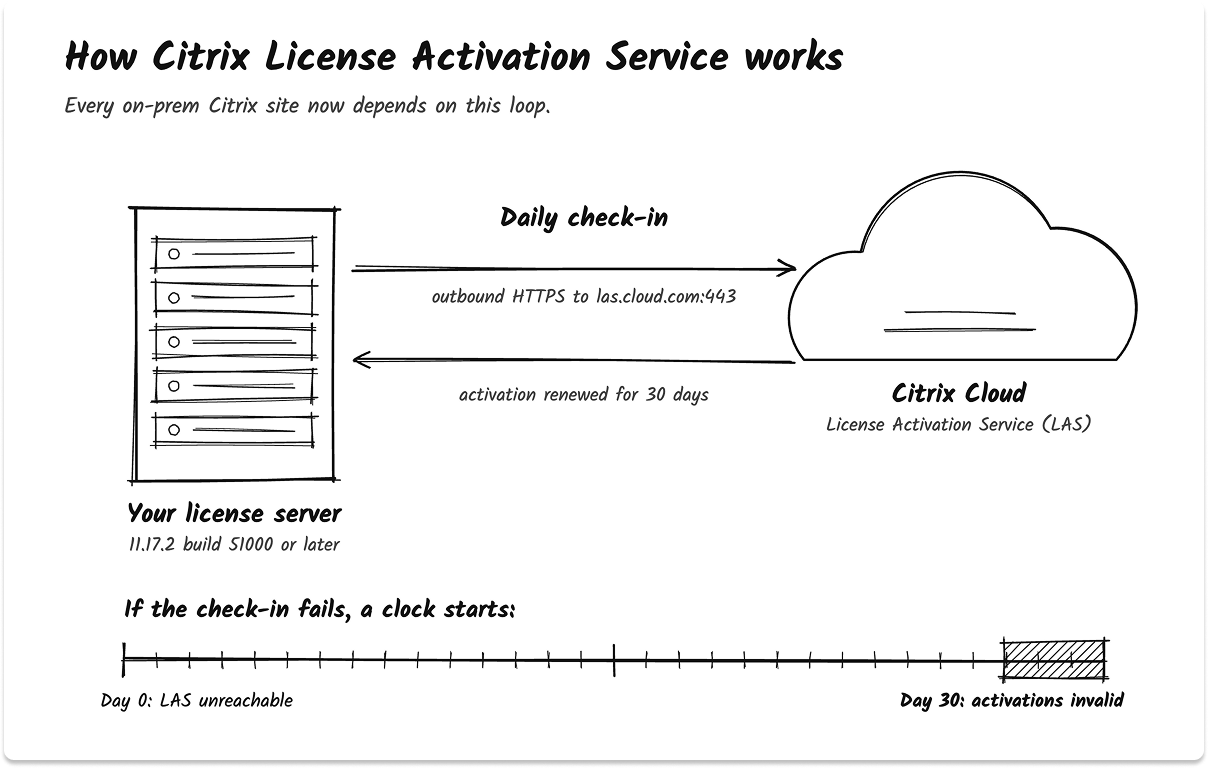
Here is LAS in plain terms:
- LAS is a Citrix Cloud service. It activates your on-prem Citrix products.
- Your license server registers with Citrix Cloud. Then it contacts LAS each day.
- If the license server cannot reach LAS, you have 30 days to fix the connection. After 30 days, the activation becomes invalid.
The requirements are specific. You need License Server 11.17.2 build 51000 or later, an outbound firewall rule to las.cloud.com on port 443, and a Citrix Cloud account. A license server can register to only one Citrix Cloud ID.
LAS covers more than CVAD. It also activates Provisioning, Workspace Environment Management, NetScaler and XenServer. If you run only Citrix DaaS with no on-prem components, LAS does not affect you.
What this means for you: your on-prem Citrix estate now has a hard dependency on Citrix Cloud. Put the LAS connection on your monitoring board. I treat it like a certificate expiry, with an alert well before day 30.
One field note from admin forums: license servers that registered with LAS sometimes showed Not Activated until someone ran the Migrate to LAS step in Studio. Add that step to your runbook.
CVAD LTSR end-of-life dates: 2203, 2402, 2507 and 2607
Citrix now gives each Long Term Service Release three years of mainstream support. These are the CVAD LTSR end-of-life dates:
- CVAD 2203 LTSR: March 23, 2027
- CVAD 2507 LTSR: August 18, 2028
- CVAD 2402 LTSR: April 15, 2029
- CVAD 2607 LTSR: August 17, 2029
Yes, 2402 outlives 2507. The older 2402 release came out under the five-year policy. The 2507 release came out under the new three-year policy. If you plan to stay on Citrix, 2402 and 2607 give you the longest runway.
Extended support past these dates exists for eligible customers only, and Citrix publishes no end date for it. Get that in writing from your Citrix account team before you count on it.
The chart below shows how many months of support each LTSR has left from November 2026.
Citrix and Horizon deadline table
The table puts every licensing and lifecycle date in one place, with the action each one asks of you.
Citrix also changed how it sells. You can no longer renew or expand standalone CVAD. It now comes inside Citrix for Private Cloud, Citrix Universal Hybrid Multi-Cloud or the Citrix Platform License. If your renewal quote shows a new package name, that is why.
CVAD 2203 is one of several dates landing in 2027. Our 2027 IT end-of-life calendar puts it next to the rest.
IT Leaders Report 2026
What are your IT peers investing in 2026?
We spoke to about 1,300 IT leaders from various organisations to understand what they're evaluating. Most of it is the kind of thing you'd only hear from a peer you know well enough to ask, so we've put it in one place.
Read the report
What Changed for VMware Horizon Under Omnissa: New License Keys and Restricted Mode
Short answer: VMware sold its end-user computing business to KKR, and it became Omnissa on July 1, 2024. Horizon 8 2412 and later need a new Omnissa-format license key.
If you upgrade without one, the console enters restricted mode after a 60-day grace period. From 2503.1 ESB and 2506, Horizon recognizes only Omnissa keys.
What Horizon restricted mode does
Restricted mode is a freeze on growth. When the console is in restricted mode, you cannot:
- Add new desktop pools or RDS farms
- Expand the pools and farms you have
- Schedule image pushes
Existing desktops keep running, so your users keep working. Your admins lose the ability to add capacity or push images on a schedule, and that becomes a security problem within one patch cycle.
Watch one trap. The vSphere license bundled with a Horizon term license has no grace period. It moves to a restricted level of service immediately.
The Omnissa rebrand touches your scripts
Starting with Horizon 8 2412, Omnissa renamed executables, folders, registry keys, service names, API names and log locations. For example, C:\ProgramData\VMware\VDM became C:\ProgramData\Omnissa\Horizon.
Practitioners report that existing VMware Group Policy settings do not map to the new Omnissa registry paths on their own. Before any upgrade, search your scripts, GPOs and monitoring checks for the old paths.
Horizon now runs on Nutanix AHV
Horizon 8 2512, released December 16, 2025, made Nutanix AHV support generally available, including automated RDSH farms. That matters if you are also migrating off VMware vSphere. You can keep Horizon and still leave ESXi.
Omnissa does not publish list prices. Ask your account team for renewal and expansion prices in writing before you budget a stay.
Citrix Alternatives and Horizon Alternatives: Stay, Azure Virtual Desktop, Windows 365 or a Split
Short answer: You have four paths. Stay on Citrix or Horizon. Move to Azure Virtual Desktop. Move to Windows 365. Or split users across them. The rule of thumb: persistent personal desktops go to Windows 365, shared desktops and published apps go to AVD, and groups with GPU, peripheral or on-prem data constraints stay put for now.
Each path fits a different kind of user:
- Stay on Citrix or Horizon. Upgrade to a newer LTSR or Horizon release and accept the new licensing. This fits heavy graphics, complex published-app estates and teams built on Citrix or Horizon skills.
- Azure Virtual Desktop. Host pools in Azure, with Windows 11 Enterprise multi-session, RemoteApp and full desktops. You run it and pay for the Azure compute and storage it uses.
- Windows 365. A fixed-price, per-user Cloud PC that Microsoft runs. You manage the desktop through Intune. Microsoft manages the hosting.
- Split estate. Windows 365 for persistent users, AVD for shared and app-only users, and a smaller Citrix or Horizon footprint for the hard cases.
In my experience the split is the most common result. It is also the one that needs an end date. Two or three consoles during a transition is normal. Two or three consoles forever is a cost you will pay every year.
Try the VDI fit picker for each user group
The interactive picker below sorts one user group at a time. Answer five questions about what the group uses, what devices it needs, where its data lives, who the users are and how many there are. You get a destination category, the reason in one sentence and the two biggest migration risks for that group.
Run it once per group. If your groups land on different answers, the picker tells you that you are looking at a split estate. It never names a vendor.
Azure Virtual Desktop vs Windows 365 for Former Citrix and Horizon Users
Short answer: Azure Virtual Desktop is pooled, multi-session infrastructure that you run in your own Azure subscription and pay for by usage. Windows 365 is a fixed-price, per-user Cloud PC that Microsoft runs for you. AVD maps to Citrix and Horizon shared desktops and published apps. Windows 365 maps to persistent personal desktops.
The difference comes down to three things:
- Who runs the hosts. With AVD, Microsoft runs the broker and gateway, and you run the session host VMs. With Windows 365, Microsoft runs the whole stack and you manage the desktop through Intune.
- How many users share a VM. Windows Enterprise multi-session runs only on AVD. A Windows 365 Cloud PC serves one user at a time.
- How you pay. AVD access rights come with licenses you may already own, and you pay Azure for compute and storage. Windows 365 is a flat monthly price per user.
The licensing point is where I see teams save the most time in scoping. AVD access rights for internal users come with Microsoft 365 E3, E5, A3, A5, F3 and Business Premium, Windows Enterprise E3 and E5, Windows Education A3 and A5, and Windows VDA per user. If you already own one of those, AVD has no extra access license for employees.
AVD session hosts running Windows 11 or Windows 10 are billed at Linux compute rates. In plain terms, you do not pay a Windows license charge on the VM itself.
The table compares all four platforms on the rows that decide a migration.
Citrix vs Azure Virtual Desktop
Citrix and AVD have the same shape. Both deliver pooled, multi-session desktops and published apps. The difference is who runs the control plane and how you pay for it.
With Citrix, you run the Delivery Controllers, StoreFront, the gateway and now the LAS connection. With AVD, Microsoft runs the broker and the gateway. Connections use reverse connect transport, so your session hosts need no inbound ports open to the internet.
The move is a rebuild. Admins who planned to lift Citrix servers into Azure with a migration tool found the same answer I give: you build a new golden image for AVD. Your Citrix VDA servers do not convert.
Choose AVD over Citrix when the group runs standard Office and line-of-business apps and you already own Microsoft 365 E3 or E5. Keep Citrix where HDX graphics or a complex app-delivery estate still earns its cost.
Citrix vs Windows 365
These two have different shapes. Citrix shines at shared and pooled delivery. Windows 365 gives each person their own persistent Cloud PC.
Windows 365 replaces your persistent Citrix desktops well, especially for knowledge workers on managed devices. It does a poor job of replacing a farm of published apps used by hundreds of shift workers. AVD or Windows 365 Flex fits that group better.
You can also keep both. Citrix can run on top of Windows 365, which the section on hybrid options covers below.
VMware Horizon vs Azure Virtual Desktop
Horizon maps onto AVD cleanly at the concept level:
- Horizon desktop pools and RDSH farms become AVD host pools.
- Unified Access Gateway goes away, because the AVD gateway is a Microsoft-run service.
- Horizon DEM profiles move to FSLogix profile containers.
One note for Horizon Cloud users: AVD per-user access pricing does not support Omnissa Horizon Cloud. Also weigh the new AHV option. If your real goal is leaving vSphere, Horizon on Nutanix AHV lets you do that without retraining your desktop team. Our Hyper-V vs VMware vs Nutanix comparison covers that platform choice.
What Moves Easily and What Breaks in a Citrix or Horizon Migration
Short answer: Standard Office and line-of-business apps, Windows images and Intune-managed settings move with little rework. Profiles, published-app packaging, printing, specialist peripherals, GPU workloads and apps that sit next to on-prem data are where a VDI migration breaks. Test each of those in the pilot before you schedule a single cutover wave.
The explainer below sorts the work into the two lanes I use when scoping a Citrix or Horizon exit.
Profiles: Citrix UPM and Horizon DEM to FSLogix
FSLogix profile containers are the profile model for AVD. Each user profile lives in a virtual disk on a file share, and Azure Files is the storage Microsoft recommends for most customers.
Microsoft publishes no guide for moving Citrix UPM or Horizon DEM profiles to FSLogix. Its frx command-line tool can copy a local profile into a VHD or VHDX file, and third-party and community tools convert UPM profiles. Test any converter on copies first.
In practice, decide early which users get a converted profile and which start clean. A clean profile costs users some setup time on day one. A corrupted converted profile costs your help desk far more.
Published apps and app layering
App Attach replaces most app layering. It attaches an app package to a user session at sign-in, so the app stays out of your golden image. It supports MSIX, App-V and Appx packages, and it now works on Windows Server 2022 and 2025 session hosts.
App-V Server reached end of support on April 14, 2026. If you still run App-V, App Attach lets you keep the packages and retire the App-V Server infrastructure.
Printing and peripheral redirection: USB, scanners and signature pads
This is where pilots fail most often. AVD sends local devices into the session in two ways:
- High-level redirection. The session understands the device type, such as a printer or a smart card reader. Use this whenever you can.
- Opaque low-level redirection. The session passes raw USB traffic to the device. Microsoft treats this as the fallback.
Some devices cannot be redirected at all. AVD redirection does not support encrypted USB storage or the Bluetooth driver stack, and all-in-one printer-scanners fall back to low-level redirection. Put one of every specialist device on the pilot list: signature pads, label printers, barcode scanners and medical devices.
Graphics and GPU workloads
AVD supports GPU acceleration on specific VM sizes, including NVv4, NVadsA10 v5 and NCasT4_v3. NVadsA10 v5 sizes start at one-sixth of a GPU, which helps you share hardware across light graphics users. Windows 365 sells GPU tiers too, from $310 to $1,914 per user per month at US list price.
CAD and imaging users are the group I keep on Citrix or Horizon longest. Pilot them with their real files and real monitors before you decide.
Apps that need on-prem data: latency and host pool placement
An app that reads a database in your data center will feel slow if its session host sits two thousand miles away. AVD lets you pick the Azure region closest to the data, or run session hosts on-prem with Azure Local. AVD on Azure Local still needs a connection to the AVD service in Azure.
Windows 365 gives you less control over where the Cloud PC runs. For data-heavy groups, that often settles the AVD vs Windows 365 choice.
Access from unmanaged devices and contractors
The Citrix Gateway or Horizon Unified Access Gateway has no direct replacement to build. AVD connections start with reverse connect transport through a Microsoft-run gateway, so nothing listens for inbound traffic on your side.
Licensing is the catch. Contractors who work for your business need an eligible license assigned in your tenant. A license in the contractor's own tenant does not count.
Per-user access pricing applies only when the users are external customers of a service you sell. If you are retiring a VPN for the same users at the same time, our guide to moving from SSL VPN to ZTNA or SASE covers that side.
Can Citrix Run on Top of Azure Virtual Desktop or Windows 365?
Short answer: Yes. Citrix DaaS can manage VDAs in AVD environments, and Citrix HDX Plus for Windows 365 installs the Citrix VDA on Windows 365 Cloud PCs automatically. This hybrid keeps the Citrix HDX experience while Microsoft hosts the desktops. Treat it as a bridge for groups that need HDX, with an end date.

How Citrix HDX Plus for Windows 365 works
You connect Citrix Cloud to your Windows 365 tenant. When you assign a user a Citrix license, Windows 365 installs the Citrix Virtual Delivery Agent (VDA) on that user's Cloud PC. The user's access then switches to Citrix.
HDX Plus for Windows 365 has firm requirements:
- Windows 365 Enterprise or Windows 365 Frontline licenses in the same tenant as Intune
- Frontline Cloud PCs in dedicated mode only
- Not available in Citrix Cloud Gov, Citrix Cloud Japan or CSP tenants
The Citrix Cloud Gov point matters for US public-sector readers. If your agency runs on Citrix Cloud Gov, this route is closed today.
After the VDA is installed, regular users can connect only through HDX. Plan your support model around that.
Citrix DaaS with Azure Virtual Desktop
Citrix DaaS has supported VDAs in AVD environments since 2019. Two limits apply. AVD per-user access pricing does not support Citrix DaaS. And Citrix DaaS does not support LTSR VDAs past end of life, even with an extended support contract.
Citrix also launched Citrix Platform Flex on May 12, 2026. It sells Citrix DaaS Flex on Citrix-managed Azure capacity through Flex Credits. Read the credit rules closely: a configured persona consumes credits even if no one uses it, and unused credits expire at the term end date.
When the hybrid is a bridge: you want Microsoft hosting now and need HDX for a few groups while you test AVD or Windows 365 for them. When it is a destination: a group depends on Citrix policies or HDX features that Microsoft's client cannot replace, and you have priced both licenses for the long term.
Citrix Pricing vs Horizon Pricing vs AVD Cost vs Windows 365 Pricing
Short answer: Citrix and Omnissa do not publish list prices, so your renewal quote is the only real number. Azure Virtual Desktop costs Azure compute, storage and network, on top of Microsoft 365 licenses you may already own. Windows 365 is a fixed price per user per month. On the US list, Windows 365 Enterprise starts at $28 and the common 2 vCPU, 8 GB tier costs $41.
Windows 365 pricing by plan
Windows 365 comes in three plans:
- Business: up to 300 users, with a lower list price. Microsoft cut Business list prices by 20% on May 1, 2026.
- Enterprise: no user cap, managed through Intune. CPU-only configurations run from $28 to $765 per user per month.
- Flex (formerly Frontline): licensed per Cloud PC slot for shift workers. In dedicated mode, one license covers up to three Cloud PCs, with one active at a time.
The chart compares three common configurations across the plans at US list price.
How to estimate AVD cost
AVD has no list price per user. Your cost is the Azure resources you run: session host VMs, profile storage, networking and any management tooling. The bill splits into Azure consumption and licensing, and the licensing half may already be paid through Microsoft 365.
The biggest lever is scaling. A pooled host pool that shuts hosts down overnight costs far less than one that runs all month. Multi-session also helps, because several users share one VM. Build your AVD estimate from pilot data, with your real scaling schedule.
Citrix pricing and VMware Horizon pricing
Neither vendor publishes list prices. Ask for three numbers in writing: the renewal price for your full user count, the price if you shrink to only the groups that stay, and the price for any expansion. The second number tells you what a split estate really costs.
Do not forget Windows 10. Windows 10 VMs and Cloud PCs on AVD and Windows 365 get Extended Security Updates at no extra charge. On your own hardware, paid ESU costs $61 per device for year one and doubles each year. Our Windows 10 ESU Year 2 guide has the full math.
Model the cost with your own numbers
The cost model below uses only your inputs. Enter your users by destination, your current per-user cost from the renewal quote, and your own AVD estimate. Windows 365 prices are prefilled from the US list, and you can edit them. You get an annual cost for today and for the new mix, side by side.
A VDI Migration Plan in Six Phases: From Inventory to License Exit
Short answer: A Citrix or Horizon migration runs in six phases: inventory users and apps, sort them into persona groups, pilot one group per destination, migrate profiles and apps, cut over in waves, then decommission and exit the old licenses. Keep the old platform running as your rollback until each wave signs off, and time the exit to your renewal date.
A straight lift-and-shift of a mature Citrix estate takes months. The six phases below keep that time under control, and each one ends with a gate.
A few notes from running these:
- Phase 1 sets the schedule. The peripheral list and the app-data map decide more of your timeline than the image build does.
- Phase 3 is where you learn your real AVD cost. Feed the pilot numbers back into the cost model above.
- Phase 4 is an endpoint project too. Policies move to Intune. If you are still on ConfigMgr, our SCCM to Intune migration guide covers the workload order. If identity still runs on-prem, read our guide to moving from Active Directory to Entra ID first.
- Phase 6 is a contract milestone. Work back from the renewal date. If you exit after it, you pay for a full term you barely use.
If you want a partner to run part of the work, our list of VDI and DaaS options compares providers that do Citrix, Horizon and AVD migrations.
Find VDI Migration Partners Anonymously
Browse pre-vetted Azure Virtual Desktop, Windows 365 and VDI migration partners on TechnologyMatch. Filter by your user count, your apps and your timeline, and match with partners who fit. Start conversations only when you're ready. It's free.
FAQ
What is the best alternative to Citrix?
The best Citrix alternative depends on the user group. Azure Virtual Desktop fits shared desktops and published apps, because it is the only service with Windows Enterprise multi-session. Windows 365 fits people who need their own persistent desktop at a fixed monthly price. Groups with GPU, specialist peripheral or on-prem data constraints often stay on Citrix for now.
Is Azure Virtual Desktop cheaper than Citrix?
It can be, but only your numbers can say. Citrix does not publish list prices. AVD access rights come with Microsoft 365 E3, E5, F3 and Business Premium, so many organizations pay only for Azure compute, storage and network. Compare your Citrix renewal quote against AVD costs measured in a pilot, with autoscaling turned on.
What's the difference between Azure Virtual Desktop and Windows 365?
Azure Virtual Desktop is pooled, multi-session infrastructure that you run in your own Azure subscription and pay for by usage. Windows 365 is a per-user Cloud PC that Microsoft runs for a fixed monthly price. AVD suits shared desktops, published apps and external users. Windows 365 suits persistent personal desktops and small IT teams.
What happens if I don't move to Citrix License Activation Service?
File-based licensing stopped working on April 15, 2026. Components that you upgrade to a LAS-compatible release stop recognizing file-based licenses, which causes a loss of functionality and affects user access. Once you are on LAS, the license server must reach LAS at least every 30 days, or its activations become invalid.
When does Citrix Virtual Apps and Desktops 2203 LTSR reach end of life?
Citrix Virtual Apps and Desktops 2203 LTSR reaches end of life on March 23, 2027. Extended support is available to eligible customers through Citrix, with no published end date. The next LTSRs end on August 18, 2028 (2507), April 15, 2029 (2402) and August 17, 2029 (2607).
Do I need new license keys for Omnissa Horizon?
Yes, for Horizon 8 2412 and later. You need a new Omnissa-format license key. Without it, the Horizon Console enters restricted mode after a 60-day grace period, and you cannot add or expand pools and farms or schedule image pushes. From 2503.1 ESB and 2506, Horizon recognizes only Omnissa keys.
Can Citrix run on top of Azure Virtual Desktop?
Yes. Citrix DaaS supports VDAs in Azure Virtual Desktop environments, and Citrix HDX Plus for Windows 365 installs the Citrix VDA on Windows 365 Enterprise or Frontline Cloud PCs. HDX Plus is not available in Citrix Cloud Gov. AVD per-user access pricing does not support Citrix DaaS.
Do I need Microsoft 365 E3 to use Azure Virtual Desktop?
No. Microsoft 365 E3 is one of several eligible licenses. Microsoft 365 E5, A3, A5, F3 and Business Premium, Windows Enterprise E3 and E5, Windows Education A3 and A5, and Windows VDA per user also include AVD access for internal users. External customers can use per-user access pricing instead. Windows Server session hosts need RDS CALs with Software Assurance.