Replacing Cisco AnyConnect with ZTNA: A Migration Guide for IT Leaders
Cisco AnyConnect 4.x is end-of-life. Cisco's upgrade path exists but staying on Secure Client with VPNaaS isn't the same as going Zero Trust. This guide covers what a genuine ZTNA migration requires, where the Cisco path has limits, and how to execute the transition without carrying the old trust model forward.

Cisco AnyConnect 4.x is end-of-life. Software maintenance ended on March 31, 2024. Any CVE disclosed after that date has no patch coming. Your concentrator stays internet-exposed, and every unpatched vulnerability stays open indefinitely.
Cisco's prescribed path forward is Secure Client 5, plugged into Cisco Secure Access, their cloud-delivered SSE platform. One agent, one console, ZTNA included. Most teams will take this path because it looks like the least disruptive option.
That framing deserves scrutiny. Cisco Secure Access is a legitimate platform. But the ZTNA it delivers coexists with VPNaaS for applications that don't meet ZTNA-ready criteria.
In most enterprise environments, a significant portion of the application stack falls into that category. Completing this migration and calling it Zero Trust while half your access traffic still moves through a VPN tunnel is a posture gap, not a posture improvement.
This guide covers what a genuine ZTNA migration requires, where the Cisco path has limits, and how to execute the transition without carrying the old trust model forward under a new name.
Step 1: Understand Why AnyConnect's Architecture Is the Problem, Not Just the Version
Treating this as a software upgrade is the most reliable way to run into serious problems post-migration.
AnyConnect is a full-tunnel VPN client. When a user authenticates, they receive an internal IP address and gain routed access to the network segment behind the concentrator. The application they need is a single internal tool. The access they receive covers everything adjacent to it.
This is the implicit trust problem. Authentication happens once, at session establishment. Trust is then assumed for the duration of that session. There is no re-evaluation of identity, device posture, or behavioral context mid-session. A compromised endpoint, a stolen session token, and a credential-stuffed account all inherit identical access to a legitimate user.
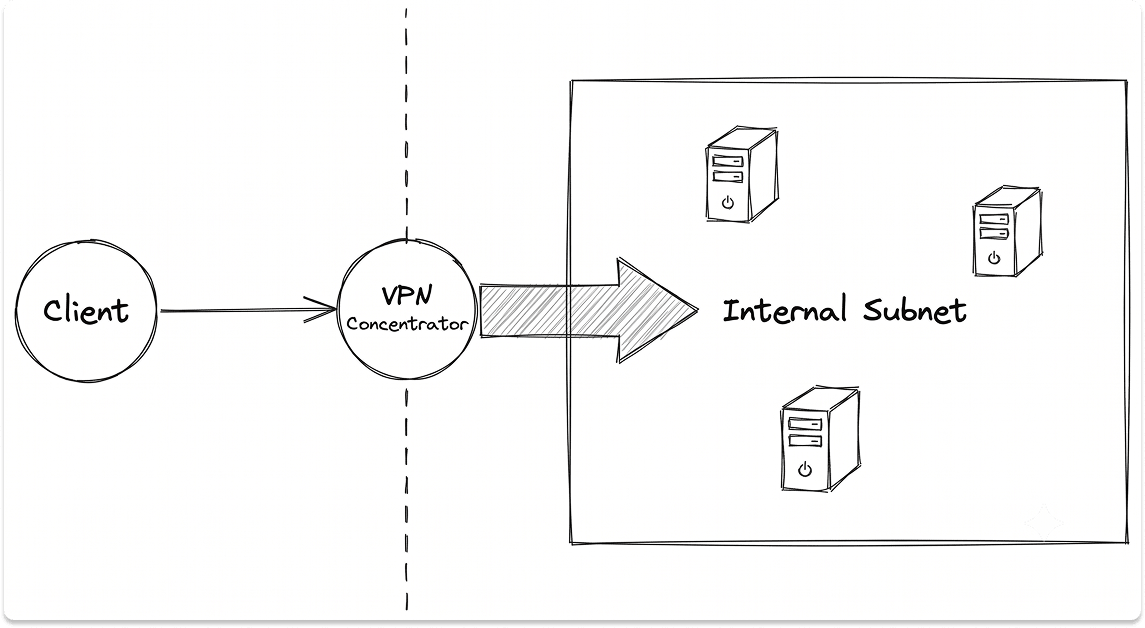
The concentrator makes this worse. It must be reachable from any IP on the internet to function. That means it is permanently exposed, permanently scannable, and permanently in scope for exploitation. 56% of organizations reported VPN-related attacks in 2023–2024. That statistic reflects the architecture, not any specific misconfiguration.
Split tunneling is often deployed to reduce bandwidth load on the concentrator. It trades a different problem: traffic routed outside the tunnel bypasses inspection entirely. You reduce hairpinning and lose visibility at the same time.
Upgrading to Secure Client 5 does not resolve any of this. Secure Client 5 is AnyConnect with a rebranded name and a ZTNA module added on top. The VPN tunnel model underneath remains unchanged unless you actively replace it.
Step 2: Assess the Cisco Upgrade Path Honestly
Before deciding whether Cisco Secure Access is the right destination, understand exactly what it delivers and where its coverage ends.
The gap is VPNaaS. Cisco's own documentation describes it as coverage for "non-ZTNA-enabled apps." In most enterprise environments, legacy internal tools, thick-client applications, and anything dependent on network-level reachability rather than HTTP/HTTPS proxying all land in that category.
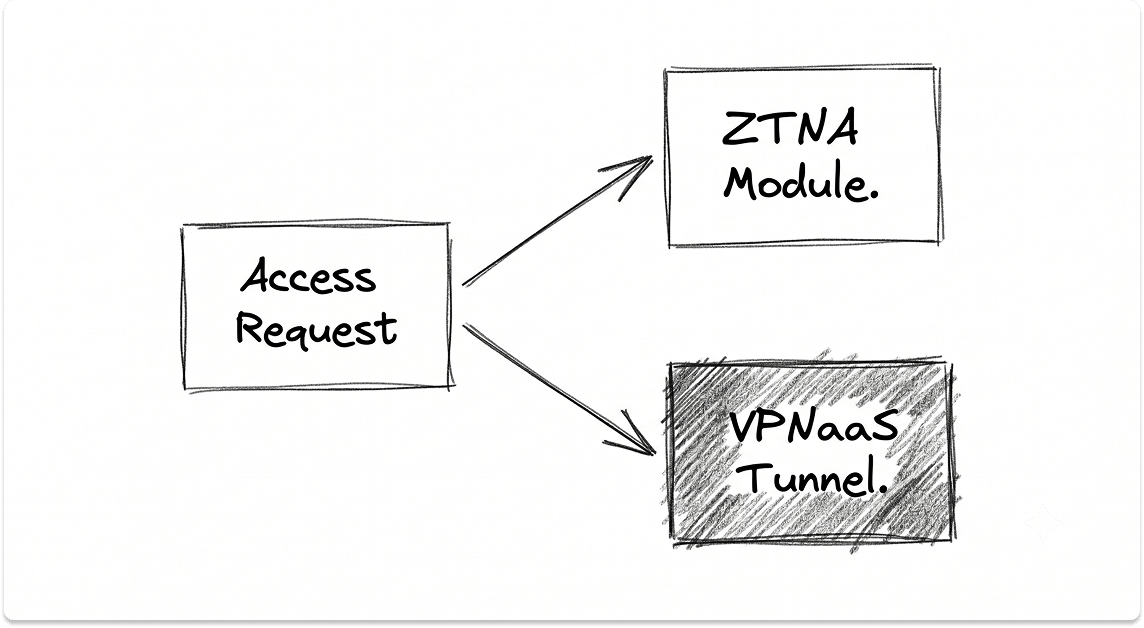
The practical outcome: Cisco Secure Access delivers ZTNA for your modern and SaaS applications. Everything else continues to run through a VPN tunnel. You are paying SSE licensing costs while carrying the VPN trust model forward on a significant share of your access traffic.
Two scenarios where Cisco Secure Access is the right call:
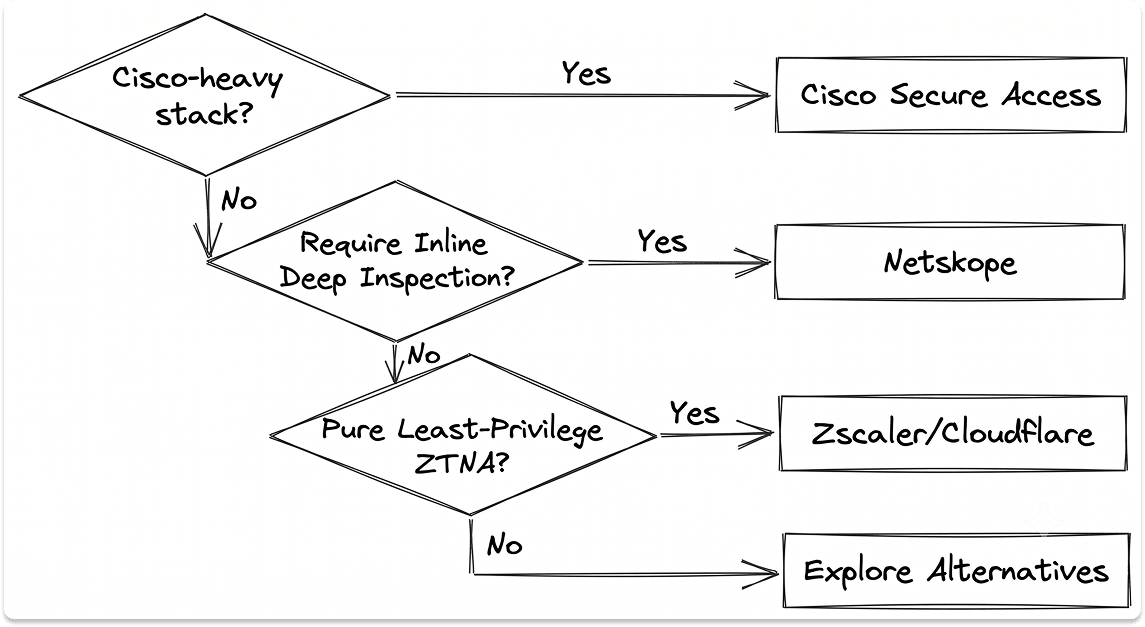
- You are running a Cisco-heavy stack (ASA, Meraki, Duo) and need the fastest path from AnyConnect to a supported state.
- You have a defined, time-bounded plan to migrate or retire the legacy applications currently covered by VPNaaS.
Two scenarios where a purpose-built ZTNA vendor is likely better:
- You need genuine least-privilege access with no legacy trust model carried forward.
- Your application inventory is predominantly modern, HTTP-based, or SaaS.
If VPNaaS becomes a permanent fixture for applications that never migrate, the Cisco path does not deliver Zero Trust. It delivers Zero Trust with a significant asterisk.
Step 3: Understand What Real ZTNA Architecture Looks Like
To evaluate any vendor's claims, you need a precise model of what ZTNA does at the architecture level and why it eliminates risks that VPN cannot.
A purpose-built ZTNA implementation has four structural components:
Identity Broker. Every access request passes through a policy engine that evaluates identity (authenticated via IdP, MFA-verified), device posture (managed, patched, compliant per MDM policy), and environmental context (location, time, behavioral signals). This evaluation happens per-request, not per-session establishment.
Outbound-Only Connectors. Internal applications are published to the ZTNA cloud service via lightweight connectors deployed inside the network. These connectors initiate outbound connections to the control plane. There are no inbound ports open on the perimeter firewall. The application's internal IP is never exposed to the user or their device. An attacker who compromises a valid user credential gets a single encrypted connection to the one application that user is authorized to reach.

Continuous Access Evaluation (CAE). CAE is the mechanism that separates ZTNA from VPN architecturally. VPN grants a session token at login and honors it until expiry. CAE allows the IdP to push real-time revocation signals to the access broker mid-session. If a device falls out of compliance — a patch goes missing, EDR flags a threat, a user's risk score spikes — access is revoked immediately without waiting for the token to expire.
Application-Level Micro-segmentation. Users access specific published applications. They never receive a routable internal IP. East-west movement is structurally unavailable, not just policy-restricted. Lateral movement requires breaching the identity layer, not just the network perimeter.
Two deployment models exist. The choice depends on the user population:
If your environment has more than minimal BYOD or contractor access, plan for both from the start. Agentless access configured as an afterthought creates policy gaps.
Step 4: Run the Pre-Migration Audit Before Configuring Anything
The majority of ZTNA migrations that stall do so because the audit was skipped or compressed. Teams deploy connectors and begin publishing applications before they have a complete picture of what their VPN is carrying. That creates gaps, rollbacks, and user-facing outages that damage confidence in the project.
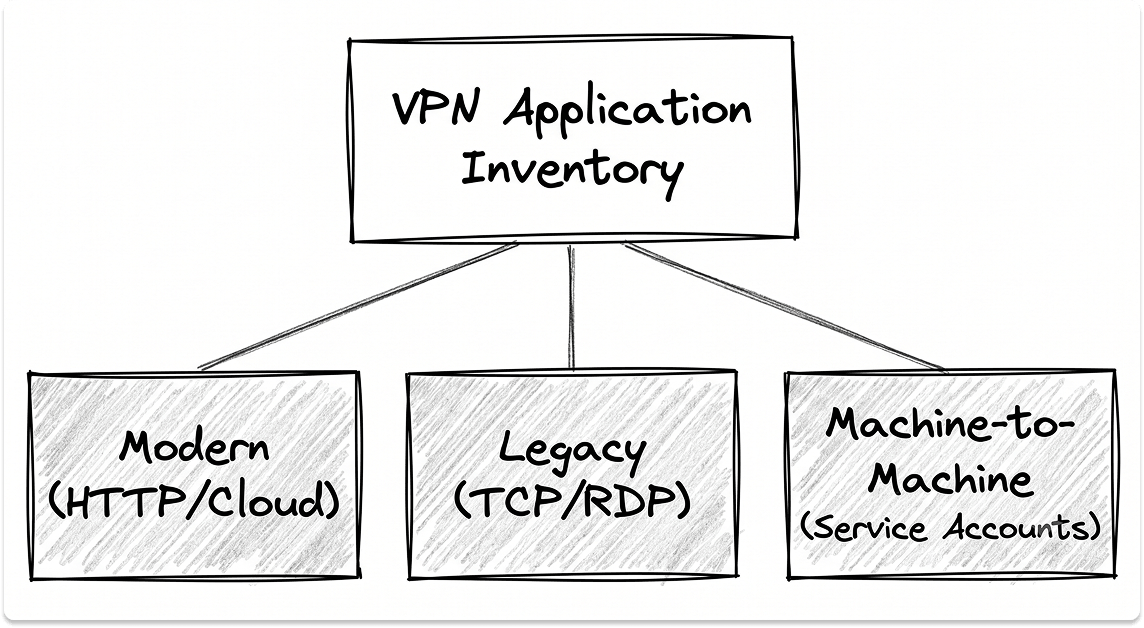
Run this inventory before touching a single policy.
Application dependency mapping. For every application accessed over VPN, document the protocol it uses (HTTP/HTTPS, RDP, SSH, thick-client TCP/UDP, ICMP), port dependencies, hosting location (on-premises, IaaS, SaaS), connection initiation direction (client-initiated vs. server-initiated), and whether it uses non-standard or dynamic port ranges. ZTNA proxy architectures handle client-initiated HTTP/HTTPS natively. Server-initiated connections, non-HTTP protocols, and thick-client applications require agent-based ZTNA with a private connector, or a deliberate VPNaaS exception with a documented resolution path.
On-premises vs. cloud ratio. If 90% or more of your resources are on-premises — file servers, ERP systems, internal web applications on private subnets — agentless ZTNA will not cover your environment. You need agent-based ZTNA with private connectors deployed for each application, and you need to validate that each application responds correctly to proxy-based access rather than requiring direct network-layer reachability.
Identity posture. ZTNA is only as strong as the identity infrastructure underneath it. Before proceeding, confirm:
Deploying ZTNA on top of weak identity infrastructure does not fix weak identity infrastructure. It inherits the same weaknesses at higher cost.
Active Directory dependencies. This is the most consistently overlooked blocker. AD-joined Windows devices that authenticate to on-premises domain controllers will break Group Policy processing, Kerberos ticket renewal, and GPUPDATE in agentless ZTNA flows. Resolution requires either agent-based deployment with a connector that can reach domain controllers, or hybrid identity configured to bridge on-prem AD to a cloud IdP.
Service account and machine-to-machine traffic. VPN tunnels routinely carry traffic that has no human user attached — backup jobs, monitoring agents, replication traffic, scheduled tasks. Map this before migration begins. None of it routes through a user-identity-based ZTNA policy without explicit handling. Services that break silently at 2am are significantly more expensive than services that break visibly during a planned pilot.
Step 5: Execute the Migration in Phases
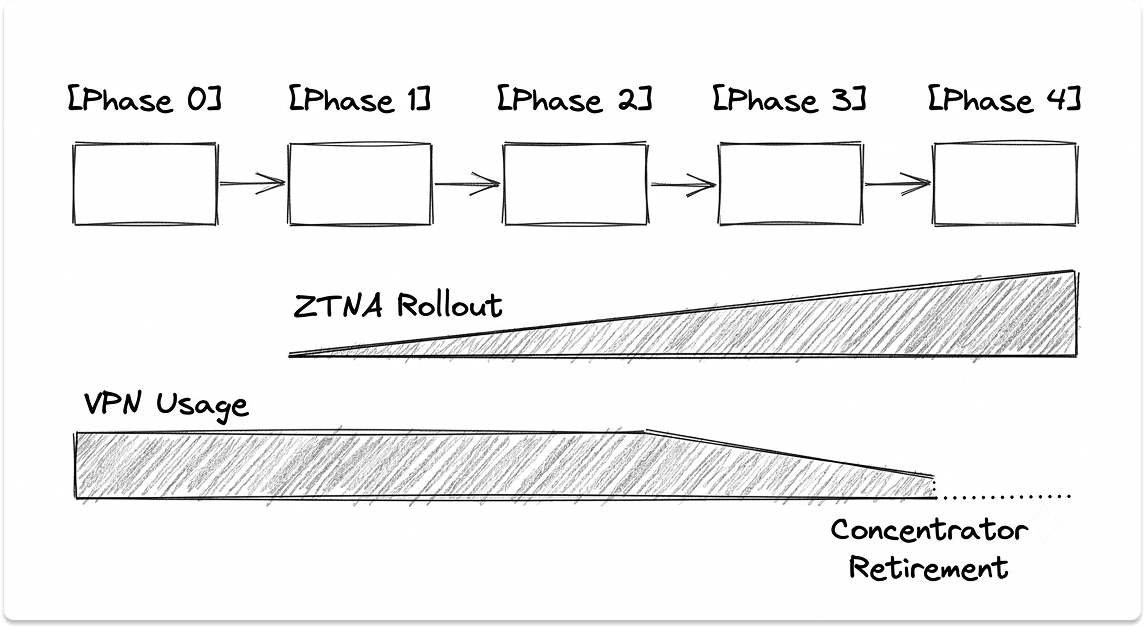
This is not a cutover. The concentrator stays live until every access scenario has been migrated and validated. Running ZTNA in parallel is the correct execution model.
Phase 0: Identity and Posture Hardening (Weeks 1–4)
Enforce phishing-resistant MFA across all accounts with no exceptions. Enroll all managed devices in MDM. Configure device compliance policies. Establish your IdP as the authoritative source for all access decisions. Do not advance past this phase until the identity layer is solid. Everything downstream depends on it.
Phase 1: Pilot on Modern Applications (Weeks 5–8)
Select 2–3 applications that are HTTP/HTTPS protocol, cloud-hosted or reachable via outbound private connector, and non-critical enough to absorb disruption if something breaks. Deploy connectors. Publish the applications. Run the pilot with your IT team only. Before expanding, validate two things explicitly: revoke a test account mid-session and confirm access drops immediately (CAE working), and confirm device posture checks are firing on connection and mid-session. If either validation fails, stop. Fix the configuration before expanding scope.
Phase 2: Expand to Remaining Modern Applications (Weeks 9–16)
Roll out to the broader application set that meets the ZTNA-ready criteria established in Phase 1. Expand user groups progressively. VPN stays live in parallel. The target at the end of this phase: all SaaS and cloud-hosted applications fully off the VPN tunnel. Monitor helpdesk tickets for access friction throughout. An increase in access-related tickets is a leading indicator of policy misconfiguration or a missing application in the published inventory, not a fundamental problem with the ZTNA platform.
Phase 3: Legacy and On-Premises Applications (Weeks 17–28)
This is the phase where migrations stall. For each legacy application, three options exist:
Do not allow Phase 3 to generate a permanent VPNaaS exception list. Every application that stays on VPN is a gap in your zero-trust posture. Name the exceptions, document the resolution path, and set a date.
Phase 4: Concentrator Retirement
When user workload traffic through the VPN concentrator reaches zero, decommission it. Retain VPN only for scenarios where ZTNA is architecturally inappropriate: OT/ICS access, network device management planes, or infrastructure that has no identity layer. Document these exceptions explicitly and review them on an annual cadence.
Step 6: Vendor Selection Framework
The right vendor depends on your environment. There is no universal answer.
Three criteria matter more than any others in vendor evaluation:
CAE implementation. Ask the vendor directly: does their platform support real-time access revocation via IdP push signals, or do they use short-lived tokens as a proxy for continuous evaluation? Short-lived tokens (5–15 minute expiry) are not the same as real-time CAE. The difference is the window an attacker retains access after a compromise event is detected.
Legacy application coverage. Ask for a technical walkthrough of how the vendor handles non-HTTP protocols, thick-client applications, and server-initiated connections in your specific environment. Vendors who can only demonstrate ZTNA against HTTP/HTTPS workloads are showing you half the architecture.
Posture check integration depth. Confirm whether the vendor can consume posture signals from your existing MDM and EDR stack, or whether they require their own agent. Deploying a separate posture agent alongside an existing EDR agent creates endpoint overhead and policy conflicts.
Step 7: Measure Whether the Migration Actually Reduced Risk
Deployment is not success. These metrics determine whether the migration achieved what it claimed to.
Authentication event coverage. Measure the percentage of application access events passing through your ZTNA policy engine. The target is 100% for all user-initiated access. Gaps in coverage indicate applications still running on VPN or direct network access.
VPN concentrator throughput. This metric should trend to zero for user workloads across the migration timeline. A plateau in Phase 3 is a signal that the VPNaaS exception list is growing rather than shrinking. Identify the applications driving the plateau and force a resolution decision.
Mean time to revoke access (MTTR-A). With CAE correctly configured, revoking a compromised user's access across all active sessions should complete in under 60 seconds. If it is not near-instantaneous, the CAE configuration needs a migration plan.
Lateral movement exposure. Track SIEM alerts for east-west connection attempts from user endpoints to internal subnets. As ZTNA adoption increases, this volume should approach zero. Any increase indicates VPN fallback use or a misconfigured application access policy.
Helpdesk ticket volume by category. Separate access-related tickets from general IT support volume. An increase during migration phases is expected and manageable. A sustained increase post-migration indicates policy misconfiguration, not user error.
The Leadership Reality of This Migration
The most consistent failure pattern in ZTNA migrations is not technical. It is a gap between the timeline the business expects and what the application dependency surface actually requires.
Before the project begins, align on four things:
- Scope acknowledgment. This is an architectural replacement of how users access every internal resource, not a software upgrade. Teams that treat it as the latter consistently discover the former six months in.
- Application inventory completeness. The migration cannot be scoped or timed until the application inventory is complete. Starting without it means the timeline is a guess.
- Legacy application ownership. Every application that cannot migrate to ZTNA cleanly needs an explicit owner and a resolution date. Without this, Phase 3 becomes a permanent holding state.
- Definition of done. Define what complete looks like before the migration starts. "ZTNA deployed" is not done. "VPN concentrator decommissioned with zero user workload exceptions" is done.
Realistic timelines depend on your application complexity:
The architecture you choose matters less than the completeness of the migration you execute. A full migration to Cisco Secure Access with VPNaaS eliminated is a better security outcome than a partial migration to a purpose-built ZTNA vendor with a permanent VPNaaS exception list covering your most sensitive applications.
Looking for ZTNA vendors?
You can find pre-vetted vendors from a curated catalog on our platform. Match with those who fit your infrastructure, compliance requirements, migration stage, and reach out to them when you're ready. It's free and private.
FAQ
Is Cisco Secure Client the same as Cisco AnyConnect?
Cisco Secure Client 5 is the direct successor to AnyConnect. Cisco rebranded AnyConnect as Secure Client and added a ZTNA module and VPN-as-a-Service (VPNaaS) capability on top of the existing architecture. The underlying VPN tunnel model carries forward. Teams that upgrade to Secure Client 5 without actively migrating applications off VPNaaS are running the same trust model under a new name.
What is the difference between ZTNA and VPN?
A VPN authenticates a user once at login and grants them routed access to a network segment for the duration of the session. ZTNA evaluates every access request individually against identity, device posture, and context — and grants access to a single application, not the network. The critical architectural difference is the attack surface: a VPN concentrator must be internet-exposed to function, ZTNA connectors speak outbound only and expose nothing. There are no inbound ports, no visible internal IPs, and no lateral movement path if a credential is compromised.
Can I replace Cisco AnyConnect with ZTNA if most of my resources are on-premises?
Yes, but the migration path is more complex. Agentless ZTNA — the browser-based reverse proxy model — only handles HTTP/HTTPS traffic cleanly. If your environment is predominantly on-premises with thick-client applications, RDP, legacy protocols, or Active Directory dependencies, you need agent-based ZTNA with private connectors deployed for each application. On-prem AD also requires a specific resolution: either agent-based deployment with connector access to domain controllers, or hybrid identity bridging AD to a cloud IdP. Environments with 90%+ on-premises workloads should expect an 18-24 month migration timeline.
What is Continuous Access Evaluation (CAE) and why does it matter for ZTNA?
Continuous Access Evaluation is the mechanism by which an identity provider pushes real-time revocation signals to the ZTNA access broker mid-session. With a traditional VPN, a session token issued at login remains valid until it expires — typically hours. With CAE, if a device falls out of compliance, an EDR threat is detected, or a user's risk score changes, access is revoked immediately without waiting for token expiry. This is the technical boundary between a genuine Zero Trust architecture and a VPN with modern branding. When evaluating ZTNA vendors, ask specifically whether they support IdP push-based revocation or rely on short-lived tokens as a proxy.
Which is better for replacing Cisco AnyConnect — Zscaler, Netskope, Palo Alto, or Cloudflare?
There is no universal answer. The right choice depends on your existing stack, your application inventory, and your data protection requirements. Zscaler Private Access suits large enterprises that need a purpose-built ZTNA broker with no legacy carry-over. Netskope One Private Access is the stronger fit when DLP and CASB enforcement on the same access session matters — its inline inspection model adds latency but covers data protection requirements that access-only ZTNA cannot. Cloudflare Access performs well for distributed, developer-heavy teams with HTTP-dominant inventories. Palo Alto Prisma Access is the natural choice for organizations already running Palo Alto NGFWs. Cisco Secure Access is the lowest-friction path for Cisco-heavy stacks — provided you build a concrete plan to eliminate VPNaaS dependencies over time.