Moving Macs from Hand Setup to MDM: Zero-Touch Enrollment at Scale
Move Macs from hand setup to zero-touch MDM enrollment: Apple Business Manager setup, first-boot design, existing Macs, rollout waves and what breaks.

The hiring push went fine. Forty designers started over two quarters, each with a MacBook Pro that someone in IT unboxed and configured by hand. Then one laptop disappeared from a rideshare, and nobody could lock it, erase it or say whether FileVault was on.
That's the day zero-touch deployment for Mac moves to the top of the list. If you run a mostly-Windows shop that now has dozens or hundreds of hand-built Macs, this guide gives you the rollout plan, including the parts vendor guides skip.
Short answer: Zero-touch enrollment means a new Mac enrolls in your MDM the first time it powers on, with no IT hands on it. It works through Apple Business (the platform that replaced Apple Business Manager in April 2026) and Automated Device Enrollment, and it starts with where you buy the Mac.
What Zero-Touch Enrollment for Macs Means
Zero-touch enrollment for Mac is Apple's Automated Device Enrollment at work. A Mac your organization owns contacts Apple during Setup Assistant, learns which MDM server it belongs to, and enrolls itself as a supervised device. IT never images it, signs in on it or ships it to the office first.
I think of zero-touch as a chain of custody that starts at the purchase order. Apple knows a Mac is yours only if it was sold to your Apple Customer Number or through a reseller linked to your account.
Apple Business routes it to your MDM only if you assigned it or set a default. Break any link and the Mac boots like a consumer laptop.
IT Leaders Report 2026
What are your IT peers investing in 2026?
We spoke to about 1,300 IT leaders from various organisations to understand what they're evaluating. Most of it is the kind of thing you'd only hear from a peer you know well enough to ask, so we've put it in one place.
Read the report
Signs You've Outgrown Setting Up Macs by Hand
You've outgrown hand setup when a Mac can go missing and you can't erase it or prove what was on it. No head count marks the line. The breaking point depends on how fast you hire, how many people work remotely and how much customer or regulated data lives on laptops.
Watch for these four signals:
- A Mac went missing and you couldn't lock or wipe it. Plan for the forgetful employee first. The Verizon 2025 Data Breach Investigations Report finds that assets remain far more likely to be lost than stolen.
- An auditor, customer or cyber insurer asked for proof. They want evidence of device control and disk encryption, and a hand-kept spreadsheet rarely satisfies them.
- New hires wait for a Mac. Remote hires' laptops ship to IT first, then ship again.
- Nobody can answer basic fleet questions. Which Macs have FileVault on? Which ones sit a major macOS version behind?
The fleet keeps growing while management lags behind it. Apple reached an 11% share of US business PC shipments in full-year 2025, up 2.4 points from 2024, according to Omdia. IDC's 2024 survey work found that fewer than half of Macs in business deployments sit in any device management tool.
Is Your Mac Fleet Ready for Zero-Touch Deployment? Take the 5-Question Readiness Check
Five answers tell you whether your Mac fleet can enroll itself today or needs groundwork first. The check scores purchasing, Apple Business status, identity, hand-built Macs and MDM choice. It then lists the three fixes to make first, in order, linked to the matching step below.
Step 1: Set Up Apple Business Manager (Now Apple Business) Before You Buy Another Mac
Apple Business, the free platform that replaced Apple Business Manager on April 14, 2026, is the root of the chain. Sign up, verify the organization, link every Apple Customer Number and reseller you buy from, and connect your identity provider. Do it before the next Mac order, because only linked purchases appear automatically.
Apple announced Apple Business as a free US service with built-in device management. If you already had an Apple Business Manager account, Apple migrated it when an administrator first signed in. The Apple Business Manager setup work below still applies; only the name changed.
How to Get Your Organization Verified in Apple Business Manager
Apple gives you 60 days after sign-up to verify. The Apple Business User Guide states that verification uses two methods and can take up to five business days, longer during busy periods. If Apple can't approve you in that window, it deletes the organization, its data and its Managed Apple Accounts.
Three details cause most of the delays I've seen:
- Use a real person for the first admin. Apple requires a legal human name and rejects entries like IT Coordinator.
- Brief your verification contact. Apple may contact the person you name to confirm the account, so make sure that person expects it.
- Add a second administrator right away. One admin account is a single point of failure.
Verify your email domains with a DNS TXT record at the same time. Federation depends on it.
Link Your Resellers So New Macs Appear Automatically
Apple states that devices purchased with your Apple Customer Number or Reseller Number appear automatically in Apple Business. For direct purchases, the legal name and mailing address on the Apple Customer Number must match your organization. Give each reseller your organization ID and ask them to submit every Mac order against it.
I'd do this first: change the purchasing policy so Macs only come through linked channels. Corporate cards, retail stores and expense reports are where the chain breaks. Write the rule into procurement, and have finance reject Mac expense claims that bypass it.
Connect Entra ID or Google Workspace for Managed Apple Accounts
Federation lets employees sign in to Apple services with company credentials, and directory sync creates their Managed Apple Accounts automatically. Apple supports Microsoft Entra ID, Google Workspace and other identity providers.
If your directory still lives on premises, our guide to migrating from on-prem Active Directory to Microsoft Entra ID covers that move.
Two newer controls matter. Since October 2024, Apple lets you block new personal Apple Accounts on your verified domains. Since September 2025, you can restrict sign-in on organization-owned devices to your own Managed Apple Accounts.
Apple Business Manager vs Apple Business Essentials
Apple Business Manager was the free enrollment and account portal. Apple Business Essentials was a US-only paid subscription that added Apple's own MDM. Since April 14, 2026, both live inside Apple Business, and Apple no longer charges for device management.
Step 2: Choose an MDM and Connect It to Apple Business Manager
Pick the MDM that will own your Macs, link it to Apple Business as an external device management service, and set it as the default for new Macs. Apple Business now includes free built-in MDM, but conditional access, security tooling and reporting usually point you to Intune or a Mac-focused MDM.
Can Intune Manage Macs, or Do You Need a Mac-Specific MDM?
Yes, Intune manages Macs. Microsoft documents Intune macOS enrollment through Automated Device Enrollment, Platform SSO during Setup Assistant and a macOS local admin password solution. Answer these questions before you choose:
- Do you already license Intune and enforce Entra ID Conditional Access on Windows?
- How fast must new macOS releases reach users?
- Who owns the Macs day to day: the Windows endpoint team or a Mac specialist?
- Do auditors need Mac-specific compliance reports?
For the trade-offs, read our jamf vs intune for mac management comparison. If Windows is mid-migration too, see our guide to moving Windows management to Intune.
Add the MDM Server and Set the Default Assignment
In Apple Business, add an external device management service, upload your MDM's public key, then download the service token and upload it to the MDM. Apple states that these server tokens expire after one year, and you may not get a warning. I put the renewal date on two calendars.
Next, make your MDM the default assignment for Macs so new purchases route to it untouched. On Intune, Microsoft warns that a Mac needs an enrollment policy assigned before it activates, or enrollment fails. Set a default policy on day one.
Step 3: Design the First-Boot Experience
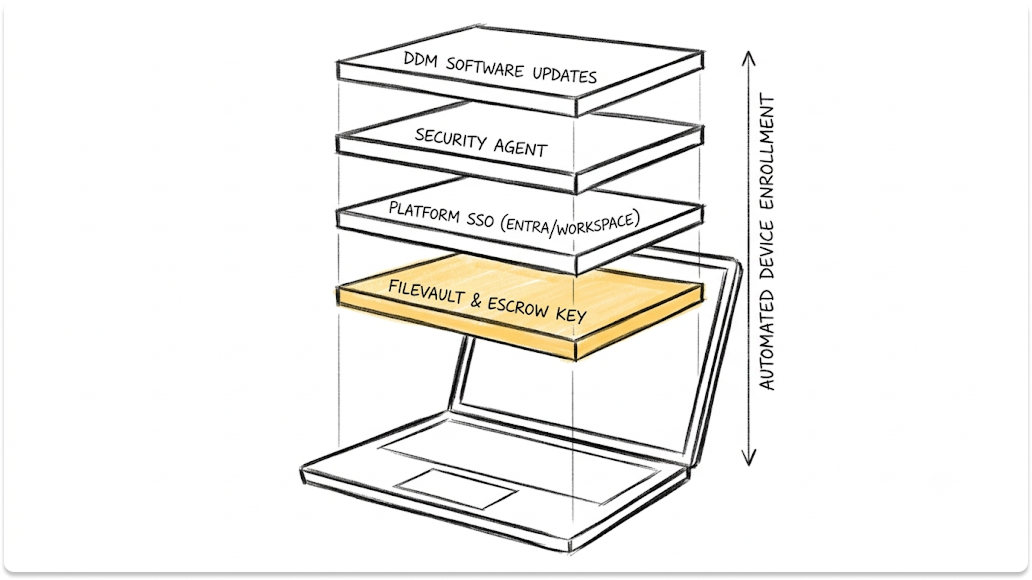
First boot is where zero-touch either delivers or leaks. Decide which Setup Assistant panes appear, lock the MDM profile, decide who gets admin rights, force FileVault with an escrowed key, and sign users in with their company account. Every choice here applies to every future Mac.
Which Setup Assistant Screens to Skip
Hide panes that add nothing on a work Mac: Siri, Screen Time, Apple Pay, iCloud Analytics, Appearance and Terms of Address. Keep Location Services so time zones set themselves, and keep Accessibility. Microsoft notes that hiding Accessibility blocks VoiceOver during setup.
Microsoft also documents that the Restore pane can't be hidden on macOS 15.4 and later. For Ethernet-connected shared Macs, Apple's Auto Advance option (macOS 11 and later) skips every pane.
How to Stop Users Removing MDM From a Mac
Turn on the prevent-unenrollment option in your ADE profile. Apple's Automated Device Enrollment documentation states that on a Mac this blocks removal from System Settings and from the profiles command-line tool. Intune calls it Locked enrollment and warns that you can't change it later without wiping the Mac.
Apple adds a backstop on macOS 14 and later. If a Mac registered in Apple Business skips enrollment during first setup, macOS shows a full-screen enrollment screen.
Standard User or Local Admin?
My default is standard users plus a separate, MDM-managed admin account with a rotating password. Intune's macOS local admin password solution creates a random password and rotates it every six months by default.
Know the trap: the first account Setup Assistant creates is an administrator unless your MDM configures it otherwise. Engineers who need admin rights get a time-limited admin tool, and you log every use.
FileVault, the Bootstrap Token and Recovery Key Escrow
Since macOS 14, an MDM can force FileVault on during Setup Assistant. On macOS 26.4 and later, FileVault turns on during Setup Assistant by default. Encryption without escrow is a liability, so hold the user at an await-configuration screen until FileVault is on and the recovery key sits in your MDM.
The bootstrap token does the quiet work. On macOS 26 and later, the Mac creates it during enrollment if your MDM supports it. On Apple silicon, it authorizes software updates and kernel extensions.
Platform SSO: Signing In With Your Company Account
Platform SSO on Mac lets users sign in with their identity provider password. It arrived in System Settings with macOS 14. macOS 26 adds Platform SSO during Automated Device Enrollment, which authenticates enrollment and creates the local account in one step.
On Intune, Microsoft says to create the Platform SSO policy before devices enroll and never to target userless ADE devices. Test this flow with your identity provider in the pilot wave before you rely on it.
What to Push on Day One
Push day-one apps, Wi-Fi and VPN, the FileVault escrow configuration and your security agent. Then move software updates to Declarative Device Management.
Apple deprecated legacy MDM software update commands in the OS 26 cycle and states that they no longer work in the 27.0 operating systems, including macOS 27.
If you're also rethinking patch and endpoint management, settle Mac updates on DDM first.
Step 4: Bring the Macs You Already Set Up by Hand Under Management
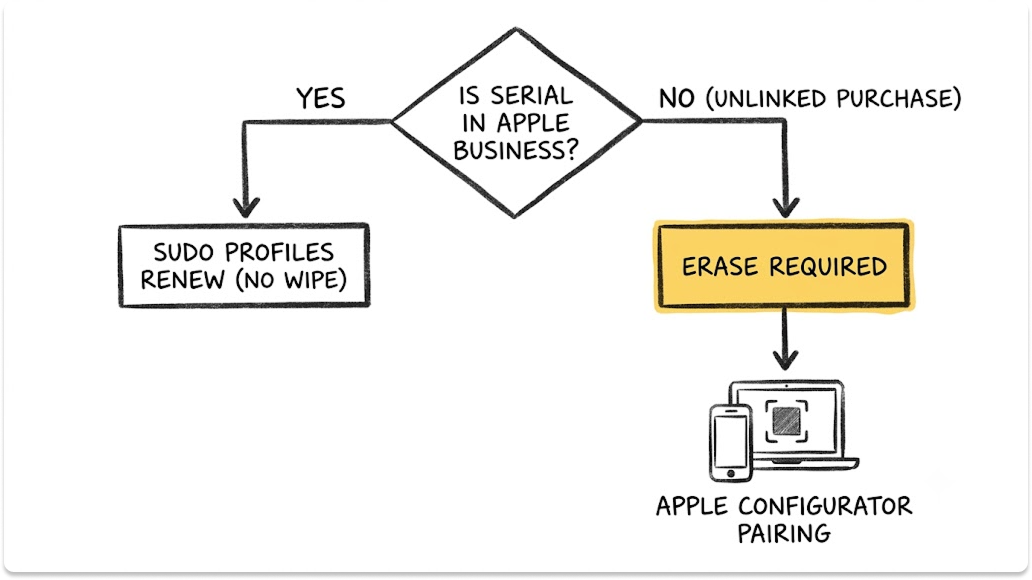
You can bring hand-built Macs under management without a wipe, but supervised, non-removable enrollment needs the serial number in Apple Business. Macs bought through linked channels qualify today.
Apple states that any Mac already set up must be erased before Apple Configurator can add it to Apple Business.
The first thing I check is where each Mac was bought, because that decides its path. The existing fleet takes longer than the new Macs, so plan your effort around it.
How to Add Existing Macs to Apple Business Manager
Start with Macs whose serials already appear in Apple Business. Assign them to your MDM, then run sudo profiles renew -type enrollment on each Mac.
Apple documents that this resets supervision and respects a non-removable enrollment without erasing. On macOS 14 and later, the user can postpone once for eight hours, and on macOS 13 and later Apple limits the command to 10 requests per 24 hours.
Macs missing from Apple Business go through Apple Configurator for iPhone. Apple's requirements:
- A Mac with Apple silicon or the T2 chip, running macOS 12.0.1 or later.
- An iPhone with iOS 16 or later, signed in with a Managed Apple Account allowed to add devices.
- An erase first. Apple requires you to erase all content and settings before you add a Mac that's already set up.
After the erase, stop at the Select Your Country or Region pane, scan the pairing image with the iPhone, then shut down the Mac. Back up user data before you start.
Macs Bought on Personal Cards or Outside Your Reseller
These Macs need the Configurator path, which means a scheduled erase. Until then, enroll them with profile-based enrollment so you can at least lock, wipe and report on encryption.
Apple also gives the user a 30-day provisional period to release a Configurator-added Mac from Apple Business, supervision and your MDM. Tell users before you hand the Mac back, and watch for releases in that window.
Step 5: Roll Out Mac MDM Enrollment in Waves
Roll out zero-touch in five waves, each with an exit criterion you can check: IT's own Macs, a friendly pilot team, all new hires, the existing fleet by department, then stragglers and exceptions. A wave closes when its criterion is met, whatever the calendar says.
How to Move Macs to a New MDM Without Wiping Them
On macOS 26 and later, you move Macs to a new MDM by reassigning them in Apple Business and setting a deadline. Apple requires the deadline to be more than a day and less than 90 days away. At the deadline, the Mac shows a full-screen prompt the user can't dismiss and re-enrolls in the new service.
This MDM migration without a wipe path arrived with the OS 26 releases in 2025. Apple's migration requirements:
- Macs on macOS 26 or later, owned by you and enrolled through Automated Device Enrollment.
- Configurator-added Macs past their 30-day provisional period.
- Both MDMs connected to the same Apple Business account.
Prepare the new MDM first. Apple says it must apply matching configurations and use the await-configuration setting for managed apps, FileVault and Activation Lock.
The new service can rotate the FileVault recovery key with the bootstrap token and creates fresh Activation Lock bypass codes. With volume-purchased apps, Apple advises a deadline of 30 days or less and moving the content token first.
When a Wipe Is Still Required
You still need an erase in these cases:
- Macs missing from Apple Business. Adding them through Apple Configurator requires an erase.
- Configurator-added Macs inside the 30-day provisional period. Wait out the window or erase.
- A failed migration you can't recover. Clear the failed migration in Apple Business and retry before you schedule an erase.
Macs older than macOS 26 can still switch services without an erase through the profiles command, if their serials sit in Apple Business. Expect more manual work.
What Breaks in Mac MDM Rollouts and How to Fix It
Most Mac MDM failures trace back to a broken link in the ownership chain: a purchase outside linked channels, a missing assignment, an expired token or a blocked Apple host. The table maps each symptom to its cause and fix, so your help desk can triage before it escalates.
Questions to Ask an MDM Vendor or Rollout Partner
Ask vendors and partners to show, on a live Mac, how they handle enrollment, escrow, identity, migration and updates. Every vendor page claims zero-touch support. These questions separate tools that hold the chain together from tools that only start it.
- Do you support Platform SSO during Automated Device Enrollment on macOS 26 with my identity provider?
- How do you escrow FileVault keys, and can you rotate a recovery key remotely?
- Do you support OS 26 migration through Apple Business, including the await-configuration setting?
- Is every software update workflow built on Declarative Device Management?
- How do you warn me before the server token expires?
- What does your rollout partner do with Macs bought outside our channels?
Closing Thoughts
Zero-touch Mac enrollment is a chain of custody, and the purchase order is the first link. Get purchasing, Apple Business and the MDM assignment right, and every new Mac sets itself up.
Your next step: pull last quarter's Mac purchases and mark which ones appear in Apple Business. Every gap on that list is a Mac you'll set up by hand again.
Find MDM Vendors and Rollout Partners for Your Macs
Rolling Macs into MDM? Tell us what you run and how many Macs you have. We'll match you with MDM vendors and rollout partners worth your time. It's private and free.
FAQ
What is zero-touch enrollment for Mac?
Zero-touch enrollment is Apple's Automated Device Enrollment. A Mac your organization bought through Apple or a linked reseller appears in Apple Business, gets assigned to your MDM server, and enrolls itself during Setup Assistant the first time it powers on. The Mac arrives supervised, with MDM the user can't remove, and IT never handles it before the employee opens the box.
How do I add existing Macs to Apple Business Manager?
If the Mac was bought through Apple or a linked reseller, its serial number is already in Apple Business, so assign it to your MDM and run sudo profiles renew -type enrollment. Other Macs need Apple Configurator for iPhone. Apple requires you to erase a Mac that's already set up, pair it at the Select Your Country or Region pane, and accept a 30-day provisional period.
Can you use Intune to manage Macs?
Yes. Microsoft documents Automated Device Enrollment for macOS in Intune, including Setup Assistant with modern authentication, Platform SSO during enrollment, locked enrollment and a macOS local admin password solution. Intune requires new or wiped Macs for ADE and an enrollment policy assigned before the Mac activates. Teams that want faster macOS-specific features often compare it with Mac-focused MDMs first.
Do I need Apple Business Manager for MDM?
You can enroll Macs in an MDM without it, but users can remove that enrollment and you lose zero-touch setup. Automated Device Enrollment and non-removable MDM require Apple Business, which replaced Apple Business Manager in April 2026. Apple Business is free and now includes built-in device management, so cost is no longer a barrier.
Can users remove MDM from a Mac?
It depends on how the Mac enrolled. Users can remove profile-based enrollments. Macs enrolled through Automated Device Enrollment with the prevent-unenrollment option block removal from System Settings and the profiles command, according to Apple. Macs added with Apple Configurator give the user a 30-day provisional period to release the device first.
How do I move Macs to a new MDM without wiping them?
On macOS 26 and later, reassign the Macs to the new MDM server in Apple Business and set a deadline of more than a day and less than 90 days. Users see notifications, then a full-screen prompt they can't dismiss at the deadline. Prepare the new MDM with matching configurations, FileVault escrow and the await-configuration setting before you start.
What's the difference between Apple Business Manager and Apple Business Essentials?
Apple Business Manager was Apple's free portal for device enrollment, apps and Managed Apple Accounts. Apple Business Essentials was a US-only paid subscription that added Apple's own MDM, support and storage. On April 14, 2026, Apple replaced both, plus Apple Business Connect, with Apple Business, and stopped charging for device management.