Ransomware Recovery Plan: How Long Would It Take You to Get Your Data Back?
Build a ransomware recovery plan around three clocks: dwell, decision and restore. See why DR fails, how to find a clean copy and what to restore first.

Sponsored: This article is sponsored by Direct Systems Support (DSS) as part of a media partnership with TechnologyMatch that also includes my podcast episode with Mark Steele, DSS's VP of Professional Services.
How many hours until your minimum viable company runs again from a copy you trust? I think that your ransomware recovery plan has to produce this one number more than anything. Considering that for larger enterprises with petabyte-scale databases, a full restore from backup can take days to weeks, and that only really starts when you know which copy is clean. Or at least clean enough.
I opened a recent episode of Between Fires and Futures, the podcast I host, with a version of that question. If you got hit with ransomware tomorrow, could you actually get everything back? And how long would it take? Having backups is one question. Getting the business running again, and knowing roughly when, is a much harder one.
I talk with IT and security leaders day in and day out, and I'll be honest: for a lot of companies, the answer is we don't know. Attackers are counting on that.
My guest was Mark Steele, VP of Professional Services at DSS, an IBM Platinum partner. Mark has spent nearly 30 years helping large organizations build infrastructure that holds up, so I mostly let him talk. Afterward I went back through our conversation line by line and checked what he said against our own buyer-call data and the newest breach research.
Here's where I landed: ransomware recovery runs on three clocks, and most plans only time one of them.

from the episodeSome of these databases customers are running on are petabytes in size. You don't restore that in minutes. That takes days, if not weeks.
Mark Steele VP of Professional Services, DSS
How long does ransomware recovery take?
Faster than it used to, if you believe the surveys. In Sophos's 2025 survey, 53% of organizations fully recovered within a week, and 18% took more than a month. But a large enterprise restoring everything from backup should plan for days to weeks, plus whatever time it takes to find a copy it trusts.
The trend looks good on paper. In Sophos's State of Ransomware 2025, that one-week number climbed from 35% the year before, and the share needing more than a month dropped from 34%.
I do wonder what fully recovered means to the people answering. For some, it means email came back and the phones stopped ringing. In your plan, it should mean every tier 1 application runs from a copy you've proven clean, with the attacker locked out. Those are two very different finish lines.
Mark sees it as a problem of scale. Restoring used to mean one server or one database. "Now that we're talking about cyber resilience, we have to look at it from an application standpoint," he told me. That's the operating system, the middleware and the data, all together, which he called "an insanely time-consuming exercise."
Then he said the line I'd tape to every CIO's monitor: "Some of these databases customers are running on are petabytes in size. You don't restore that in minutes. That takes days, if not weeks."
The three clocks of ransomware recovery
Here's how I've started thinking about it. Recovery runs on three clocks. The dwell clock looks backward: how long the attacker was inside decides how far back you need a copy you can trust. The other two run forward from the moment you find the attack, and together they are your downtime. The decision clock covers forensics, ownership and where you restore. The restore clock is terabytes, throughput and rebuild layers. Most plans I hear about only time the third one.
Your RTO lives on that third clock. It quietly assumes you already know what to restore and where to put it. Ransomware takes both of those away.
Clock 1: dwell. How long has the attacker been inside? It depends a lot on who they are. Mandiant's M-Trends 2026 puts global median dwell time in 2025 at 14 days, up from 11. The long tails are espionage and North Korean IT worker operations, both at a median of 122 days. The IBM Cost of a Data Breach Report 2026 puts the mean time to identify any breach at 183 days, plus another 64 to contain it. I treat that 183 as the outer edge of the risk. It covers every kind of breach, and a typical ransomware case is shorter.
Clock 2: decision. Someone has to pick the recovery point, decide where to restore it and decide what stays untouched for forensics. Who is that person at your company? If nobody knows until the ransom note shows up, this clock eats hours you won't get back.
Clock 3: restore. Data size divided by real throughput, repeated for every layer you rebuild. Mark added a catch I hadn't really considered: "Most hackers will go after the backup infrastructure to begin with. So then you got to rebuild that before you can then redeploy the applications."
So I tried lining the first clock up against a few common retention windows.
Look at the bottom bar. If your immutable snapshots roll off after a week, a median-length intrusion is already older than anything you keep. Thirty days covers the median with room to spare, but not the espionage-style tail, and nothing short of a long archive reaches the outer edge.
Short retention can still be fine, as long as you're honest that your snapshots protect your data and something else has to protect your systems. More on that in a minute, because it's where a lot of plans quietly break.
Why your disaster recovery plan fails against ransomware
Because DR was built for a different kind of disaster. It replicates production to a second site, so when ransomware encrypts site A, site B gets the same encrypted data, often within minutes. DR saves you when you lose a building. Cyber recovery is what saves you when you can't trust your own data anymore, and that needs isolated, immutable copies plus somewhere safe to test them.
Mark traces this back to 9/11. After that, the industry poured money and effort into disaster recovery, and honestly, it worked for the disasters it was built for. Ask an IT leader today what happens after a ransomware hit and, Mark says, you'll often hear: we'll just fail over to the DR site. I've heard versions of that myself.

Replication sends the ransomware to your second site
The whole point of a DR site is to be an exact copy of production. So if ransomware hits site one, Mark said, it travels straight into your disaster recovery site. Ask him whether a cyberattack is recoverable by disaster recovery and his answer is short: "it is not."
I picture a DR site as a very loyal, very expensive mirror. It copies everything you do with total devotion. Including the encryption.
One exception is worth checking. Some DR setups replicate on a delay and keep locked snapshots or journals at the second site. Even if the live copy at site B gets encrypted, those older recovery points can survive and roll back fast. You'd still validate them in an isolated environment before promoting anything.
So keep DR for fire, flood and a lost site, and build cyber recovery separately, for the day your own data turns on you.
Attackers go after backups first
This is the stat that stopped me when I was preparing for the episode. In Sophos's 2024 survey, 94% of organizations hit by ransomware said attackers tried to compromise their backups, and 57% of those attempts worked.
Mark put it to me from the attacker's chair: "If you come in and attack me and you didn't destroy my backup, I figure out how you got in, I close the door, and then I just restore to yesterday." There's still pain in that, he admitted. "But I don't have to pay your ransom." So of course they go for the backups first.
CISA says much the same in its #StopRansomware Guide: many ransomware variants hunt for accessible backups and delete or encrypt them, so you can't restore unless you pay.
Now look back at the chart in the first section. In 2025, only 54% of victims used backups to restore encrypted data, the lowest rate in six years of the survey. Recovery got faster, yet fewer companies recovered from their backups. Part of that is good news. The same survey found encryption at a six-year low, with only about half of attacks getting that far, so more teams stopped the attack before it reached the data. My guess is the rest is backups that look fine on paper and then fall over under pressure.
Our own calls lean the same way. Across 450 vendor-matching calls our account managers had with IT buyers between March and November 2026, on every kind of IT project, backup, DR and resilience came up in 85. Slow restores came up in 25 of those. One buyer had backup storage holding 8 TB that really needed 20 to 30 TB, and a full restore took a day or two. Another lost a full day of work in a past ransomware event because backups only ran nightly. That's the kind of detail that never makes it onto the RTO slide.
If you want the wider view, our 2026 IT peer benchmark shows where peers are putting money against the same problems.
How do you know which backup copy is clean?
You don't know until you test it. Restore the candidate copy into an isolated recovery environment, scan it, validate it, and leave the attacked systems alone for forensics. Then split the question in two: which copy has clean data, and which copy has clean systems? The answers usually carry different dates.
Data-clean and system-clean copies
This was the part of our conversation I keep coming back to. Attackers don't encrypt on day one. "They're not going to start day one encrypting things," Mark said, "because they would get caught." They move around first, sometimes for weeks, sometimes for months.
So there are really two kinds of clean. A data-clean copy predates the encryption, maybe by hours. A system-clean copy predates the intrusion, which can be weeks or months earlier. Restore your servers from the first kind and you can restore the attacker's backdoor right along with them. That's a nasty surprise to find a week after you thought you'd recovered.
Mandiant's numbers back this up for ransomware specifically. Prior compromise was the top way into ransomware incidents in 2025, at 30%, double the 15% of 2024. So the encryption may be recent while the way they got in is much older.
That's the whole case for keeping a system-clean copy. And once someone has a way in, things move fast. The median time from initial access to the handoff to a second group fell from more than 8 hours in 2022 to 22 seconds in 2025, because access brokers now pre-stage the next group's tools. Nobody catches a 22-second handoff by watching for it.
So what would I actually do? A split restore. Roll the data back a short distance, and rebuild the systems from known-good images. CISA recommends keeping current golden images of critical systems, with a preconfigured OS and applications, next to your offline backups. That's your system-clean copy, kept on purpose.
This is something I would check first, by the way: when was your golden image last updated? If nobody can answer that quickly, start there. Golden images also have to keep pace with your patches and schema changes, or the rebuilt application won't match the database you restore under it.

Restore into an isolated recovery environment first
Mark called it a segregated recovery environment, what people used to call a clean room. You load a backup or snapshot into an environment cut off from production, then scan and validate it before it touches anything else. IBM packages this as a cyber vault, and backup vendors have their own versions.
Scan for more than malware while you're in there. Attackers can hide inside the data itself, as rogue database accounts, triggers or web shells on file shares.
It also solves a forensics problem most teams don't plan for. Mark's question for any recovery team: "Do you have a place to restore to without overwriting what you think was actually attacked in the first place?"
If the answer is no, you'll either destroy evidence to get running or stay down to protect it. I wouldn't want to make that call at 3 a.m.
Minimum viable company: what to restore first
I'll admit I hadn't heard the term until Mark used it, and now I can't stop using it. A minimum viable company is the smallest set of systems, data and people your business needs to keep serving customers. You define it before an incident, restore it first, and bring everything else back after. It turns rebuild everything into a ranked list with owners and target times, which sounds a lot more doable.
Mark keeps coming back to MGM Resorts, because, as he put it, it was "such a graphic one." He was at an IBM conference the day MGM was hit in September 2023. "The slot machines were all turned off, no one could check in, you couldn't charge anything to your room," he told me. "It was a complete disaster."
MGM later estimated the hit at about $100 million. In Mark's telling, the attackers also went after the backups, which made the restore much harder.
So what does a casino bring back first? Probably the customer experience, Mark said. Check-in, payments, the floor. That's the minimum viable company question, and every business answers it a little differently.
Look at what sits in tier 0: the backup and recovery infrastructure itself. If attackers take it out first, which Mark expects, your recovery starts by rebuilding the tool you were planning to recover with. Is that step in your plan? Does it have hours next to it?
Tier 0 has an order of its own. Your backup and storage consoles need break-glass credentials that don't depend on the Active Directory you're trying to bring back.
Time servers, certificates and encryption key management need to be up before identity can work. And Active Directory itself needs a proper forest recovery, including resetting the krbtgt account twice, rather than a quick rollback of last night's volume.
One opinion of mine: if your tier 1 list runs past a handful of applications, it's probably a wish list. I'd keep cutting until the restore clock fits inside the downtime your business can actually survive.
Who owns ransomware recovery?
Short version: security owns containment and forensics, infrastructure owns the restore, application owners validate, and the business sets the restore order and signs off on how much data it can afford to lose.
In my experience, the trouble starts when those teams meet for the first time during the incident. So agree the RACI, the recovery point process and the restore location well before anyone needs them.
Mark was clear about where security's job ends. The security team runs the firewall, works out how attackers got in and gets them out. "But it's not their job to get the applications back."
That lands on infrastructure, and Mark argues storage is well placed for it, because a storage-level copy brings back the OS, middleware, applications and data together, the way they were yesterday. App teams then test, and the backup team protects what you restored. "It's a whole team effort at that point."
One caveat, given the dwell clock. Yesterday's copy is almost certainly data-clean, but if the attacker got in weeks ago, the OS and apps in it may not be system-clean. So I'd mount that copy in the isolated environment first and attach the validated data to freshly rebuilt hosts before anything goes back into production.
This matches what I hear, too. When I talk to IT and security leaders, they tend to start with the protective layer and with detection and response. The infrastructure piece usually comes up last, if it comes up at all.
In our buyer calls, the people side often shows up as key-person risk. One buyer's DR ran as a paid service, and only two people knew how to run a recovery.
Another had switched hypervisors and owned a full DR site with no replication tool behind it. Neither of those shows up on an RTO spreadsheet. Both would show up on the bad day.
Can storage detect ransomware before your security tools do?
It can, at least at the encryption stage. Storage sees every write, so it can spot the I/O pattern of mass encryption as it starts. Treat it as one more layer next to your endpoint and network tools.
My first real look at how different this is came at an IBM partner event last summer, and Mark filled in the rest. His argument is simple: whatever route attackers take in, "at the end of the day, they're encrypting what's on your disk."
Endpoint tools look for known threats where their software runs, and attackers sometimes hide below that, in device drivers. Storage watches the result: blocks changing in an order that isn't normal.
IBM puts the analysis in the drive itself. Its February 2026 FlashSystem announcement says the fifth-generation FlashCore Module detects ransomware in under one minute, using hardware-accelerated analytics on every I/O.
Because each drive has its own compute, Mark pointed out, adding capacity also adds analysis power. As far as he knows, other vendors run that analysis on array controllers that are already busy with encryption, compression and deduplication.
When the drive sees the pattern, Mark said, it can alert your SIEM within minutes and take a safeguarded copy right then. You still have to stop the attack before you roll anything back.
He also mentioned IBM backs the detection with guarantees, and that those guarantees come with fine print. Read that fine print carefully before relying on it.
Encryption is only half of it, though. Attackers also steal data and threaten to publish it, which we wrote about in how to fight ransomware when there's nothing left to restore.
Mark mentioned IBM had just added exfiltration detection, and StorageReview reported in late October 2026 that FlashSystem 5600, 7600 and 9600 arrays now flag data exfiltration inside the drive.
It works differently from encryption detection. The drive learns each volume's normal read pattern, confirms a suspected theft over a 30-minute window, and notifies you rather than blocking the transfer.
My take? Encryption detection buys you minutes at the very end of the dwell clock. Exfiltration detection can fire earlier, while data is still being staged, but it's an alarm, since no rollback can un-steal data. Neither helps the restore clock unless the copy you restore from rolls back fast. So buy for both clocks, or you've bought half a plan.
Ransomware recovery options compared
No single option covers every failure. DR replication handles a lost site, immutable backups survive deletion, immutable storage snapshots roll back large volumes fastest, a cyber vault proves a copy is clean, and offline tape is the last copy nobody can reach. Most enterprises need at least three of the five.
Tape deserves its own paragraph. I actually asked Mark if tape was making a comeback, and he politely told me it never went away. He once worked an attack where the attackers destroyed nearly everything on disk, and "what saved the customer in that case was tape." The tapes sat on a shelf, out of reach.
If he ran a large enterprise, Mark said, he'd absolutely rely on tape, for resilience and for the capacity and speed of today's drives and libraries.
Here's how I'd think about the choice. Choose immutable snapshots if your minimum viable company lives on a few large volumes and a full restore would blow your target time. Choose a cyber vault if regulators, insurers or your legal team will ask you to prove the copy was clean. Keep tape if you want one copy that no online credential can touch.
For backup platforms specifically, our Rubrik vs Cohesity vs Veeam comparison and enterprise backup software ranked by RPO and RTO go deeper. And if you're leaving VMware, read what happens to your backup strategy when you leave VMware first. A hypervisor switch can quietly break replication, and you might not find out until you need it.
How to pressure-test your ransomware recovery plan this week
Start with three questions for your recovery team: how long would a full restore of your minimum viable company take, where would you restore it, and which copy would you trust? If the answers come back as a guess, a production server and last night's backup, the plan needs work. Then check which protections you already own and never switched on.
I asked Mark this directly: what's the one honest question a CIO should ask their team this week? His answer had two parts: where would you restore without overwriting what was attacked, and how long would it take? On the second one, he predicted "the answer that they would get back from their recovery team would surprise them."
What answer should worry you? Mark's was a week to restore the one big database the business runs on. He has a customer in a similar spot right now, where a full restore of that database would take days.
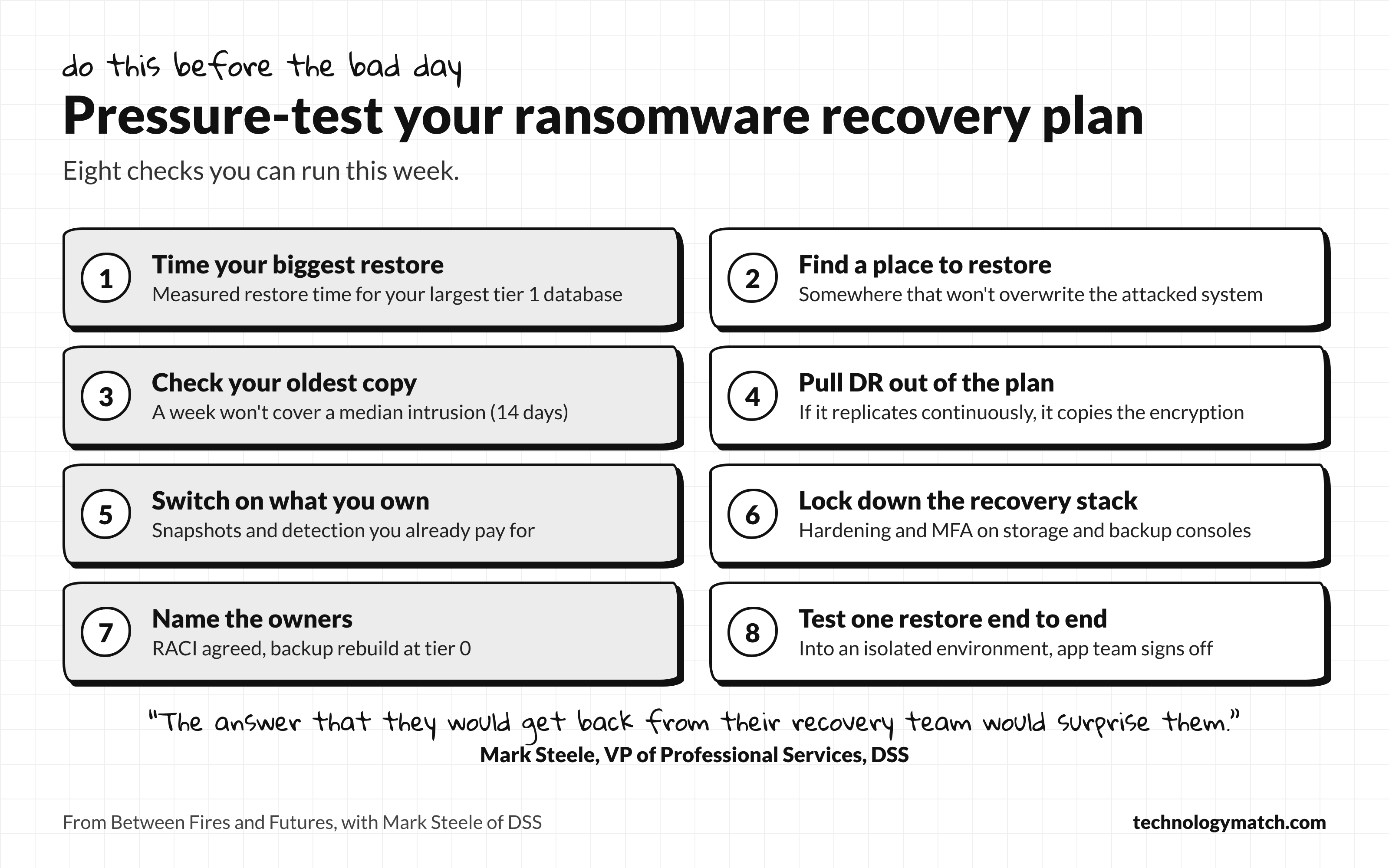
Here's the list I'd run through this week:
- Ask for the measured restore time of your largest tier 1 database. A guess doesn't count.
- Ask where you'd restore it without overwriting the attacked system.
- Check how far back your oldest immutable copy reaches. A week won't cover a median intrusion (14 days), and an older way in can sit months back.
- Check whether your DR site replicates continuously. If it does, take it out of the ransomware plan.
- List the protection features you already pay for, and check which ones are switched on.
- Lock down the recovery stack itself: hardening and multifactor authentication on storage and backup consoles.
- Name the owners in your RACI, and put the backup infrastructure rebuild at tier 0.
- Test one restore end to end, into an isolated environment, with the app team signing off.
Step 5 sounds almost too easy, so here's Mark being refreshingly candid about it: "We sell a lot of these storage subsystems that have all these features and customers just never turn them on."
Budgets make this harder in 2026. In our buyer calls, server quotes ran 60% or more above earlier prices and some storage refreshes got pushed out, which keeps older arrays without immutable snapshots in service longer.
If you're bridging old hardware, make sure the bridge includes a safe copy. And if nobody watches your environment at night, compare MDR vs MSSP vs SOC as a service.
Where storage-layer recovery partners like DSS fit
A storage-layer partner can help you time your three clocks against what your infrastructure can actually do, then close the gaps with immutable snapshots, detection and isolated recovery.
DSS is one of IBM's largest Platinum Business Partners in the US and builds cyber resilience on IBM FlashSystem, Safeguarded Copy and Cyber Vault.
DSS has been an IBM solution provider since 1993. Its cyber resilience practice is built around a shift from prevention to incident preparation, using IBM FlashSystem Cyber Vault and Safeguarded Copy immutable snapshots.
What I liked about Mark's approach is where it starts. His first conversation with a customer is the minimum viable company question, then the recovery team, then the tools. "We're not coming in with a PowerPoint saying, hey, buy this because it's the best for everything," he said. "Every customer is gonna have different needs." I think that's the right order, whoever you end up working with.
If you already run IBM storage, your first step may cost nothing: turn on what you own. If you don't, storage-layer recovery is one row in the table above, so compare it against backup-side and vault-side options before you buy anything.
I closed the episode with the line I keep coming back to: resilience is something you have to prove. Most organizations find out whether they can recover on the worst possible day. You could find out this week instead.
One more note, since you've read this far: DSS sponsored this article and joined me on the podcast. The comparison above stands either way, and the right fit for you may well be a different row.
You can listen to the full conversation on Between Fires and Futures. And if you'd like to compare storage, backup and recovery partners side by side, TechnologyMatch can match you with vetted vendors.
Compare recovery partners before the bad day
Get matched with vetted storage, backup and recovery vendors that fit your environment.
FAQ
How long does it take to recover from ransomware?
In Sophos's 2025 survey, 53% of organizations fully recovered within a week and 18% took more than a month. Enterprises restoring large databases from backup should plan for days to weeks. Add the time it takes to find a clean copy and decide where to restore it.
Can you recover from ransomware without paying the ransom?
Yes, if you have a clean copy the attackers couldn't reach. That's why 94% of victims in Sophos's 2024 survey saw attackers go after their backups. Immutable snapshots, isolated copies and offline tape are what make refusing to pay a real option.
Is disaster recovery enough for ransomware?
No. Continuous DR replication copies changes from production to a second site, so encrypted data lands there too. Keep DR for site loss, and add immutable, isolated copies you can test before you restore. Even a DR site with locked snapshots needs that isolated validation step.
What is a minimum viable company?
A minimum viable company is the smallest set of systems, data and people your business needs to keep serving customers during a crisis. You define it before an incident, restore it first and bring everything else back afterward. Put the backup infrastructure, identity and core network first on the restore list.
How do you know if a backup is clean?
Restore it into an isolated environment, scan it and validate it with the application owners before it touches production. Then check two dates: a data-clean copy predates the encryption, and a system-clean copy predates the intrusion. Rebuild systems from golden images and roll data back a short distance.
What is an isolated recovery environment?
An isolated recovery environment, sometimes called a clean room or cyber vault, is a segregated space where you restore and test copies away from production. It lets you validate a copy and keep the attacked systems intact for forensics at the same time.
Are immutable backups enough to recover from ransomware?
Immutable backups stop attackers from deleting or encrypting your copies. They don't make restores faster, and a restore of petabyte-scale data can take days to weeks. Pair them with fast rollback for large volumes and an isolated place to validate copies.
Who should own ransomware recovery?
Security owns containment and forensics, infrastructure owns the restore, application owners validate, and the business sets the restore order and approves the data-loss window. Agree this RACI before an incident, because the first hours of an incident go to decisions.
What are the three clocks of ransomware recovery?
The dwell clock looks backward: how long attackers were inside, a median of 14 days in Mandiant's M-Trends 2026 (2025 data) and months for espionage-style intrusions, decides how far back you need a copy you can trust. The decision clock (who picks the recovery point and where you restore) and the restore clock (data size, throughput and the layers you rebuild) run forward from detection and make up your downtime.