Replacing an Out-of-Support Avaya or Mitel Contact Center (CCaaS)
Avaya and Mitel end of support passed. Pick your cloud contact center path, map IVR, CTI and E911 risks, and compare CCaaS pricing models.

What to do when your Avaya or Mitel contact center is out of support: stabilize the system first with a support bridge and locked-down network edge.
Then inventory everything that will move: call flows, routing, CTI, workforce management, recordings, numbers and E911. Choose a cloud contact center (CCaaS) platform by testing what breaks at cutover. Migrate in phases if you have 100 or more agents or complex integrations.
I have watched contact center cutovers go wrong on day one because an undocumented IVR branch sent callers into a dead end. The risk you control now is the speed of the migration, so this guide starts with the dates, then gives you a way to pick a path, test platforms and plan the move.
Avaya and Mitel end-of-support dates for contact center platforms
Avaya Aura 10.1, including Call Center Elite, Communication Manager and Session Manager, lost patches after December 31, 2025. Older G430 and G450 gateways on Aura 10.2 followed on June 30, 2026. On the Mitel side, MiCloud Connect is gone, MiVoice Office 250 is unsupported, and partners report MiVoice Connect stopped receiving patches at the end of 2025.
Read the gateway row carefully. The G430 and G450 notice applies by hardware vintage and Aura release, so check the vintage label on each chassis. Avaya still sells Release 10, which means Aura 10.2 is the supported on-premises track, and Avaya announced Aura 10.3 for general availability on September 28, 2026.
Both vendors have also restructured. Avaya filed a prepackaged Chapter 11 on February 14, 2023, and emerged on May 1, 2023, after cutting its debt from about $3.4 billion to about $800 million. Mitel filed in March 2025 and emerged on June 20, 2025, with debt reduced by about $1.15 billion, now owned by its former lenders. Both companies still operate and support customers. Both have narrowed where they invest, and Avaya now concentrates on its largest enterprise accounts.
Choose to act now if you are a mid-market Avaya customer, on IP Office, or on any Mitel platform without a published successor. Your vendor's attention is moving elsewhere.
What happens when your contact center is out of support
An unsupported contact center keeps routing calls until something outside it changes. A carrier updates its SIP requirements, a Windows patch lands on a call server, or a certificate expires. Then the system breaks, and nobody has the code or authority to fix it.

Security patches, SIP trunks and carrier changes
The Avaya Aura 10.1 notice is explicit: no security updates, bug fixes or patches for 10.1.x after December 31, 2025. That covers Session Manager and the Session Border Controller, the components that face your carrier and, often, the internet.
Mitel MiVoice Connect shows how the failure usually arrives. Partners documented Windows updates that stopped services on MiVoice Connect servers and took down voicemail, auto attendants and workgroups. The phone system did nothing wrong. The operating system under it moved on.
In my experience, the first outage on an unsupported platform comes from the edge: an SBC certificate, a TLS version the carrier retired, or a codec change. Treat your SBC as the most exposed box in the building.
Compliance exposure: PCI DSS, call recording and E911
Three obligations get harder on an unsupported system:
- PCI DSS applies if your IVR or agents take card payments. Unpatched systems that handle cardholder data are a finding waiting for your next assessment.
- Call recording retention and HIPAA apply if recordings hold health information. You need to read every recording you are required to keep, in a format that survives the migration.
- E911 applies to the new system. Kari's Law requires direct 911 dialing and on-site notification for multi-line telephone systems installed after February 16, 2020. RAY BAUM'S Act requires a dispatchable location, including for off-premises devices since January 6, 2022.
The E911 point catches teams off guard. A legacy system installed before 2020 may have predated these rules, but its replacement will not. Every remote agent's softphone on the new platform needs a dispatchable location.
Do you need UCaaS or a cloud contact center (CCaaS)?
You need a cloud contact center if you run queues, skills-based routing, an IVR and supervisors who watch real-time metrics. You need UCaaS if your problem is desk phones, extensions and voicemail for staff who do not take queued customer calls. Most Avaya and Mitel shops need both, bought as two decisions.

Many pages that rank for avaya alternatives answer the UCaaS question. They rank business phone systems next to contact center platforms, so a buyer with 150 agents ends up comparing desk phone plans. Keep two shortlists.
Contact center as a service (CCaaS) is a cloud-hosted contact center platform billed by subscription or usage. It covers ACD routing, IVR, omnichannel queues, agent desktop, reporting and, often, workforce management, quality management and AI tools.
Choose CCaaS if your agents work from queues and you report on service levels. Choose UCaaS if you mostly replace phones. Buy both if you run a contact center inside a larger phone estate, which describes most Avaya Aura and MiVoice Business customers.
Which migration path fits your contact center?
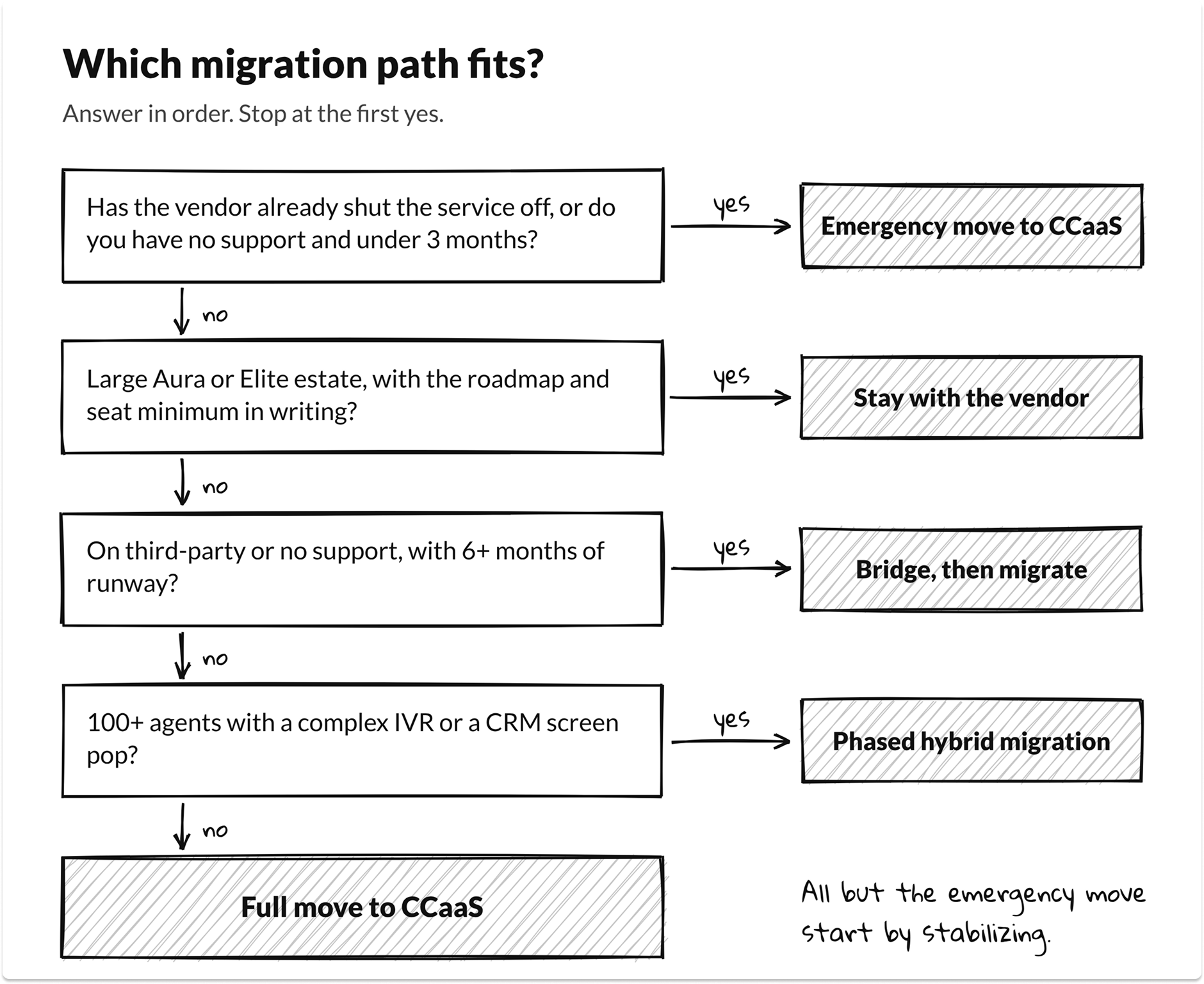
You have four paths off an unsupported Avaya or Mitel system: stay with the vendor, bridge with third-party support, migrate in phases, or move everything to CCaaS at once. The right one depends on your runway, size, integrations and how much of your routing logic lives in people's heads.
Third-party support is a bridge to the next decision. Independent support providers can keep a system running and fix configuration problems, but they cannot ship vendor security patches or restore vendor engineering. Use the time it buys to document and select.
Stay with the vendor if you run a large Aura or Elite estate with heavy vector logic and AES integrations, and Avaya gives you the roadmap and seat minimum in writing. Leave if you are mid-market, on IP Office, or your vendor cannot confirm your product's next three years.
A phased hybrid migration is a temporary state. Both platforms run side by side only until the last business unit moves, and then the old system is shut down.
If you plan to keep part of your contact center on-premises for the long term, read how a hybrid cloud CCaaS model works before you choose. Choose a phased migration if you have 100 or more agents, several sites, or IVR and CRM integrations you cannot rebuild in one weekend.
CCaaS readiness and path finder
Enter your platform, support status, agent count, runway and integrations. The tool returns a recommended migration path, a readiness score out of 100 and your top five cutover risks. It never names a vendor.
Here's an example: an Avaya Aura / Call Center Elite system with vendor support, 40 peak agents, 9 months to contract end, a payment IVR, documented flows, a CRM screen pop, remote agents and no telecom engineer. The path finder returns Full move to CCaaS with a readiness score of 57. The top risks are unpatched components, the payment IVR's PCI scope, E911 for remote agents, the CRM screen pop rebuild and seat floors.
Stabilize your Avaya or Mitel system before you migrate
Stabilizing means making the current system safe enough to run for three to six more months while you plan. A rushed migration drops customers on day one. A stabilized legacy system keeps taking calls while you document, select and pilot.
Do these five things in the first month:
- Put a support bridge in place: vendor support where you still qualify, or a third-party provider on a monthly term.
- Lock down the SBC and every admin portal. Restrict management access to a jump host and remove internet exposure you do not need.
- Back up every configuration: vectors, VDNs, scripts, schedules, CMS reports and user data.
- Export or confirm access to historical call recordings in a format you can read without the old system.
- Freeze changes. Every new vector or workgroup you add now is one more thing to rebuild.
The exception is a service the vendor already turned off. MiCloud Connect customers had no stabilize option once RingCentral discontinued the platform on June 24, 2026. Move now if the service is gone or you cannot patch an internet-facing component. Stabilize first if the system runs on-premises and you can buy three to six months of support.
Inventory your contact center before you talk to CCaaS vendors
The inventory is the list of everything the new platform must do on day one. Build it before the first demo, so vendors show you your own call flows instead of their best ones. Use the map below to see where each Avaya or Mitel component lands in a cloud contact center.
IVR call flows, routing and skills
Export every vector, VDN, skill, script and schedule. Then interview the supervisors. Legacy routing hides rules nobody wrote down: a holiday table someone edits by hand, an overflow that only fires after 6 p.m., a priority bump for one large customer.
I have seen a rebuilt IVR pass every test and still fail on the first Monday, because nobody knew a vector sent callers from one area code to a different queue. Rebuild the business logic, then improve it. Copying a 15-year-old IVR one-for-one carries its problems forward.
CTI and CRM integrations (Salesforce, ServiceNow, Dynamics)
Avaya AES and Mitel CTI connectors do not move to the cloud. The new platform needs its own connector for each CRM, and you need to test three things: the screen pop on answer, click-to-dial, and call notes written back to the record. List every system that receives call data, including ticketing, billing and custom databases the IVR queries.
WFM, quality management and recording archives
Workforce management needs historical volume data to forecast. Export at least a year of interval data before you switch, or your first schedules on the new platform will be guesses.
Recordings take the longest. Find out how many you hold, in what format, with what metadata, and how long you must keep them. Then decide whether to migrate them, archive them in a searchable store, or keep a read-only copy of the old system.
Telephony: numbers, SIP trunks, porting and E911
List every number: main lines, toll-free numbers, DIDs, fax lines, and analog lines for elevators and alarms. FCC rules set a 1 business day interval for simple ports and 4 business days for non-simple ports. Multi-line business accounts are non-simple ports, and toll-free numbers follow a separate process.
Those intervals apply to a valid port request. A request rejected for mismatched account details has to be corrected and sent again, and that costs days. Start toll-free and main-number ports 30 to 45 days before you need them, and port in waves with a rollback plan for each.
Then map E911 for every agent location. Remote agents need a dispatchable location that updates when they move, and you should test a real 911 call from a home office before go-live.
How to evaluate CCaaS providers on what breaks at cutover
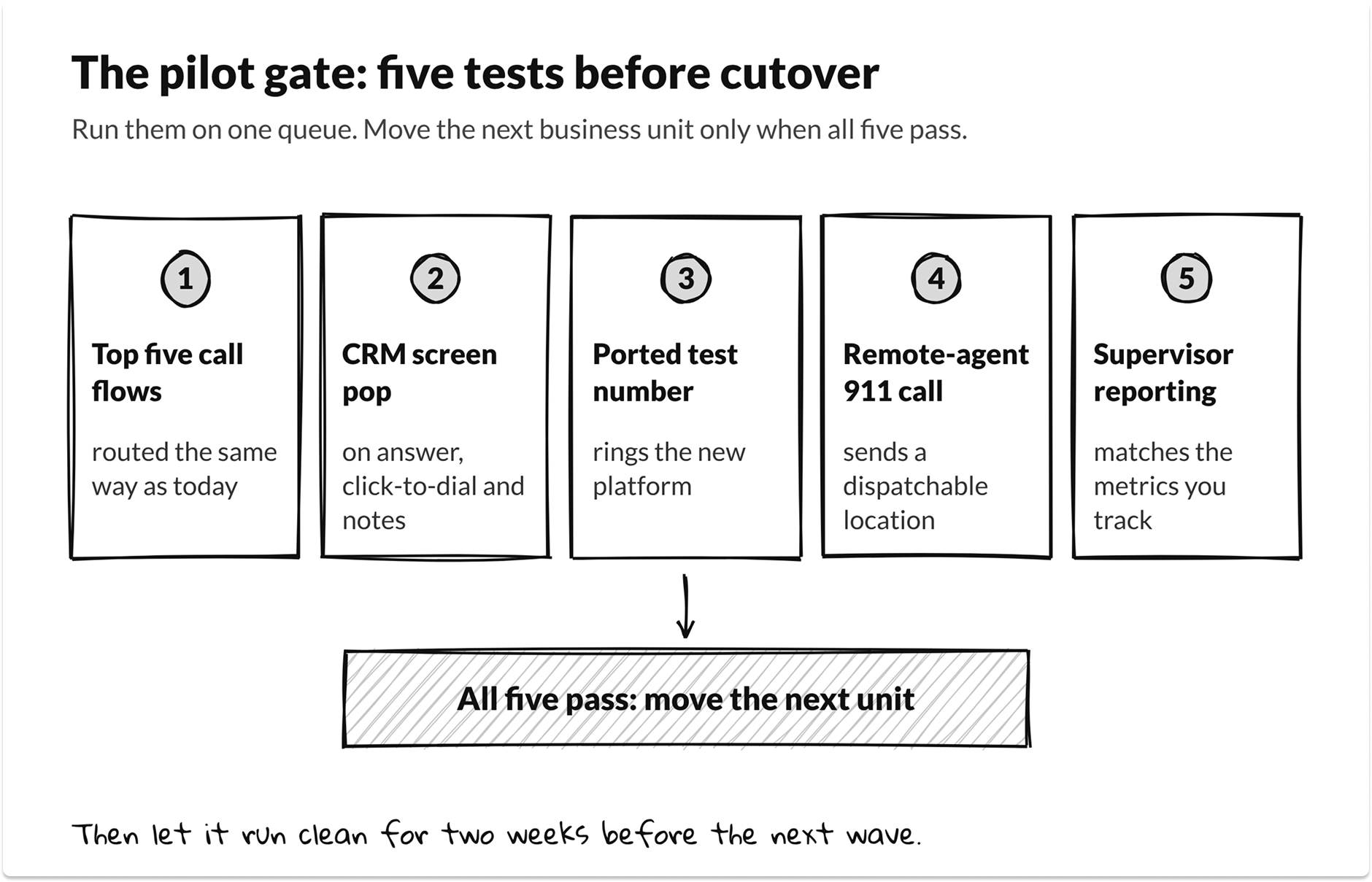
Choose the platform whose team can run your top five call flows, a CRM screen pop, a ported test number and a 911 call from a remote agent in a pilot. Feature lists look the same across CCaaS providers. Cutover behavior is where they differ.
CCaaS buyer's criteria
Questions that expose migration risk in a demo
Send these before the demo and ask for answers on screen:
- Show our three most complex call flows rebuilt in your designer.
- Show a screen pop in our CRM with our field mappings.
- What is your seat floor, platform minimum and minimum term?
- How do remote agents set and update their 911 dispatchable location?
- How do you import our historical recordings and interval data?
- Who owns number porting, and what happens if a port is rejected?
- Which features in this demo cost extra, including AI and usage?
A vendor that cannot show item 1 on your own flows during a sales cycle will struggle during your cutover. Score the answers with an IT vendor scorecard, and run the pilot as a proper proof of concept with written pass criteria.
CCaaS pricing: seat floors, named vs. concurrent licensing and AI usage
Seat floors, the licensing model and AI usage fees decide what CCaaS costs more than the per-seat list price. The same 100-agent shift pattern prices differently on a named-user plan, a concurrent-seat plan and a per-minute plan. Compare total annual cost on your real staffing.
Three licensing terms matter most:
- Named vs. concurrent. A named license covers one person. A concurrent seat covers whoever is logged in at the same moment. Five9's annual report defines a seat as the maximum number of named agents allowed to use the service at the same time, and notes that clients typically have more named agents than seats. If you have many part-time or shift agents, concurrent pricing usually wins.
- Minimums and term. A 50-seat floor or a $2,000 monthly platform minimum can double the effective per-agent price for a 20-agent team. A 3-year term locks in your seat count before you know your real usage.
- Usage and AI. Telephony minutes, SMS, AI tokens and transcription are often billed outside the seat price. Ask for every overage rate in the quote and model a busy month.
My rule of thumb: if you have more than about 1.3 named agents per peak concurrent seat, price concurrent licensing. If your volume swings with seasons, price per-minute as well. Use the guide to comparing vendor proposals to put quotes on the same basis.
Avaya or Mitel to CCaaS migration plan (90 to 180 days)
A contact center migration for 100 to 300 agents takes about 26 weeks when you stabilize first and cut over by business unit. Smaller, simpler estates can finish in about 13 weeks. The phases overlap, and number porting starts before selection ends.
Phased migrations follow a pattern. AWS's guidance for moving Avaya to Amazon Connect describes migrating one business unit at a time, with calls entering through one platform and handing off to the other while both run. Plan coexistence routing before the first wave, so a failed cutover can fall back in minutes.
When I plan these, the pilot gate does the most work. A pilot passes only if all five tests pass: top call flows, CRM screen pop, a ported test number, a remote-agent 911 call and supervisor reporting. Do not move a second business unit until the first one has run clean for two weeks.
Decommission last. Keep the old platform, or a read-only archive, until every recording you must retain is exported and searchable. Then cancel support, wipe the servers and close out carrier circuits. The SLA management guide covers how to hold the new provider to the uptime and support terms you negotiated.
What IT buyers told us about contact center migrations
TechnologyMatch account managers held 450 calls with US IT buyers between March and November 2026. 78 of those calls raised telephony, collaboration or customer experience. 35 were about CCaaS or a contact center, and 12 named an Avaya, Mitel or RingCentral end of life or price rise as the reason to move.
If you want to know more, we have an entire report on what your IT peers are investing in 2026.
The calls show three patterns that vendor pages miss:
- Price is the new end of life. Contract renewals and price rises started more phone projects than end-of-support dates. One buyer called a RingCentral renewal due at the end of summer "very pricey" and was putting out feelers.
- Buyers want visibility before more channels. One buyer ran a 15-year-old, out-of-support Avaya system alongside RingCentral, with about 100 seats on month-to-month terms and very low visibility into quality and productivity. Reporting was the need.
- AI pressure rides along. 23 calls asked for AI in customer experience or the contact center, and 73 mentioned a boss or board pushing AI. Price AI features in the first quote, because they rarely sit inside the seat price.
Two smaller signals matter for regulated teams. Five buyers raised secure payments in the contact center, and most were not far enough along to scope PCI work. Four raised healthcare phones and call recording tied to an EHR or clinic go-live.
Partner calls booked most reliably when the buyer had a renewal date and a seat count. Small sites were harder to match, because CCaaS partners set seat floors.
Know both numbers before you shop, and if you want help running the evaluation, our MSP vs. MSSP vs. co-managed IT guide explains when a managed cutover makes sense.
Next steps for your Avaya or Mitel contact center
- Confirm your support status and every adjunct's end date in writing.
- Lock down the SBC and admin access, and back up every configuration.
- Run the path finder above and share the result with your team.
- Build the inventory: flows, CTI, WFM data, recordings, numbers and E911 locations.
- Send the seven demo questions to three CCaaS providers and pilot the best two.
If you are also clearing other end-of-support deadlines this year, the Windows Server 2016 and 2012 end-of-support guide uses the same stabilize-then-move approach.
Get matched with vetted CCaaS and migration partners
Tell us your platform, seat count and contract date, and we'll book you with partners that meet your floor and region, free for IT leaders. Compare them privately and reach out only when you're ready.
FAQ
When did Avaya Aura 10.1 support end?
Avaya stopped security updates, bug fixes and patches for Aura 10.1.x after December 31, 2025, and end of manufacturer support took effect January 1, 2026. That includes Communication Manager, Session Manager, AES and Call Center Elite 10.1. Aura 10.2 is the supported on-premises release.
Is Mitel MiVoice Connect end of life?
Mitel lists end of technical support for MiVoice Connect on December 31, 2029. Partners report that design changes and security patches ended on December 31, 2025, so the platform runs without fixes until then.
What happened to Mitel MiCloud Connect?
RingCentral bought MiCloud Connect on June 21, 2024, and discontinued the platform on June 24, 2026. Customers had to move to another service before that date.
Is Avaya going out of business after its bankruptcy?
No. Avaya emerged from Chapter 11 on May 1, 2023, as a private company with far less debt, and still sells and supports Aura and its cloud products. It now concentrates on its largest enterprise customers, so mid-market buyers should get roadmap commitments in writing.
What is the difference between UCaaS and CCaaS?
UCaaS replaces business phones, voicemail and meetings for employees. CCaaS (contact center as a service) runs queues, skills-based routing, IVR, agent desktops and contact center reporting. Most Avaya and Mitel contact centers need both, bought as separate decisions.
How long does a contact center migration take?
Plan on about 26 weeks for 100 to 300 agents when you stabilize first and cut over by business unit. Small estates with simple call flows can move in about 13 weeks. Number porting, recording exports and CRM integration testing set the pace.
How long does number porting take for a contact center?
FCC rules set 1 business day for simple ports and 4 business days for non-simple ports, and multi-line business accounts are non-simple. Toll-free numbers follow a separate process. Start main and toll-free ports 30 to 45 days before cutover.
Do Kari's Law and RAY BAUM'S Act apply to cloud contact centers and remote agents?
Yes. Both apply to multi-line telephone systems, including cloud systems, installed after February 16, 2020. Your new platform must allow direct 911 dialing, send on-site notification and provide a dispatchable location for remote agents.
Which migration path is right for my Avaya or Mitel contact center?
Use the CCaaS readiness and path finder in this guide. It weighs your platform, support status, agent count, runway and integrations, then returns one of five paths: emergency move, stay with the vendor, bridge then migrate, phased hybrid migration, or full move to CCaaS. It never names a vendor.