Three new sites in twelve months: what growth does to IT infrastructure
Multi-site IT infrastructure breaks when growth exposes single-site assumptions. The seven layers that fail, and the order to fix them.
Summary:
Opening multiple sites breaks single-site IT infrastructure because growth is a topology change, not a capacity problem: a WAN now sits between users and the systems they depend on, exposing assumptions that quietly held inside one building.
Seven layers fail in a predictable cascade, and each should be fixed in dependency and lead-time order.
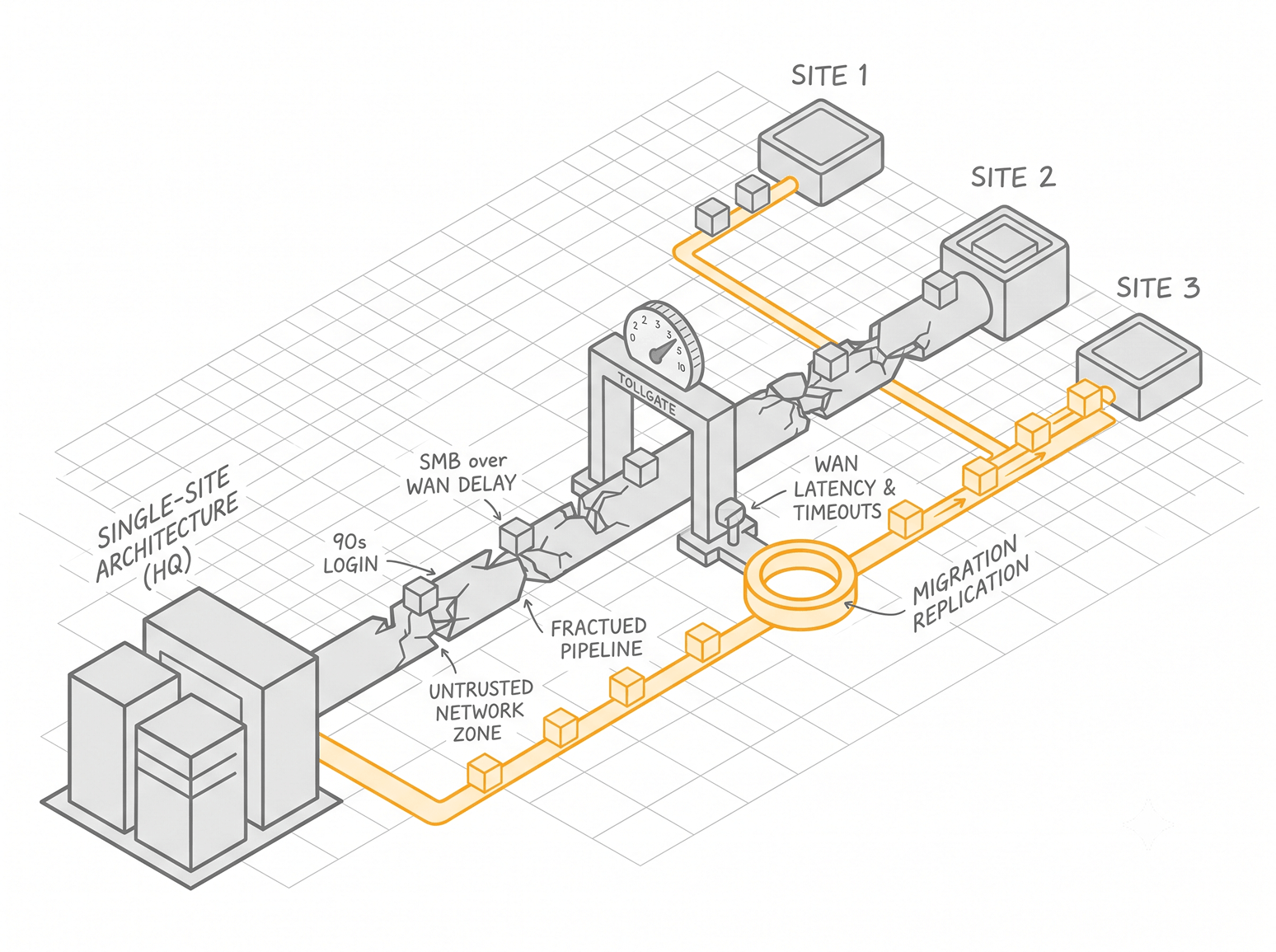
A company we worked with signed leases on three new offices inside one financial year. The head-office setup had run without complaint for a decade. By the time the second site opened, logins were taking ninety seconds, a shared drive that loaded instantly one floor down was unusable from the new location, and the help desk had rebuilt the same laptop image by hand four times in a week.
Growth caused none of that. Every failure was a latent assumption in the original build, waiting for distance to expose it. A single-site architecture rests on conditions that quietly hold inside one building and quietly collapse the moment a wide area network sits between users and the systems they depend on.
These failures do not arrive independently. They cascade, and each one feeds the next. Handle them in the wrong order and the whole expansion turns into firefighting. What follows walks the cascade in the sequence it hits, so you can get ahead of each layer before it becomes an outage.
Why single-site IT architecture fails across multiple locations
When a business grows, the instinct is to add capacity. More bandwidth into the head office, a bigger server, another block of licenses. That instinct treats growth as a volume problem.
Adding three sites is a topology problem. You are not pushing more load through one place. You are asking one design to stay consistent across locations that cannot see each other at LAN speed.
Every single-site build carries assumptions it never had to state out loud:
- Users and the systems they authenticate against share a fast local link.
- The network is one broadcast domain sitting inside one trust boundary.
- Files travel over a link fast enough that the chattiness of the protocol never shows.
- A machine can be set up by hand, because there are few of them and they are all in one place.
- The person who understands the environment is down the hall.
Across a multi-site network, all five are false at once. The distance between a user and their domain controller now includes a WAN hop. The single trust boundary is now several. The fast local file link is now a slow remote one.
The shape of the work also changes with the number of locations. At roughly ten sites the job is standardization, making every location look the same.
Around twenty-five it becomes genuine scale-out, where consistency has to be enforced by system rather than by habit. Past fifty it turns into governance, where the question is who is allowed to change what, and how you prove it.
The rest of this teardown takes each layer in the order the cascade hits it: connectivity, identity, files, endpoint management, security policy, observability, and the operating model that has to hold all of it together.
Multi-site network connectivity: the longest lead time in the build
Connectivity comes first for a blunt reason. Nothing else at a new location can be provisioned until there is a link, and the link is almost always the slowest thing to arrive.
Circuit provisioning sets the timeline, not the hardware
You can rack a firewall in an afternoon. A dedicated business circuit can take weeks to be surveyed, ordered, and installed by the carrier. When a site misses its opening date because of IT, the reason is usually a circuit that was ordered too late, not gear that shipped slowly.
Start the connectivity clock the day the lease is signed. Treat the carrier lead time as the critical path for the entire site build.
Backhaul, hairpinning, and local internet breakout
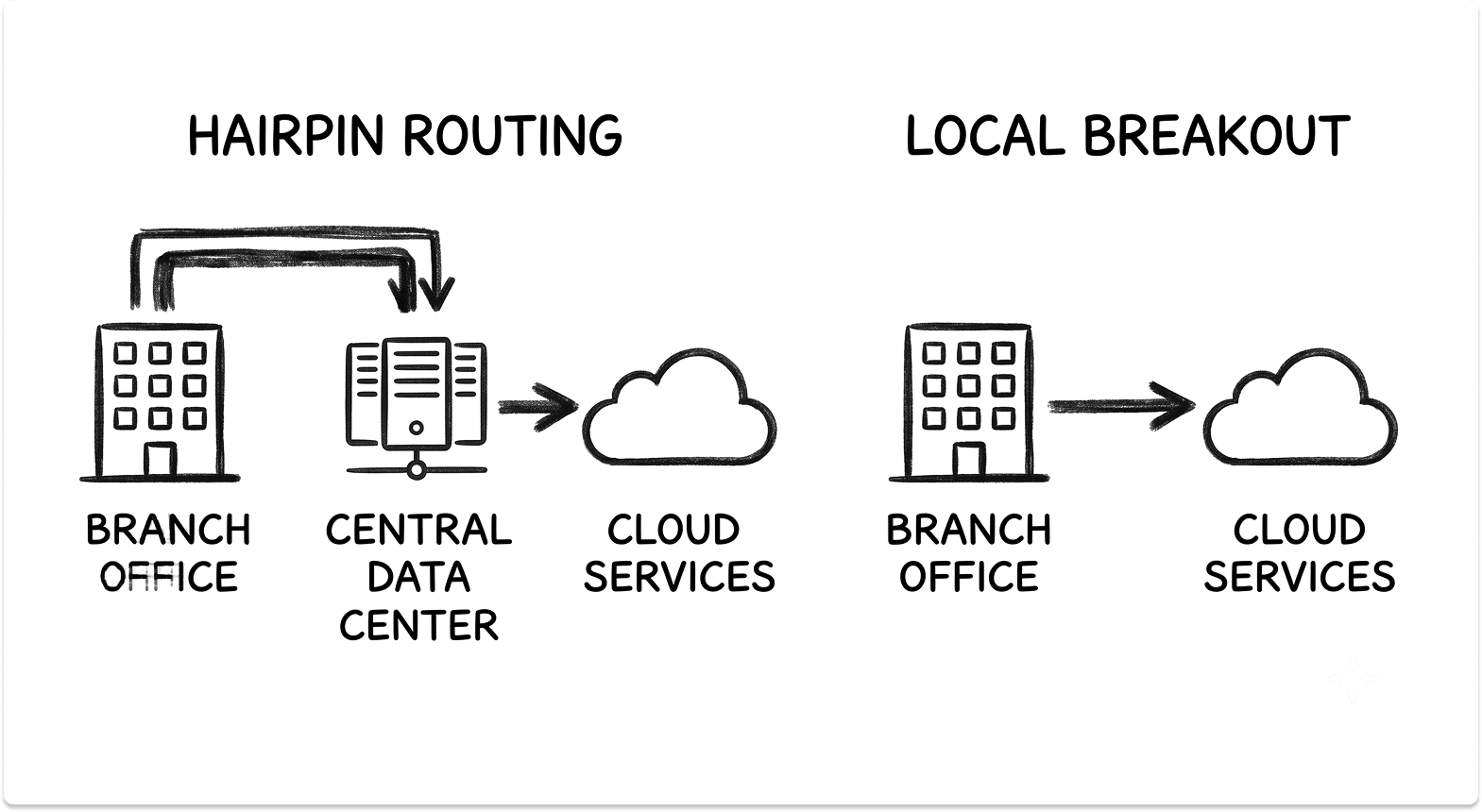
The older model routes all traffic from a branch back to a central data center before it reaches the internet. When the applications people use live in SaaS, that path is wasteful.
Traffic leaves the site, crosses the WAN to head office, turns around, and goes back out to the cloud. This hairpin adds latency to every request and burns the central link's capacity on traffic that was never meant to touch it.
Local internet breakout sends cloud-bound traffic straight out from the site instead. A user at a branch office network reaches Microsoft 365 or Salesforce directly, over the local connection, with head office out of the path entirely.
The result is lower latency for the applications people actually use, and a central link that stops carrying transit traffic it should never have seen.
The connectivity architecture, in brief
The architecture decision behind all of this comes down to how the sites connect. MPLS gives you private, carrier-managed circuits with predictable performance, at the cost of long provisioning and rigid change control.
SD-WAN replaces that with an overlay across commodity broadband and cellular links, steering traffic per application and failing over automatically when a link degrades, which is the core of the SD-WAN vs MPLS trade-off.
The direction of travel is convergence: SD-WAN's routing folded together with cloud-delivered security into a single SASE architecture, so policy is written once and enforced at every location.
For a three-site rollout, the decision that matters most is operational, not theoretical. Choose the model that lets a new site come online without sending a network engineer to configure it in person.
Standardize the branch edge so the appliance arrives pre-staged, connects home on power-up, and pulls its full configuration from a central controller.
Identity and authentication: when the domain controller becomes a single point of failure
Once a link exists, the first thing that visibly breaks is logging in.
The line-of-sight assumption
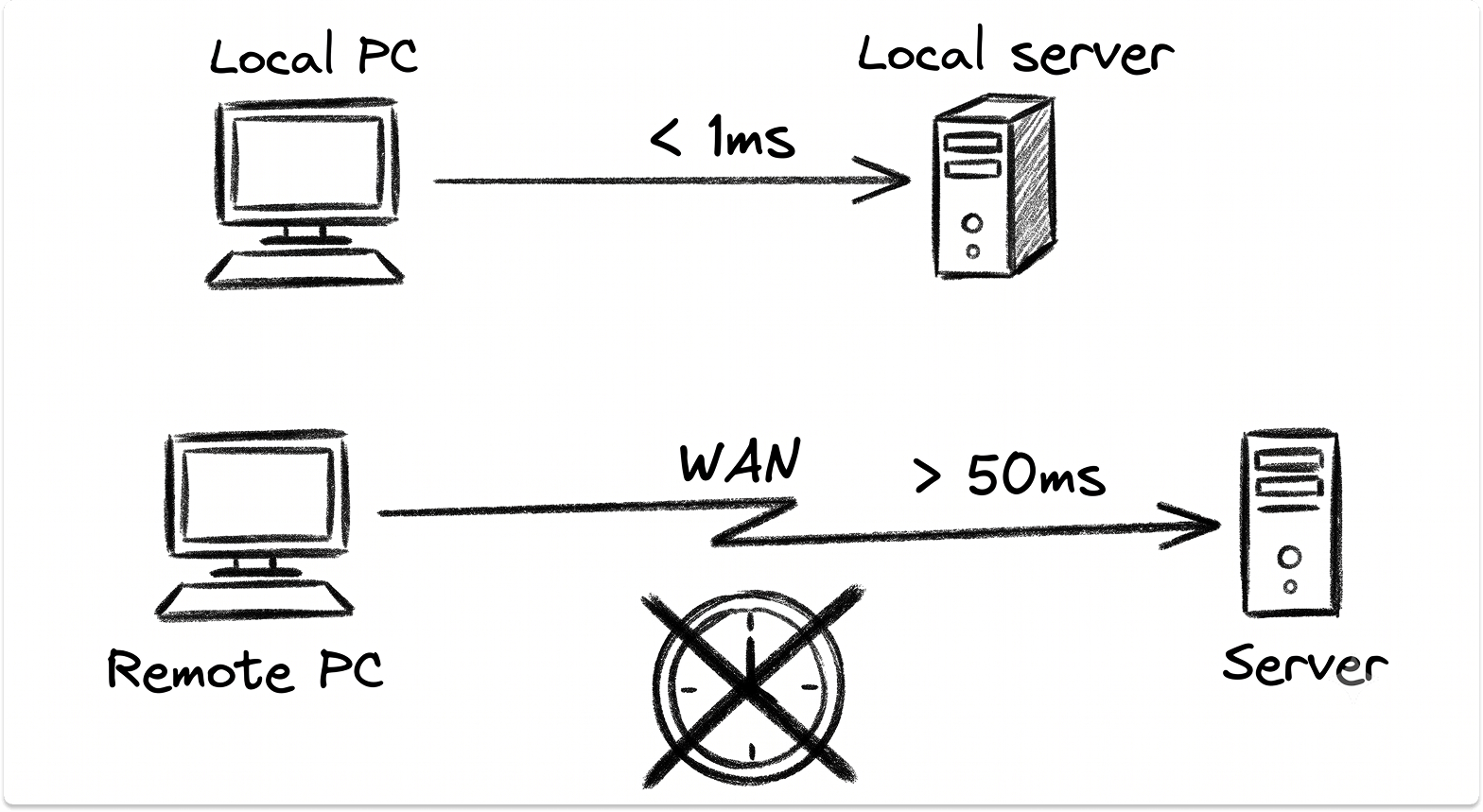
On-premises authentication was built for a local network. Kerberos ticketing, NTLM, and LDAP lookups all assume the client has fast, reliable line-of-sight to a domain controller. That holds inside one building. Put a WAN between the user and the controller and every authentication event now pays a latency toll.
What actually breaks at a new site
A location with no local domain controller sends its logins across the WAN to one at head office. Sign-ins slow to a crawl, group policy takes minutes to apply, and drive mappings fail intermittently. Worse, the whole company now depends on that one controller and the link to it. If either goes down, no one at the remote sites can log in at all.
You can paper over this by shipping a domain controller to every site, but that multiplies the number of Tier 0 assets you have to secure and patch, and it deepens the dependency on a design that was already straining.
Decoupling authentication from location
The durable fix is cloud identity management, where the authority that users authenticate against no longer lives in a single building.
Sign-in happens against a cloud directory reachable from anywhere at the same speed, with conditional access deciding what each request is allowed to do based on user, device, and risk rather than which network the request came from.
For most organizations this means a deliberate move off on-premises Active Directory toward a cloud-first model, a shift worth planning as its own project. The mechanics of that transition, including what still needs a local presence and what can move, are covered in the migration from on-prem Active Directory to Microsoft Entra ID.
Growth also forces two controls that single-site teams often defer. Multi-factor authentication becomes non-negotiable once identities are reachable from anywhere. Privileged accounts need tight control, because a stolen admin credential now reaches every site at once.
File and data access across sites: the limits of SMB over the WAN
Files are the second thing users notice, right after login.
Why SMB degrades over distance
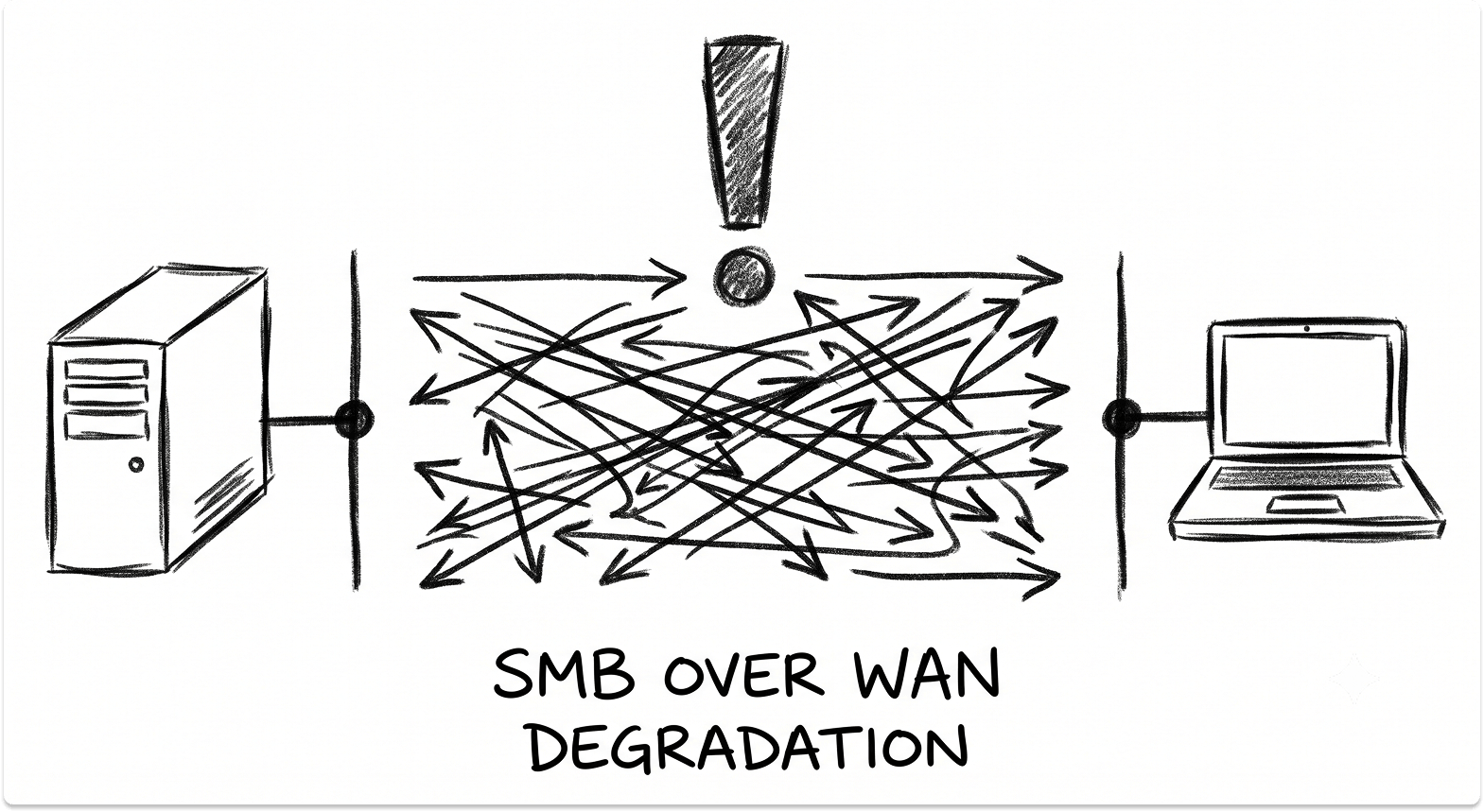
The SMB protocol that serves files from a Windows file server or NAS is chatty by design. Opening or saving a document involves many small round trips between client and server. On a LAN, each round trip costs a fraction of a millisecond and no one notices.
Run SMB over WAN and every one of those round trips now carries the latency of the link. A file that opened instantly at head office takes ten or twenty seconds from a new site, and a large document can feel broken. Latency, not bandwidth, is the killer here, so adding a faster circuit rarely fixes it.
The version-drift failure
When the central share becomes painful to use, people route around it. They email themselves copies, save to the desktop, and work from local files that never sync back. Within weeks there are four versions of the same document, no one is sure which is current, and a file that only ever existed on one laptop is gone the day that laptop dies.
Matching the file strategy to the data
The fix starts with classification, not a product. Sort your data by how location-sensitive it actually is. Content that many people edit together, from anywhere, belongs on cloud file storage for business where the service handles distribution and versioning natively.
A small set of large, latency-sensitive working files may justify a distributed file system with local caching at each site, so reads are served locally while a single authoritative copy stays central.
The mistake is lifting the existing file server into the new topology unchanged and expecting SMB to behave the same way over a WAN. It will not.
Endpoint management at scale: why manual provisioning stops working
The head desk that hand-built every laptop hits a wall the moment devices spread across sites.
Zero-touch provisioning
Manual imaging does not scale past one location. A technician cannot stand next to every machine at three sites, and shipping devices to head office to be imaged and shipped back adds days to every hire.
Zero-touch provisioning removes the technician from the loop. A device ships from the vendor directly to the user, and on first boot it registers itself, pulls its configuration and applications from a central service, and enrolls into management with no hands-on setup. Site four becomes as fast to stand up as site one.

Central policy, enrollment, and remote wipe
The point of modern endpoint management is that policy lives centrally and applies everywhere. Enrollment is automatic, configuration baselines are enforced by the platform, patching runs on a schedule you can prove, and a lost or stolen device can be wiped remotely from a console.
A device that is not centrally managed is a device you cannot patch, cannot audit, and cannot erase when it goes missing, which across multiple sites is a matter of when, not if.
Mixed Windows and Mac fleets
Expansion often brings a mix of hardware, especially when a new site houses a design or engineering team running Macs alongside a mostly-Windows company. Each platform needs its own management path, and mobile device management for Apple hardware works differently from Windows management.
The trade-offs across the main Apple MDM options are laid out in the Intune vs Jamf Pro vs Kandji comparison. Stand this capability up before the hiring wave, not after the first laptop walks out the door.
Also, we have a guide on scaling zero-touch enrollment of moving Macs from hand setup to MDM.
Security policy across distributed sites: one trust boundary becomes many
A single site has one perimeter. Three sites have three, plus the links between them, and the old assumption that everything inside is trusted stops being safe.
Network segmentation and lateral movement
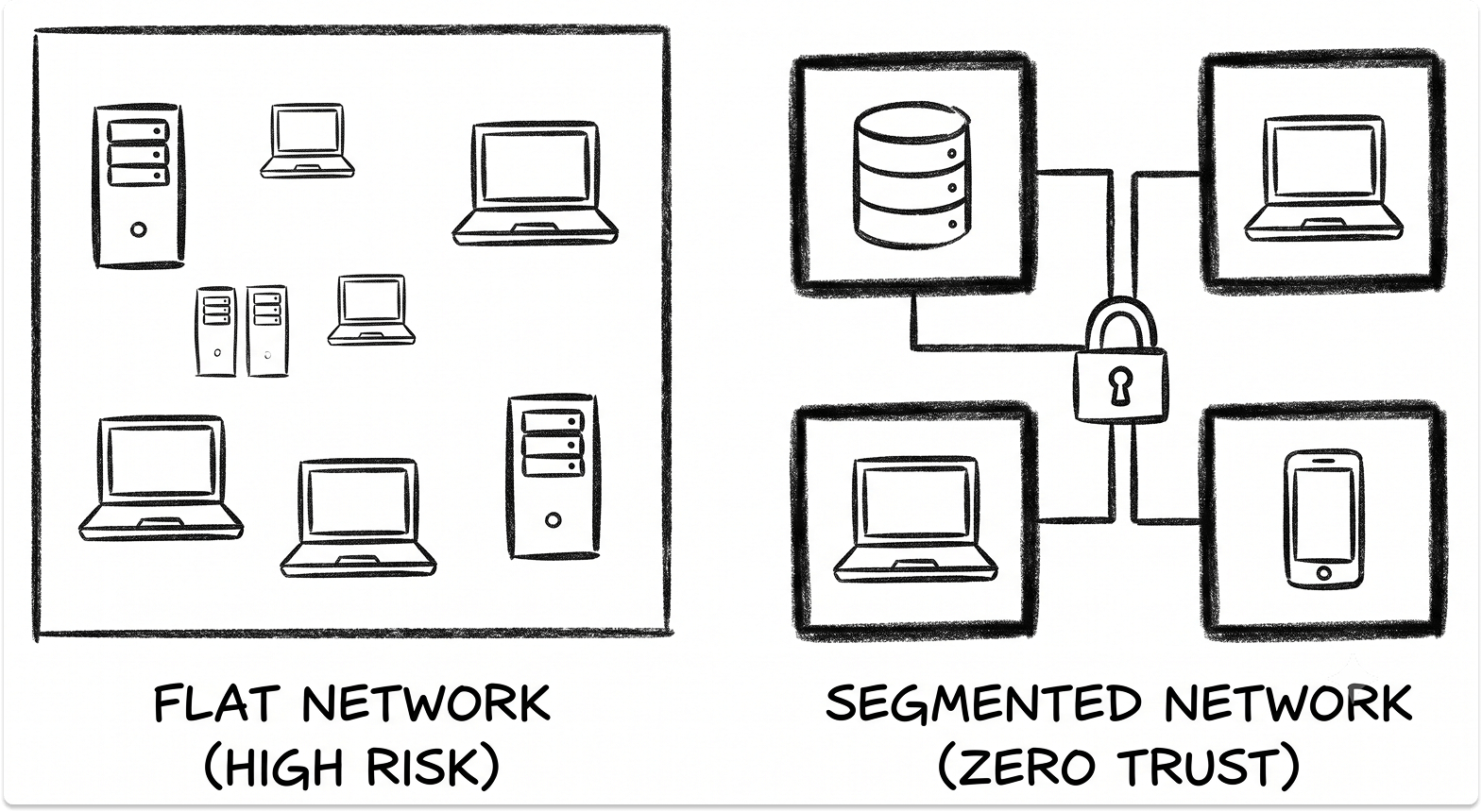
A flat network stretched across locations means a machine compromised at the smallest branch can reach systems at head office.
Network segmentation breaks the environment into zones so that a foothold in one place does not become free movement everywhere else. Segment by site and by function, and control the east-west traffic between segments, so an incident stays contained to where it started.
Policy drift versus central enforcement
When each site is configured by hand, its firewall rules, access policies, and security settings drift apart over time. Six months in, no two locations are configured the same way and no one can say which rules are live where.
Policy written centrally and pushed to every site keeps them identical by design. You change a rule once, and it applies everywhere, with a record of what changed.
From broad VPN access to zero trust network access
Remote access built on a traditional VPN hands a connected user broad reach into the internal network. As sites and remote workers multiply, that VPN becomes both the daily bottleneck and the widest attack surface you own, because one stolen credential exposes far more than the user ever needed.
Zero trust network access replaces network-level trust with per-connection verification. Under ZTNA, a user authenticates and is granted access to specific applications, never to the network as a whole, and each request is checked against identity and device posture.
The path from a legacy client to this model is walked in the guide to replacing Cisco AnyConnect with ZTNA, and the underlying design principles are set out in the guide to building a reliable Zero Trust architecture.
Growth also widens the compliance surface. A second or third location can pull you into new data-residency rules or per-site obligations that a single office never had to consider, so treat compliance scope as something to re-check with every site you open.
Network observability across locations
You cannot operate what you cannot see, and multi-site sprawl blinds a team fast.
Without a single view across sites, the network team learns about problems when users call to complain. Outages last longer because the cause has to be hunted down, and the team spends its days reacting instead of preventing the next failure.
Network observability and network monitoring close that gap by showing what is happening across every location in one place, flagging degradation before users feel it. The requirement goes beyond the network layer.
When an application feels slow at one site, you need end-to-end visibility spanning the network path and the application itself to tell whether the problem is the circuit, the cloud service, or the app, rather than guessing. The options for that application-layer view are compared in the Datadog vs New Relic vs Dynatrace APM guide.
Instrument before you scale. Visibility is day-one infrastructure, not a tool you bolt on after the third outage you could not explain.
The IT operating model: scaling the function, not just the hardware
The layer teams under-plan is the one that runs everything else.
Capacity is the easy part. Servers, bandwidth, and licenses are all buyable, and money solves them. The harder question is whether your operating model absorbs a new site as a routine repeat or treats each one as a fresh project that pulls the whole team off its day job.
Every growth event also adds vendors, licenses, and integrations. Left ungoverned, the stack fragments until one person is quietly managing a dozen vendor relationships and a compliance surface no one has mapped. IT infrastructure scalability is as much about controlling that sprawl as it is about compute.
Then there is the single-admin risk. In many growing companies, one person holds the knowledge for a critical system, and when that person is stretched across three sites or leaves, the knowledge leaves with them.
This is the point where organizations weigh building out the internal team against bringing in managed IT services to run or co-manage the load, so no single location, and no single person, becomes the thing that breaks.
Decide the operating model before the third site opens. Write the runbook for standing up a location once, so the fourth site is a repeat of a known process rather than another improvised scramble.
A sequencing framework for multi-site infrastructure
The whole cascade, and the order to work it, in one view. Each layer names the single-site assumption that fails, what breaks when it does, the fix, and when to begin.

Closing Thoughts
The teams that come through a fast expansion intact do one thing differently. They treat the first new site as the moment to rebuild the assumptions, rather than to copy the head-office setup across the WAN and hope it holds.
The cascade is predictable, which makes it manageable. Order the work by lead time and by dependency, start connectivity the day the lease is signed, and every layer after it has room to land before it becomes the outage that defines your year.
Plan your expansion by lead time, not by luck
You know which layers expose you and the order to fix them. Line up the vendors for each one, connectivity, identity, files, endpoints, security, and observability, in one place, and build a shortlist you can act on before the next lease is signed.
FAQ
Why does IT infrastructure break when a company opens new sites?
Because a single-site build makes silent assumptions that only hold inside one building: fast local access to the domain controller and file server, one trust boundary, and few enough machines to set up by hand. Adding sites is a topology change, not a capacity increase, so those assumptions fail across the WAN and the failures compound.
What should IT set up first when opening a new office?
Connectivity, because it has the longest lead time. A business circuit can take weeks for the carrier to survey and install, while gear takes an afternoon. Order the link the day the lease is signed, and treat carrier lead time as the critical path for the whole site build.
Why are logins slow at a new site?
On-premises authentication using Kerberos, NTLM, and LDAP assumes fast line-of-sight to a domain controller. A site with no local controller sends every login across the WAN, which adds latency to sign-ins and group policy. If the whole company relies on one controller and one link, a failure locks everyone out. Moving to cloud identity decouples authentication from location.
Why do shared files load slowly from a remote site?
The SMB protocol is chatty, and each file operation involves many small round trips between client and server. On a LAN each trip is negligible; over a WAN every trip carries the link's latency, so files crawl. Latency is the cause, not bandwidth, so a faster circuit rarely fixes it. Cloud file services or a distributed file system with local caching solve it properly.
Should multiple sites connect over MPLS, SD-WAN, or SASE?
MPLS offers private, predictable circuits at the cost of long provisioning and rigid changes. SD-WAN runs an overlay across commodity broadband and cellular links, steering traffic per application and failing over automatically. SASE converges that routing with cloud-delivered security into one policy layer. For a fast rollout, the deciding factor is operational: choose the model that lets a new site come online without a network engineer on-site to configure it.